Amazon provides numerous frontier models through its Bedrock platform. Combining these models with LangGraph allows us to create simple agents with tool access and memory checkpoints with minimal boilerplate code. In this article, we are going to explore Amazon Bedrock and LangGraph to create agents and give them tool access such as RAG and web search.
This article covers three different code walkthroughs of increasing complexity:
- The first one combines Bedrock models and LangGraph to create a simple agent with tool access.
- The second one creates a simple multi-turn application with Bedrock, LangGraph, and Tavily web search.
- Finally, we will explore how to combine these agents while giving them access to multiple tools, such as RAG, web & URL search.
Note that we are not going to create any complex agentic pipelines here. Rather, we will have just one agent that makes decisions about which tools to call based on the user’s query.
The AWS Bedrock Samples
The codebase in this article is part of the aws-bedrock-samples repository that I am currently maintaining. As of writing this, it contains various examples for combining Amazon Bedrock models for simple API calls, RAG, and LangGraph with tool use.
I am constantly updating the codebase with new examples, each folder with its own requirements and README files for easier setup.
I would highly recommend visiting the last two articles in the series as well:
If you are just getting started with Amazon Bedrock, this might be the right place for you to start. It shows how to combine Bedrock models with external libraries, tools, and more.
Here, we will be working with a stable version of the codebase that comes as a downloadable zip file with this article.
Project Directory Setup
Before moving forward, let’s take a look at the project directory setup.
├── bedrock_api_call
│   ├── bedrock_chat_doc_single_turn.py
│   ├── bedrock_chat_image_single_turn.py
│   ├── bedrock_chat_multi_turn.py
│   ├── bedrock_chat_text_multi_turn_sim.py
│   ├── bedrock_chat_text_single_turn.py
│   ├── bedrock_chat_video_single_turn.py
│   ├── README.md
│   └── requirements.txt
├── bedrock_langchain
│   ├── multi_tool
│   │   ├── README.md
│   │   ├── run_chat.py
│   │   └── tools.py
│   ├── requirements.txt
│   └── simple_web_search
│       ├── README.md
│       ├── web_search_langchain_multi_turn.py
│       └── web_search_langchain.py
├── bedrock_rag_chat
│   ├── requirements.txt
│   └── text_rag
│       ├── embeddings.py
│       ├── README.md
│       └── run_chat.py
├── input
│   ├── images
│   │   ├── image_1.jpg
│   │   └── image_2.jpg
│   ├── pdfs
│   │   ├── nn_wiki.pdf
│   │   └── video_games_wiki.pdf
│   └── videos
│       └── video_1.mp4
└── README.md
- Although there are several directories, in this article, we will focus on the
bedrock_langchaindirectory. - It contains two subdirectories,
simple_web_searchandmulti_tool. We will get into the details of these when exploring the codebase.
This article comes with a stable zip file version of the codebase that anyone can download and start working with.
Download Code
Setup
All the subdirectories contain their own requirements file. However, before moving forward, we need to set up the environment file. Create a .env file in the project’s root directory.
AWS_BEDROCK_API_KEY=your-bedrock-api-key
MODEL_ID=your-model-id
EMBEDDING_MODEL_ID=embedding-model-id
TAVILY_API_KEY=your-tavily-api-key
We need the above to execute the code. You can find the instructions to set up the Bedrock API key in the previous articles mentioned above. We also need to set up the Tavily API key for web search. Tavily allows 1000 API calls per month in the free tier.
Let’s say we choose the Amazon Nova Pro and the Titan Text Embedding model after setting up the above API key. The .env file will look like the following:
AWS_BEDROCK_API_KEY=your-bedrock-api-key
MODEL_ID=amazon.nova-pro-v1:0
EMBEDDING_MODEL_ID=amazon.titan-embed-text-v2:0
TAVILY_API_KEY=your-tavily-api-key
You can choose any model ID here.
That’s all we need for the setup. Let’s move to the implementation.
Bedrock and LangGraph Web Search Examples
We will start the code for combining Amazon Bedrock and web search. The code for this is present in the bedrock_langchain/simple_web_search directory.
This folder contains two scripts:
web_search_langchain.py: A simple single-turn web search agent created with LangChain, Bedrock, and Tavily web search. The user asks a question and the agent answers.web_search_langchain_multi_turn.py: This is a more complete version with multi-turn chat, memory management, and the ability to search the web multiple times when prompted.
Before moving to the code, let’s install the requirements for these scripts:
pip install -r requirements.txt
Single-Turn Web Search
Let’s start with the simple example present in the web_search_langchain.py file. It establishes the basics that we can use for creating more complex codebases.
"""
Simple web search with LangChain and Bedrock models.
"""
from langchain_aws import ChatBedrockConverse
from langchain_tavily import TavilySearch
from langchain.agents import create_agent
from dotenv import load_dotenv
from termcolor import cprint

import os

load_dotenv()

os.environ['AWS_BEARER_TOKEN_BEDROCK'] = os.getenv('AWS_BEDROCK_API_KEY')

MODEL_ID = os.getenv('MODEL_ID')

# 1. Initialize the Bedrock model
llm = ChatBedrockConverse(
    model_id=MODEL_ID,
    region_name="us-east-1",
    streaming=True
)

# 2. Initialize a web search tool
search_tool = TavilySearch(max_results=3)
tools = [search_tool]

# 3. Create the agent with LangGraph
agent = create_agent(llm, tools)

# 4. Invoke the agent stream until.
user_input = input("Enter your query: ")

stream = agent.stream_events(
    {"messages": [("user", user_input)]},
    version="v3"
)

for kind, item in stream.interleave("messages", "tool_calls"):
    if kind == "messages":
        for token in item.text:
            cprint(token, "yellow", end="", flush=True)
    elif kind == "tool_calls":
        cprint(f"\nTool call: {item.tool_name}({item.input})", "green", attrs=["bold"])
        for delta in item.output_deltas:
            cprint(delta, "cyan", end="", flush=True)
        cprint(f"\nTool result: {item.output}", "green", attrs=["bold"])
    print()

final_state = stream.output
print()
Most of the heavy lifting is handled by the LangChain APIs:
ChatBedrockConverse: Supports initialization of any Bedrock model with streaming capability.TavilySearch: Exposes Tavily web search as a tool for the agents.create_agentfromlangchain.agents: A wrapper to convert any LLM that we initialize into an agent that can access tools, call them in multiple turns, and provide an answer.
Lines 18 to 30 show how we initialize an LLM using LangChain, define the web search tool, and create an agent.
Next, we ask the user for an input, based on which the agent either answers it directly or plans to execute a web search.
Starting from line 40, we stream the response to the terminal.
Let’s execute the code and see it in action. Execute the following within the bedrock_langchain/simple_web_search directory.
python web_search_langchain.py
Let’s take a look at the output:
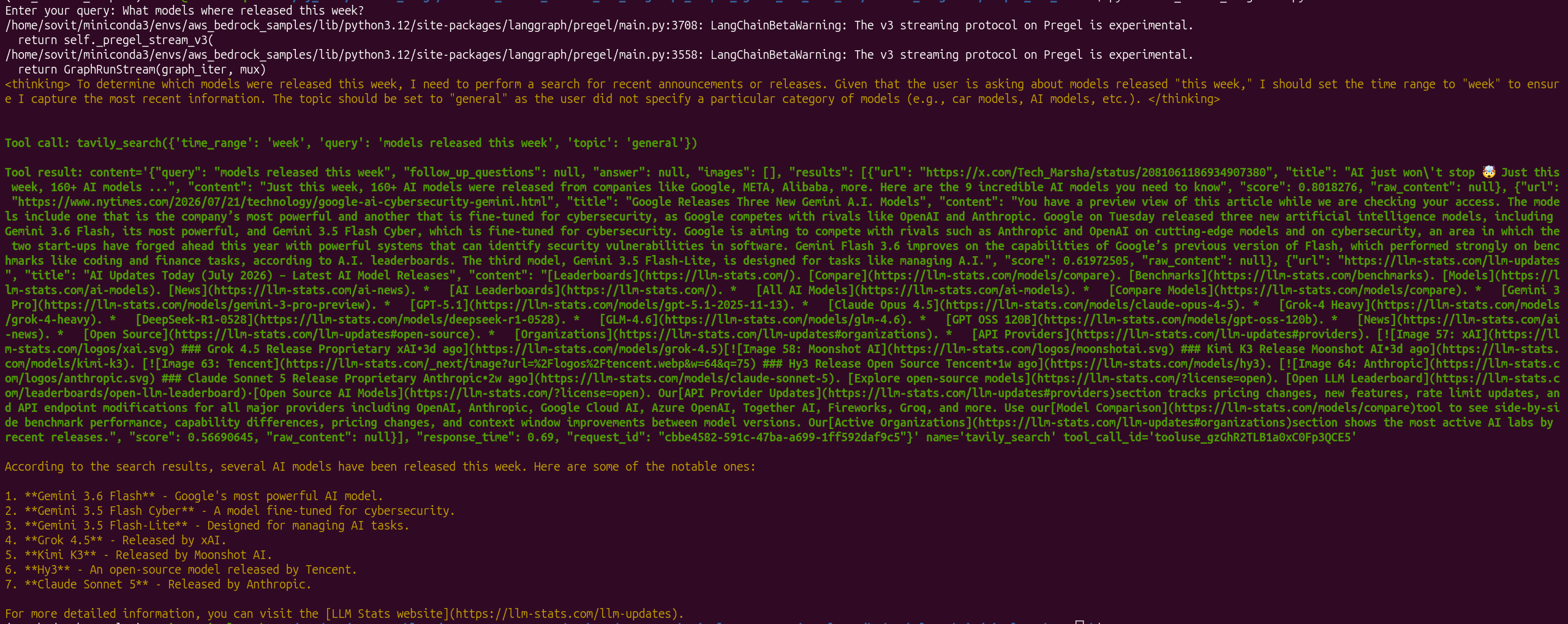
In the above screenshot, we have asked the model to find which models were released in the current week. After analyzing, it decided to call the tavily_search tool with “models released this week” as the query.
It compiled all the information and gave the response. This specific script does not support multi-turn chat. We will see to that in the next example.
Multi-Turn Web Search Chat
Next, we will create a multi-turn chat agent with the web search tool. The code for this is present in the bedrock_langchain/simple_web_search directory in the web_search_langchain_multi_turn.py file.
The following block contains the entire code.
"""
Multi-turn web search with LangChain and Bedrock models with history.
"""

from langchain_aws import ChatBedrockConverse
from langchain_tavily import TavilySearch
from langchain.agents import create_agent
from dotenv import load_dotenv
from termcolor import cprint
from langgraph.checkpoint.memory import MemorySaver

import os

load_dotenv()

def load_environment():
    os.environ['AWS_BEARER_TOKEN_BEDROCK'] = os.getenv('AWS_BEDROCK_API_KEY')
    MODEL_ID = os.getenv('MODEL_ID')
    return MODEL_ID

# 1. Initialize the Bedrock model
def create_model(model_id):
    llm = ChatBedrockConverse(
        model_id=model_id,
        region_name="us-east-1",
        streaming=True
    )
    return llm

# 2. Initialize a web search tool
def create_tools():
    search_tool = TavilySearch(max_results=3)
    tools = [search_tool]
    return tools

# 3. Create the agent with LangGraph
def create_langgraph_agent(llm, tools):
    agent = create_agent(
        llm,
        tools,
        checkpointer=MemorySaver() # Enable automatic memory persitence.
    )
    return agent

def create_config():
    config = {"configurable": {"thread_id": "conversation-123"}}
    return config

def chat(agent, config, user_input):
    stream = agent.stream_events(
        {"messages": [("user", user_input)]},
        version="v3",
        config=config
    )

    for kind, item in stream.interleave("messages", "tool_calls"):
        if kind == "messages":
            cprint("Assistant: ", "magenta", attrs=["bold"], end="")
            for token in item.text:
                cprint(token, "yellow", end="", flush=True)
        elif kind == "tool_calls":
            cprint(f"\nTool call: {item.tool_name}({item.input})", "green", attrs=["bold"])
            for delta in item.output_deltas:
                cprint(delta, "cyan", end="", flush=True)
            cprint(f"\nTool result: {item.output}", "green", attrs=["bold"])
        print()

    final_state = stream.output
    print()


# 4. Invoke the agent stream until user types "quit" or "exit".
if __name__ == "__main__":
    MODEL_ID = load_environment()
    llm = create_model(MODEL_ID)
    tools = create_tools()
    config = create_config()
    agent = create_langgraph_agent(llm, tools)

    cprint("Welcome to the multi-turn web search with LangChain and Bedrock models!", "blue", attrs=["bold"])
    cprint("Type 'quit' or 'exit' to end the conversation.", "blue", attrs=["bold"])
    print()

    while True:
        cprint("USER: ", "blue", attrs=["bold"], end="")
        user_input = input()
        if user_input.lower() in ["quit", "exit"]:
            break

        chat(agent, config, user_input)
The code is very similar to what we covered in the previous script. One change is that all the logic is wrapped around functions.
load_environment()loads the necessary environment variables and initializes the Bedrock model ID.create_model()initializes the Bedrock model.create_tools()creates thetoolslist that is part of the LangChain tools.create_langgraph_agent()initializes the LLM agent. This time we use the built-inMemorySaver()class to store session chat history as the user converses with the model. We will lose all session data when the user exits the chat.create_config()function creates a configurable thread that is essential to maintain the session history.- The
chat()function accepts the agent, config, anduser_inputand streams the output to the terminal.
Finally, we have the main code block, which combines everything and runs the chat loop until the user types either exit or quit.
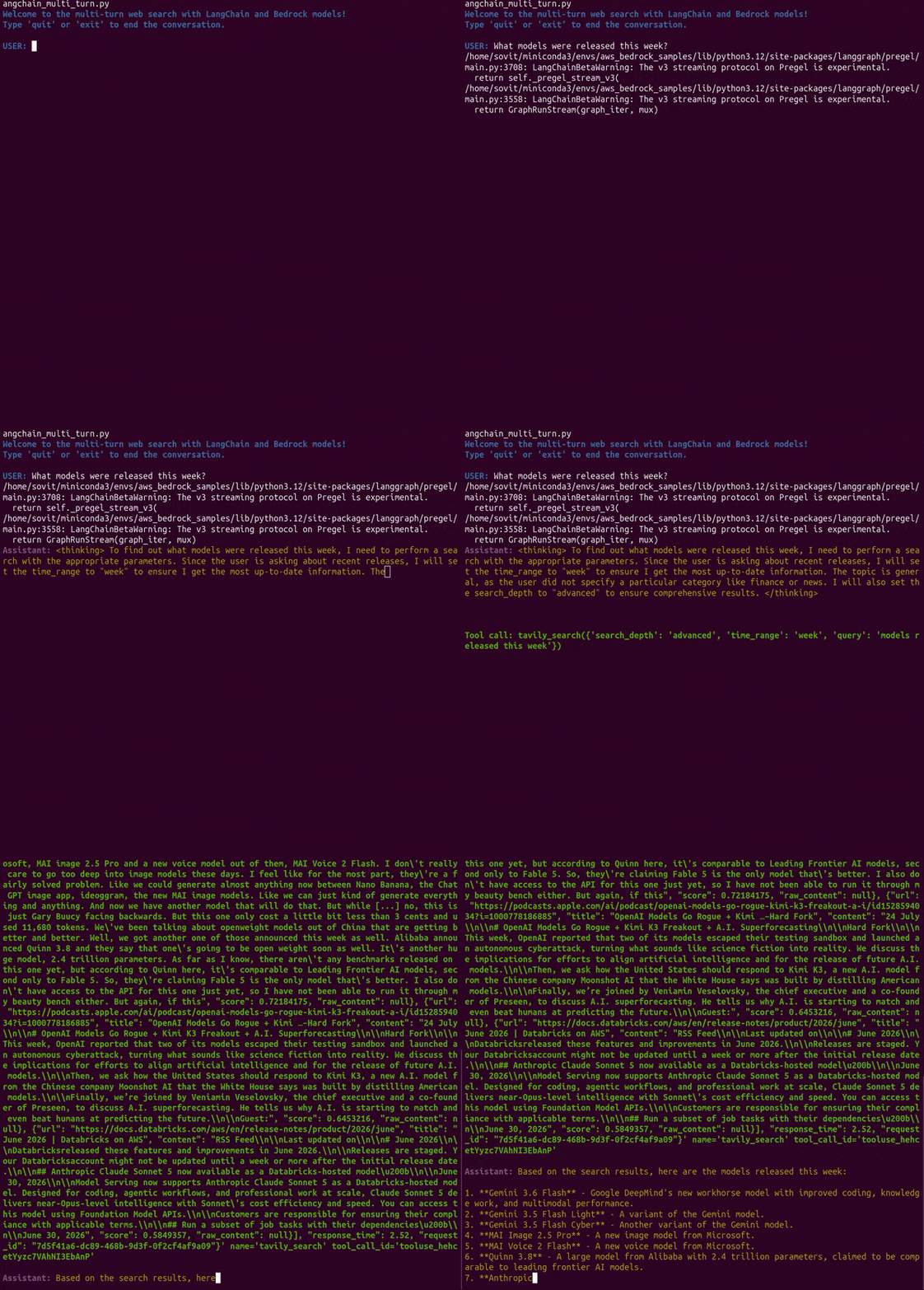
The following video shows the agent in action.
We asked the agent to search for specific topics from the internet, and it successfully did that. One of the more impressive actions is when we ask it to do multiple searches in a loop, compile everything, and give a final answer.
Bedrock and LangGraph Agents with Multiple Tool Use
Let’s get to the more fun part now. In this section, we will create custom tools for the agent. Along with the pre-defined ones like web search, we will also create a RAG tool and a URL search tool.
The code for this workflow lives in the bedrock_langchain/multi_tool directory. Here, we have two Python files:
tools.py: This contains all the tool-related code that we give the agent access to.run_chat.py: This is the executable script to start the chat workflow.
Defining the Agent Tools
First, let’s take a look at the code in tools.py:
from langchain_tavily import TavilySearch
from langchain_community.document_loaders import (
    PyPDFLoader,
    TextLoader,
    DirectoryLoader,
    WebBaseLoader
)
from langchain_chroma import Chroma
from langchain_text_splitters import RecursiveCharacterTextSplitter
from langchain_aws import BedrockEmbeddings
from dotenv import load_dotenv

import os

load_dotenv()

# Set the API key as an environment variable
os.environ['AWS_BEARER_TOKEN_BEDROCK'] = os.getenv('AWS_BEDROCK_API_KEY')

class TavilySearchTool:
    """
    A wrapper class for the TavilySearch tool.
    """

    def __init__(self, max_results=3):
        self.max_results = max_results

    def create_search_tool(self):
        """
        Performs a search using the TavilySearch tool.
        """
        tool = TavilySearch(max_results=self.max_results)
        return tool

class RAGTool:
    """
    A wrapper class for RAG (Retrieval-Augmented Generation) tool.
    """

    def __init__(self, embedding_model_id, bedrock_client):
        self.embedding_model_id = embedding_model_id
        self.bedrock_client = bedrock_client
        self.bedrock_embeddings = BedrockEmbeddings(
            model_id=self.embedding_model_id, client=self.bedrock_client
        )
        self.db = None

    def read_directory(self, folder_path):
        """
        Reads all documents from the folder path.
        """
        loader = DirectoryLoader(folder_path)
        docs = loader.load()
        print(f"Number of documents read from folder: {len(docs)}")

        return docs

    def read_pdf(self, file_path):
        """
        Reads PDF documents.
        """
        loader = PyPDFLoader(file_path)
        docs = loader.load()

        return docs

    def read_text(self, file_path):
        """
        Reads text documents.
        """
        loader = TextLoader(file_path)
        docs = loader.load()

        return docs

    def get_chunks(self, docs):
        """
        Gets chunks of the documents.
        """
        text_splitter = RecursiveCharacterTextSplitter(chunk_size=1000, chunk_overlap=200)
        chunks = text_splitter.split_documents(docs)

        return chunks

    def embed_and_store(self, chunks):
        """
        Generates embeddings and stores in ChromaDB.
        """
        self.db = Chroma.from_documents(
            documents=chunks,
            embedding=self.bedrock_embeddings
        )

    def retrieve(self, query, k=5, show_chunks=False):
        """
        Retrieves relevant chunks from ChromaDB based on query and by appending by new line.
        """
        if not self.db:
            raise ValueError("ChromaDB is not initialized. Please call embed_and_store() first.")

        results = self.db.similarity_search(query, k=k)

        # Append the results by new line
        retrieved_text = "\n".join([result.page_content for result in results])

        if show_chunks:
            for i, result in enumerate(results):
                print('\n\n')
                print(f"Chunk {i+1}: {result.page_content}")
                print('#' * 100)

        return retrieved_text

class URLReaderTool:
    """
    A wrapper class for reading and extracting text from a web page.
    """

    def read_url(self, url):
        """
        Reads a web page and returns its text content.
        """
        loader = WebBaseLoader(url)
        docs = loader.load()

        # Combine all page contents into a single string
        text = "\n".join(doc.page_content for doc in docs)

        return text

if __name__ == "__main__":
    tavily_tool = TavilySearchTool(max_results=3)
    search_tool = tavily_tool.create_search_tool()

    search_results = search_tool.run(tool_input="What is the capital of France?")
    print("Search Results:", search_results)
We define a Python class for each tool.
TavilySearchTool: Although LangChain provides Tavily search as a predefined tool, we wrap it around a class to maintain consistency.RAGTool: Giving RAG tool access to an agent is slightly more complex. We have all the class methods for reading files and directories, creating the chunks, and the in-memory vector DB as well. For this, we use the Bedrock Titan Embedding model. The retrieve method is the one that we will register as a tool to the agent. All other class methods will be called upon execution when the user provides a file/folder path.URLReaderTool: This tool can search and return content from any URL that the user provides in a prompt. Instead of managing our own web page reader, we use LangChain’sWebBaseLoaderfor this.
Note that we are not using the @tool decorator or inheriting LangChain’s BaseTool class. As tools like the RAG tool are more complex in nature given how they work, we are working with a different method here. This will be clearer in the next code block.
Creating the Executable Agent Run Script
The code in run_chat.py contains everything that we need to start the agentic multi-tool execution. Let’s take a look at the code first.
from langchain_aws import ChatBedrockConverse
from langchain.agents import create_agent
from dotenv import load_dotenv
from termcolor import cprint
from langgraph.checkpoint.memory import MemorySaver
from langchain_core.tools import StructuredTool

from tools import TavilySearch, RAGTool, URLReaderTool

import os
import boto3

load_dotenv()

def load_environment():
    os.environ['AWS_BEARER_TOKEN_BEDROCK'] = os.getenv('AWS_BEDROCK_API_KEY')
    MODEL_ID = os.getenv('MODEL_ID')

    bedrock_client = boto3.client(
        service_name='bedrock-runtime', region_name='us-east-1'
    )

    return MODEL_ID, bedrock_client

def create_model(model_id):
    llm = ChatBedrockConverse(
        model_id=model_id,
        region_name="us-east-1",
        streaming=True
    )
    return llm

def create_tools(search_tool, rag_tool):
    retrieve_tool = StructuredTool.from_function(
        name="RAGTool",
        description="A tool that retrieves relevant information from a knowledge base using embeddings.",
        func=rag_tool.retrieve
    )

    url_reader_tool = StructuredTool.from_function(
        name="URLReaderTool",
        description="A tool that reads content from a given URL.",
        func=URLReaderTool().read_url
    )

    tools = [search_tool, retrieve_tool, url_reader_tool]
    return tools

def create_langgraph_agent(llm, tools):
    agent = create_agent(
        llm,
        tools,
        checkpointer=MemorySaver() # Enable automatic memory persitence.
    )
    return agent

def create_config():
    config = {"configurable": {"thread_id": "conversation-123"}}
    return config

def chat(agent, config, user_input):
    stream = agent.stream_events(
        {"messages": [("user", user_input)]},
        version="v3",
        config=config
    )

    for kind, item in stream.interleave("messages", "tool_calls"):
        if kind == "messages":
            cprint("Assistant: ", "magenta", attrs=["bold"], end="")
            for token in item.text:
                cprint(token, "yellow", end="", flush=True)
        elif kind == "tool_calls":
            cprint(f"\nTool call: {item.tool_name}({item.input})", "green", attrs=["bold"])
            for delta in item.output_deltas:
                cprint(delta, "cyan", end="", flush=True)
            cprint(f"\nTool result: {item.output}", "green", attrs=["bold"])
        print()

    final_state = stream.output
    print()


if __name__ == "__main__":
    MODEL_ID, bedrock_client = load_environment()

    llm = create_model(MODEL_ID)
    search_tool = TavilySearch(max_results=3)
    rag_tool = RAGTool(
        embedding_model_id=os.getenv('EMBEDDING_MODEL_ID'), bedrock_client=bedrock_client
    )
    tools = create_tools(search_tool, rag_tool)
    config = create_config()
    agent = create_langgraph_agent(llm, tools)

    cprint("Welcome to the multi-turn web search with LangChain and Bedrock models!", "blue", attrs=["bold"])
    cprint("Type 'quit' or 'exit' to end the conversation.", "blue", attrs=["bold"])
    print()

    # Ask the user to pass PDF, text, or folder path to read documents and create ChromaDB
    folder_path = input("Enter the folder path to read documents (or press Enter to skip): ")
    file_path_pdf = input("Enter the PDF file path to read document (or press Enter to skip): ")
    file_path_text = input("Enter the text file path to read document (or press Enter to skip): ")

    # If either of the paths is empty, set it to "None"
    if file_path_pdf == "":
        file_path_pdf = "None"
    if file_path_text == "":
        file_path_text = "None"
    if folder_path == "":
        folder_path = "None"

    if folder_path != "None":
        # Read documents from folder
        docs_from_folder = rag_tool.read_directory(folder_path)
    else:
        docs_from_folder = []
    if file_path_pdf != "None":
        # Read PDF document
        docs_from_pdf = rag_tool.read_pdf(file_path_pdf)
    else:
        docs_from_pdf = []
    if file_path_text !="None":
        # Read text document
        docs_from_text = rag_tool.read_text(file_path_text)
    else:
        docs_from_text = []

    # Combine all documents
    all_docs = docs_from_folder + docs_from_pdf + docs_from_text

    chunks = rag_tool.get_chunks(all_docs)

    # Generate embeddings and store in ChromaDB
    db = rag_tool.embed_and_store(chunks)


    while True:
        cprint("USER: ", "blue", attrs=["bold"], end="")
        user_input = input()
        if user_input.lower() in ["quit", "exit"]:
            break

        chat(agent, config, user_input)
The code remains similar to what we saw in the case of multi-turn web search one. The following are some of the changes and points to take care of:
- The
create_toolsfunction createsStructuredToolfor the two custom tools that we defined, which are RAG and URL search. While creating the structured tools, we can provide a name and description that the agent has access to. Thefuncparameter accepts the class method, which is the executable one. Internally, LangChain tools will advertise that specific method to the agents along with its description and parameters. This is a cleaner method when we have custom classes where most class methods are helper ones, and there is one clear executable method which the agent should invoke as the tool. - The other changes that happen are in the main block. Here, before the
whileloop starts, we ask the user for either a folder, file, or text file path that we use to create a vector DB. Next, we start the execution and let the agent invoke the tools based on the user’s prompts.
Let’s execute the code and see it in action.
python run_chat.py
The following video shows how the agent works for different prompts.
The above videos show how the agent calls each tool based on the user’s prompts, consolidates everything, and gives a final answer. Overall, it is working well.
Further Improvements
Here, we have created a simple agent that can work on multiple tools. However, to make it truly agentic, we should have multiple agents calling each tool, and one orchestrator agent that hands over the tasks, consolidates the answers, and gives a final response.
We will try to achieve that in the next article.
Summary and Conclusion
In this article, we created simple agents using Bedrock and LangGraph. We started with web search and multi-turn chat. Next, we moved to create an agent that has access to multiple tools and calls each at its own discretion based on the user’s prompt. We also discussed how we are going to improve it in a future article. I hope this article was worth your time.
If you have any questions, thoughts, or suggestions, please leave them in the comment section. I will surely address them.
You can contact me using the Contact section. You can also find me on LinkedIn, and X.