
In the previous series of articles, we covered creating singular AgentCore agents with custom tools and creating agents-as-tools by providing each agent a separate MCP server. The natural progression from this would be adding memory to our agent chat sessions. That would be our aim in this article. Here, we will add long-term memory to our Bedrock AgentCore agents.
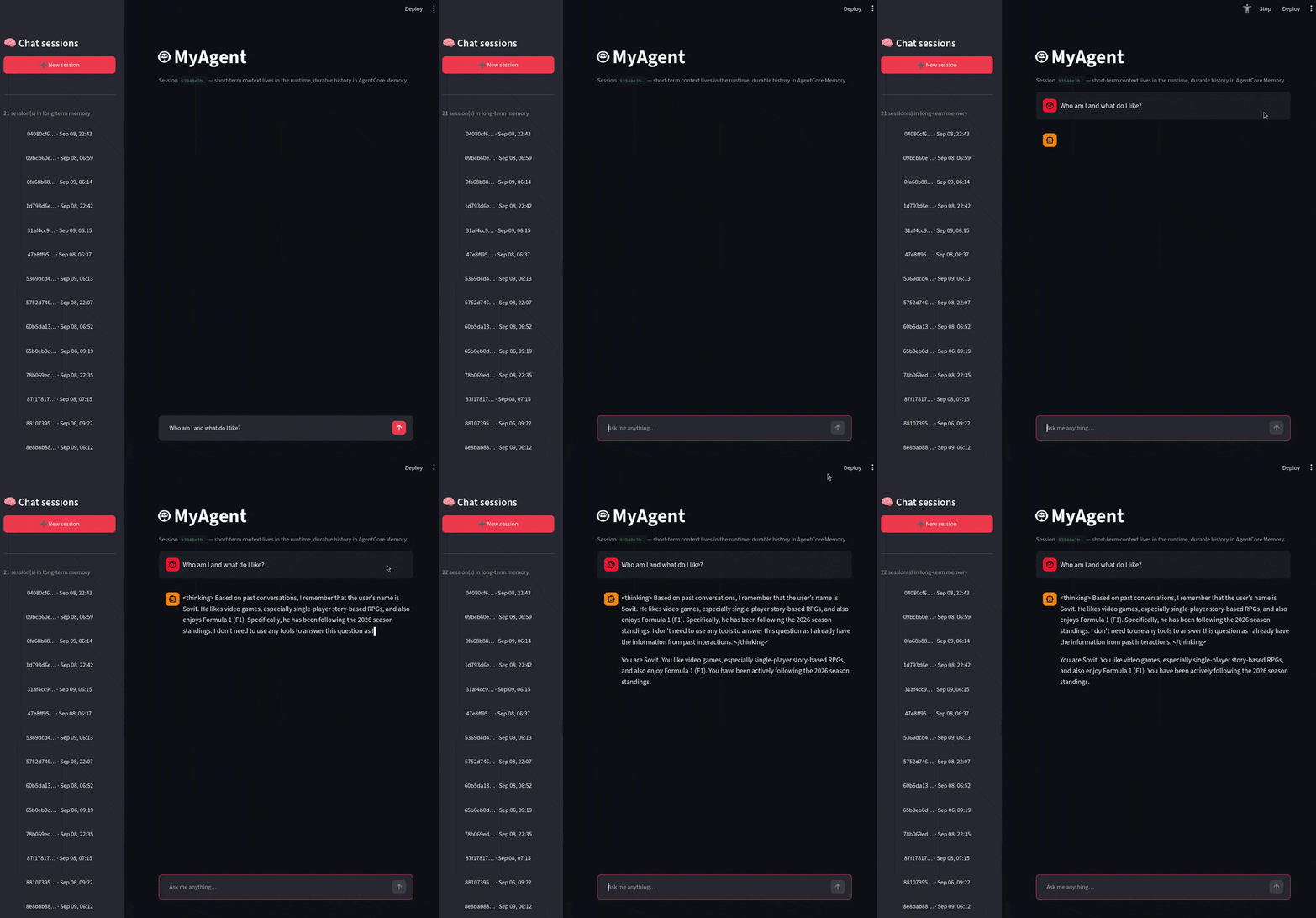
In the last few articles, we have been using an in-memory checkpointer. This uses the runtime’s process memory and is ephemeral. Any restart or redeployment destroys the memory. LLM application that we use online has session memory and long-term memory. This allows users to return to any chat session at any point in time and continue the conversation. Implementing the storage and retrieval logic for this could be complex. This requires scaling storage resources while managing the strategy for storing chat sessions and long-term memory. However, Bedrock AgentCore simplifies the process, which we will discover in this article.
Here is what we will cover:
- Adding a memory resource to the AgentCore project with
agentcore add memory. - Understanding memory events, extraction strategies, and memory records.
- Saving each conversation turn to long-term memory from
main.py. - Retrieving relevant memories and injecting them into the agent’s prompt.
- Building a Streamlit UI that lists all chat sessions and replays them.
- Testing, deploying, and verifying the complete workflow.
Few Assumptions and Concepts
There are a few concepts and assumptions that we need to understand before moving into the implementation:
- We are not replacing the
InMemorySaver. It still handles the in-session chat conversation memory for the user and assistant. The AgentCore memory adds a long-term layer that is permanent across restarts and redeployment of resources. - We implement semantic search for long-term memory, and each in-turn session acts as an event. The long-term semantic memory acts asynchronously on the events and performs semantic search on these when a user returns to a past session.
- We are not handling multi-tenancy here. This is a single-user demo.
Prerequisites for AgentCore Long-Term Memory Implementation
The project setup steps, including creating the AgentCore project, setting up AWS credentials, and installing the AgentCore CLI and uv, were covered in the AgentCore introduction article. Please follow the steps from there, as we will be skipping them here.
We continue with the same codebase from the AgentCore multi-agent orchestration article: an orchestrator agent with local tools and three worker agents (web search, DeepWiki, and F1), each backed by its own MCP server.
Downloading the Code and Local Setup
All the code is available for download in the form of a zip file. The following section contains all the setup steps.
Download Code
After downloading and extracting the zip file, we can see the following directory structure.
MyAgent/
├── AGENTS.md
├── NOTES.md
├── README.md
├── agentcore/
│    ├── agentcore.json
│    ├── aws-targets.json
│    └── cdk/
├── app/
│    └── MyAgent/
│         ├── main.py
│         ├── pyproject.toml
│         ├── mcp_client/
│         │        ├── __init__.py
│         │        └── client.py
│         └── model/
│                  ├── __init__.py
│                  └── load.py
└── ui/
     ├── app.py
     ├── requirements.txt
     └── README.md
Compared to the previous articles in the series, we have a new ui directory. This holds the Streamlit application.
app/MyAgent/main.py: This is the agent entry point and where the memory save and retrieve logic lives now.app/MyAgent/model/load.py: The script for loading the model. Just like the previous articles, we are using the Amazon Nova Pro model.agentcore/agentcore.jsonui/app.py: This is the Streamlit application that we will build in this article.
We can follow these commands to set up the project locally after extracting the file.
cd MyAgent

# Install project dependencies
cd app/MyAgent
uv sync
cd ../..

# Run locally
agentcore dev
Adding Long-Term Memory to Bedrock AgentCore Agents
From this section onward, we will focus on the technical components and the code changes that we have made.
Adding a Memory Resource
Besides the chat session, we need to add a long-term memory resource to our project configuration. We can do this using a single line of command using the CLI.
agentcore add memory --name MyMemory --strategies SEMANTIC,USER_PREFERENCE --expiry 7
Here are the important flags:
--name MyMemory: This is the name of the memory resource. We can give any name of our choice.-
--strategies SEMANTIC,USER_PREFERENCE: This defines the extraction strategies.SEMANTICextracts key facts and context from conversations, making them searchable by meaning.USER_PREFERENCEtracks preferences the user expresses. Other options areSUMMARIZATIONandEPISODIC. --expiry 7: How long the raw conversation events are stored, in days.
The above command will update the agentcore/agentcore.json file. This is what the memory section looks like.
"memories": [
  {
    "name": "MyMemory",
    "eventExpiryDuration": 7,
    "strategies": [
      {
        "type": "SEMANTIC",
        "name": "SemanticMemory",
        "description": "Extracts key facts and context from conversations for semantic retrieval",
        "namespaceTemplates": ["/actors/{actorId}/"]
      },
      {
        "type": "USER_PREFERENCE",
        "name": "UserPreferenceMemory",
        "description": "Tracks user preferences expressed during conversations",
        "namespaceTemplates": ["/actors/{actorId}/"]
      }
    ]
  }
]
By default, each strategy stores its extracted records under a generated namespace:
/strategies/{memoryStrategyId}/actors/{actorId}/. The{memoryStrategyId}part is a random suffix assigned at deploy time (e.g.SemanticMemory-6ghOct7pMt), which makes retrieval awkward. If we go forward with the default namespace, our code would need to look up the strategy IDs first.There is no CLI flag for this, so we add
namespaceTemplatesto each strategy manually inagentcore.json. With"/actors/{actorId}/", every record for our user lands under/actors/blog-user/, and the retrieval code can search that path directly. The{actorId}placeholder is filled in from theactor_idwe pass tocreate_event().
How the Memory Reaches the Agent
When we deploy, the AgentCore CDK constructs automatically wire every memory to every runtime in the project. This does not require a manual connection step. The memory’s ID is injected into the runtime as an environment variable following the pattern MEMORY_{NAME}_ID.
Since our memory name is MyMemory, the runtime ID will follow this syntax:
MEMORY_MYMEMORY_ID=the_deployed_memory_resource_ID
The agent code reads this variable to find the memory.
The Memory SDK
We need to install the bedrock-agentcore Python SDK to use the memory operations. The uv sync command already takes care of it. If needed, we can install it manually.
pip install bedrock-agentcore
We mostly care about the MemoryClient class.
from bedrock_agentcore.memory import MemoryClient
It’s three primary methods that we will use here:
create_event(): saves conversation messages as an event.retrieve_memories(): semantic search over extracted records.list_sessions()andlist_events(): list stored sessions and replay their events (used by the UI).
The Workflow on a High Level
Let’s take a look at the workflow and data flow at a high level before touching the code.
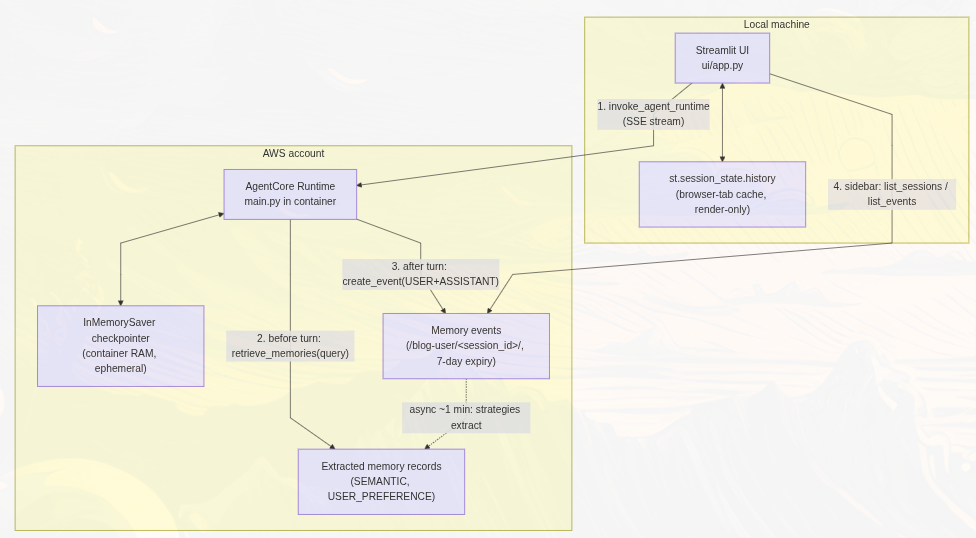
The following table gives us an overview of each memory component:
| Store | Where it lives | Lifetime | Who reads it |
|---|---|---|---|
| Checkpointer ( InMemorySaver) | Runtime container’s process memory | Ephemeral – lost on restart or scale-down | The agent, for within-session context |
| Memory events | AWS (the memory resource) | 7 days ( eventExpiryDuration) | The UI sidebar, for replaying transcripts |
| Memory records | AWS (the memory resource) | Durable | The agent, via semantic retrieval |
And this is what happens on every user turn:
- The user sends a prompt.
- Before the agent runs, we call
retrieve_memories()with the prompt as the query. Matching records get injected into the system prompt. - The agent runs and streams its response, exactly as before.
- After the stream completes, we call
create_event()to upload the (user prompt, assistant response) pair to AWS. - In the background (roughly a minute later), the strategies extract records from that event. Future turns can find them semantically.
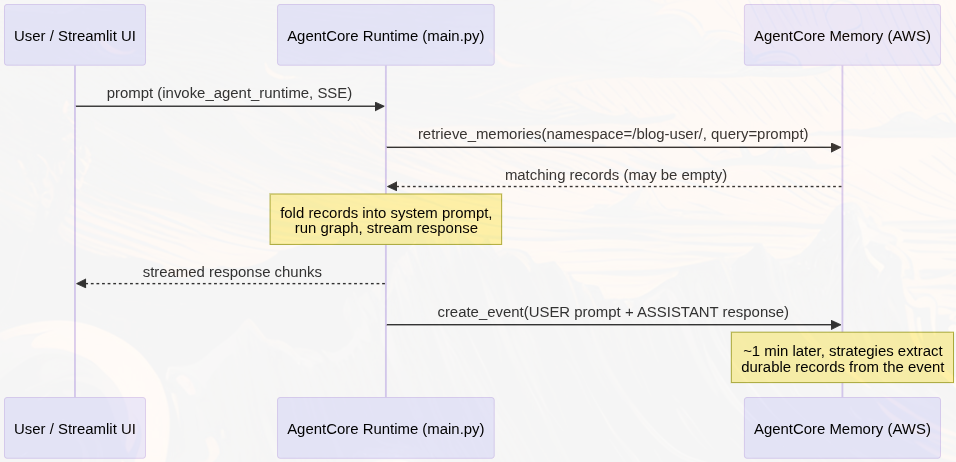
So, every completed turn gets uploaded to the AWS account.
Code Changes to AgentCore Long-Term Memory
Now, let’s focus on the code changes that we have made to the application.
Changes in main.py
All the agent-specific changes live in the app/MyAgent/main.py. There are three primary modifications that happen in the main script:
- Importing of the necessary modules
- Introducing memory infrastructure
- And modifying the
invoke()entry point
The New Imports
We are importing the MemoryClient from the bedrock_agentcore module to manage long-term memory.
from bedrock_agentcore.memory import MemoryClient
Managing the Memory Infrastructure
For managing long-term memory, first, we need to discover the memory ID from the environment.
def _discover_memory_id() -> str | None:
    """Find the injected memory ID env var (MEMORY__ID)."""
    if os.environ.get("MEMORY_MYMEMORY_ID"):
        return os.environ["MEMORY_MYMEMORY_ID"]
    for key, value in os.environ.items():
        if key.startswith("MEMORY_") and key.endswith("_ID"):
            return value
    return None


MEMORY_ID = _discover_memory_id()
ACTOR_ID = "blog-user"  # single-user demo; derive per-user for multi-tenant apps

_memory_client = None

def get_memory_client() -> MemoryClient | None:
    """Lazily create the MemoryClient (region comes from the runtime env)."""
    global _memory_client
    if MEMORY_ID is None:
        return None
    if _memory_client is None:
        _memory_client = MemoryClient(region_name=os.environ.get("AWS_REGION"))
    return _memory_client
These are a few design choices that we have to make here:
- We check for
MEMORY_MYMEMORY_IDexplicitly first, then fall back to scanning for anyMEMORY_*_IDvariable. If we rename the memory inagentcore.json, the code still still should be able to find it. - If no memory ID is found, everything degrades gracefully.
get_memory_client()returnsNone, and the agent still runs. This is important for local development withagentcore dev, where the environment variable is not injected. - The code creates the
MemoryClientlazily, once per container process, and is reused.
The semantic search happens in the retrieve_memory_context function.
def retrieve_memory_context(session_id: str, query: str) -> str:
    """Fetch relevant long-term memories for this session/user as prompt context."""
    client = get_memory_client()
    if client is None:
        return ""
    try:
        memories = client.retrieve_memories(
            memory_id=MEMORY_ID,
            namespace_path=f"/actors/{ACTOR_ID}/",
            query=query,
            top_k=5,
        )
        texts = []
        for record in memories:
            content = record.get("content", {})
            text = content.get("text") if isinstance(content, dict) else None
            if text:
                texts.append(text)
        return "\n".join(texts)
    except Exception as e:
        log.warning(f"Memory retrieval failed (continuing without): {e}")
        return ""
This is where the long-term memory retrieval comes into the picture. The namespace_path=f"/{ACTOR_ID}/" allows the search to happen for everything stored under the particular actor, across all sessions. Even with a brand new session, with an empty checkpointer, conversations that happened weeks earlier can surface as memory.
Then we have the save function.
def save_exchange_to_memory(session_id: str, prompt: str, response: str):
    """Persist one user/assistant exchange as a memory event (best-effort)."""
    client = get_memory_client()
    if client is None or not response.strip():
        return
    try:
        client.create_event(
            memory_id=MEMORY_ID,
            actor_id=ACTOR_ID,
            session_id=session_id,
            messages=[
                (prompt, "USER"),
                (response, "ASSISTANT"),
            ],
        )
        log.info(f"Saved exchange to long-term memory (session={session_id})")
    except Exception as e:
        log.warning(f"Memory save failed: {e}")
We wrap both the functions in try/except blocks so that failure in storage and retrieval of memory should not stop the normal conversation flow.
Also, note that, we only save the prompt and final response pair. The tool calls and their results do not make it memory by choice.
Modifications to the Entry Point
The final changes happen to the invoke() function.
This time, we retrieve past memories via semantic search first, and inject them as system prompt before building the graph.
@app.entrypoint
async def invoke(payload, context):
    log.info("Invoking Agent.....")

    # Process the user prompt
    prompt = payload.get("prompt", "What can you help me with?")
    if not isinstance(prompt, str):
        raise ValueError("prompt must be a string")
    session_id = getattr(context, "session_id", "default-session")
    _current_session_id.set(session_id)
    touch_thread(session_id)
    log.info(f"Agent input: {prompt}")

    # Long-term recall: pull relevant memories and fold them into the system prompt
    memory_context = retrieve_memory_context(session_id, prompt)
    system_prompt = DEFAULT_SYSTEM_PROMPT
    if memory_context:
        system_prompt += (
            "\n\nRelevant memories from past conversations:\n" + memory_context
        )
        log.info(f"Injected {len(memory_context)} chars of memory context")

    # Define the agent using create_react_agent (checkpointer is shared across invocations)
    graph = create_react_agent(
        get_or_create_model(),
        tools=tools,
        prompt=system_prompt,
        checkpointer=_checkpointer,
    )
    ...
The model sees the past conversation summaries as context.
The rest of the changes happen in the streaming loop. We also accumulate all the responses now so that we can persist them in long term memory.
    # Accumulate the streamed response so we can persist it to long-term memory
    response_parts: list[str] = []

    async for message_chunk, metadata in graph.astream(
        {"messages": [HumanMessage(content=prompt)]},
        config={
            "configurable": {"thread_id": session_id},
            "callbacks": [ToolLoggingHandler()],
        },
        stream_mode="messages",
    ):
        if not isinstance(message_chunk, AIMessageChunk):
            continue
        if message_chunk.tool_call_chunks:
            continue
        content = message_chunk.content
        if isinstance(content, str):
            if content:
                response_parts.append(content)
                yield content
        elif isinstance(content, list):
            for block in content:
                if isinstance(block, dict) and block.get("type") == "text":
                    text = block.get("text", "")
                    if text:
                        response_parts.append(text)
                        yield text
                elif isinstance(block, str):
                    response_parts.append(block)
                    yield block

    # Persist the completed exchange to AgentCore Memory (durable, cross-session)
    save_exchange_to_memory(session_id, prompt, "".join(response_parts))
The rest of the streaming behavior remains the same.
These are all the agent side chages that we need.
The Streamlit UI
For this article, we are building a simple Streamlit UI. This is a proper chat interface, where we can go back to past chat sessions and continue the conversation. This is crucial to test the long-term memory.
The UI code lives in the ui directory and has its own dependencies.
We can install them via the following steps:
cd ui
pip install -r requirements.txt
All the code remains in the ui/app.py file. Let’s go through the important sections.
Finding the Deployed Resources
The UI needs two pieces of information to work as expected, the runtime ARN and the memory ID to read sessions from. When we deploy the Agentcore application, the necessary configuration is stored in the agentcore/.cli/deployed-state.json. We can retrieve the necessary information from there.
PROJECT_ROOT = Path(__file__).resolve().parent.parent
DEPLOYED_STATE = PROJECT_ROOT / "agentcore" / ".cli" / "deployed-state.json"
DEFAULT_ACTOR_ID = "blog-user"


@st.cache_resource
def load_deployment_config() -> dict:
    """Resolve runtime ARN + memory ID from env vars or deployed-state.json."""
    runtime_arn = os.environ.get("AGENT_RUNTIME_ARN")
    memory_id = os.environ.get("MEMORY_MYMEMORY_ID") or os.environ.get("MEMORY_ID")
    region = os.environ.get("AWS_REGION", "us-east-1")
    actor_id = os.environ.get("ACTOR_ID", DEFAULT_ACTOR_ID)

    if (not runtime_arn or not memory_id) and DEPLOYED_STATE.exists():
        state = json.loads(DEPLOYED_STATE.read_text())
        resources = (
            state.get("targets", {}).get("default", {}).get("resources", {})
        )
        if not runtime_arn:
            runtime_arn = (
                resources.get("runtimes", {}).get("MyAgent", {}).get("runtimeArn")
            )
        if not memory_id:
            memory_id = (
                resources.get("memories", {}).get("MyMemory", {}).get("memoryId")
            )

    return {
        "runtime_arn": runtime_arn,
        "memory_id": memory_id,
        "region": region,
        "actor_id": actor_id,
    }
If the environment variables are missing any configuration details, we pick up that from the deployed state. We can use Streamlit cache to share them across runs.
@st.cache_resource
def get_memory_client() -> MemoryClient:
    cfg = load_deployment_config()
    return MemoryClient(region_name=cfg["region"])


@st.cache_resource
def get_runtime_client():
    cfg = load_deployment_config()
    return boto3.client("bedrock-agentcore", region_name=cfg["region"])
Session Memory Sidebar
All chat applications have a sidebar with past conversations. We are going to replicate the same here so that we can go back to any of the past conversations.
def list_memory_sessions(memory_id: str, actor_id: str) -> list[dict]:
    """All sessions this actor has persisted in AgentCore Memory."""
    response = get_memory_client().list_sessions(
        memoryId=memory_id, actorId=actor_id
    )
    return response.get("sessionSummaries", [])
Each summary contains sessionId, actorId, and createdAt. When we click one, we replay its transcript from the stored events:
def load_transcript(memory_id: str, actor_id: str, session_id: str) -> list[dict]:
    """Replay a historical session as chat messages from memory events."""
    events = get_memory_client().list_events(
        memory_id=memory_id,
        actor_id=actor_id,
        session_id=session_id,
    )
    messages: list[dict] = []
    for event in events:
        for item in event.get("payload", []):
            conv = item.get("conversational")
            if not conv:
                continue
            text = (conv.get("content") or {}).get("text", "")
            role = (conv.get("role") or "OTHER").lower()
            if text and role in ("user", "assistant"):
                messages.append({"role": role, "content": text})
    return messages
Each event’s payload is a list of items, and we only populate the conversational ones in the UI. These are the exact pairs that we uploaded in main.py via save_exchange_to_memory function.
One important note here is that the sidebar does not tap into the checkpointer to retrieve the above. It does so from the stored events in AWS. Even if the runtime scales to zero, we have our long-term memory and the sidebar keeps working.
Invoking the Runtime and Parsing the Stream
We use the boto3 Python SDK to invoke the deployed runtime.
def stream_agent_response(runtime_arn: str, region: str, session_id: str, prompt: str):
    """Invoke the deployed runtime and yield text chunks parsed from the SSE stream."""
    client = get_runtime_client()
    response = client.invoke_agent_runtime(
        agentRuntimeArn=runtime_arn,
        runtimeSessionId=session_id,
        payload=json.dumps({"prompt": prompt}).encode("utf-8"),
        qualifier="DEFAULT",
    )

    buffer = ""
    for raw in response["response"].iter_chunks():
        buffer += raw.decode("utf-8", errors="replace")
        # SSE events are separated by blank lines
        while "\n\n" in buffer:
            event_text, buffer = buffer.split("\n\n", 1)
            for chunk in _parse_sse_event(event_text):
                yield chunk
    # Flush any trailing event without a final separator
    if buffer.strip():
        for chunk in _parse_sse_event(buffer):
            yield chunk


def _parse_sse_event(event_text: str):
    """Extract text payloads from one SSE event block."""
    for line in event_text.splitlines():
        if not line.startswith("data: "):
            continue
        data = line[len("data: "):]
        try:
            decoded = json.loads(data)
        except json.JSONDecodeError:
            continue
        if isinstance(decoded, str) and decoded:
            yield decoded
The runtimeSessionId is the session UUID that the UI generates. It flows through to the runtime as context.session_id, which is what main.py uses both as the checkpointer thread ID and as the memory session ID.
The above block also contains a _parse_sse_event() function. Network chunks can split an event anywhere, so we buffer and only process complete events (delimited by a blank line). Each data: line carries a JSON-encoded text string, which we decode and yield.
Completing the Streamlit UI
Let’s complete the rest of the standard Streamlit UI.
if prompt := st.chat_input("Ask me anything…"):
    st.session_state.history.setdefault(current_session, []).append(
        {"role": "user", "content": prompt}
    )
    with st.chat_message("user"):
        st.markdown(prompt)

    with st.chat_message("assistant"):
        placeholder = st.empty()
        parts: list[str] = []
        try:
            for chunk in stream_agent_response(
                cfg["runtime_arn"], cfg["region"], current_session, prompt
            ):
                parts.append(chunk)
                placeholder.markdown("".join(parts) + "▌")
        except Exception as e:
            st.error(f"Invocation failed: {e}")

        full_response = "".join(parts)
        if full_response:
            placeholder.markdown(full_response)
            st.session_state.history[current_session].append(
                {"role": "assistant", "content": full_response}
            )

    # The agent persisted this exchange to memory after streaming; refresh
    # the sidebar so the session shows up immediately.
    st.rerun()
Every new session appears on the sidebar. This does not require a manual refresh.
Testing the Long-Term Memory
There are a few ways to test whether our long-term memory is working or not.
Go into the UI directory and run the Streamlit app.
cd ui

streamlit run app.py
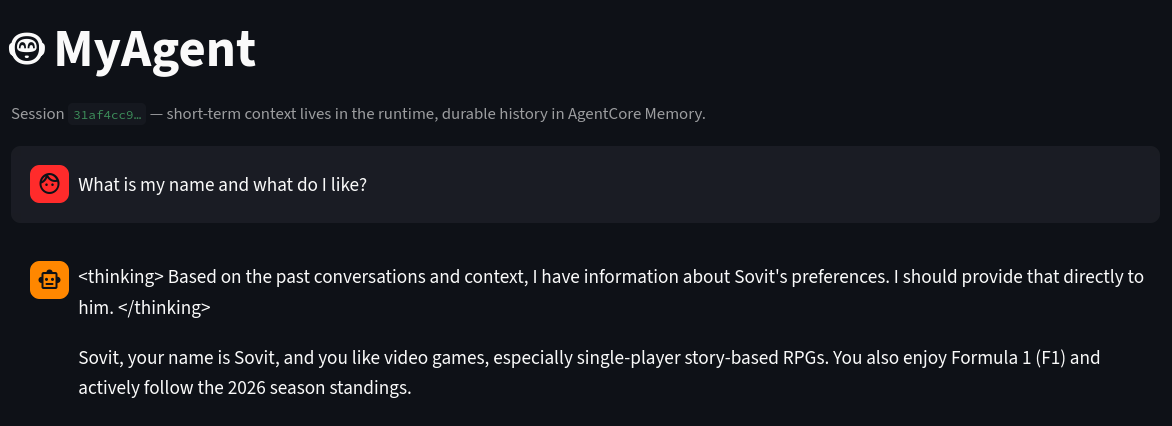
We can tell the agent a few facts, like a fictional cat’s name or a story. Then we wait for a minute or so for the long-term memory to be stored. Next, we can create a new session and ask the same questions again. If the agent answers them correctly, then the long-term memory is working.
Deploying the Application
Before deploying the application, go to agentcore/aws-targets.json file and change the account ID to yours.
[
  {
    "name": "default",
    "description": "Default target (us-east-1)",
    "account": "YOUR_ACCOUNT_ID",
    "region": "us-east-1"
  }
]
We can deploy the application via the following command:
agentcore deploy
A Few Caveats
- Extraction is asynchronous. Events are stored the moment we call
create_event(), but records appear roughly a minute later. If a recall test fails immediately, we need to try again. - Events expire but the records persist. With
eventExpiryDuration: 7, the raw transcripts disappear from the sidebar after seven days. The extracted records stay, so the agent keeps recalling the facts even after the transcript is gone. If we want longer transcript history, we can raise the expiry up to 365 days. - Local development has no memory by default.
agentcore devdoes not injectMEMORY_MYMEMORY_ID. The agent runs fine without it. To enable memory locally, add the variable toagentcore/.env.local.
Summary and Conclusion
In this article, we covered how to add long-term memory using Bedrock AgentCore. Long term memory and being able to go back to chat sessions is one of the foudations of any modern chat application. This article covered the basics of that: starting from the setup till the code.
I hope this article was worth your time. If you have any questions thoughts or suggestions, please leave them in the comment section. I will surely address them.
You can contact me using the Contact section. You can also find me on LinkedIn, and X.