
LLMs have come a long way since their inception. They are not just chatbots or assistants anymore. The current usage of LLMs tends to be more towards agentic workflows, coding, and seamless terminal workflows. Currently, most of the LLMs that are good at agentic tasks tend to be 20B parameters and above (most frontier models are much larger, reaching more than a trillion parameters). However, the latest IBM Granite 4.2 is trying to tackle this by training 3B, 8B, and 30B models for complex agentic workflows that can run locally. In this article, we will explore the important components of the Granite 4.2 model and use them for tool-calling tasks.
These agentic behaviors do not inherently get embedded into the LLMs with simple chat or assistant based fine-tuning. Rather, we need to explicitly train them to perform these tasks. The smaller the model, the more meticulous the process has to be. While covering the training process for Granite 4.2, we will see exactly how it was done. Along with that, we will launch the model via llama.cpp and run simple tool-calling tasks.
What are we going to cover in this article?
- An introduction to the Granite 4.2 family of models.
- The architecture of Granite 4.2 models, including the 3B, 8B, and 30B models.
- A brief about the public benchmarks.
- GPU hardware requirements for the GGUF models.
- Connecting Granite 4.2 models to gpt-oss-chat for multiple tool-calling workflows.
Introduction to Granite 4.2
Granite 4.2 is a family of dense large language models released by the IBM team for local agentic, coding, and terminal workflows. Granite 4.2 comes in three parameter sizes: 3B, 8B, and 30B.
The Granite 4.2 models are a leap from the previous 4.0 and 4.1 models, which were chat and assistant models. The new models come with native reasoning/thinking capabilities as well.
The models are released under the Apache 2.0 license, allowing developers and researchers unrestricted use, fine-tuning, and deployment for commercial purposes.
The 3B and 8B variants support a 128K context length, while the 30B model supports long context up to 512K tokens. The models support multiple languages, including English, German, Spanish, French, Japanese, Portuguese, Arabic, Czech, Italian, Korean, Dutch, and Chinese.
What’s New in Granite 4.2?
Compared to the previous generation of Granite 4.1 models, the new Granite 4.2 models introduce the following:
- Three thinking modes: The new 4.2 models have a thinking (full thinking), no thinking, and a low-effort thinking mode, each suitable for tasks of different complexities.
- Native reasoning capabilities: The previous generation of Granite LLMs did not have native reasoning capabilities. The latest models emit their reasoning by default within the
- Agentic reinforcement learning: Although the previous generation of the Granite models were trained for reasoning, the newer Granite 4.2 8B and 30B models have an agentic RL training phase as well. These cover tasks like SWE, terminal, and search agent.
The 4.2 models are post-trained from the Granite-4.1 base models, inheriting their strong instruction following and code capabilities.
Architecture of Granite 4.2
Granite 4.2 models use a dense, decoder only transformer architecture. Here are the key architecture components:
- GQA: Grouped Query Attention with 40 attention heads and 8 KV heads.
- RoPE: Using RoPE for positional embedding.
- SwiGLU: The feed forward (MLP) uses SwiGLU activation.
- RMSNorm: For layer normalization (epsilon = 1e-5)
- Separate input and output embeddings.
| Component | 3B Dense | 8B Dense | 30B Dense |
|---|---|---|---|
| Embedding size | 2560 | 4096 | 4096 |
| Number of layers | 40 | 40 | 64 |
| Attention head size | 64 | 128 | 128 |
| Number of attention heads | 40 | 32 | 32 |
| Number of KV heads | 8 | 8 | 8 |
| MLP hidden size | 8192 | 12800 | 32768 |
| MLP activation | SwiGLU | SwiGLU | SwiGLU |
| Sequence length | 131072 | 131072 | 131072 |
| Position embedding | RoPE | RoPE | RoPE |
| # Parameters | 3B | 8B | 30B |
Later in the article, we will use the 8B model for multi-turn tool execution using an open-source project.
Training Pipeline of Granite 4.2 Models
The Granite 4.2 models are post-trained from the Granite-4.1 base models.
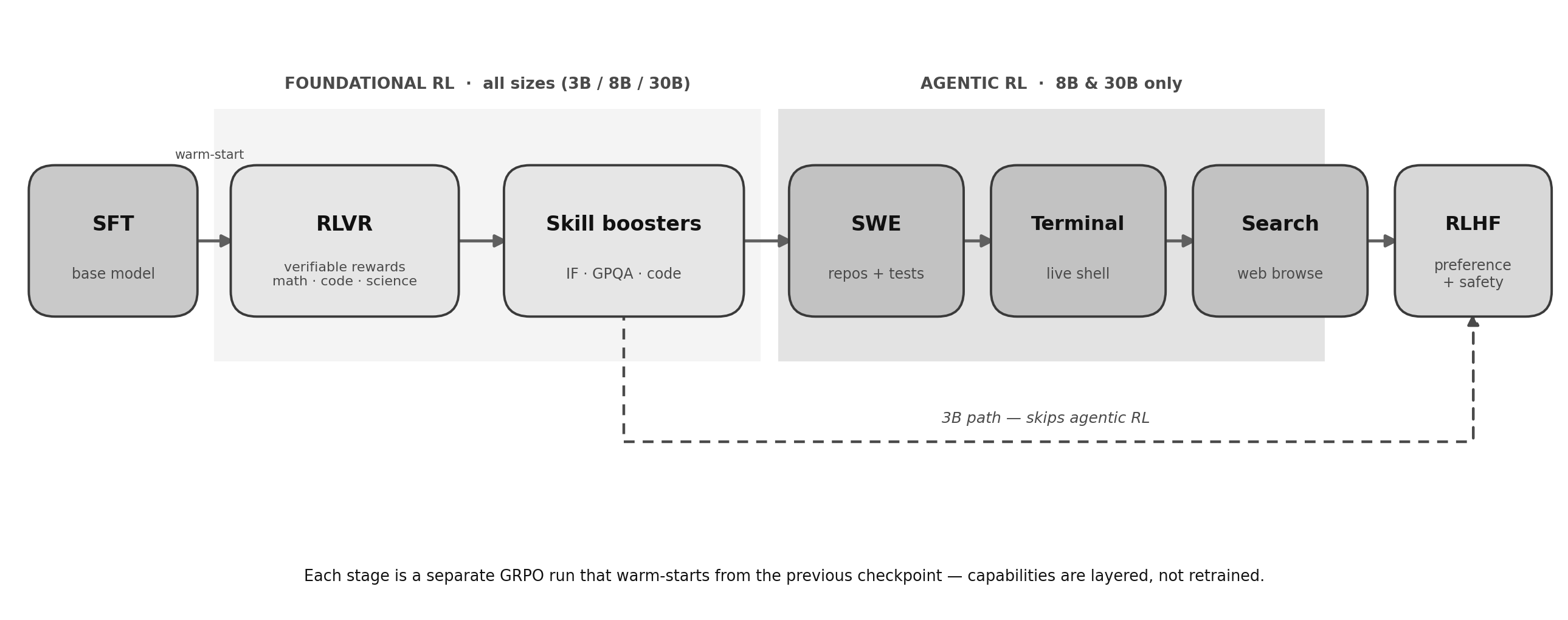
At a high level, the training pipeline is divided into two stages:
- Foundational Reinforcement Learning (RL)
- Agentic Reinforcement Learning
The Foundational RL stage covers the following training strategies:
- Supervised Fine-Tuning (SFT) of the base models.
- Reinforcement Learning for Verifiable Reward (RLVR) for maths, science, and coding.
- Focused Skill Boosters training for instruction following, GPQA, and focused coding tasks.
All three model sizes go through the training steps above.
Additionally, the 8B and 30B models go through an Agentic RL phase, which includes the following steps:
- SWE Agent: The models are trained on software engineering tasks using real repositories.
- Terminal Agent: Training the models on multi-step tasks for terminal and OS operations.
- Search Agent: This is a deep research training step where models have access to web search and browsing to answer hard multi-hop questions.
Finally, all three model sizes go through the RLHF alignment stage for preference and safety tuning.
GPU Requirements for Running Granite 4.2
IBM does not publish an official VRAM requirement guide for running the models. However, we can infer the GPU requirement for the 8B parameter model for the GGUF format.
The following table lists the available GGUF quantizations and their file sizes:
| Quantization | File Size |
|---|---|
| BF16 (full precision) | 17.6 GB |
| Q8_0 | 9.35 GB |
| Q6_K | 7.22 GB |
| Q5_K_M | 6.25 GB |
| Q5_K_S | 6.10 GB |
| Q5_1 | 6.63 GB |
| Q5_0 | 6.10 GB |
| Q4_K_M | 5.35 GB |
| Q4_K_S | 5.09 GB |
| Q4_1 | 5.58 GB |
| Q4_0 | 5.06 GB |
| Q3_K_M | 4.35 GB |
| Q3_K_S | 3.94 GB |
| Q3_K_L | 4.70 GB |
| Q2_K | 3.41 GB |
These file sizes represent model weights only. At runtime, we need additional VRAM for the KV cache (which grows with context length), compute buffers, and the inference framework overhead.
The Q4_K_M is one of the sweet spots for local inference, as it uses between ~7GB VRAM with around a 32K context length and runs comfortably within 8GB.
Granite 4.2 Benchmarks
The following are some of the key benchmarks worth looking at for the Granite 4.2 models.
Reasoning
| Benchmark | 3B | 8B | 30B |
|---|---|---|---|
| AIME25 | 78.33 | 86.67 | 89.17 |
| HMMT Feb25 | 66.67 | 78.33 | 89.17 |
| GPQA | 54.80 | 64.14 | 66.41 |
| LiveCodeBench v6 | 69.71 | 73.24 | 75.77 |
| SciCode | 24.11 | 36.09 | 38.76 |
Agentic (Coding)
| Benchmark | 3B | 8B | 30B |
|---|---|---|---|
| SWE Bench Multilingual | NA | 30.78 | 41.89 |
| SWE Bench Pro | NA | 19.11 | 33.29 |
| SWE Bench Verified | NA | 47.67 | 57.00 |
| Terminal-Bench 2.1 | NA | 20.56 | 29.24 |
Agentic (General)
| Benchmark | 3B | 8B | 30B |
|---|---|---|---|
| τ³-bench (AVG) | 45.78 | 58.06 | 62.00 |
| BFCL v4 | 52.41 | 52.39 | 61.39 |
| ProfBench | 32.10 | 41.20 | 42.90 |
| BirdBench | NA | 41.07 | 41.85 |
Chat and Instruction Following
| Benchmark | 3B | 8B | 30B |
|---|---|---|---|
| MMLU-Pro | 67.84 | 74.04 | 77.60 |
| Arena-Hard-V2 | 34.96 | 65.19 | 67.93 |
| IFBench (prompt) | 74.33 | 79.33 | 77.17 |
Long Context
| Benchmark | 3B | 8B | 30B |
|---|---|---|---|
| RULER 64K | 67.52 | 80.99 | 89.96 |
| RULER 128K | 55.30 | 71.41 | 81.38 |
The 8B model performs particularly well on reasoning tasks (86.67 on AIME25) and agentic coding benchmarks (47.67 on SWE Bench Verified).
We will end the theoretical discussion here and move on to the more practical coding section next. However, it is worth noting that the official release article covers a lot more. Going through it will give more insights.
Exploring Granite 4.2 Tool Calling Capabilities
From this section onward, we will set up Granite 4.2 8B locally and use it for different tool calling functionalities.
We will explore the following:
- Download the Granite 4.2 GGUF Q4_K_M model via llama.cpp and launch it using llama server.
- Connect it with the gpt-oss-chat codebase and use it for web search, URL search, and codebase exploration tasks.
Code Download and Setup
A stable version of the codebase is available in the form of a zip file. We can extract it, install the dependencies, and get started with the code right away.
Download Code
The following is the codebase directory structure.
.
├── assets
│   ├── gpt-oss-chat-terminal.png
│   └── gpt-oss-chat-ui.png
├── tools
│   ├── tool_simulation.py           # Debug script for tool call testing
│   └── tools.py                     # Tool schemas and implementations
├── utils
│   └── prompt.py                    # System prompt and chat history management
├── api_call.py                      # Terminal chat with multi-turn tool calling
├── app.py                           # Gradio web UI
├── LICENSE
├── README.md
├── requirements.txt
├── semantic_engine.py               # PDF ingestion, chunking, Qdrant vector search
└── web_search.py                    # Tavily and Perplexity web search
api_call.py: the main entry point for terminal-based chat. Handles streaming, multi-turn tool calls, and context injection.semantic_engine.py: reads PDFs with PyMuPDF, chunks the text, and manages an in-memory Qdrant vector collection for RAG.web_search.py: wraps the Tavily and Perplexity search APIs.tools/tools.py: defines four tools (search_web, local_rag, url_search, code_search) in OpenAI function-calling schema format.utils/prompt.py: contains the system prompt with multi-tool usage guidelines and the chat history helper.
Local Setup
After extracting the codebase and entering the directory, we need to install the dependencies and set up environment variables.
Install requirements:
pip install -r requirements.txt
Set up .env file:
We need the Tavily API key for web search. If you do not have an account, you can create one and get 1000 web search API calls per month for free. Next, create a .env file and add your API key.
TAVILY_API_KEY=YOUR_TAVILY_API_KEY
This is all the setup we need to run the code. We are not exploring the codebase here. Please refer to one of the previous gpt-oss-chat articles to understand how the project is set up:
- gpt-oss-chat Local RAG and Web Search
- Web Search Tool with Streaming in gpt-oss-chat
- RAG Tool Call for gpt-oss-chat
- Multi-Turn Tool Call with gpt-oss-chat
Furthermore, please refer to the gpt-oss llama.cpp introductory article to set up llama.cpp with CUDA support locally.
Next, we can run the llama-server with the following command:
llama-server -hf ibm-granite/granite-4.2-8b-GGUF
The above will start the llama-server, and we can make API calls to the model via OpenAI compatible endpoints on port 8080.
Within the project directory, execute the following command to start the TUI (Terminal User Interface) chat.
python api_call.py
You should see an interface similar to the following:

We can start asking the model any questions of our choice now.
Granite 4.2 with Web Search Tool
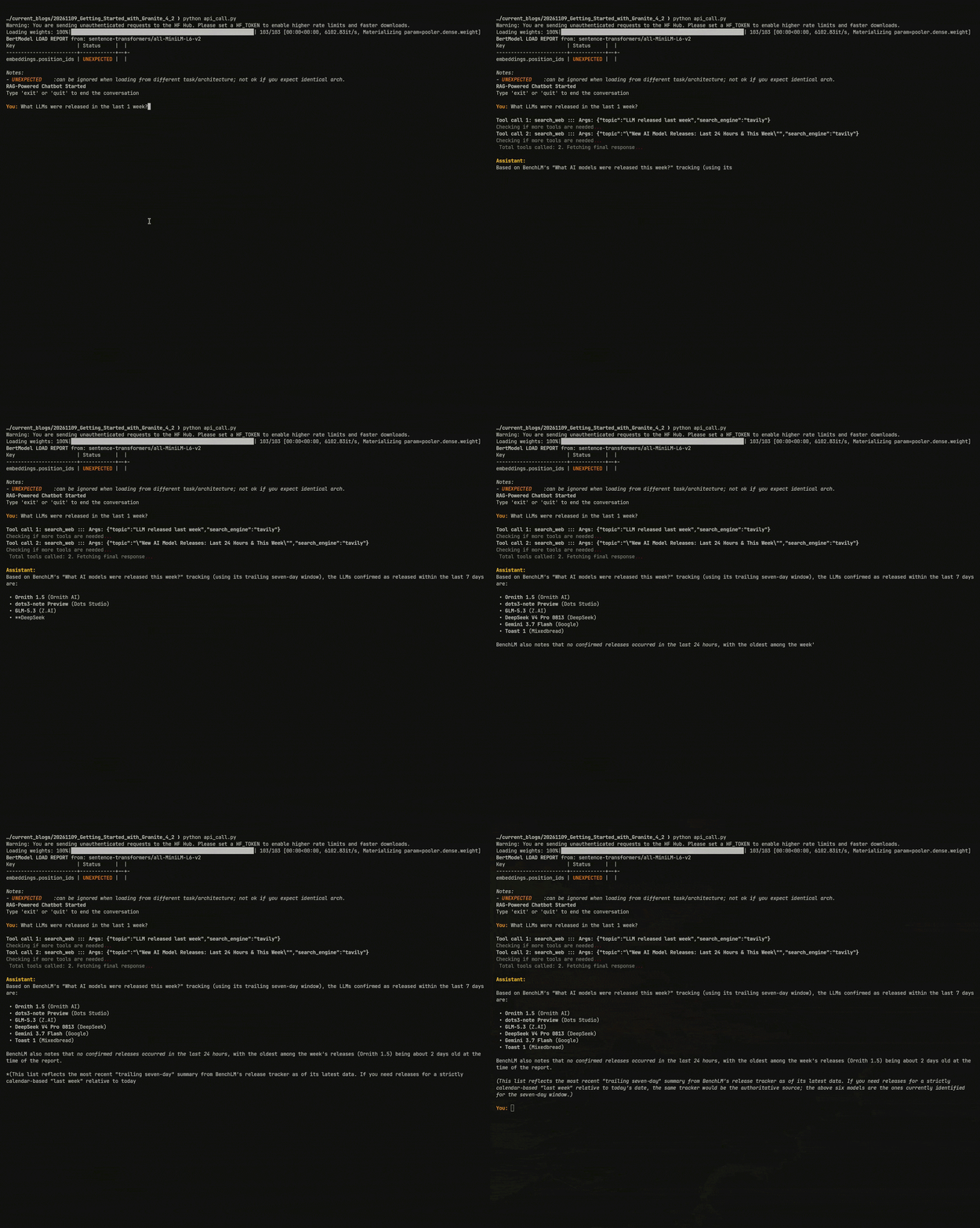
We will start with the web search tool capability using the Granite 4.2 model. Initially, we ask the model to do a web search for all the latest LLMs that were released this week.
The model was able to make multiple Tavily web search tool calls to find the latest LLM releases. We can keep on asking questions on the same topic and explore more, as the chat history is persistent throughout a session.
Specific URL Search with Granite 4.2
Next, we can ask the model to search a specific URL, and it should be able to invoke the right tool.
Here we asked the model to search for an article about PP-OCRv6, and it invoked the url_search tool for this. Finally, it gave a detailed answer about it.
Codebase Search with Granite 4.2
The final task that we will carry out is giving the model access to a code repository and probing it.
Here, we asked how the gpt-oss model was used in the codebase, and after calling the right tool, the model was able to give a concise answer.
Summary and Conclusion
In this article, we covered an introduction to the Granite 4.2 model. We started with the reason for building Granite 4.2, its architecture, and finally gave it different tool-calling capabilities for interactive tasks. However, we can do much more with the model. The full 8B and 30B models are capable of handling multi-turn terminal and SWE tasks, which we will explore in a future article. I hope this article was worth your time.
If you have any questions, thoughts, or suggestions, please leave them in the comment section. I will surely address them.
You can contact me using the Contact section. You can also find me on LinkedIn, and X.