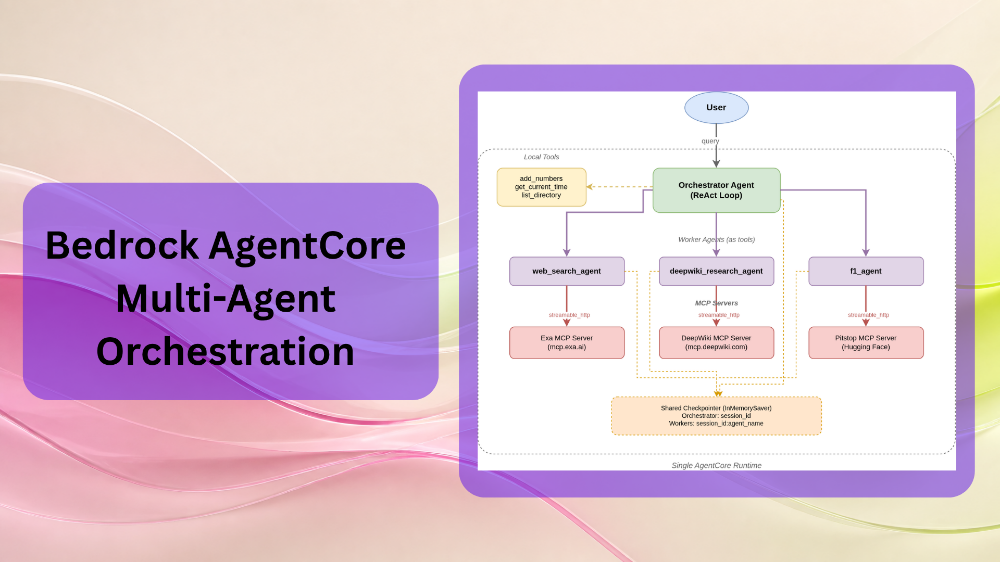
When working with LLM agents, it is a common practice to have different agents for different tasks. In complex and long-running workflows, the orchestrator-worker agent pattern works well. In this, there is a primary orchestrator agent that delegates tasks to different worker agents, compiles the final answer, and passes it to the user. The benefit of this is that each agent does not need oversight into the context of every other agent, and they focus on their granular tasks & tools only. In this article, we will achieve a simpler but similar workflow. We will use Bedrock AgentCore along with LangGraph for multi-agent orchestration.
In the last two articles, we focused on getting started with AgentCore and extending the AgentCore agents with tools and MCPs, respectively. This article is an extension of the same, where we will cover:
- Setting up different LLM agents for different tasks.
- How each LLM agent handles its own tools.
- How the task delegation happens between the orchestrator and worker agents based on the user query.
Notes on the Multi-Agent Orchestration using Bedrock AgentCore
There are a few things that we need to keep in mind before moving forward:
- This is not an A2A implementation: We will not be using any agent-to-agent communication methodology or protocol here. None of the worker agents will have insights into the other worker agents’ roles.
- This is the agents-as-tools pattern: Each worker agent acts as a tool, and they are present as tool calls to the orchestrator agent. The orchestrator agent calls these tools (agents) as per the user query. Furthermore, they do not share context or history with each other. Only the orchestrator agent has full insight into what each agent has done.
- A single AgentCore Runtime: All agents run within a single AgentCore runtime. The orchestrator and different worker agents do not have different AgentCore Runtime endpoints (ARNs). We will cover this in more detail further in the article.
Downloading the Code, Setting Up Locally, and Directory Structure
The AgentCore project that we discuss in this article is available as a zip that we can extract and set up locally.
Download Code
The project setup steps, including creating the AgentCore project, setting up AWS credentials, and installing dependencies, were covered in the previous post, Extending AgentCore Agents with Custom Tools and MCP Servers. Please follow the steps from the article, as we will be skipping them here.
Setting Up Locally
After extracting the project directory, follow the commands to complete the initial setup.
cd MyAgent

# Install project dependencies
cd app/MyAgent
uv sync
cd ../..

# Run locally
agentcore dev
Running agentcore dev opens the developer UI in the default browser, where we can start testing agents.
Directory Structure
The final directory structure looks like the following:
MyAgent/
├── AGENTS.md
├── NOTES.md
├── README.md
├── agentcore/
│   ├── agentcore.json
│   ├── aws-targets.json
│   └── cdk/
└── app/
    └── MyAgent/
        ├── main.py
        ├── pyproject.toml
        ├── README.md
        ├── mcp_client/
        │   ├── __init__.py
        │   └── client.py
        └── model/
            ├── __init__.py
            └── load.py
- The model configuration in
model/load.pyremains the same. - We use
amazon.nova-pro-v1:0viaChatBedrock. - All the changes are in
main.pyandmcp_client/client.py.
The Problem with a Flat MCP Tool List
In the previous article, a single agent handled all the local tools and MCP tools. The orchestrator agent had access to every tool from every MCP server. This works when we have a limited number of tools, but breaks down in the following scenarios:
- Tool names collide or are ambiguous: Two MCP servers may expose tools with similar names or purposes.
- The agent gets confused: With too many tools, the LLM struggles to pick the right one, leading to hallucinated tool calls or wrong tool selection.
- Context bloat: Every tool description is injected into the system prompt, consuming tokens even when irrelevant to the query.
To mitigate this, we can give each agent access to only the tools it needs. This is where the agents-as-tools pattern becomes useful.
Multi-Agent Orchestration with AgentCore Architecture Overview
Here is what our current architecture looks like.
User query
    │
    ▼
Orchestrator agent (main ReAct loop)
    │ tools: add_numbers, get_current_time, list_directory,
    │        web_search_agent, deepwiki_research_agent, f1_agent
    │
    ├──► web_search_agent ──► Exa MCP server tools
    ├──► deepwiki_research_agent ──► DeepWiki MCP server tools
    └──► f1_agent ──► Pitstop MCP server tools
The local tools are still handled by the primary orchestrator agent. However, we have different agents handling tools from different MCP servers.
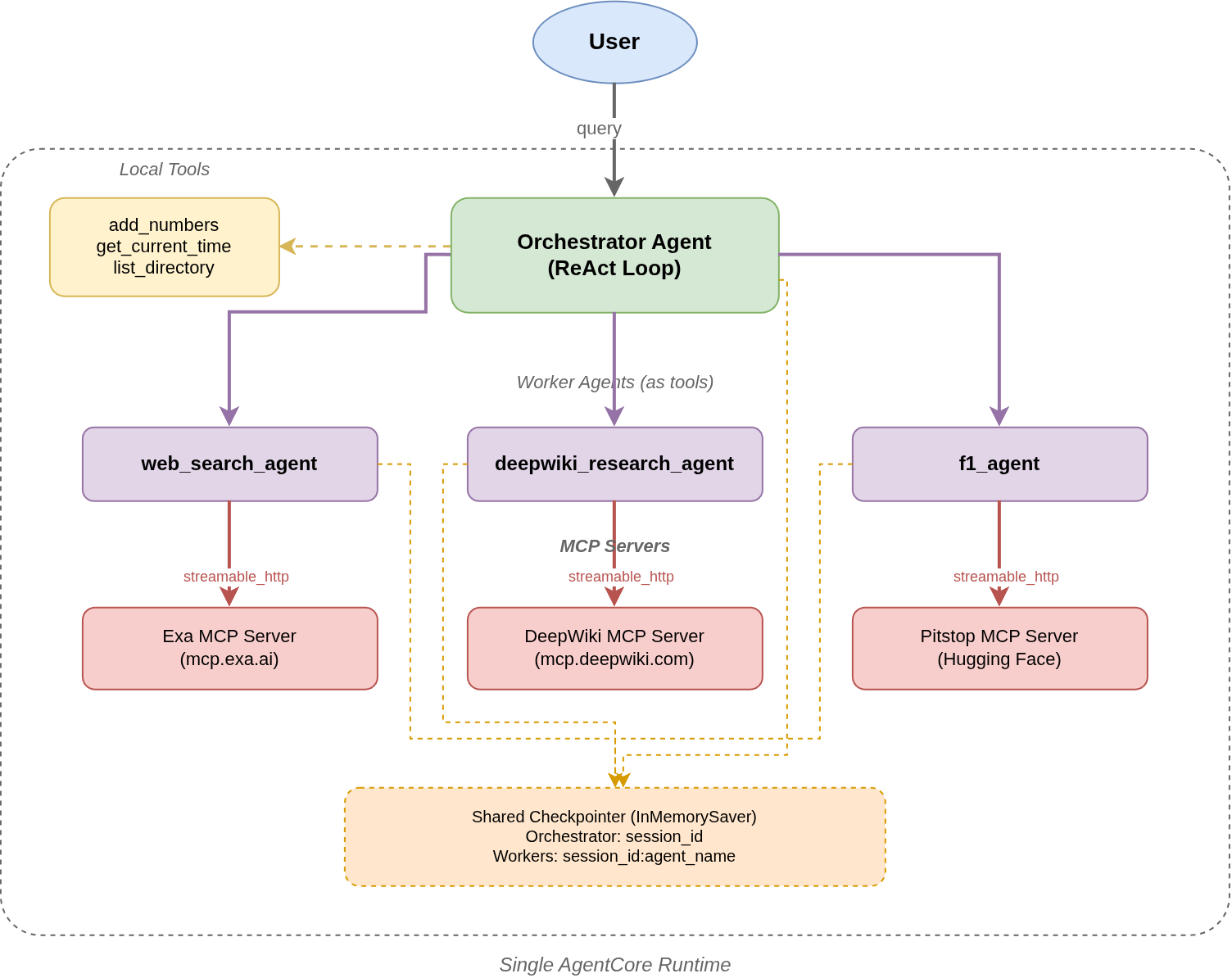
The orchestrator agent sees three worker agents as regular tools. Each worker agent, when invoked, creates its own ReAct agent internally with tools loaded from its dedicated MCP server. The worker runs its own agent loop, calls MCP tools as needed, and returns a text summary to the orchestrator.
Other articles in the Bedrock series:
- Building an Orchestrator-Worker Agent System with LangGraph and Amazon Bedrock: Creating orchestrator-worker agent workflows without AgentCore
- Getting Started with Bedrock AgentCore
Understanding the Code for AgentCore Multi-Agent Orchestration
Let’s dive deep into the coding components here. We have two primary files to cover:
mcp_client/client.py: This file exposes the MCP servers.model/load.py: This is where all our agents live, and it acts as the invocation entry point of our application.
MCP Client – Per Server Tool Loading
The first change is in mcp_client/client.py. Previously, we had a single function that returned one MultiServerMCPClient for all servers. Now, we need a client scoped to a single server so each worker agent gets only its own tools.
The following block shows the entire code with all the changes.
# app/MyAgent/mcp_client/client.py

import os
import logging
from langchain_mcp_adapters.client import MultiServerMCPClient

logger = logging.getLogger(__name__)

EXAMPLE_MCP_ENDPOINT = "https://mcp.exa.ai/mcp"
DEEPWIKI_MCP_ENDPOINT = "https://mcp.deepwiki.com/mcp"
PITSTOP_MCP_ENDPOINT = "https://praneeth1025-pitstop.hf.space/mcp"

MCP_SERVERS = {
    "exaai": {
        "transport": "streamable_http",
        "url": EXAMPLE_MCP_ENDPOINT,
    },
    "deepwiki": {
        "transport": "streamable_http",
        "url": DEEPWIKI_MCP_ENDPOINT,
    },
    "pitstop": {
        "transport": "streamable_http",
        "url": PITSTOP_MCP_ENDPOINT,
    }
}


def get_streamable_http_mcp_client(server_name: str) -> MultiServerMCPClient:
    """Returns an MCP Client for a specific server, compatible with LangChain/LangGraph."""
    if server_name not in MCP_SERVERS:
        raise ValueError(f"Unknown MCP server: {server_name}. Available: {list(MCP_SERVERS.keys())}")
    return MultiServerMCPClient({server_name: MCP_SERVERS[server_name]})
The key change here is that get_streamable_http_mcp_client function now accepts a server_name parameter and returns a MultiServerMCPClient configured only for that server. We can pass either of the three MCP server key names present in the MCP_SERVERS dictionary.
The {server_name: MCP_SERVERS[server_name]} wrapping is important as MultiServerMCPClient expects a dictionary mapping server names to their configurations.
This returns a list containing StructuredTool where each element is a tool in the MCP server.
The following is just one example.
[StructuredTool(name='web_search_exa', description='Search the web for any topic and get clean, ready-to-use content.\n\n...
...
...
Worker Agents as Tools
Let’s focus on creating the worker agents now. As discussed earlier, we will register each worker agent as a tool with @tool decorator, and they will have access to one MCP server each.
All these changes take place in the app/MyAgent/main.py file.
Web Search Agent
Let’s start with the web search agent.
@tool
async def web_search_agent(query: str) -> str:
    """Research a topic using Exa Web Search, returning a summary of findings.
    The agent may call the tools multiple times to gather information
    and documentation. Returns a summary of findings."""

    tools = await get_or_create_mcp_tools("exaai")

    agent = create_react_agent(
        get_or_create_model(),
        tools=tools,
        prompt=DEFAULT_SYSTEM_PROMPT,
        checkpointer=_checkpointer,
    )

    session_id = _current_session_id.get()
    worker_thread = f"{session_id}:researcher"
    touch_thread(worker_thread)

    try:
        result = await agent.ainvoke(
            {"messages": [HumanMessage(content=query)]},
            config={
                "configurable": {"thread_id": worker_thread},
                "callbacks": [ToolLoggingHandler()],
                "tags": ["agent:web_search"]
            },
        )
    except Exception as e:
        return f"Error: research failed: {e}"

    content = result["messages"][-1].content
    if isinstance(content, list):
        return " ".join(b.get("text", "") for b in content if isinstance(b, dict))
    return content
The following points cover some of the important things happening here:
- Tool loading: The
get_or_create_mcp_tools("exaai")fetches the tools only from the Exa MCP server. We are caching the tools of each server on the first call, so subsequent calls do not make redundant HTTP requests. - Internal ReAct Agent: The worker creates its own agent via
create_react_agentfunction. It has access to its own MCP tools. The agent can decide which MCP tools to call from the server. - Thread isolation: The worker thread ID is
f"{session_id}:researcher". This means that the web search agent has its own conversation history in the checkpointer. This is separate from the orchestrator and other worker agents. - Error handling: If the agent fails, it returns an error string rather than raising an exception. This allows the orchestrator agent to continue with next steps or mitigations rather than stopping the workflow abruptly.
DeepWiki Research Agent
The next worker agent that we are going to register is the DeepWiki research agent. In the last article, we added the DeepWiki MCP server for understanding GitHub repositories in depth. This time, we will give that task to a specialized agent.
@tool
async def deepwiki_research_agent(query: str) -> str:
    """Research a topic using DeepWiki to search a GitHub repository, returning a summary of findings.
    The agent may call the tools multiple times to gather information and documentation.
    Returns a summary of findings. The user will always provide the repository path as
    user_name/repo_name in the query."""

    tools = await get_or_create_mcp_tools("deepwiki")

    agent = create_react_agent(
        get_or_create_model(),
        tools=tools,
        prompt=DEFAULT_SYSTEM_PROMPT,
        checkpointer=_checkpointer,
    )

    session_id = _current_session_id.get()
    worker_thread = f"{session_id}:wiki_researcher"
    touch_thread(worker_thread)

    try:
        result = await agent.ainvoke(
            {"messages": [HumanMessage(content=query)]},
            config={
                "configurable": {"thread_id": worker_thread},
                "callbacks": [ToolLoggingHandler()],
                "tags": ["agent:wiki_research"]
            },
        )
    except Exception as e:
        return f"Error: research failed: {e}"

    content = result["messages"][-1].content
    if isinstance(content, list):
        return " ".join(b.get("text", "") for b in content if isinstance(b, dict))
    return content
The structure remains similar to the web search agent with minor modifications. It loads the deepwiki MCP server tools and uses the thread ID f"{session_id}:wiki_researcher". When prompting, we use a structure similar to the following to ask about a specific repository: “Find all the details about the repository user_name/repo_name”. This format is important so that the agent understands which worker to call and which repository to search.
F1 Agent
The final agent that we are going to register is the F1 Agent.
@tool
async def f1_agent(query: str) -> str:
    """Research a topic using F1 Pitstop, returning a summary of findings.
    The agent may call the tools multiple times to gather information and documentation.
    Returns a summary of findings."""

    tools = await get_or_create_mcp_tools("pitstop")

    agent = create_react_agent(
        get_or_create_model(),
        tools=[get_current_time] + tools,
        prompt=DEFAULT_SYSTEM_PROMPT,
        checkpointer=_checkpointer,
    )

    session_id = _current_session_id.get()
    worker_thread = f"{session_id}:f1_researcher"
    touch_thread(worker_thread)

    try:
        result = await agent.ainvoke(
            {"messages": [HumanMessage(content=query)]},
            config={
                "configurable": {"thread_id": worker_thread},
                "callbacks": [ToolLoggingHandler()],
                "tags": ["agent:f1_research"]
            },
        )
    except Exception as e:
        return f"Error: research failed: {e}"

    content = result["messages"][-1].content
    if isinstance(content, list):
        return " ".join(b.get("text", "") for b in content if isinstance(b, dict))
    return content
This connects to the pitstop MCP server and can get information about recent F1 events. The tool calling here follows a specific pattern. If the agent notices that the data we are asking for is past its training date, then it first calls the get_current_time tool to know the current date and time and then calls the necessary tools. This ensures that it does not revert back to the orchestrator saying something similar to – “The request for information is for 2026, but I have information till 2023…”.
The Orchestrator Agent
Now, coming to the orchestrator agent, which will be our entry point after each user prompt.
tools = [add_numbers, get_current_time, list_directory,
        web_search_agent, deepwiki_research_agent, f1_agent]

@app.entrypoint
async def invoke(payload, context):
    log.info("Invoking Agent.....")

    graph = create_react_agent(
        get_or_create_model(),
        tools=tools,
        prompt=DEFAULT_SYSTEM_PROMPT,
        checkpointer=_checkpointer,
    )

    prompt = payload.get("prompt", "What can you help me with?")
    if not isinstance(prompt, str):
        raise ValueError("prompt must be a string")
    session_id = getattr(context, "session_id", "default-session")
    _current_session_id.set(session_id)
    touch_thread(session_id)

    async for message_chunk, metadata in graph.astream(
        {"messages": [HumanMessage(content=prompt)]},
        config={
            "configurable": {"thread_id": session_id},
            "callbacks": [ToolLoggingHandler()],
        },
        stream_mode="messages",
    ):
        if not isinstance(message_chunk, AIMessageChunk):
            continue
        if message_chunk.tool_call_chunks:
            continue
        content = message_chunk.content
        if isinstance(content, str):
            if content:
                yield content
        elif isinstance(content, list):
            for block in content:
                if isinstance(block, dict) and block.get("type") == "text":
                    yield block.get("text", "")
                elif isinstance(block, str):
                    yield block
It has access to all the local tools and agents-as-tools that we defined above.
The orchestrator agent uses graph.astream with stream_mode="messages" for streaming responses.
Per-Server MCP Tool Caching
All of the above agents call the get_or_create_mcp_tools function for tool loading and caching.
_mcp_tools_by_server: dict[str, list] = {}

async def get_or_create_mcp_tools(server_name: str) -> list:
    """Load MCP tools for a specific server, cached per server."""
    if server_name not in _mcp_tools_by_server:
        mcp_client = get_streamable_http_mcp_client(server_name)
        _mcp_tools_by_server[server_name] = await mcp_client.get_tools() if mcp_client else []
    return _mcp_tools_by_server[server_name]
The _mcp_tools_by_server dictionary caches the tools per server name. The first call for a given server creates the MCP client and fetches the tools over HTTP. Subsequent calls return the cached list immediately when a worker agent is invoked multiple times within a single turn.
Session Memory and Thread Isolation
The checkpointer remains the same as in the previous article. However, threading is slightly more nuanced now.
_CHECKPOINT_LIMIT = 128
_checkpointer = InMemorySaver()
_thread_ids = OrderedDict()

def touch_thread(thread_id):
    if thread_id in _thread_ids:
        _thread_ids.move_to_end(thread_id)
        return
    while len(_thread_ids) >= _CHECKPOINT_LIMIT:
        evicted, _ = _thread_ids.popitem(last=False)
        _checkpointer.delete_thread(evicted)
    _thread_ids[thread_id] = True
Each agent operates on its own thread:
- Orchestrator: Uses the runtime’s
session_iddirectly (e.g.,abc123). - Web search agent: Uses
f"{session_id}:researcher"abc123:researcher). - DeepWiki agent: Uses
f"{session_id}:wiki_researcher"(e.g.,abc123:wiki_researcher). - F1 agent: Uses
f"{session_id}:f1_researcher"(e.g.,abc123:f1_researcher).
This means that within a single user session, each worker agent maintains its own conversation history. The F1 agent does not see the web search agent’s conversation, and vice versa. Only the orchestrator has visibility into the overall session. This isolation keeps each agent focused on its own task without context pollution from other agents.
Running Locally
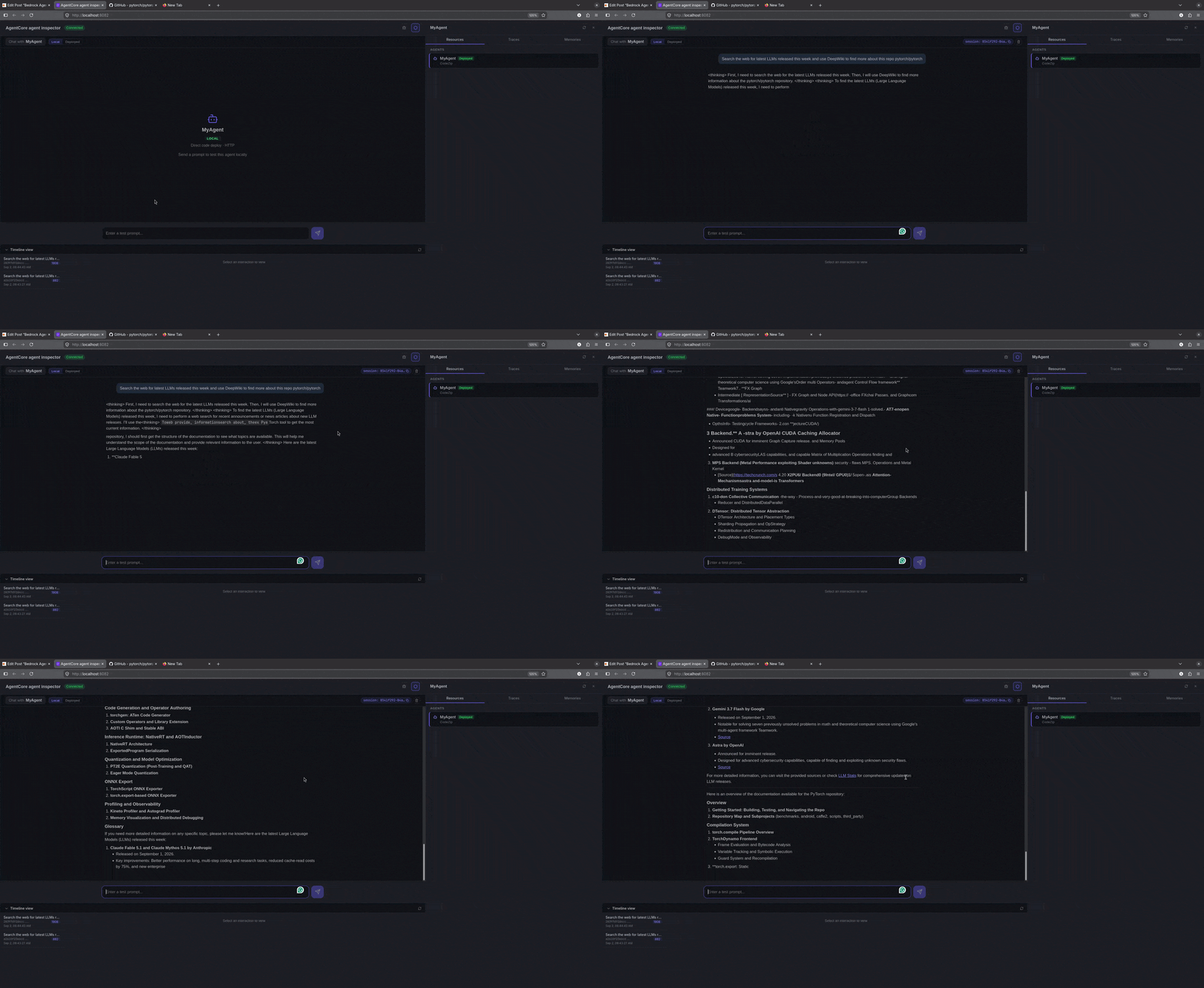
We can test the entire agentic loop locally using agentcore dev. Run the following command in the terminal.
agentcore dev
We can test out simple and complex queries now.
Simple Tool Call
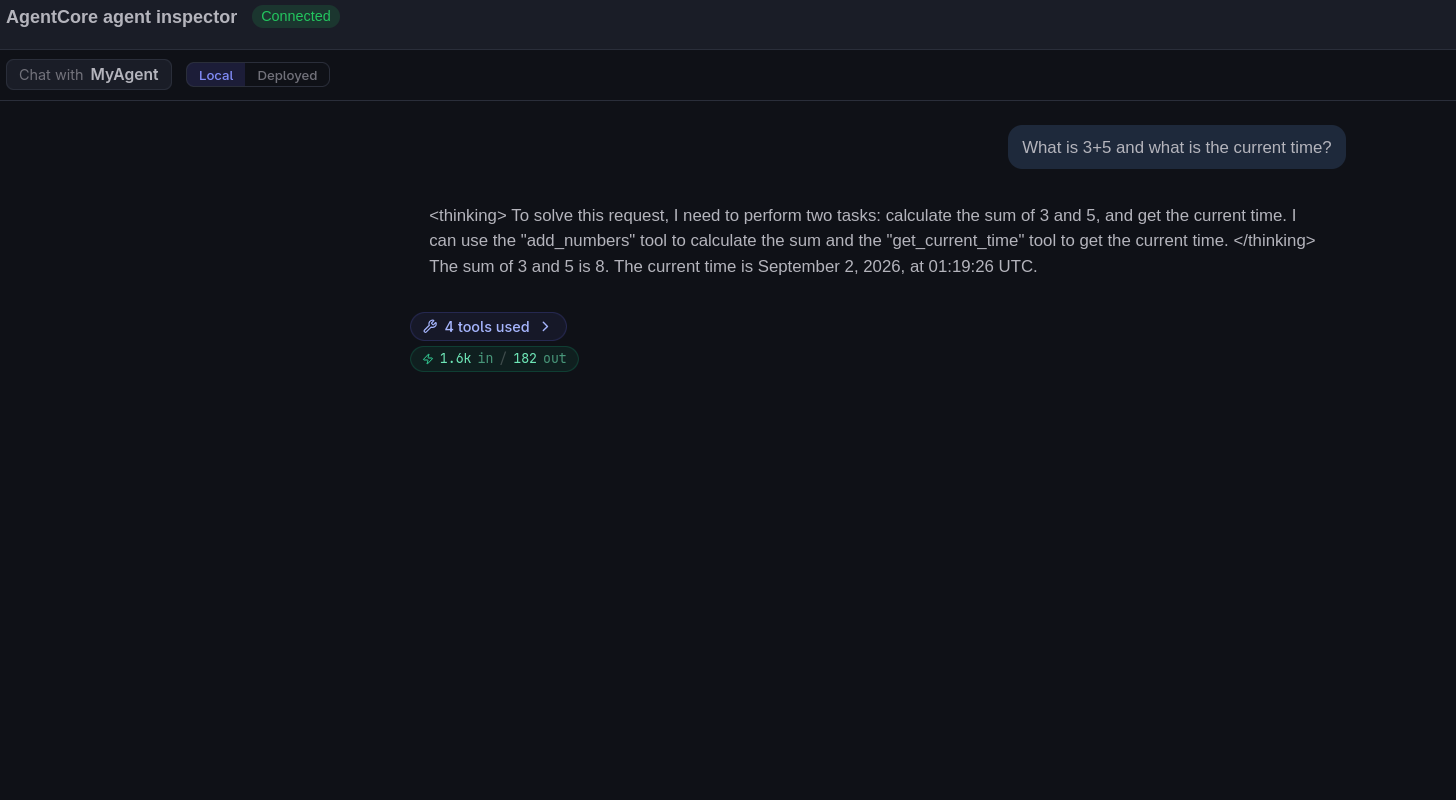
In the above, we asked the agent to do a simple mathematical operation and get the current time.
Web Search and DeepWiki Search
The following video shows how agent delegation happens for more complex tasks.
The orchestrator agent is able to delegate each task to the respective agent, aggregate all the information, and provide the answer back to the user.
Deployment
Before deploying the application, go to agentcore/aws-targets.json file and change the account ID to yours.
[
  {
    "name": "default",
    "description": "Default target (us-east-1)",
    "account": "YOUR_ACCOUNT_ID",
    "region": "us-east-1"
  }
]
We can use the AgentCore CLI to easily deploy the application to the connected AWS account.
agentcore deploy
The AgentCore Runtime dashboard will show the ARN that we can use to invoke the agents via CLI or using the Python SDK.
agentcore invoke --prompt "What are the latest F1 race results?"
Using SDK:
import json
import uuid
import boto3

agent_arn = "YOUR_AGENT_ARN"
prompt = "Get the current date and time and find the 2026 F1 standings. Also, provide details of the 2026 F1 Dutch Grand Prix."

# Initialize the Amazon Bedrock AgentCore client
agent_core_client = boto3.client('bedrock-agentcore')

# Prepare the payload
payload = json.dumps({"prompt": prompt}).encode()

# Invoke the agent
response = agent_core_client.invoke_agent_runtime(
    agentRuntimeArn=agent_arn,
    runtimeSessionId=str(uuid.uuid4()),
    payload=payload,
    qualifier="DEFAULT"
)

# SSE parsing: events are "data: \n\n", but network chunks can split
# anywhere — so buffer and only process complete events.
buffer = ""
for chunk in response.get("response", []):
    buffer += chunk.decode('utf-8')
    while "\n\n" in buffer:
        event, buffer = buffer.split("\n\n", 1)
        for line in event.splitlines():
            if line.startswith("data: "):
                text = json.loads(line[len("data: "):])
                if isinstance(text, str):
                    print(text, end="", flush=True)

print()
Summary
In this article, we created a multi-agent orchestration workflow using Bedrock AgentCore and LangGraph. We started with the motivation of the article and then covered the codebase. We saw how to register multiple agents as tool which have access to their own MCP servers. Finally, we tested the entire workflow. I hope this article was worth your time.
If you have any questions, thoughts, or suggestions, please leave them in the comment section. I will surely address them.
You can contact me using the Contact section. You can also find me on LinkedIn, and X.