
PP-OCRv6 is the latest OCR model from PaddlePaddle. Although VLMs are becoming more prominent for OCR tasks across various industries, they are slow and costly to deploy across devices and use cases. In most scenarios, we need the good old OCR pipeline where the model gives the output in a structured JSON format with bounding boxes and text. This is where the PP-OCR series really shines. In this article, we cover their latest, PP-OCRv6, with a brief discussion of the paper and a guide to building a PP-OCRv6 inference pipeline with Gradio.
The most interesting part about PP-OCRv6 is that, with a redesign of the backbone and detection & recognition neck, it is able to surpass VLMs with larger parameter counts. These include the likes of the GPT-5 series and Qwen3-VL. We will cover all these details in the article.
What are we going to cover here?
- We will start with a brief introduction to the paper. Here we will cover the model sizes, architecture, and benchmarks.
- Next, we will move on to inference. This includes:
- Setting up Paddle-OCR locally.
- Covering the Gradio inference code.
- Running inference experiments with PP-OCRv6.
Project Directory Structure
Let’s take a look at the project directory structure that we are dealing with here.
├── input
├── outputs  [14 entries exceeds filelimit, not opening dir]
├── app.py
├── ocr_engine.py
└── requirements.txt
- The
inputandoutputsdirectories contain the document that we will use for inference and the results from the PP-OCR pipeline, respectively. - The
ocr_engine.pyfile contains the core logic for inference using the PP-OCRv6 model. All the Gradio code is present in theapp.pyfile. - And we have a
requirements.txtfile for handling the dependencies.
All the code files are available for download in the form of a zip file along with this article.
Download Code
Installing Dependencies
We can install all the necessary libraries and frameworks using the requirements file.
pip install -r requirements.txt
We are done with the setup step. Let’s jump into discussing the important bits from the PP-OCRv6 paper.
PP-OCRv6: Paper Discussion
The PP-OCRv6 model was released by the authors from PaddlePaddle in the paper titled PP-OCRv6: From 1.5M to 34.5M Parameters, Surpassing Billion-Scale VLMs on OCR Tasks.
It is the sixth iteration in the PP-OCR series, which began its story back in 2020.
What Problems Does PP-OCRv6 Solve?
VLMs have become a major part of document processing pipelines. However, they suffer from the following issues frequently:
- Imprecise localization: Current VLMs are bad at text localization, which is the first step for accurate text recognition.
- Hallucination: Tables and forms introduce layout complexities inherently. VLMs can hallucinate information in such scenarios, leading to inaccuracies in downstream tasks.
- Computational Inefficiency: There are hardly any VLMs out there, even OCR-specific ones, which are below 1B parameters, barring a few like GLM-OCR. The huge parameter count of VLMs can become a bottleneck in deployment, especially in low-resource environments.
The above are the primary problems that PP-OCRv6 solves. The contributions of the paper are threefold to solve the above:
- Scalable Model Family: The PP-OCRv6 model family comes in three versions – from 1.5M to 34.5M parameters. This solves the problem of deployment on mobile devices as well as self-hosted and cloud servers.
- Lightweight Architecture: The authors introduce lightweight architectures for the backbone, text detection, and text recognition. These include LCNetV4, RepLKFPN, and EncoderwithLightSVTR, respectively.
- Multi-Language Support: The PP-OCRv6 model family supports 50 languages across different display types, ranging from digital text, dot-matrix characters, and even tire prints.
The above highlights the contribution of the paper at a glance.
PP-OCRv6 Architecture and Model Sizes
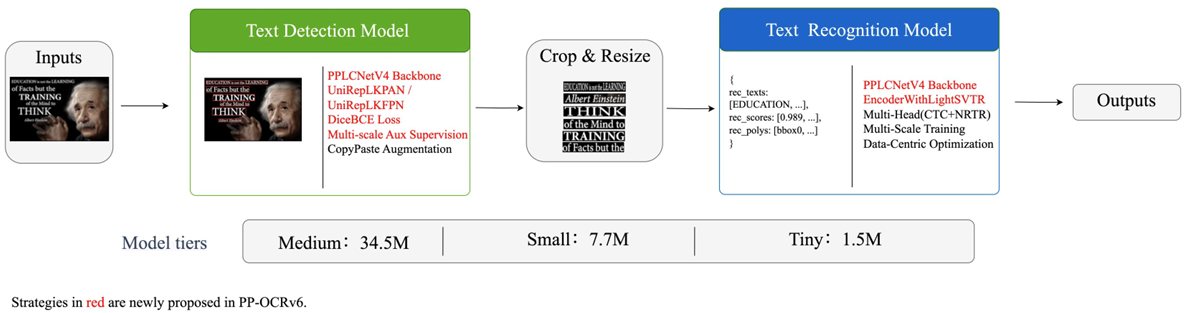
As mentioned above, the PP-OCRv6 model family comes in three sizes:
- Tiny: 1.5M parameters
- Small: 7.7M parameters
- Medium: 34.5M parameters
LCNetV4 is the backbone that handles the input to both text detection and text recognition blocks.
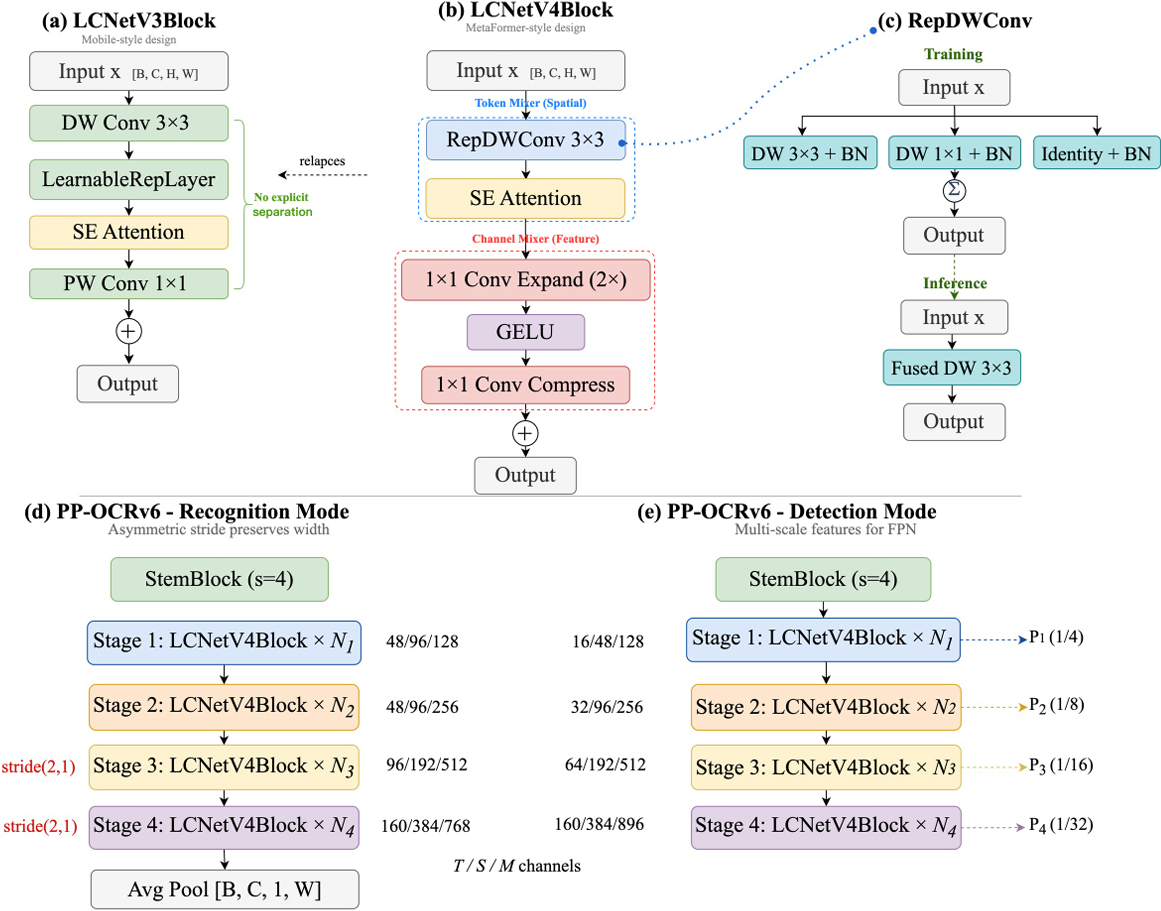
There are no separate backbones that feed data to the text detection and text recognition layers. The LCNetV4 module serves both of them through task-specific stride configurations, as we can see in Figure 3. Previously, separate backbone families served the detection neck and the recognition head. The current unified architecture reduces the parameter count to a good extent.
The detection neck of PP-OCRv6 is powered by RepLKFPB (Reparameterized Lightweight Large-Kernel Feature Pyramid). This is a lightweight feature pyramid network with large receptive fields.
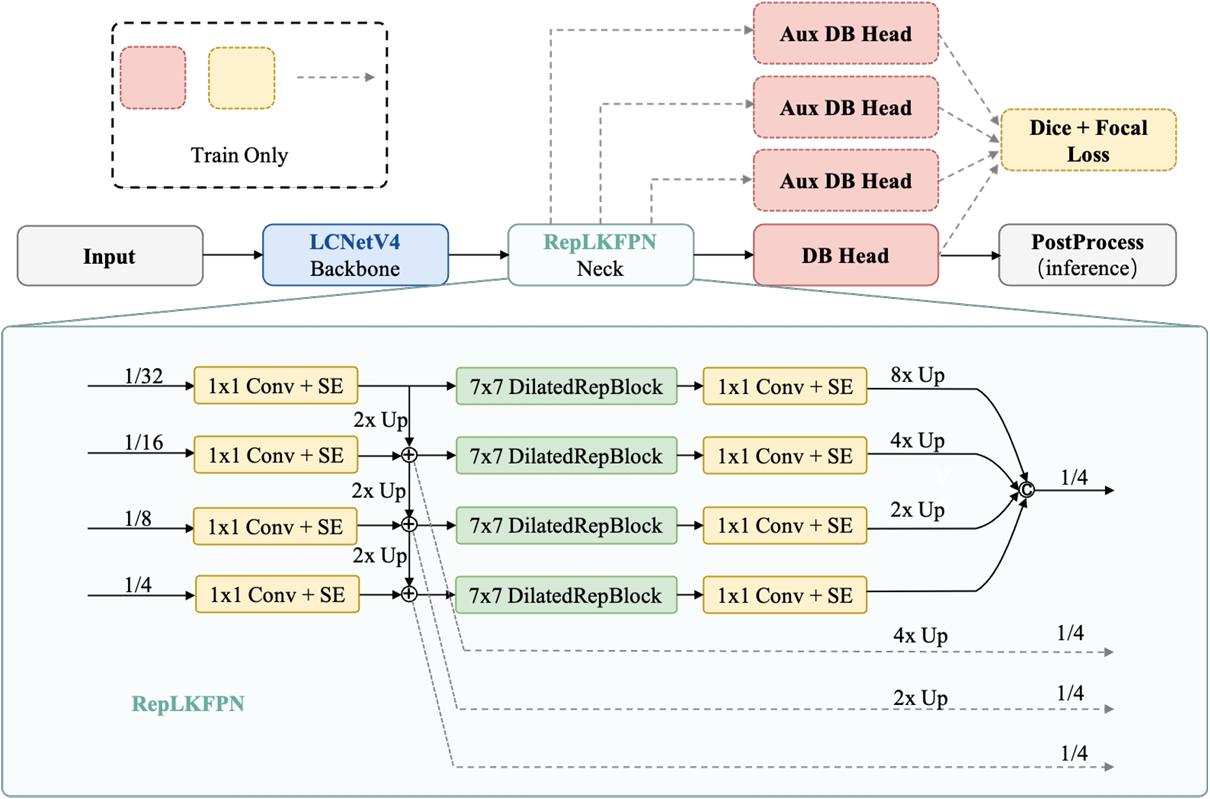
The above shows the text detection architecture of PP-OCRv6. This module performs multi-scale fusion and per-level refinement, followed by aggregation of outputs, which happens at 1/4 of the original resolution.
Next, we have the text recognition model, which is the EncoderWithLightSVTR.
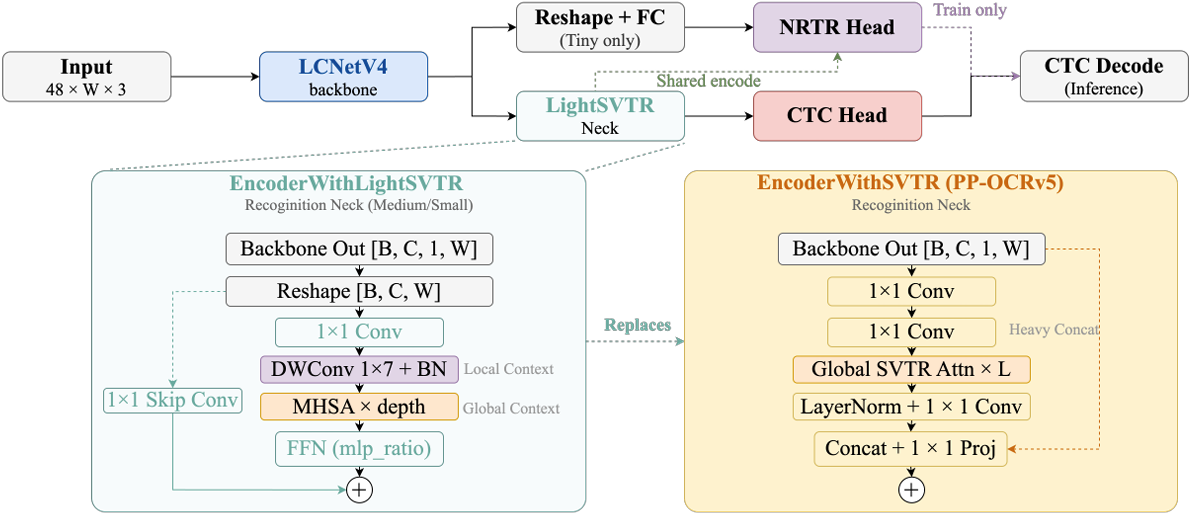
The above figure shows the overall architecture where the data flows from the LCNetV4 backbone to the SVTR model. The output from LightSVTR feeds into the CTC Head for inference and text decoding.
We have covered the architecture of PP-OCRv6 at a very high-level here. I highly recommend going through the paper to understand it in detail.
PP-OCRv6 Benchmarks
The final component that we will discuss from the paper is the benchmarks.
Perhaps the most impressive part of the PP-OCRv6 model series is how they hold up against some of the foundation vision-language models.
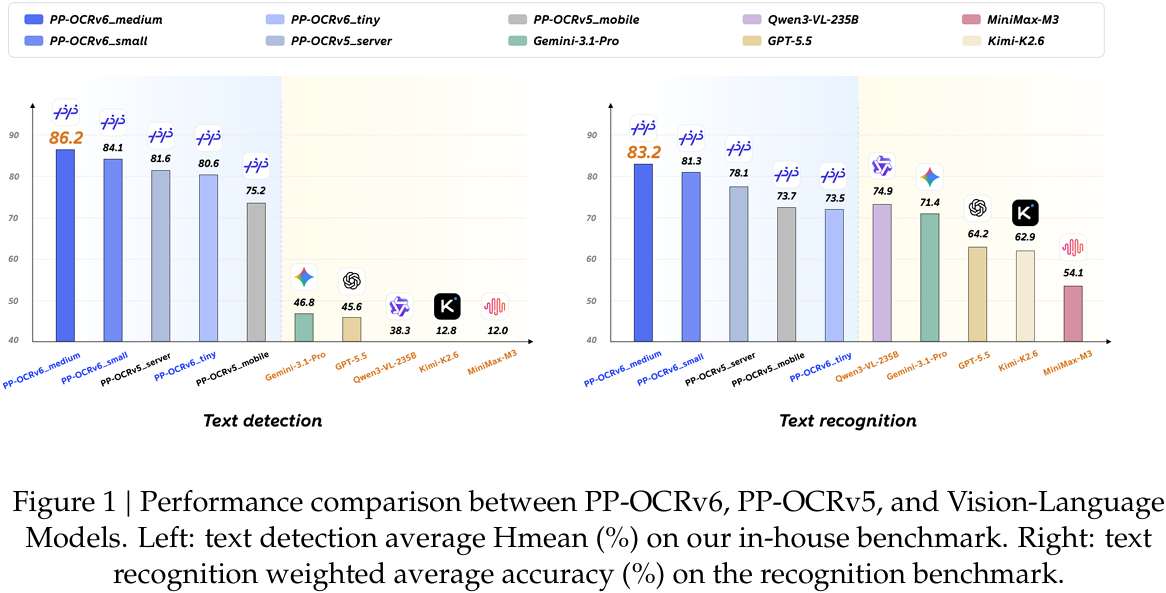
The PP-OCRv6 Medium model easily beats foundation models like Gemini, GPT, and Kimi in text detection. In text recognition, the Tiny model falls slightly behind Qwen3-VL-235B, which is orders of magnitude larger than the former. The other PP-OCRv6 models easily surpass every other foundation VLM.
Here is a more detailed text detection result.
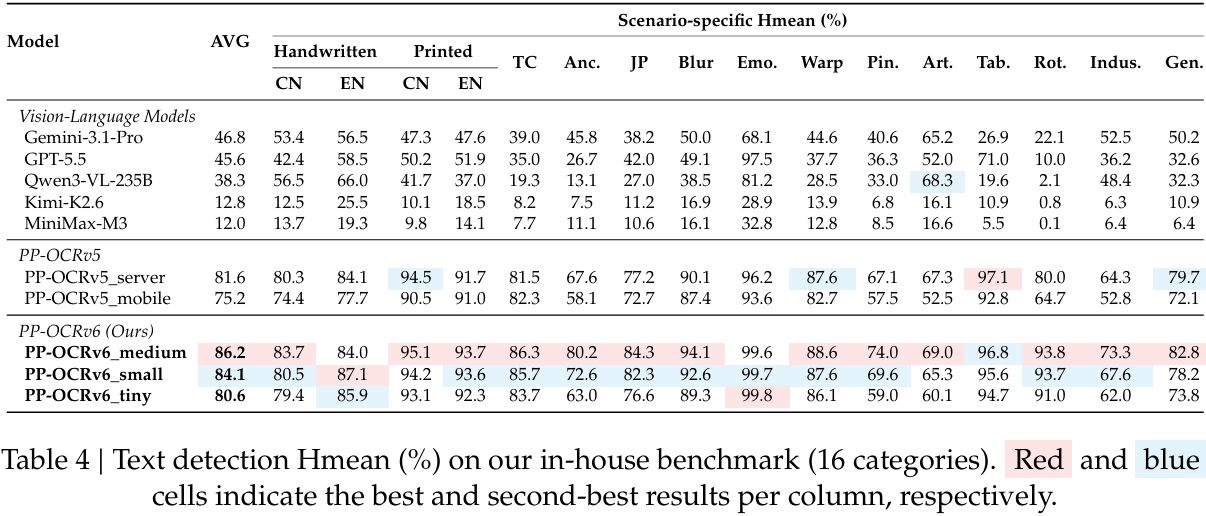
Interestingly, the PP-OCRv6 family tops all models in text detection, except for PP-OCRv5_server, a previous generation model from the same family.
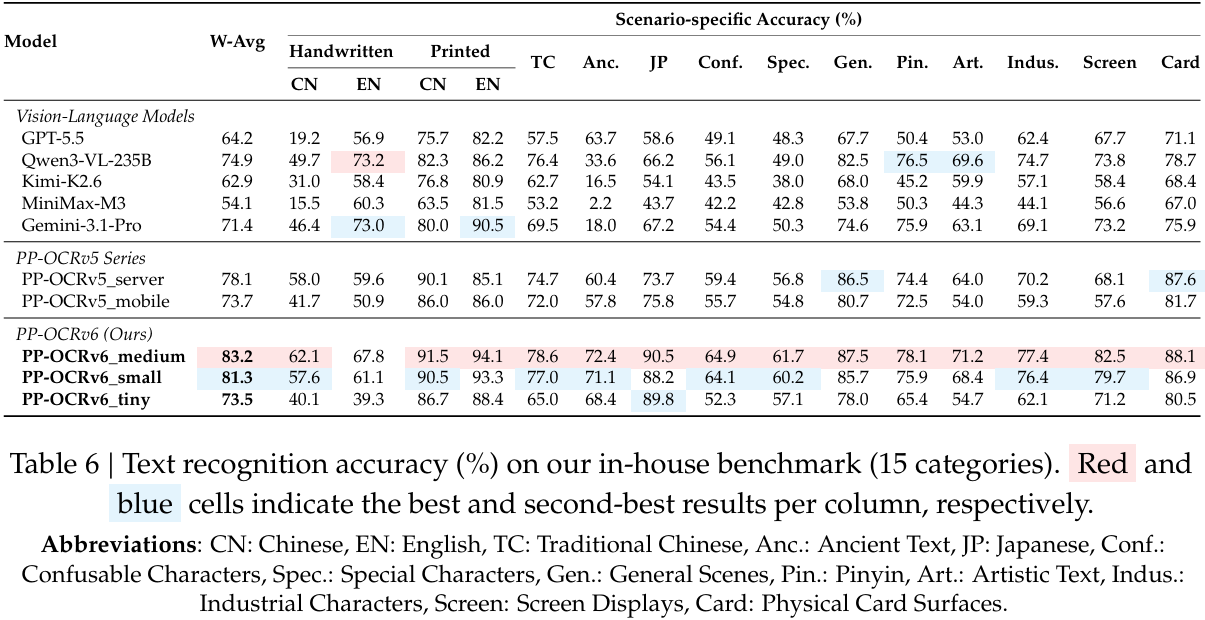
The story stays similar for text recognition, where the Medium model is bested by only Qwen3-VL-235B in English text.
The paper covers other benchmark results in more detail, which are worthwhile going through.
We will conclude the paper discussion here and move to the more practical discussion: inference with PP-OCRv6.
Inference using PP-OCRv6
The inference syntax for PP-OCRv6 is quite straightforward.
General PP-OCRv6 Syntax
from paddleocr import PaddleOCR

# Uses PP-OCRv6 models by default
ocr = PaddleOCR(
    use_doc_orientation_classify=False, # Disables document orientation classification model via this parameter
    use_doc_unwarping=False, # Disables text image rectification model via this parameter
    use_textline_orientation=False, # Disables text line orientation classification model via this parameter
)

result = ocr.predict("image.png")
for res in result:
    res.print()
    res.save_to_img("output")
    res.save_to_json("output")
The above is the ideal scenario, where the latest version of PP-OCR loads by default, which is PP-OCRv6 in this case. We use the predict method to pass an image/PDF file for processing. Finally, we can iterate over the results to save the results as an image and a complete JSON file.
We can also specify which model version/size to use, the computation device, and language among other parameters when initializing the PaddleOCR engine.
ocr = PaddleOCR(
    text_detection_model_name="PP-OCRv6_tiny_det",
    text_recognition_model_name="PP-OCRv6_tiny_rec",
    device="gpu",
    lang=lang,
    use_doc_orientation_classify=False,
    use_doc_unwarping=False,
    use_textline_orientation=False,
)
The following is a sample output.
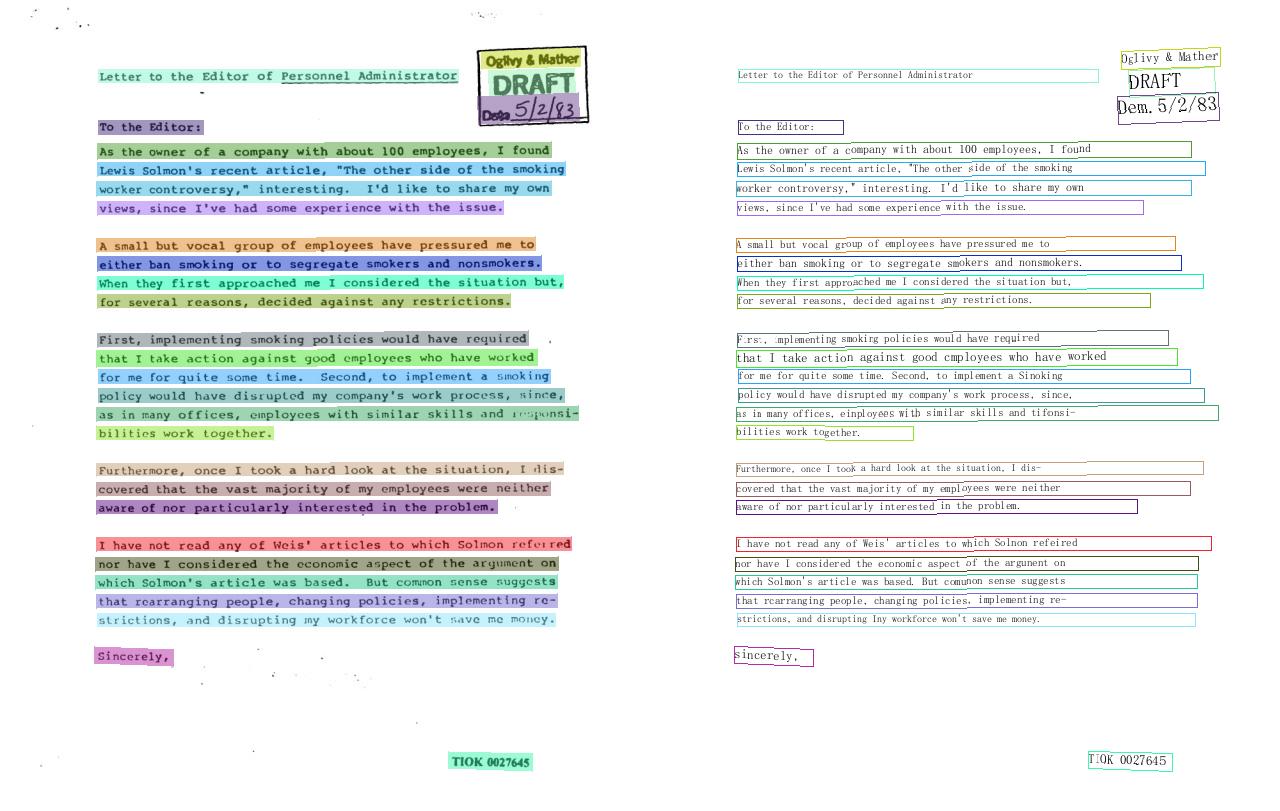
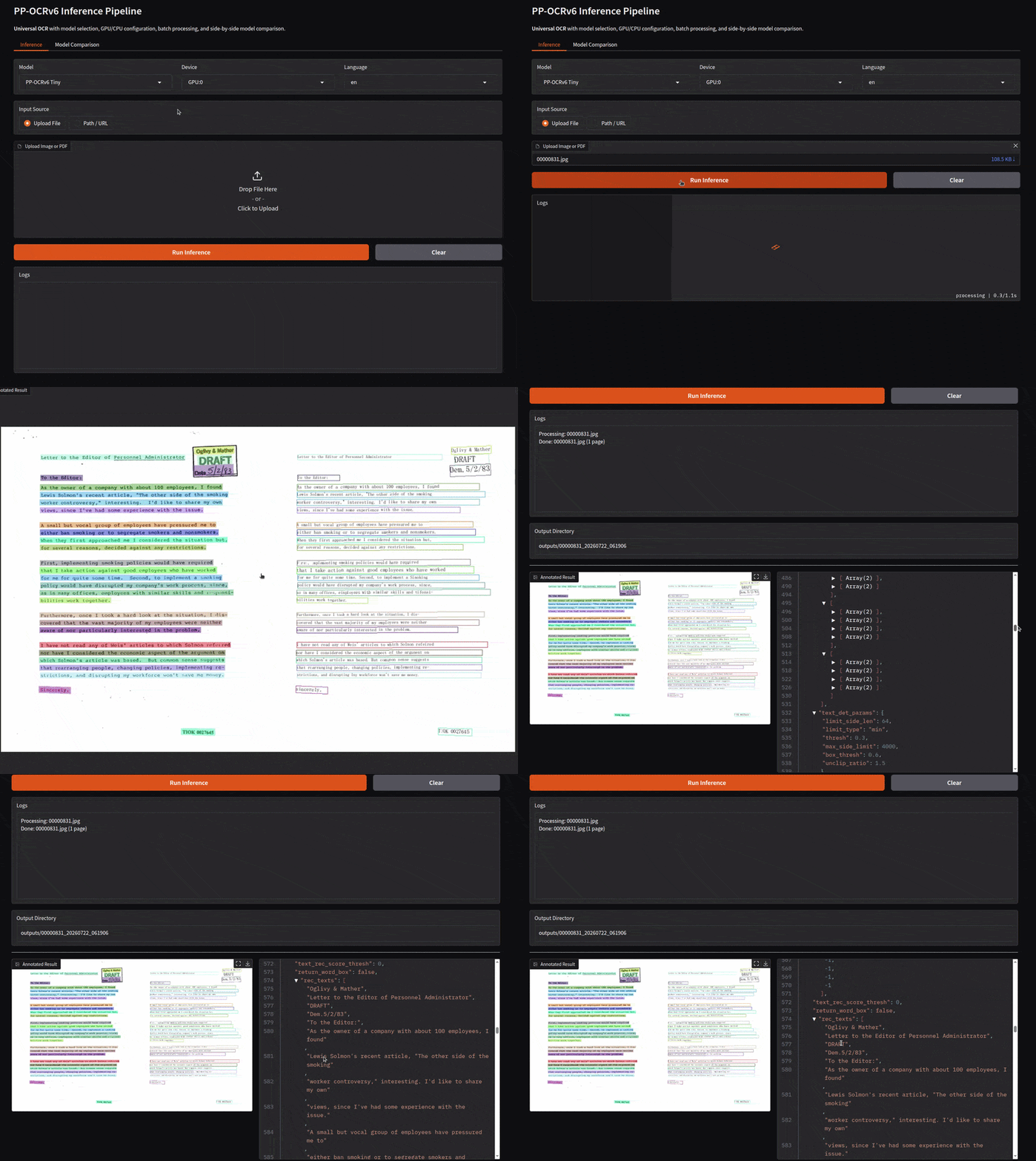
The final image result contains the detected text on the left and an additional canvas containing all the recognized text. This is good for visualization. However, in most scenarios, for downstream processing, we will need something more structured. This is where the JSON result comes into the picture.
{
    "input_path": "00000831.jpg",
    "page_index": null,
    "model_settings": {
        "use_doc_preprocessor": false,
        "use_textline_orientation": false
    },
    "dt_polys": [
        [
            [
                481,
                51
            ],
            [
                580,
                47
            ],
            [
                580,
                66
            ],
            [
                481,
                69
            ]
        ],
        .
        .
        .
    ],
    "text_det_params": {
        "limit_side_len": 64,
        "limit_type": "min",
        "thresh": 0.3,
        "max_side_limit": 4000,
        "box_thresh": 0.6,
        "unclip_ratio": 1.5
    },
    "text_type": "general",
    "textline_orientation_angles": [
        -1,
        -1,
        -1,
        -1,
        -1,
        .
        .
        .
        -1,
        -1,
        -1,
        -1,
        -1,
        -1,
        -1,
        -1,
        -1
    ],
    "text_rec_score_thresh": 0.0,
    "return_word_box": false,
    "rec_texts": [
        "Oglivy & Mather",
        "Letter to the Editor of Personnel Administrator",
        "DRAFT",
        "Dem.5/2/83",
        "To the Editor:",
        "As the owner of a company with about 100 employees, I found",
        "Lewis Solmon's recent article, \"The other side of the smoking",
        "worker controversy,\" interesting. I'd like to share my own",
        "views, since I've had some experience with the issue.",
        "A small but vocal group of employees have pressured me to",
        "either ban smoking or to segregate smokers and nonsmokers.",
        "When they first approached me I considered the situation but,",
        "for several reasons, decided against any restrictions.",
        "First, implementing smoking policies would have required",
        "that I take action against good cmployees who have worked",
        "for me for quite some time. Second, to implement a Sinoking",
        "policy would have disrupted my company's work process, since,",
        "as in many offices, einployees with similar skills and tifonsi-",
        "bilities work together.",
        "Furthermore, once I took a hard look at the situation, I dis-",
        "covered that the vast majority of my employees were neither",
        "aware of nor particularly interested in the problem.",
        "I have not read any of Weis' articles to which Solnon refeired",
        "nor have I considered the economic aspect of the argunent on",
        "which Solmon's article was based. But comunon sense suggests",
        "that rcarranging people, changing policies, implementing re-",
        "strictions, and disrupting Iny workforce won't save me money.",
        "sincerely,",
        "TIOK 0027645"
    ],
    "rec_scores": [
        0.8799494504928589,
        0.9922054409980774,
        0.9991234540939331,
        0.8212496638298035,
        0.9913377165794373,
        0.9734723567962646,
        .
        .
        .
        0.9790153503417969,
        0.9418299198150635,
        0.9683392643928528,
        0.9678210020065308,
        0.963363766670227,
        0.9741662740707397,
        0.9833434820175171,
        0.9820644855499268
    ],
    "rec_polys": [
        [
            [
                481,
                51
            ],
            [
                580,
                47
            ],
            [
                580,
                66
            ],
            [
                481,
                69
            ]
        ],
        .
        .
        .
    ],
    "rec_boxes": [
        [
            481,
            47,
            580,
            69
        ],
        .
        .
        .
        [
            448,
            751,
            532,
            771
        ]
    ]
}
After processing an image through the PP-OCRv6 engine, we get the following elements in the resulting JSON file. Some of the important parameters in the JSON file include:
"dt_polys": These are the polygon boxes around the detected text."rec_scores": The recognition score for each of the recognized text elements."rec_boxes": The detected bounding boxes around the text inxyxyformat.
However, the most important among them is the "rec_texts" parameter, which is a list containing all the detected text in order. Let’s say, in case we are trying to feed the data to an LLM for a downstream task, we can directly read the data from here and pass it on.
We can also process PDFs in a similar manner. Each PDF page will be saved as a subdirectory with the resulting image and its corresponding JSON file.
The PP-OCRv6 Gradio Application
To make it easier to play around with PP-OCRv6, the article comes with a Gradio application.
The primary logic for the OCR processing lives in the ocr_engine.py file. The following block contains the entire code.
"""
ocr_engine.py
PP-OCRv6 inference engine with batch processing, comparison, and structured output.
"""

import os
import json
from datetime import datetime
from pathlib import Path
from typing import List, Dict, Optional, Callable, Tuple

from paddleocr import PaddleOCR


class OCREngine:
    """
    Wrapper around PaddleOCR for PP-OCRv6.
    Handles model lifecycle, batch processing, and structured output organization.
    """

    MODEL_MAP = {
        "PP-OCRv6 Tiny": ("PP-OCRv6_tiny_det", "PP-OCRv6_tiny_rec"),
        "PP-OCRv6 Small": ("PP-OCRv6_small_det", "PP-OCRv6_small_rec"),
        "PP-OCRv6 Medium": ("PP-OCRv6_medium_det", "PP-OCRv6_medium_rec"),
    }

    def __init__(self):
        self._ocr: Optional[PaddleOCR] = None
        self._cfg: Optional[tuple] = None

    # ------------------------------------------------------------------ #
    # Helpers
    # ------------------------------------------------------------------ #
    @staticmethod
    def _sanitize(name: str) -> str:
        """Make a filesystem-safe name."""
        return "".join(c if c.isalnum() or c in "_-" else "_" for c in name)

    @staticmethod
    def _timestamp() -> str:
        return datetime.now().strftime("%Y%m%d_%H%M%S")

    def _get_device(self, device_str: str) -> str:
        """Convert UI label to PaddleOCR device string."""
        return "cpu" if device_str == "CPU" else device_str.lower().replace(" ", "")

    def _mkdir(self, *parts) -> str:
        """Create and return a directory path."""
        path = os.path.join(*parts)
        os.makedirs(path, exist_ok=True)
        return path

    def _find_results(self, root: str) -> Tuple[List[str], List[str]]:
        """Recursively collect result images and JSON files."""
        images, jsons = [], []
        for dirpath, _, files in os.walk(root):
            for f in files:
                fp = os.path.join(dirpath, f)
                if f.lower().endswith((".jpg", ".jpeg", ".png", ".bmp", ".gif", ".webp")):
                    images.append(fp)
                elif f.lower().endswith(".json"):
                    jsons.append(fp)
        return sorted(images), sorted(jsons)

    def _read_json(self, path: str) -> dict:
        try:
            with open(path, "r", encoding="utf-8") as f:
                return json.load(f)
        except Exception as exc:
            return {"error": str(exc), "path": path}

    # ------------------------------------------------------------------ #
    # Model lifecycle
    # ------------------------------------------------------------------ #
    def init(self, model_name: str, device: str, lang: str = "ch") -> PaddleOCR:
        """Lazy-init PaddleOCR. Re-inits only if config changed."""
        det, rec = self.MODEL_MAP[model_name]
        dev = self._get_device(device)
        cfg = (model_name, device, lang)

        if self._cfg == cfg and self._ocr is not None:
            return self._ocr

        self._ocr = PaddleOCR(
            text_detection_model_name=det,
            text_recognition_model_name=rec,
            device=dev,
            lang=lang,
            use_doc_orientation_classify=False,
            use_doc_unwarping=False,
            use_textline_orientation=False,
        )
        self._cfg = cfg
        return self._ocr

    # ------------------------------------------------------------------ #
    # Core processing
    # ------------------------------------------------------------------ #
    def process_file(
        self,
        file_path: str,
        out_dir: str,
        log_cb: Optional[Callable[[str], None]] = None,
    ) -> Dict:
        """
        Process a single image, PDF, or URL.
        PDFs with multiple pages create sub-folders page_1, page_2, ...
        """
        if log_cb:
            log_cb(f"Processing: {Path(file_path).name}")

        results = self._ocr.predict(file_path)

        for i, res in enumerate(results):
            if len(results) > 1:
                page_dir = self._mkdir(out_dir, f"page_{i + 1}")
                res.save_to_img(page_dir)
                res.save_to_json(page_dir)
            else:
                res.save_to_img(out_dir)
                res.save_to_json(out_dir)

        images, jsons = self._find_results(out_dir)
        json_data = self._read_json(jsons[0]) if jsons else {}

        if log_cb:
            log_cb(f"Done: {Path(file_path).name} ({len(results)} page{'s' if len(results) > 1 else ''})")

        return {
            "output_dir": out_dir,
            "images": images,
            "jsons": jsons,
            "json_data": json_data,
            "num_pages": len(results),
        }

    def process_directory(
        self,
        dir_path: str,
        out_dir: str,
        progress_cb: Optional[Callable[[float], None]] = None,
        log_cb: Optional[Callable[[str], None]] = None,
    ) -> List[Dict]:
        """
        Scan directory for images & PDFs, process each into its own sub-folder.
        """
        src = Path(dir_path)
        if not src.exists():
            raise FileNotFoundError(f"Directory not found: {dir_path}")

        # Gather files (PaddleOCR dir-mode does NOT support PDFs, so we handle them)
        files = []
        for pat in ("*.jpg", "*.jpeg", "*.png", "*.bmp", "*.gif", "*.webp", "*.pdf", "*.tif", "*.tiff"):
            files.extend(src.glob(pat))
        files = sorted(files, key=lambda p: p.name.lower())

        if not files:
            raise ValueError(f"No supported image/PDF files found in {dir_path}")

        if log_cb:
            log_cb(f"Found {len(files)} file(s) in {src.name}")

        records = []
        for idx, fp in enumerate(files):
            sub = self._mkdir(out_dir, f"{self._sanitize(fp.stem)}_{idx:03d}")
            try:
                res = self.process_file(str(fp), sub, log_cb=log_cb)
                records.append({
                    "input_file": fp.name,
                    "output_subdir": sub,
                    "status": "success",
                    **res,
                })
            except Exception as exc:
                if log_cb:
                    log_cb(f"Failed: {fp.name} - {exc}")
                records.append({
                    "input_file": fp.name,
                    "output_subdir": sub,
                    "status": "failed",
                    "error": str(exc),
                })

            if progress_cb:
                progress_cb((idx + 1) / len(files))

        return records

    # ------------------------------------------------------------------ #
    # Public entry points
    # ------------------------------------------------------------------ #
    def run(
        self,
        input_path: str,
        model: str,
        device: str,
        lang: str = "ch",
        progress_cb: Optional[Callable[[float], None]] = None,
        log_cb: Optional[Callable[[str], None]] = None,
    ) -> Dict:
        """
        Universal entry point: file, directory, or URL.
        Returns a dict with type=='file' or type=='directory'.
        """
        self.init(model, device, lang)
        inp = input_path.strip()

        # URL
        if inp.startswith(("http://", "https://")):
            out = self._mkdir("outputs", f"url_{self._timestamp()}")
            return {"type": "file", **self.process_file(inp, out, log_cb)}

        p = Path(inp)

        # Directory
        if p.is_dir():
            out = self._mkdir("outputs", f"{self._sanitize(p.name)}_{self._timestamp()}")
            batch = self.process_directory(inp, out, progress_cb, log_cb)
            return {"type": "directory", "output_dir": out, "results": batch}

        # Single file
        if p.is_file():
            out = self._mkdir("outputs", f"{self._sanitize(p.stem)}_{self._timestamp()}")
            return {"type": "file", "output_dir": out, **self.process_file(inp, out, log_cb)}

        raise FileNotFoundError(f"Path not found: {inp}")

    def compare(
        self,
        input_path: str,
        model_a: str,
        model_b: str,
        device: str,
        lang: str = "ch",
        log_cb: Optional[Callable[[str], None]] = None,
    ) -> Dict:
        """
        Run two models on the same input and return side-by-side results.
        Output: outputs/compare_run_/
        """
        out_root = self._mkdir("outputs", f"compare_run_{self._timestamp()}")
        p = Path(input_path.strip())
        is_dir = p.is_dir()

        # ---- Model A ----
        if log_cb:
            log_cb(f"Initializing {model_a} ...")
        self.init(model_a, device, lang)
        a_dir = self._mkdir(out_root, "model_a")
        if is_dir:
            a_res = self.process_directory(input_path, a_dir, log_cb=log_cb)
            a_payload = {"type": "directory", "output_dir": a_dir, "results": a_res}
        else:
            a_payload = {"type": "file", **self.process_file(input_path, a_dir, log_cb)}

        # ---- Model B ----
        if log_cb:
            log_cb(f"Initializing {model_b} ...")
        self.init(model_b, device, lang)
        b_dir = self._mkdir(out_root, "model_b")
        if is_dir:
            b_res = self.process_directory(input_path, b_dir, log_cb=log_cb)
            b_payload = {"type": "directory", "output_dir": b_dir, "results": b_res}
        else:
            b_payload = {"type": "file", **self.process_file(input_path, b_dir, log_cb)}

        return {
            "output_dir": out_root,
            "model_a": model_a,
            "model_b": model_b,
            "result_a": a_payload,
            "result_b": b_payload,
        }
The OCREngine class handles everything from the backend. These include:
- Defining the PP-OCRv6 detection and recognition model sizes.
- Sanitizing path names when providing the path to an entire directory containing files.
- Creating the resulting subdirectory with timestamps for each run.
- Initializing the OCR engine with the correct model size and computation device.
- Carrying out the forward pass for inference.
- Running two models on the same input when we choose the “Compare” model option.
We will not go into the details of the app.py script, which primarily defines the code for the Gradio frontend. We can launch the application by executing the following command and head over to http://0.0.0.0:7860 in the browser.
python app.py
To give a glimpse of what is supported in the application, here are the screenshots.
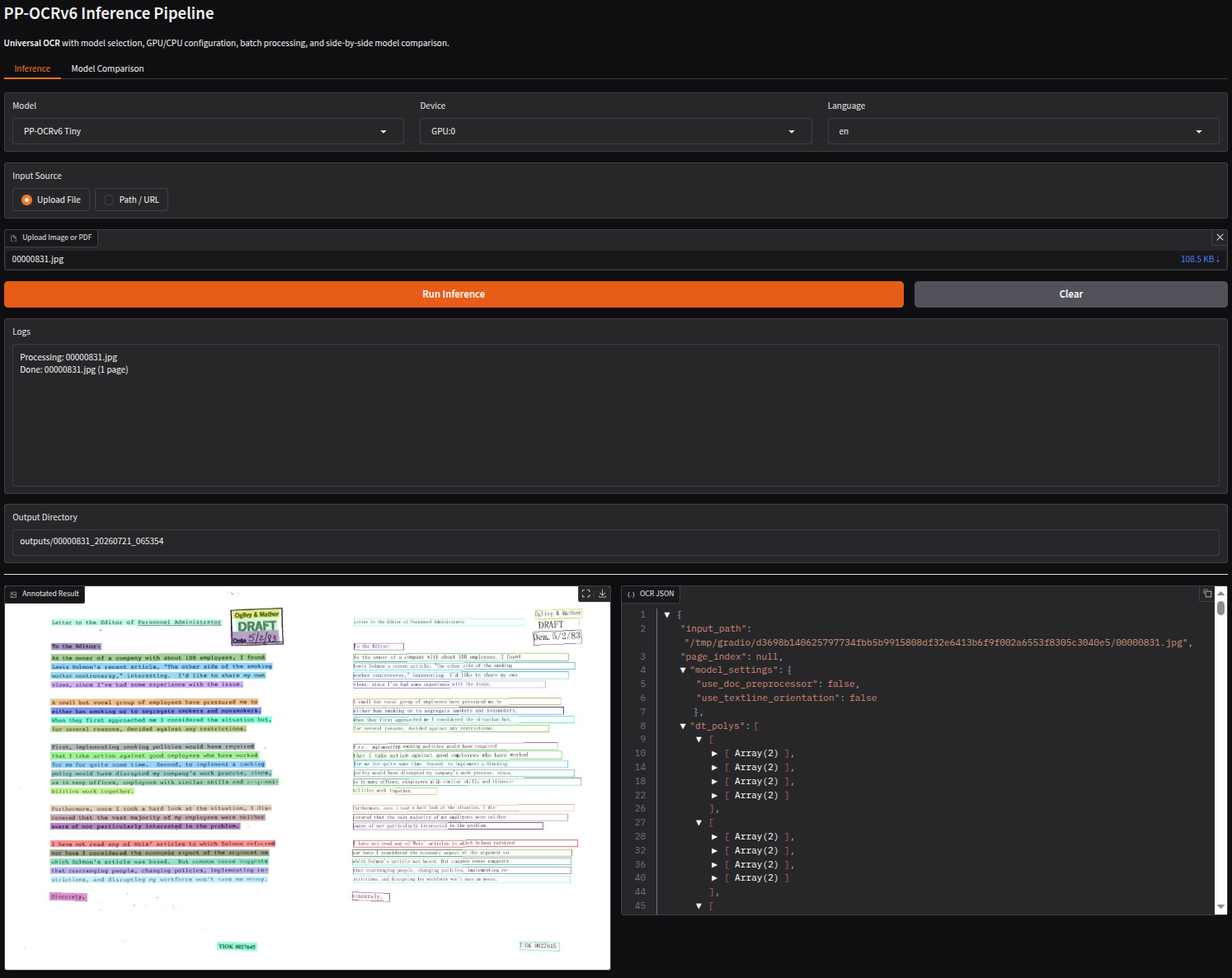
The above figure shows the first tab, which is the Inference tab in the UI. Here, we can choose a model from the dropdown, the computation device, the target language, upload an image or PDF, and start the inference process. The resulting image and JSON file are rendered below in the same UI. At the same time, the results are stored in the outputs directory.
We also have a Model Comparison tab.
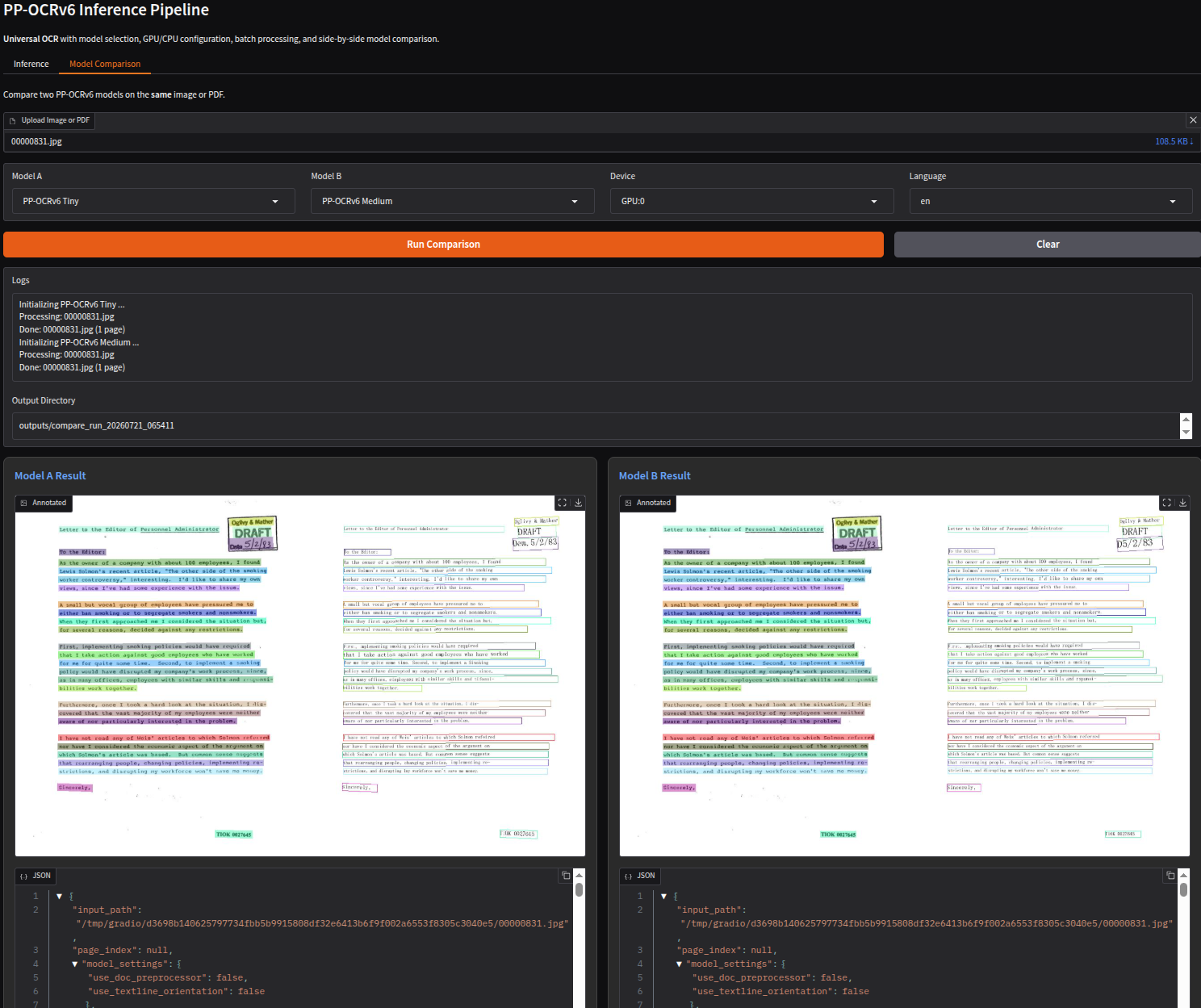
Here, we can choose two models to compare the outputs. For example, in the above figure, we are comparing the PP-OCRv6 Tiny and the PP-OCRv6 Medium models. After the inference is run, the results are rendered side-by-side along with the JSON files. This is a faster way to choose between two models when dealing with complex documents before starting the processing on a directory of images/PDFs.
Finally, the following video shows an end-to-end workflow of uploading an image and carrying out inference.
You can upload your own images and PDFs to start experimenting with how each PP-OCRv6 model holds up against documents of different complexities.
Summary and Conclusion
In this article, we covered an introduction to PP-OCRv6. We started with a discussion of the paper covering what problems PP-OCRv6 solves, the architecture, and benchmarks in brief. Next, we moved on to carrying out inference and setting up a Gradio UI for easier experimentation with the model. Although we did not cover the analysis of results in detail here, we plan to do so in future articles, including deployment for long-running tasks and creating full-fledged applications around the PP-OCR models. I hope this article was worth your time.
If you have any questions, thoughts, or suggestions, please leave them in the comment section. I will surely address them.
You can contact me using the Contact section. You can also find me on LinkedIn, and X.
References