This is going to be an introductory article for Amazon Bedrock. Launched in 2023, Bedrock quickly became a go-to platform for building LLM, Generative AI, and agentic applications. Given its tight coupling with other components in the AWS ecosystem, architecture, and security, there is hardly any other platform that matches its capabilities. This makes it a compelling reason to explore some of the most important components of the Amazon Bedrock Converse API.
We will discuss how to get started with AWS Bedrock easily and use LLMs from the Bedrock Model Catalog. Specifically, we will cover the following in the article:
- Understanding message format, conversing with LLMs, and streaming response text.
- Understanding multi-turn conversation and its format.
Note: Apart from the necessary AWS components, we will not cover the setup of AWS/IAM roles in this article. Please refer to the official AWS guide and docs for the necessary setup.
Amazon Bedrock – A Brief Introduction
Currently, Amazon Bedrock has hundreds of models, including the recently added GPT frontier models as part of the Bedrock Mantle Console.
You can access all the models by searching for Amazon Bedrock in the search bar and then clicking on the Model catalog in the left tab.
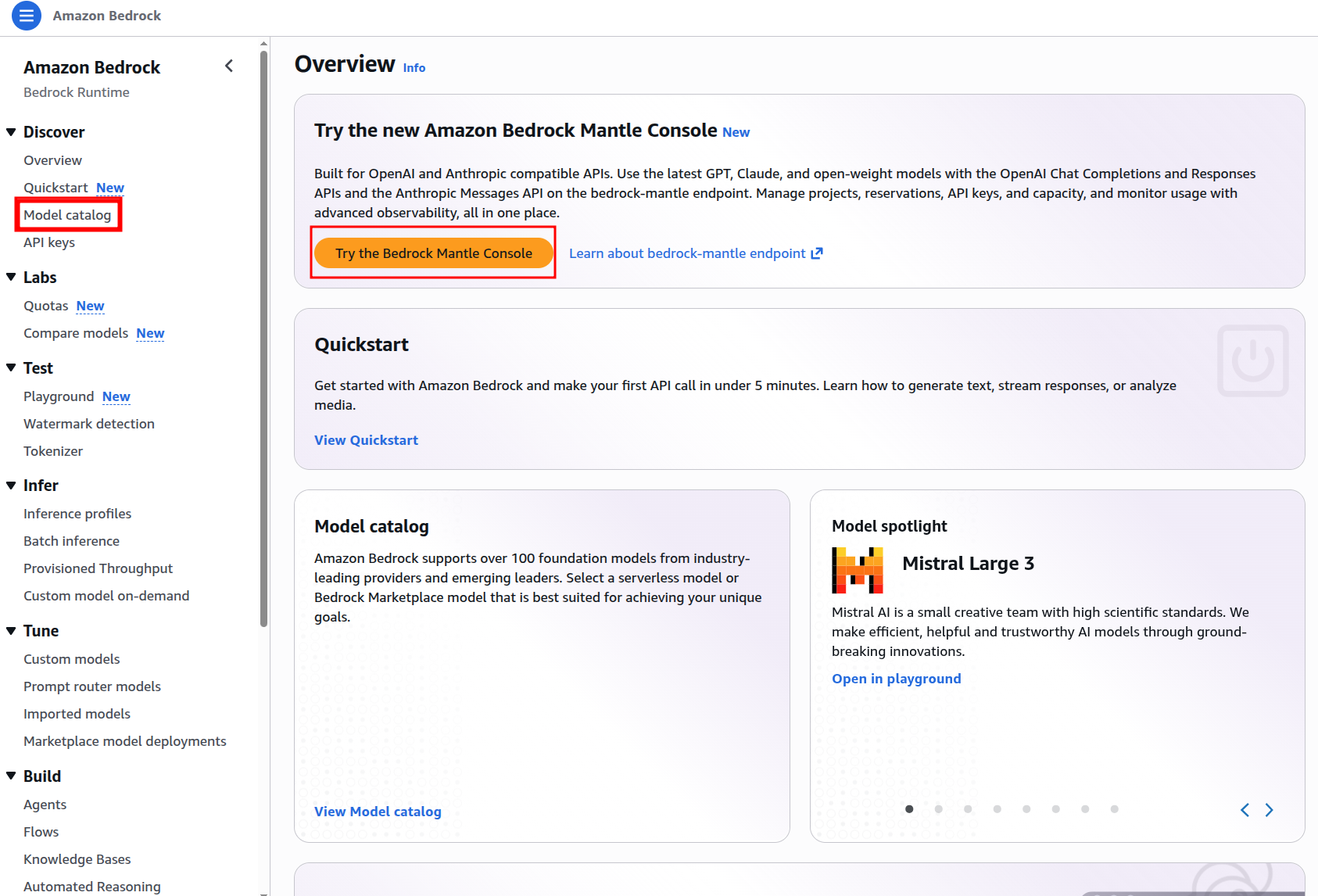
We will focus on the models available in the Model catalog in this article. Some of the Anthropic family of models might not work right away if you just started using Bedrock. But we can work with most of the other models that are available. We can filter and check models by Providers and Input & Modalities.
Before we jump into the codebase, let’s create an API key that we will work with in this article.
Click on the API keys on the left tab and generate either a short-term or long-term API key, depending on your usage. We do not need any other AWS Access or Secret key for this article. Just the API key will suffice. Copy and paste the API key in a text editor now. We will use it later when building the codebase.
Project Directory Structure
The codebase is part of my aws-bedrock-samples GitHub repository, where the plan is to add several practical and useful projects and sample code related to Amazon Bedrock and its components.
├── bedrock_api_call
│   ├── bedrock_chat_multi_turn.py
│   ├── bedrock_chat_multi_turn_sim.py
│   ├── bedrock_chat_single_turn.py
│   ├── README.md
│   └── requirements.txt
├── bedrock_rag_chat
│   ├── input
│   │   └── Elon Musk - Wikipedia.pdf
│   ├── embeddings.py
│   ├── README.md
│   ├── requirements.txt
│   └── run_chat.py
└── README.md
- Currently, there are two directories.
bedrock_api_callcontains examples for straightforward API calls to Bedrock models. These include converse, converse stream, and multi-turn chat examples. - The
bedrock_rag_chatdirectory contains a simple RAG application built with LangChain, ChromaDB, and a CLI-based chat interface. However, this is not the focus of this article.
A stable version of the codebase is available to download in the form of a zip file along with this article.
Download Code
Setting Up API Key
After downloading and extracting the codebase, create a .env file in the root directory and add the following.
# Add your Bedrock API key and model ID here
AWS_BEDROCK_API_KEY=your-bedrock-api-key
MODEL_ID=your-model-id
The MODEL_ID above corresponds to the Bedrock Model ID provided in the respective pages.
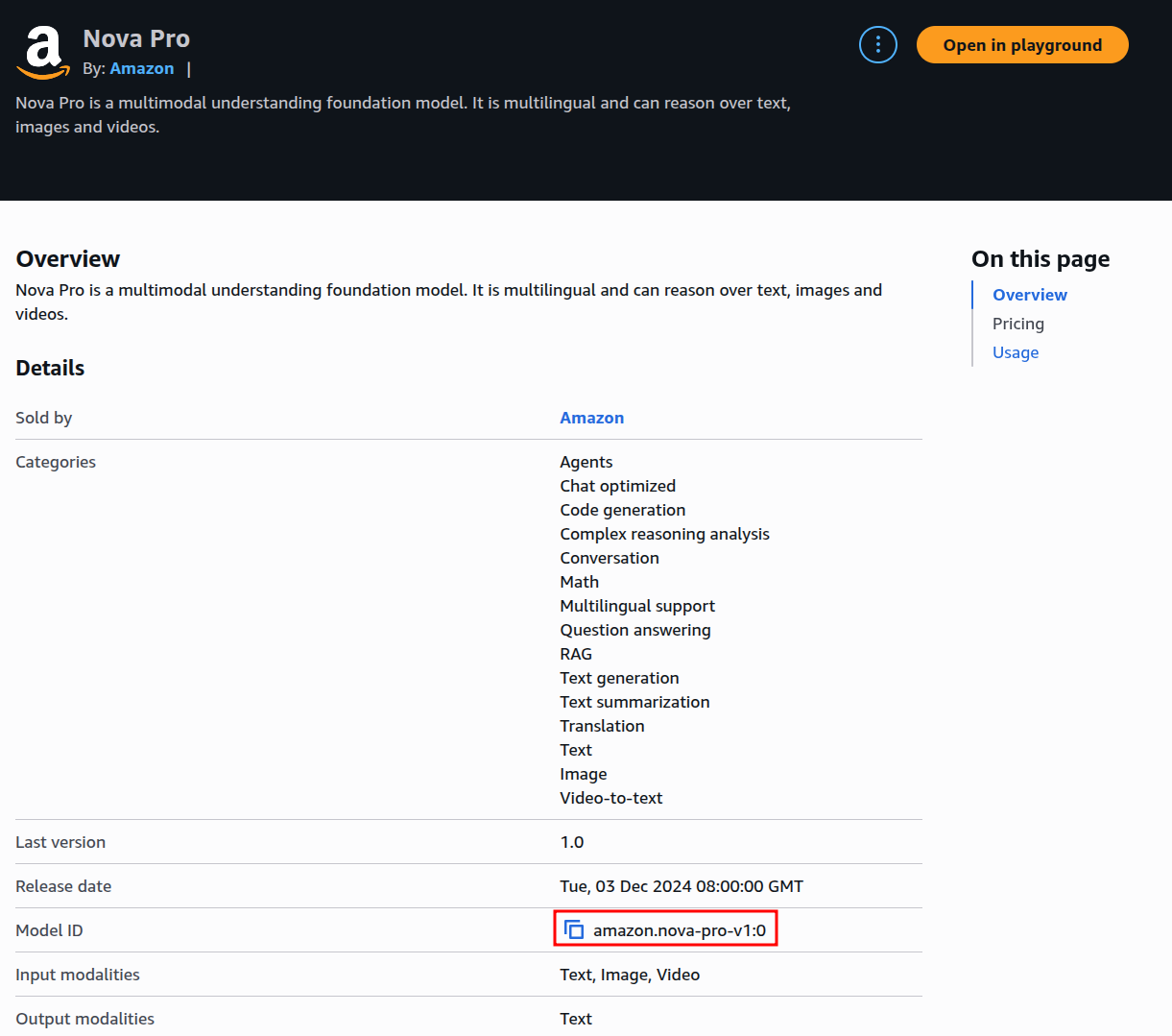
For example, for Amazon Nova Pro, it is amazon.nova-pro-v1:0. You can use any model of your choice; however, for some third-party models, the first invocation can trigger an automatic subscription/setup process that may take up to about 15 minutes before access is fully available.
This completes the setup. We can now focus on the codebase.
Bedrock Converse API and Streaming Text
We will start with the simple Bedrock converse and text streaming examples present in the bedrock_api_call directory. Here, we will cover:
- Single-turn conversation
- Simulated multi-turn conversation
- Multi-turn conversation via CLI
Before proceeding, let’s install the requirements.
cd bedrock_api_call
pip install -r requirements.txt
Single Turn Chat with Converse API
Let’s start with the simplest one, the single-turn chat present in bedrock_chat_single_turn.py.
"""
Simple single-turn API call to Amazon Bedrock using the Boto3 SDK.
This script demonstrates how to send a message to a Bedrock model and receive a response,
with optional streaming support.
"""

import boto3
import os
import argparse

from dotenv import load_dotenv

# Argument parsers.
parser = argparse.ArgumentParser()
parser.add_argument('--stream', action='store_true', help='Enable streaming mode')

args = parser.parse_args()

load_dotenv()

STREAM = args.stream

# Set the API key as an environment variable
os.environ['AWS_BEARER_TOKEN_BEDROCK'] = os.getenv('AWS_BEDROCK_API_KEY')

# Create the Bedrock client
client = boto3.client(
    service_name='bedrock-runtime',
    region_name='us-east-1'
)

# Define the model and message
model_id = os.getenv('MODEL_ID')
messages = [
    {
        'role': 'user',
        'content': [{'text': 'Hello! Who are you?'}]
    }
]

if STREAM:
    # Make the API call with streaming
    response = client.converse_stream(
        modelId=model_id,
        messages=messages
    )

    response_stream = response.get('stream')

    # Print the streamed response
    for event in response_stream:
        if 'contentBlockDelta' in event:
            print(event['contentBlockDelta']['delta']['text'], end="")

else:
    # Make the API call
    response = client.converse(
        modelId=model_id,
        messages=messages,
    )

    # Print the response
    print(response['output']['message']['content'][0]['text'])
Here, we are using the boto3 SDK to create a simple single-turn chat example.
Some of the important points that we need to focus on here:
- We are adding the
AWS_BEARER_TOKEN_BEDROCKto the environment variables by capturing the Bedrock API key present in the.envfile (line 24). - Then we are creating a boto3 client while initiating it with the service and region. In this case, the service is
bedrock-runtime, and we are using theus-east-1region (lines 27 to 30). - Then we capture the model name from the
.envfile and create themessageslist. We have appended oneusermessage in the necessary format here. - Next, depending on whether we use the
--streamcommand line argument or not, we make the API call using either theconverseorconverse_streamfunction. We pass two parameters in the payload; one is themodel_idand the other is themessageslist. - Finally, we print the response on the screen. For a non-streaming response, we directly print it on the terminal. For a streaming response, we capture the stream event and print the response block on the terminal.
There are a few important points to focus on. We are using the Converse API that exposes the Converse and ConverseStream class definitions to us. This is the newer API standard from Bedrock, which unifies the message list format and parameter configuration for API calls. The older Invoke API required making subtle changes to the parameter configuration and message list depending on the model that we used. The Converse API remains the same, no matter the model.
We have not passed some of the fine-grained parameter configurations in code. However, you can visit the above link to get an idea of the additional request fields that the Converse API supports.
For now, let’s execute the code. Be sure to be within the bedrock_api_call directory when executing the following command.
python bedrock_chat_single_turn.py
We get the following greeting response from the model.

We can also stream the response with the --stream argument.
python bedrock_chat_single_turn.py --stream
Simulated Multi-Turn Chat with Converse API
Let’s take a look at another example. We can easily modify the Convserse API message list to simulate multi-turn chat.
The following code lives in the bedrock_multi_turn_sim.py file.
"""
Simple simulated multi-turn API call to Amazon Bedrock using the Boto3 SDK.
This script demonstrates how to send a message to a Bedrock model and receive a response,
with optional streaming support.
"""

import boto3
import os
import argparse

from dotenv import load_dotenv

# Argument parsers.
parser = argparse.ArgumentParser()
parser.add_argument('--stream', action='store_true', help='Enable streaming mode')

args = parser.parse_args()

load_dotenv()

STREAM = args.stream

# Set the API key as an environment variable
os.environ['AWS_BEARER_TOKEN_BEDROCK'] = os.getenv('AWS_BEDROCK_API_KEY')

# Create the Bedrock client
client = boto3.client(
    service_name='bedrock-runtime',
    region_name='us-east-1'
)

# Define the model and message
model_id = os.getenv('MODEL_ID')
# Simulated multi-turn example.
messages = [
    {
        'role': 'user',
        'content': [{'text': 'What is a neural network?'}]
    },
    {
        'role': 'assistant',
        'content': [{'text': 'A neural network is a machine learning model inspired by the structure of the brain. It consists of layers of interconnected nodes (neurons) that learn patterns from data.'}]
    },
    {
        'role': 'user',
        'content': [{'text': 'How does a neural network learn from data?'}]
    },
    {
        'role': 'assistant',
        'content': [{'text': 'Neural networks learn by adjusting their weights during training. They make predictions, measure the error using a loss function, and update the weights through backpropagation and gradient descent.'}]
    },
    {
        'role': 'user',
        'content': [{'text': 'What is backpropagation?'}]
    },
    {
        'role': 'assistant',
        'content': [{'text': 'Backpropagation is the process of computing how much each weight contributed to the prediction error. These gradients are then used to update the weights and improve future predictions.'}]
    },
    {
        'role': 'user',
        'content': [{'text': 'What are some common neural network architectures?'}]
    },
    {
        'role': 'assistant',
        'content': [{'text': 'Common architectures include feedforward neural networks, convolutional neural networks (CNNs) for images, recurrent neural networks (RNNs) for sequences, and transformers for language and multimodal tasks.'}]
    },
    {
        'role': 'user',
        'content': [{'text': 'What have we been talking about?'}]
    },
]

if STREAM:
    # Make the API call with streaming
    response = client.converse_stream(
        modelId=model_id,
        messages=messages
    )

    response_stream = response.get('stream')

    # Print the streamed response
    for event in response_stream:
        if 'contentBlockDelta' in event:
            print(event['contentBlockDelta']['delta']['text'], end="")

else:
    # Make the API call
    response = client.converse(
        modelId=model_id,
        messages=messages,
    )

    # Print the response
    print(response['output']['message']['content'][0]['text'])
Most of the things other than the messages list remain the same. We have appended several user and assistant roles in the list to simulate a multi-turn conversation about neural networks. The final user question probes the model about the current conversation. Let’s execute and check the response.
python bedrock_chat_multi_turn_sim.py

The model promptly responds that we have been discussing neural networks.
Multi-Turn Chat with Converse API
The final example script in this article is creating a simple multi-turn CLI-based chat environment using the Converse API and Amazon Nova Pro model. Feel free to use any model ID in the .env file.
The following code lives in the bedrock_chat_multi_turn.py file.
"""
Simple multi-turn API call to Amazon Bedrock using the Boto3 SDK.
This script demonstrates how to send a message to a Bedrock model and receive a response,
with optional streaming support.
"""

import boto3
import os
import argparse

from dotenv import load_dotenv
from termcolor import cprint

# Argument parsers.
parser = argparse.ArgumentParser()
parser.add_argument('--stream', action='store_true', help='Enable streaming mode')

args = parser.parse_args()

load_dotenv()

STREAM = args.stream

# Set the API key as an environment variable
os.environ['AWS_BEARER_TOKEN_BEDROCK'] = os.getenv('AWS_BEDROCK_API_KEY')

# Create the Bedrock client
client = boto3.client(
    service_name='bedrock-runtime',
    region_name='us-east-1'
)

# Define the model and message
model_id = os.getenv('MODEL_ID')
# Empty messages list to hold the conversation history.
messages = []

cprint("You can type 'exit' or 'quit' to end the chat.", 'green')
while True:
    cprint('USER: ', 'blue', attrs=['bold'], end='')
    user_input = input()
    if user_input.lower() in ['exit', 'quit']:
        print("Exiting the chat.")
        break

    # Append the user's message to the messages list.
    messages.append({
        'role': 'user',
        'content': [{'text': user_input}]
    })

    assistant_response = ''

    cprint('Assistant: ', 'magenta', attrs=['bold'], end='')

    if STREAM:
        # Make the API call with streaming
        response = client.converse_stream(
            modelId=model_id,
            messages=messages
        )

        response_stream = response.get('stream')

        # Print the streamed response
        for event in response_stream:
            if 'contentBlockDelta' in event:
                stream_out = event['contentBlockDelta']['delta']['text']
                cprint(stream_out, 'yellow', end='')
                assistant_response += stream_out

        print('\n')

    else:
        # Make the API call
        response = client.converse(
            modelId=model_id,
            messages=messages,
        )

        # Print the response
        assistant_response = response['output']['message']['content'][0]['text']
        cprint(assistant_response, 'yellow')

        print()

    # Append the assistant's response to the messages list to maintain conversation history.
    messages.append({
        'role': 'assistant',
        'content': [{'text': assistant_response}]
    })
The components prior to the while block on line 39 remain the same. We start a continuous chat until the user types exit or quit in the terminal.
We use termcolor to differentiate the user and assistant messages.
However, the more important part is managing the context (history) after each turn. We append the user text to the messages list before the conversation API call and the assistant text after. They are present in lines 47 and 88, respectively. The rest of the code is straightforward.
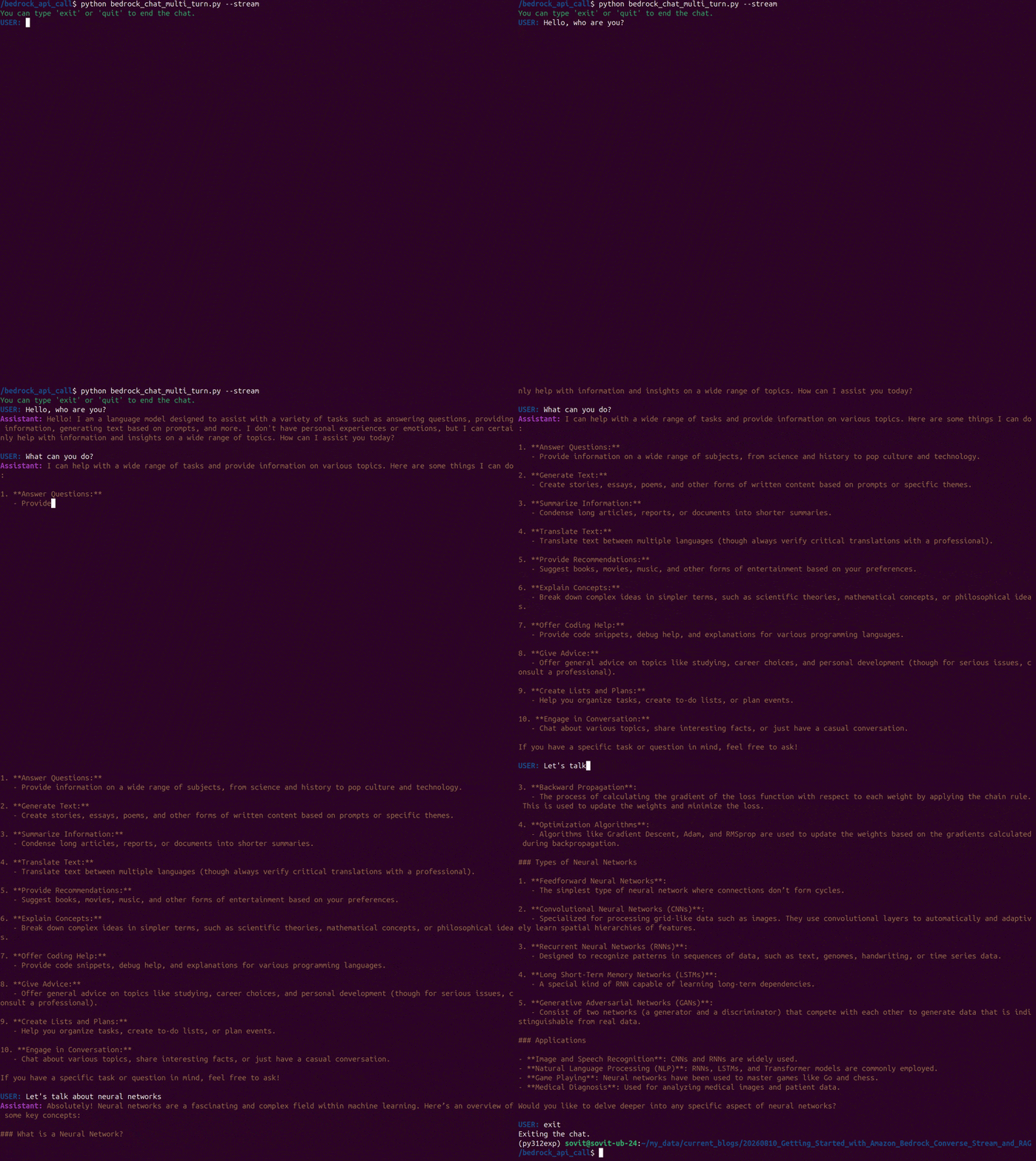
Let’s execute the script and check it in action.
python bedrock_chat_multi_turn.py --stream
We execute the script in streaming mode and have a simple conversation with the model. In the end, we type exit to stop the conversation.
Summary and Conclusion
In this article, we covered the basics of the Amazon Bedrock Converse API. We focused on text chat with streaming response. However, we have a lot to cover in terms of multimodal and document input along with tool use. We will cover them in future articles. I hope this article was worth your time.
If you have any questions, thoughts, or suggestions, please leave them in the comment section. I will surely address them.
You can contact me using the Contact section. You can also find me on LinkedIn, and X.


2 thoughts on “Amazon Bedrock Converse API and Streaming Chat”