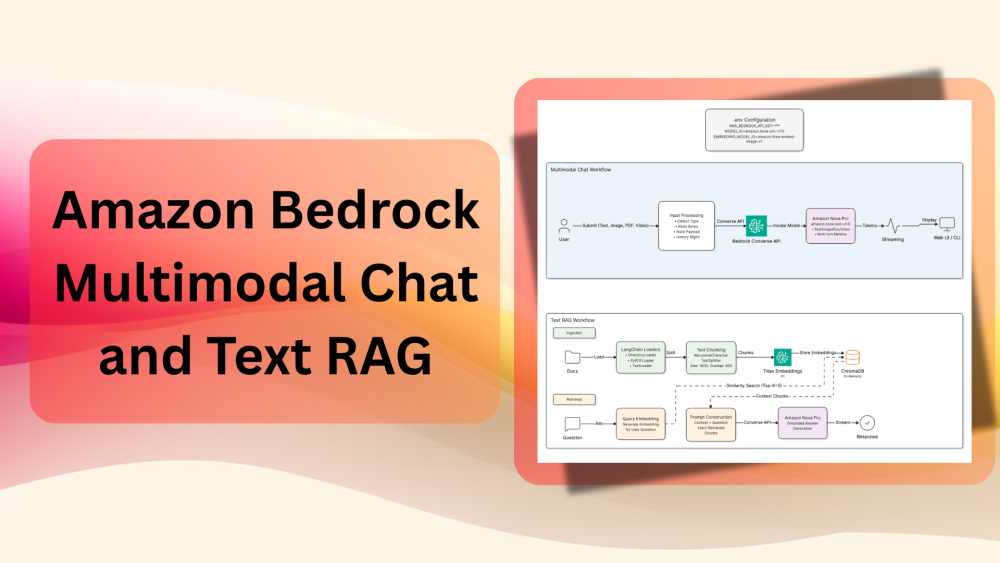
This is the second article in the Amazon Bedrock series. In this article, we will explore Amazon Bedrock multimodal chat and text RAG. They contain some of the essential fundamentals to get up to speed with the capabilities of the Bedrock Converse API. Specifically, we will cover image chat, video chat, document chat, and create a simple text RAG application with an in-memory vector DB.
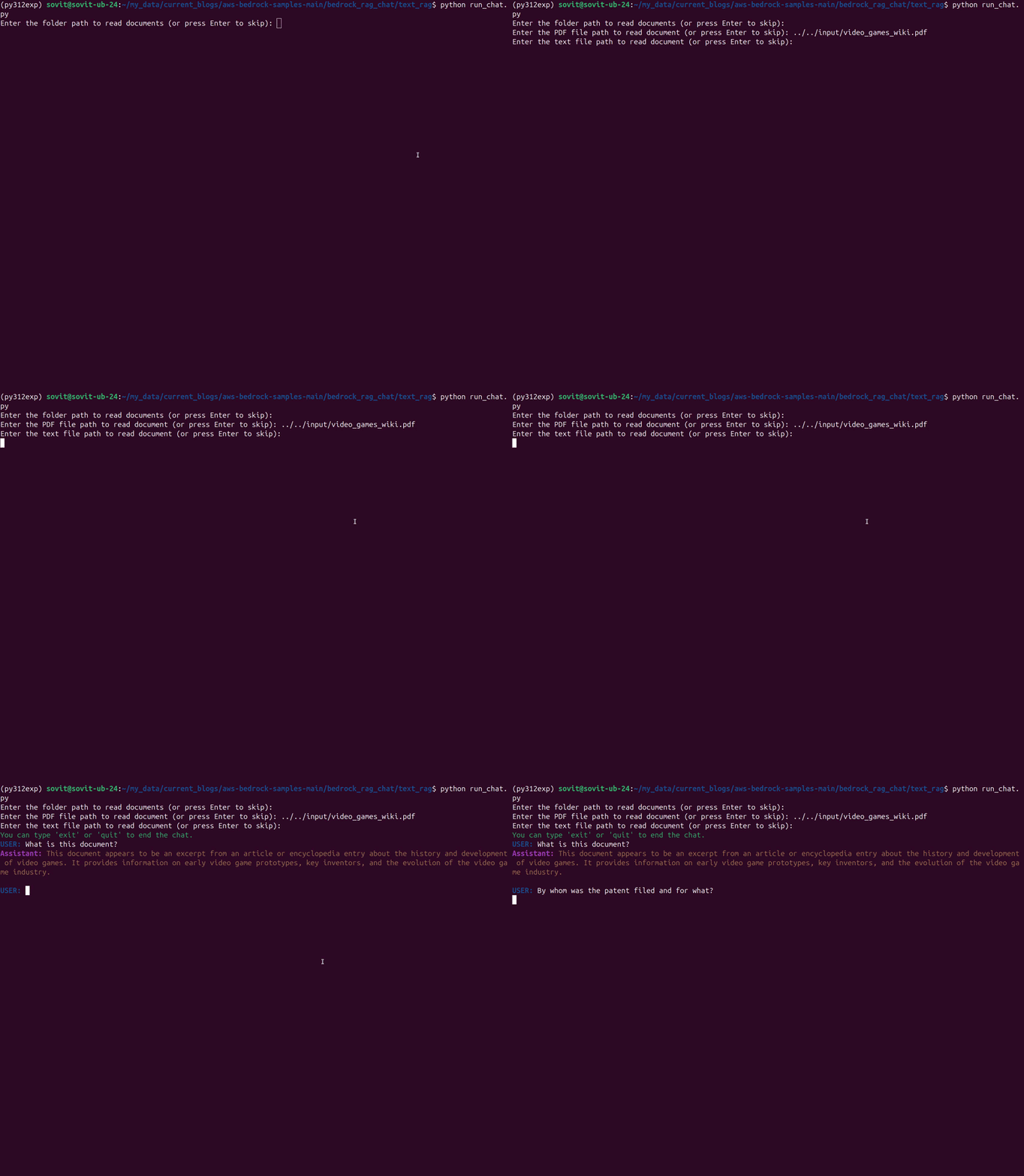
In the last article, we covered the basics of the Converse and Converse Stream APIs. It included text-only chat with streaming mode. Here, we will expand the capabilities with the following:
- Multimodal chat with image and video input
- Document input and querying the LLM about it
- Building a text RAG application using Bedrock Embedding models and Bedrock LLMs
Note: We are not covering the setup of the AWS account/IAM roles. Please refer to the official docs for AWS setup. Before moving forward, please make sure to have your AWS account set up for Amazon Bedrock.
Project Directory Structure
The codebase in this article is part of the aws-bedrock-samples GitHub repository that I am currently maintaining. The following is the directory structure at the time of writing this.
├── bedrock_api_call
│   ├── bedrock_chat_doc_single_turn.py
│   ├── bedrock_chat_image_single_turn.py
│   ├── bedrock_chat_multi_turn.py
│   ├── bedrock_chat_text_multi_turn_sim.py
│   ├── bedrock_chat_text_single_turn.py
│   ├── bedrock_chat_video_single_turn.py
│   ├── README.md
│   └── requirements.txt
├── bedrock_rag_chat
│   ├── text_rag
│   │   ├── embeddings.py
│   │   ├── README.md
│   │   └── run_chat.py
│   └── requirements.txt
├── input
│   ├── image_1.jpg
│   ├── image_2.jpg
│   ├── nn_wiki.pdf
│   ├── video_1.mp4
│   └── video_games_wiki.pdf
└── README.md
Our focus is only on a few of the above scripts in this article.
- From the
bedrock_api_calldirectory, we will cover thebedrock_chat_image_single_turn.py,bedrock_chat_doc_single_turn.py,bedrock_chat_video_single_turn.py, andbedrock_chat_multi_turn.pyfiles. - We will also cover a simple text-RAG application present in the
bedrock_rag_chat/text_ragdirectory.
The project is constantly evolving, so the article comes with a stable zip file version of the codebase that anyone can download and start executing.
Download Code
Environment File Setup
Before moving ahead with discussing the code, create a .env file in the project’s parent directory with the following secret keys.
AWS_BEDROCK_API_KEY=your-bedrock-api-key
MODEL_ID=your-model-id
EMBEDDING_MODEL_ID=embedding-model-id
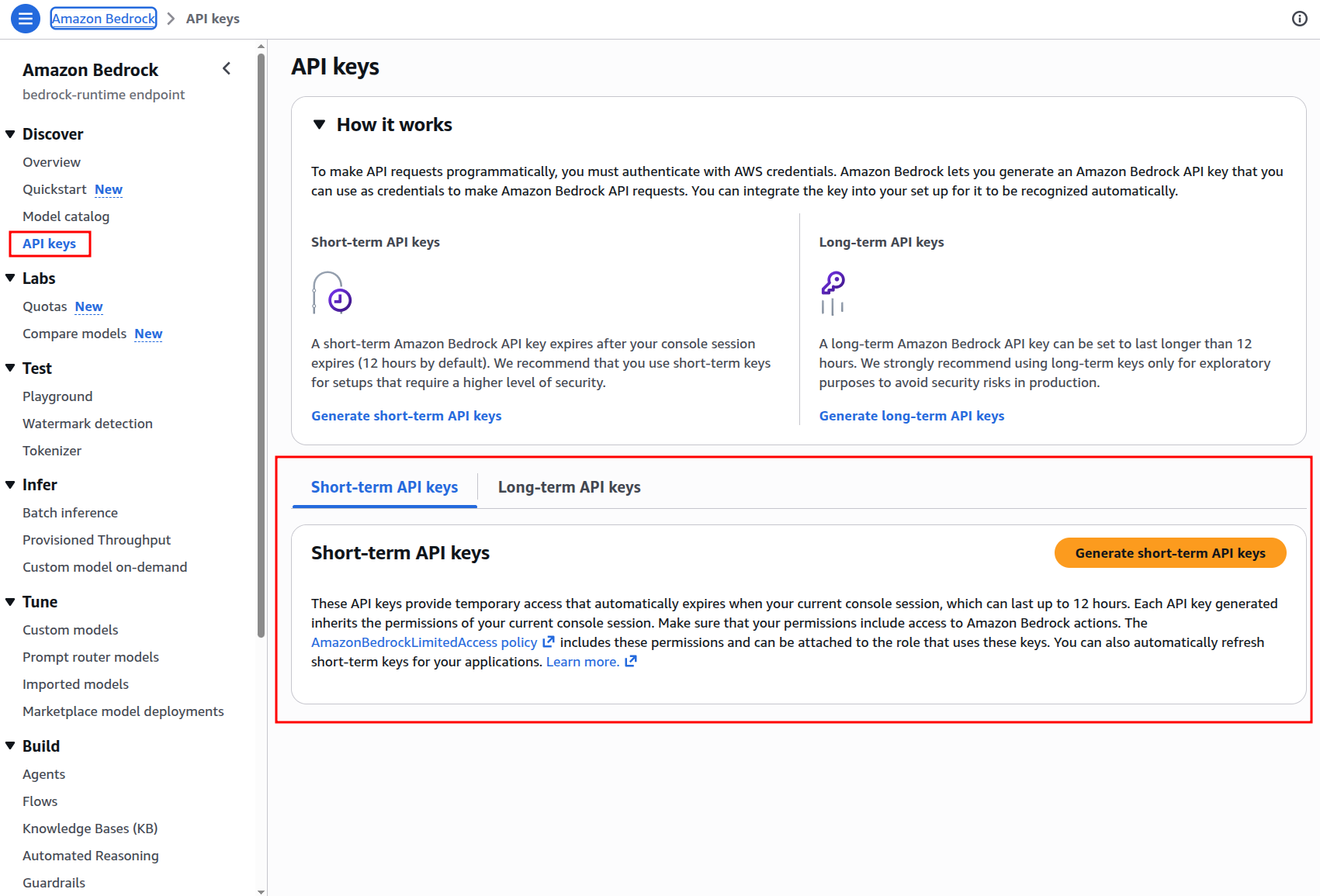
We can get a short-term or a long-term Bedrock API key (AWS_BEDROCK_API_KEY in the above file) from the Bedrock => API keys section.
For the MODEL_ID, we are choosing the Amazon Nova Pro 1.0 (amazon.nova-pro-v1:0) here, which accepts text, image, video, and document inputs. You can find all the model IDs by clicking on the respective model cards in the Model catalog section.
We also need an embedding model for the RAG application. For the EMBEDDING_MODEL_ID, we choose the Titan Multimodal Embeddings G1 (amazon.titan-embed-image-v1) here.
This is all the setup we need for now. We will handle the library requirements in their respective sections.
Multimodal Chat with Amazon Bedrock
We will start with testing the individual scripts for multimodal chat present in the bedrock_api_call directory.
First, we need to enter the directory and install the requirements.
cd bedrock_api_call

pip install -r requirements.txt
As we will not be going through each line of code in detail, I highly recommend going through the previous article. There, we discussed the Converse and Converse Stream API with specific examples and syntax. That will make it easier to follow the content in this article.
Document Chat with Amazon Bedrock
We will start with the document chat script. For supported models, the Bedrock converse API allows us to send any type of document in bytes format and chat with it directly. The following code present in bedrock_api_call/bedrock_chat_doc_single_turn.py is one such example.
"""
Simple single-turn PDF document API call to Amazon Bedrock using the Boto3 SDK.
This script demonstrates how to send document data + user message to a Bedrock model and receive a response,
with optional streaming support.
"""

import boto3
import os
import argparse

from dotenv import load_dotenv

# Argument parsers.
parser = argparse.ArgumentParser()
parser.add_argument('--stream', action='store_true', help='Enable streaming mode')

args = parser.parse_args()

load_dotenv()

STREAM = args.stream

# Set the API key as an environment variable
os.environ['AWS_BEARER_TOKEN_BEDROCK'] = os.getenv('AWS_BEDROCK_API_KEY')

# Create the Bedrock client
client = boto3.client(
    service_name='bedrock-runtime',
    region_name='us-east-1'
)

# Read PDF document and convert to bytes.
document_path = '../input/nn_wiki.pdf'
with open(document_path, 'rb') as document_file:
    document_bytes = document_file.read()

# Define the model and message
model_id = os.getenv('MODEL_ID')
messages = [
    {
        'role': 'user',
        'content': [
            {
                'document': {
                    'format': 'pdf',
                    'name': 'Neural Network Wikipedia',
                    'source': {
                        'bytes': document_bytes
                    }
                }
            },
            {'text': 'What is this document about? Summarize in detail'}
        ]
    }
]

def chat(messages, model_id, stream=False):
    if stream:
        # Make the API call with streaming
        response = client.converse_stream(
            modelId=model_id,
            messages=messages
        )

        response_stream = response.get('stream')

        # Print the streamed response
        for event in response_stream:
            if 'contentBlockDelta' in event:
                print(event['contentBlockDelta']['delta']['text'], end="")
    else:
        # Make the API call
        response = client.converse(
            modelId=model_id,
            messages=messages,
        )

        # Print the response
        print(response['output']['message']['content'][0]['text'])

    return response

if __name__ == '__main__':
    response = chat(messages, model_id, STREAM)
The codebase comes with a few PDFs, images, and video files that are present in the input directory. In the above script, we read the nn_wiki.pdf file, which contains information about neural networks from Wikipedia. First, we read and convert the document into bytes format. Then, we ask the model what the document is about and to summarize it in detail.
Let’s execute the script in the streaming model and check the response.
python bedrock_chat_doc_single_turn.py --stream
We get the following response.
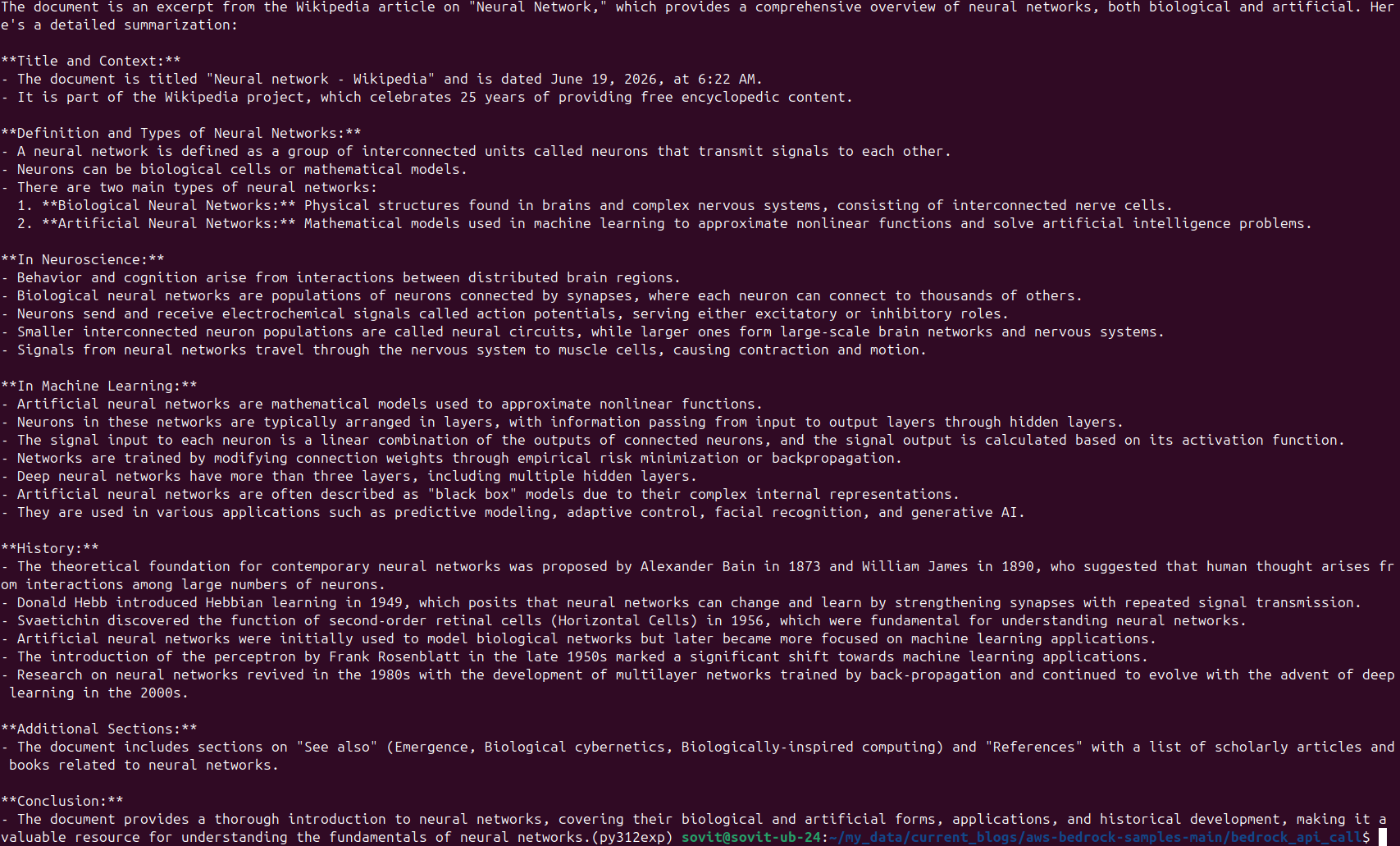
The response is quite detailed and captures all the important points from the document.
The important part in the above code block is the messages list format.
messages = [
    {
        'role': 'user',
        'content': [
            {
                'document': {
                    'format': 'pdf',
                    'name': 'Neural Network Wikipedia',
                    'source': {
                        'bytes': document_bytes
                    }
                }
            },
            {'text': 'What is this document about? Summarize in detail'}
        ]
    }
]
In the content block, we have two nested dictionaries. One is the document dictionary, which contains the format, name, and the source of the document in bytes format. The other is the text dictionary containing the user query. One important point here is the name key of the document. When we are having a multi-turn chat, each new document must have a new name value. Usually, appending a chat turn iteration number is the simplest solution. However, giving a proper document name can act as metadata for the model, allowing it to provide better answers.
Image Chat with Amazon Bedrock
Next, we will focus on image chat. The code is present in bedrock_api_call/bedrock_chat_image_single_turn.py file.
"""
Simple single-turn image API call to Amazon Bedrock using the Boto3 SDK.
This script demonstrates how to send a message to a Bedrock model and receive a response,
with optional streaming support.
"""

import boto3
import os
import argparse

from dotenv import load_dotenv

# Argument parsers.
parser = argparse.ArgumentParser()
parser.add_argument('--stream', action='store_true', help='Enable streaming mode')

args = parser.parse_args()

load_dotenv()

STREAM = args.stream

# Set the API key as an environment variable
os.environ['AWS_BEARER_TOKEN_BEDROCK'] = os.getenv('AWS_BEDROCK_API_KEY')

# Create the Bedrock client
client = boto3.client(
    service_name='bedrock-runtime',
    region_name='us-east-1'
)

# Read image and convert to bytes.
image_path = '../input/image_1.jpg'
with open(image_path, 'rb') as image_file:
    image_bytes = image_file.read()

# Define the model and message
model_id = os.getenv('MODEL_ID')
messages = [
    {
        'role': 'user',
        'content': [
            {
                'image': {
                    'format': 'jpeg',
                    'source': {
                        'bytes': image_bytes
                    }
                }
            },
            {'text': 'What is this image?'}
        ]
    }
]

def chat(messages, model_id, stream=False):
    if stream:
        # Make the API call with streaming
        response = client.converse_stream(
            modelId=model_id,
            messages=messages
        )

        response_stream = response.get('stream')

        # Print the streamed response
        for event in response_stream:
            if 'contentBlockDelta' in event:
                print(event['contentBlockDelta']['delta']['text'], end="")
    else:
        # Make the API call
        response = client.converse(
            modelId=model_id,
            messages=messages,
        )

        # Print the response
        print(response['output']['message']['content'][0]['text'])

    return response

if __name__ == '__main__':
    response = chat(messages, model_id, STREAM)
Here, almost everything remains the same as above. Only the messages format changes. We read an image containing a peacock and convert it into bytes format.
python bedrock_chat_image_single_turn.py
The following is the response that we got.

The model is able to provide quite a detailed response for the image input.
Video Chat with Amazon Bedrock
The final sample API call we have includes feeding a video to the model along with a user query. The code resides in the bedrock_api_call/bedrock_chat_video_single_turn.py file.
"""
Simple single-turn video API call to Amazon Bedrock using the Boto3 SDK.
This script demonstrates how to send video data + user message to a Bedrock model and receive a response,
with optional streaming support.
"""

import boto3
import os
import argparse

from dotenv import load_dotenv

# Argument parsers.
parser = argparse.ArgumentParser()
parser.add_argument('--stream', action='store_true', help='Enable streaming mode')

args = parser.parse_args()

load_dotenv()

STREAM = args.stream

# Set the API key as an environment variable
os.environ['AWS_BEARER_TOKEN_BEDROCK'] = os.getenv('AWS_BEDROCK_API_KEY')

# Create the Bedrock client
client = boto3.client(
    service_name='bedrock-runtime',
    region_name='us-east-1'
)

# Read video file and convert to bytes.
video_path = '../input/video_1.mp4'
with open(video_path, 'rb') as video_file:
    video_bytes = video_file.read()

# Define the model and message
model_id = os.getenv('MODEL_ID')
messages = [
    {
        'role': 'user',
        'content': [
            {
                'video': {
                    'format': 'mp4',
                    'source': {
                        'bytes': video_bytes
                    }
                }
            },
            {'text': 'What is this video about? Summarize in detail'}
        ]
    }
]

def chat(messages, model_id, stream=False):
    if stream:
        # Make the API call with streaming
        response = client.converse_stream(
            modelId=model_id,
            messages=messages
        )

        response_stream = response.get('stream')

        # Print the streamed response
        for event in response_stream:
            if 'contentBlockDelta' in event:
                print(event['contentBlockDelta']['delta']['text'], end="")
    else:
        # Make the API call
        response = client.converse(
            modelId=model_id,
            messages=messages,
        )

        # Print the response
        print(response['output']['message']['content'][0]['text'])

    return response

if __name__ == '__main__':
    response = chat(messages, model_id, STREAM)
Here as well, the code remains similar, with the only exception of reading a video in bytes format and passing it to the model. In the message’s content block, we now pass a video dictionary and a user prompt to describe it.
Let’s execute it.
python bedrock_chat_video_single_turn.py
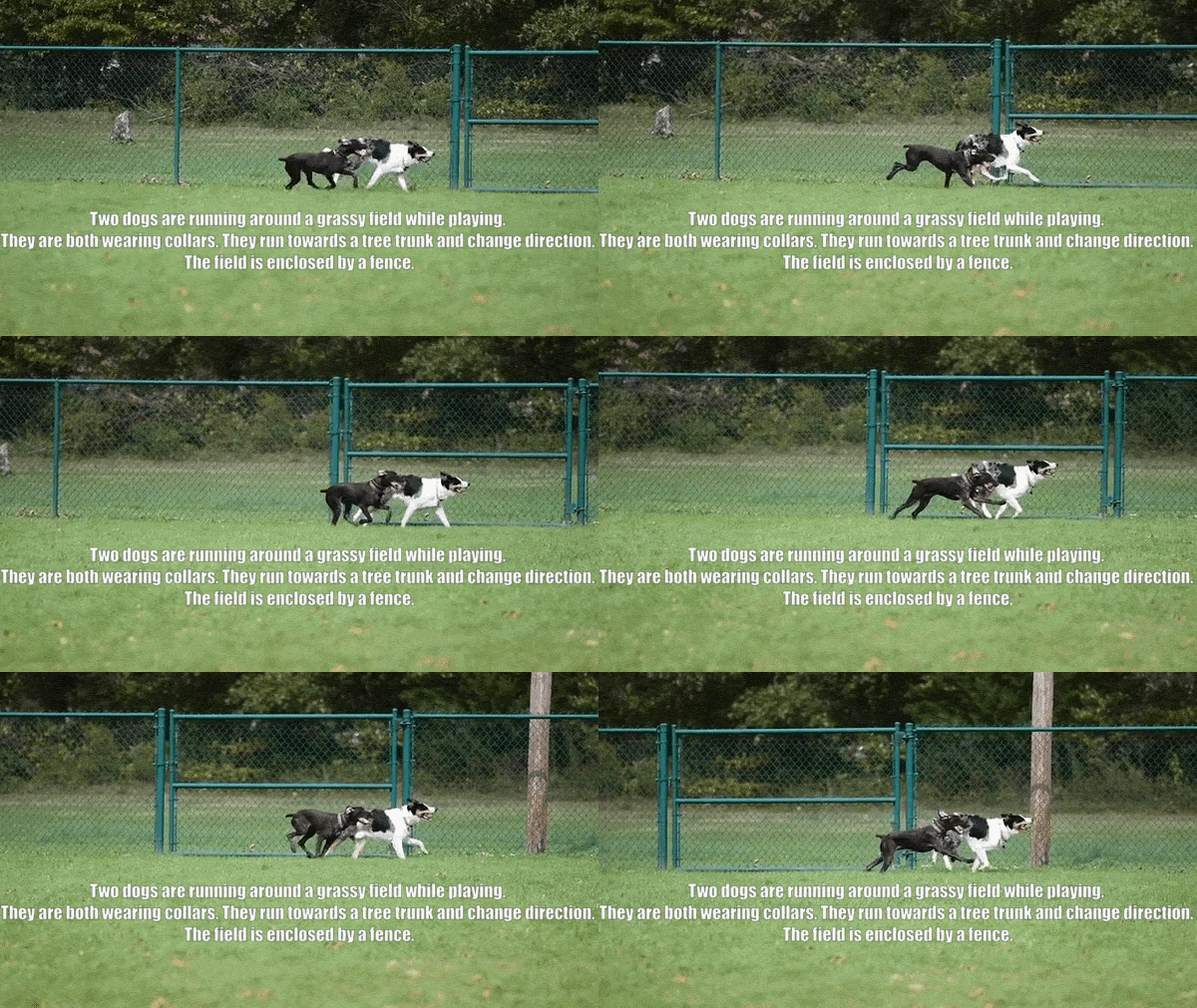
The model captures the overall essence of the video. However, it wrongly recognizes the dogs changing direction, which does not happen.
A Simple Multi-Turn Chat with Bedrock
Let’s build a simple multi-turn multi-modal chat solution here. We have all the individual components ready; let’s combine them into a minimal CLI-based chat interface.
The following block contains the entire code that is present in bedrock_api_call/bedrock_chat_multi_turn.py script.
"""
Simple multi-turn API call to Amazon Bedrock using the Boto3 SDK.
This script demonstrates how to send a message to a Bedrock model and receive a response,
with optional streaming support.

Support for image, video, and document inputs.
"""

import boto3
import os
import argparse

from dotenv import load_dotenv
from termcolor import cprint

# Argument parsers.
parser = argparse.ArgumentParser()
parser.add_argument('--stream', action='store_true', help='Enable streaming mode')
parser.add_argument(
    '--max_tokens',
    type=int,
    default=1024,
    help='Maximum number of tokens to generate in the response'
)

args = parser.parse_args()

load_dotenv()

STREAM = args.stream
MAX_TOKENS = args.max_tokens
INFERENCE_CONFIG = {
    'maxTokens': MAX_TOKENS,
}

# Set the API key as an environment variable
os.environ['AWS_BEARER_TOKEN_BEDROCK'] = os.getenv('AWS_BEDROCK_API_KEY')

# Create the Bedrock client
client = boto3.client(
    service_name='bedrock-runtime',
    region_name='us-east-1'
)

# Define the model and message
model_id = os.getenv('MODEL_ID')
# Empty messages list to hold the conversation history.
messages = []

def chat(user_input, model_id, chat_iter=0, stream=False):
    global messages

    # Deternine the type of input based on user input and append to messages list.
    # We take a look at the extensions for now. The file names should have a space before
    # the message with underscores and no spaces in the file name. The file name should be the last word in the message.
    # jpeg, jpg, png, mp4, avi, pdf, docx, txt, etc.

    # Extract file path and user message from the input. We assume the file path is the last word in the input.
    user_input_parts = user_input.split()
    if len(user_input_parts) > 1:
        file_path = user_input_parts[-1]
        user_message = ' '.join(user_input_parts[:-1])
    else:
        file_path = ''
        user_message = user_input

    if file_path.lower().endswith(('.jpeg', '.jpg', '.png')):
        # Read image and convert to bytes.
        with open(file_path, 'rb') as image_file:
            image_bytes = image_file.read()

        messages.append({
            'role': 'user',
            'content': [
                {
                    'image': {
                        'format': 'jpeg',
                        'source': {
                            'bytes': image_bytes
                        }
                    }
                },
                {'text': user_message}
            ]
        })
    elif file_path.lower().endswith(('.mp4', '.avi')):
        # Read video file and convert to bytes.
        with open(file_path, 'rb') as video_file:
            video_bytes = video_file.read()

        messages.append({
            'role': 'user',
            'content': [
                {
                    'video': {
                        'format': 'mp4',
                        'source': {
                            'bytes': video_bytes
                        }
                    }
                },
                {'text': user_message}
            ]
        })
    elif file_path.lower().endswith(('.pdf', '.docx', '.txt')):
        # Read document and convert to bytes.
        with open(file_path, 'rb') as document_file:
            document_bytes = document_file.read()

        messages.append({
            'role': 'user',
            'content': [
                {
                    'document': {
                        'format': 'pdf',
                        'name': f"User document {chat_iter}",
                        'source': {
                            'bytes': document_bytes
                        }
                    }
                },
                {'text': user_message}
            ]
        })


    # Append the user's message to the messages list if text only.
    else:
        messages.append({
            'role': 'user',
            'content': [{'text': user_input}]
        })

    assistant_response = ''

    cprint('Assistant: ', 'magenta', attrs=['bold'], end='')

    if stream:
        # print(f"CURRENT MESSGAGES SENT TO MODEL: {messages}\n")  # Debugging line to check the messages being sent to the model.
        # Make the API call with streaming
        response = client.converse_stream(
            modelId=model_id,
            messages=messages,
            inferenceConfig=INFERENCE_CONFIG
        )

        response_stream = response.get('stream')

        # Print the streamed response
        for event in response_stream:
            if 'contentBlockDelta' in event:
                stream_out = event['contentBlockDelta']['delta']['text']
                cprint(stream_out, 'yellow', end='')
                assistant_response += stream_out

        print('\n')
    else:
        # Make the API call
        response = client.converse(
            modelId=model_id,
            messages=messages,
            inferenceConfig=INFERENCE_CONFIG
        )

        # Print the response
        assistant_response = response['output']['message']['content'][0]['text']
        cprint(assistant_response, 'yellow')

        print()

    # Append the assistant's response to the messages list to maintain conversation history.
    messages.append({
        'role': 'assistant',
        'content': [{'text': assistant_response}]
    })


if __name__ == '__main__':
    iter = 0
    while True:
        cprint('USER: ', 'blue', attrs=['bold'], end='')
        user_input = input()
        if user_input.lower() in ['exit', 'quit']:
            print("Exiting the chat.")
            break

        chat(user_input, model_id, chat_iter=iter, stream=STREAM)

        iter += 1
Let’s go over some of the important components in the above code block.
- We have two command-line arguments, one for streaming text and another for defining the maximum output tokens of the model. They are
--streamand--max_tokensrespectively. - There is a single
chatfunction (starting from line 50) accepting the following parameters:user_input: The current user messagemodel_id: The model ID, which remains the same on each turnchat_iter: Chat iteration, which keeps increasing on each turnstream: A boolean defining whether to have streaming text from the model or not
- One simple aim here is to allow the user to pass either a document path, an image path, a video path, or a simple text query to the model.
- The major concern is segregating the paths from the text query. For this, we follow a simple pattern. We allow the user to first add a simple text query/question, and then add a file path if needed, e.g., “What is this image path/to/image”.
- However, we need to add one constraint on the user side. The file path cannot have spaces.
- That way, we can easily split the message into two parts. The first part is the user query, the second part is the file path. The logic for that is present from lines 59 to 132.
- The rest of the code is the Converse API call and appending the history to the
messageslist.
The input parsing approach is similar to the Ollama CLI, where a user enters a prompt followed by a local file path, allowing the CLI to distinguish between the textual query and the media file before constructing the request.
Let’s execute the script and start chatting. We add a streaming response with an output token limit of 8192.
python bedrock_chat_multi_turn.py --stream --max_tokens 8192
In the above video, we ask the model about various files and general questions as well. Overall, it looks good. However, the response quality and the capability of remembering past chats might depend on the model family as well.
We can type either exit or quit to stop the chat.
Creating a Text RAG Application with Bedrock
In this section, we will focus on creating a text RAG application. We will use the following tech stack.
- Langchain: For loading documents and chunking.
- ChromaDB: For VectorDB. We will load ChromaDB via LangChain and create an in-memory vector DB to start with. No persistent memory here.
- Bedrock Embeddings: For embedding generation,
- Bedrock LLM: To chat with the vector DB.
As we discussed in the setup section, we are using the Titan Multimodal Embeddings G1 (amazon.titan-embed-image-v1) as the embedding model and Nova Pro (amazon.nova-pro-v1:0) as the LLM here.
We follow a simple architecture and workflow here.
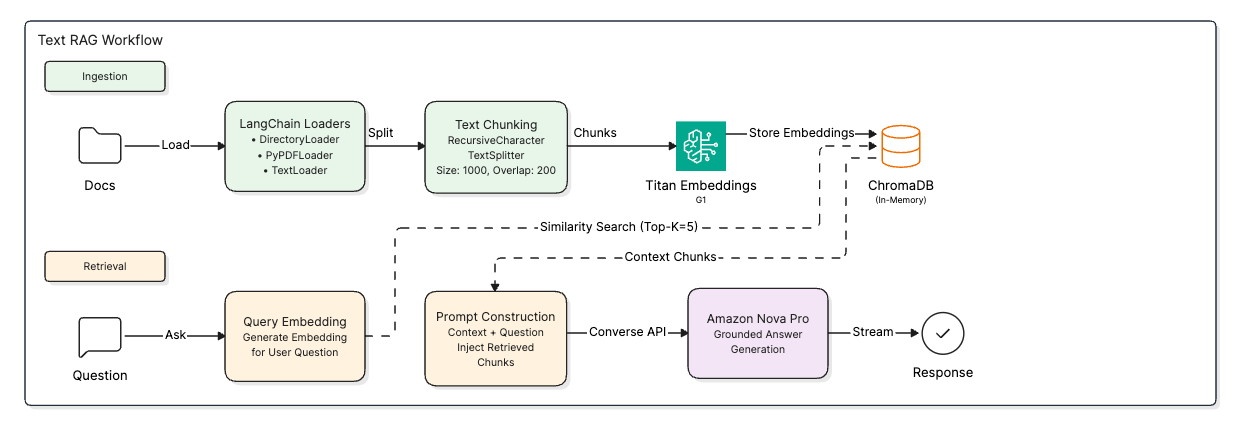
Let’s jump into the codebase. The code for this is present in bedrock_rag_chat/text_rag directory. Here, we have two Python files.
Embedding Generation Using Bedrock Titan Multimodal Embeddings G1
The code that generates the embeddings is present in the embeddings.py file. Following is the entire code for that. We try to keep this as simple as possible.
"""
Script to generate embeddings by taking file path or folder path.
The folder can contain PDFs and text files.
Same extension goes for the indivual files paths as well.
Using ChromaDB, LangChain, and Bedrock Embeddings.

Functions present.
`read_directory()` => gets all documents from the folder path.
`read_pdf()` => gets PDF documents.
`read_text()` => gets text documents.
`get_chunks()` => gets chunks of the documents.
`embed_and_store()` => generates embeddings and stores in ChromaDB.
`retrieve()` => retrieves relevant chunks from ChromaDB based on query and by appending by new line.
"""


import boto3
import os

from langchain_community.document_loaders import PyPDFLoader, TextLoader, DirectoryLoader
from langchain_chroma import Chroma
from langchain_text_splitters import RecursiveCharacterTextSplitter
from langchain_aws import BedrockEmbeddings
from dotenv import load_dotenv

load_dotenv()

# Set the API key as an environment variable
os.environ['AWS_BEARER_TOKEN_BEDROCK'] = os.getenv('AWS_BEDROCK_API_KEY')

def read_directory(folder_path):
    """
    Reads all documents from the folder path.
    """
    loader = DirectoryLoader(folder_path)
    docs = loader.load()
    print(f"Number of documents read from folder: {len(docs)}")

    return docs

def read_pdf(file_path):
    """
    Reads PDF documents.
    """
    loader = PyPDFLoader(file_path)
    docs = loader.load()

    return docs

def read_text(file_path):
    """
    Reads text documents.
    """
    loader = TextLoader(file_path)
    docs = loader.load()

    return docs

def get_chunks(docs):
    """
    Gets chunks of the documents.
    """
    text_splitter = RecursiveCharacterTextSplitter(chunk_size=1000, chunk_overlap=200)
    chunks = text_splitter.split_documents(docs)

    return chunks

def embed_and_store(chunks):
    """
    Generates embeddings and stores in ChromaDB.
    """

    # Create embeddings. This is a one time call.
    bedrock_client = boto3.client(
        service_name='bedrock-runtime', region_name='us-east-1'
    )
    bedrock_embeddings = BedrockEmbeddings(
        model_id=os.getenv('EMBEDDING_MODEL_ID'), client=bedrock_client
    )

    # Create ChromaDB instance
    db = Chroma.from_documents(
        documents=chunks,
        embedding=bedrock_embeddings,
        # persist_directory='chroma_db'
    )

    return db

def retrieve(query, db, k=5, show_chunks=False):
    """
    Retrieves relevant chunks from ChromaDB based on query and by appending by new line.
    """
    results = db.similarity_search(query, k=k)

    # Append the results by new line
    retrieved_text = "\n".join([result.page_content for result in results])

    if show_chunks:
        for i, result in enumerate(results):
            print('\n\n')
            print(f"Chunk {i+1}: {result.page_content}")
            print('#' * 100)

    return retrieved_text

def __main__():
    """
    Main function to test the above functions.
    """
    # Example usage
    folder_path = "None"
    file_path_pdf = "../../input/nn_wiki.pdf"
    file_path_text = "None"

    # Read documents from folder
    if folder_path != "None":
        docs_from_folder = read_directory(folder_path)
    else:
        docs_from_folder = []

    # Read PDF document
    if file_path_pdf != "None":
        docs_from_pdf = read_pdf(file_path_pdf)
    else:
        docs_from_pdf = []

    # Read text document
    if file_path_text != "None":
        docs_from_text = read_text(file_path_text)
    else:
        docs_from_text = []

    # Combine all documents
    all_docs = docs_from_folder + docs_from_pdf + docs_from_text

    chunks = get_chunks(all_docs)

    # Generate embeddings and store in ChromaDB
    db = embed_and_store(chunks)

    # Retrieve relevant chunks based on query
    query = "Neural Networks"
    retrieved_text = retrieve(query, db, k=5, show_chunks=True)

    print('#' * 100)
    print(retrieved_text)

if __name__ == "__main__":
    __main__()
The above script does the following:
- First, import all the necessary libraries and their modules.
- Second, based on the user input from the CLI (we will see to it shortly in the next section), we either read the documents from a directory, a PDF file, or a text file. If the user provides all three inputs, then we read and combine all the documents. This is done in the
read_directory,read_pdf, andread_textfunctions. - Third, the
get_chunksfunction uses the LangChain recursive character splitter to create chunks of 1000 characters with a 200-character overlap. - Fourth, the
embed_and_storefunction receives the chunks, initializes the Bedrock Tital Multimodal embedding, and ingests them into a Chroma vector DB. - Finally, we have a
retrievefunction that we can call by providing the user query, the vector DB instance, and number of chunks to retrieve to carry out the retrieval process.
The script also contains a __main__() method for sanity check. The embedding generation is deliberately simple at this point without any persistence. We will lose the vector DB instance when we exit the program; however, that makes it simple to test things as well.
Chatting with the Documents in the VectorDB
The run_chat.py is a minimal script that allows us to provide document/folder paths, create an instance of a vector DB, and chat with the documents.
from embeddings import (
    read_directory,
    read_pdf,
    read_text,
    get_chunks,
    embed_and_store,
    retrieve
)
from dotenv import load_dotenv
from termcolor import cprint

import boto3
import os

load_dotenv()

# Set the API key as an environment variable
os.environ['AWS_BEARER_TOKEN_BEDROCK'] = os.getenv('AWS_BEDROCK_API_KEY')

# Create the Bedrock client
client = boto3.client(
    service_name='bedrock-runtime',
    region_name='us-east-1'
)

# Define the model and message
model_id = os.getenv('MODEL_ID')

# Create the messages for Bedrock API call
messages = []
system_message = [
    {
        'text': 'You are a helpful assistant that answers questions based on the provided context. If the context does not contain the answer, say you do not know.'
    }
]

def main():
    # Ask the user to pass PDF, text, or folder path to read documents and create ChromaDB
    folder_path = input("Enter the folder path to read documents (or press Enter to skip): ")
    file_path_pdf = input("Enter the PDF file path to read document (or press Enter to skip): ")
    file_path_text = input("Enter the text file path to read document (or press Enter to skip): ")

    # If either of the paths is empty, set it to "None"
    if file_path_pdf == "":
        file_path_pdf = "None"
    if file_path_text == "":
        file_path_text = "None"
    if folder_path == "":
        folder_path = "None"

    if folder_path != "None":
        # Read documents from folder
        docs_from_folder = read_directory(folder_path)
    else:
        docs_from_folder = []
    if file_path_pdf != "None":
        # Read PDF document
        docs_from_pdf = read_pdf(file_path_pdf)
    else:
        docs_from_pdf = []
    if file_path_text !="None":
        # Read text document
        docs_from_text = read_text(file_path_text)
    else:
        docs_from_text = []

    # Combine all documents
    all_docs = docs_from_folder + docs_from_pdf + docs_from_text

    chunks = get_chunks(all_docs)

    # Generate embeddings and store in ChromaDB
    db = embed_and_store(chunks)

    cprint("You can type 'exit' or 'quit' to end the chat.", 'green')
    while True:
        cprint('USER: ', 'blue', attrs=['bold'], end='')
        user_input = input()
        if user_input.lower() in ['exit', 'quit']:
            cprint("Exiting the chat.", 'red')
            break

        retrieved_text = retrieve(user_input, db, k=5, show_chunks=False)

        # Append the user's message to the messages list.
        user_message = f"Context: {retrieved_text}\n\nQuestion: {user_input}"
        messages.append({
            'role': 'user',
            'content': [{'text': user_message}]
        })

        assistant_response = ''

        cprint('Assistant: ', 'magenta', attrs=['bold'], end='')

        # Make the API call with streaming
        response = client.converse_stream(
            modelId=model_id,
            messages=messages,
            system=system_message,
            inferenceConfig={
                'maxTokens': 8192,
            }
        )

        response_stream = response.get('stream')

        # Print the streamed response
        for event in response_stream:
            if 'contentBlockDelta' in event:
                stream_out = event['contentBlockDelta']['delta']['text']
                cprint(stream_out, 'yellow', end='')
                assistant_response += stream_out

        print('\n')

        # Append the assistant's response to the messages list to maintain conversation history.
        messages.append({
            'role': 'assistant',
            'content': [{'text': assistant_response}]
        })

if __name__ == '__main__':
    main()
- As usual, we import the necessary libraries and initialize the LLM model first.
- We have defined a
system_messagelist that we will pass down to the Converse API to steer the model behavior. - Coming to the
mainfunction:- We ask the user to provide the path to either a directory containing documents, a PDF file, or a text file.
- Based on the user input, we read the documents, combine them, create the chunks, and initialize the Chroma vector DB (lines 39 to 73).
- Then we start a
whileloop, which keeps running until the user passesexitorquitas the input. On each turn, we search the vector DB, retrieve the top 5 chunks, append them to the user message, and call the Converse API to generate the response. - After each turn, we append the assistant’s response to the message history list.
This is a simple workflow that will get us up and running with Bedrock embeddings and the LLM text RAG application right away.
Executing the Text RAG Application
We can run the following command to start the RAG chat application. Be sure to run the following within the bedrock_rag_chat/text_rag folder.
python run_chat.py
The following is a video showing the workflow.
Summary and Conclusion
In this article, we covered the basics of Bedrock multimodal chat involving image, documents, videos, and building a simple text RAG application using Bedrock embeddings and ChromaDB. We saw how they work in action; however, of course, there is room for improvement. We will try to incorporate these improvements into the repository and cover them in future articles. I hope this article was worth your time.
If you have any questions, thoughts, or suggestions, please leave them in the comment section. I will surely address them.
You can contact me using the Contact section. You can also find me on LinkedIn, and X.


1 thought on “Amazon Bedrock Multimodal Chat and Text RAG”