
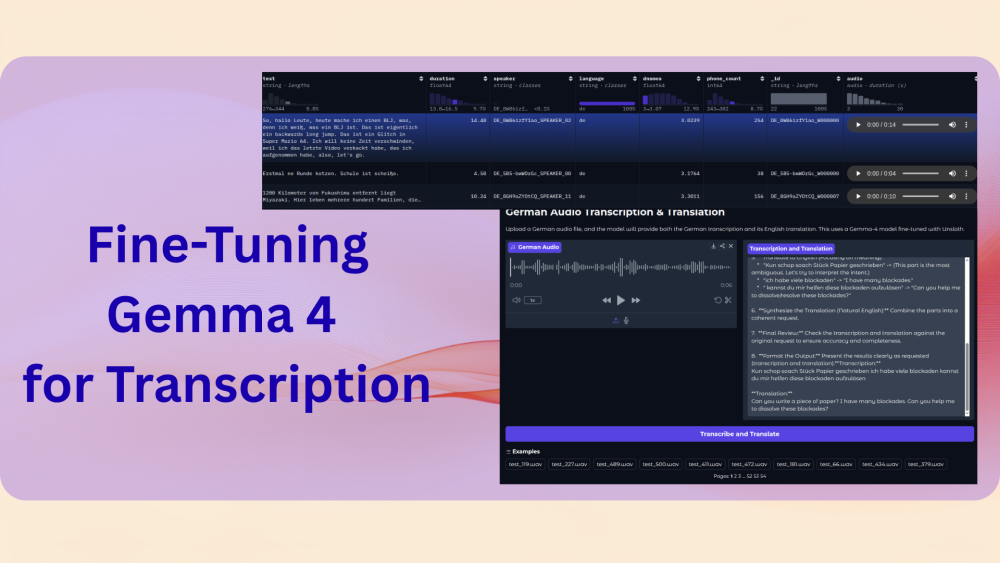
Gemma 4 is the latest open source model by Google in the Gemma family. It is a completely open-source family of models with the Apache 2.0 license. There are 4 model sizes in the family, multimodal by default, capable of understanding text, image, audio, and video. In this article, we will be fine-tuning Gemma 4 for audio transcription and translation.
Here, we will be focusing on the Gemma 4 E2B model, which is the smallest in the family. Although capable of English transcription to a good extent, it cannot transcribe other languages with high accuracy. One of them is German. However, along with teaching the model how to transcribe German audio, we will also teach it to translate it to English.
We will focus on the following topics in this article:
- Discussing the German transcription dataset.
- Discussing the preparation of the German to English ground-truth data.
- Setting up the training environment.
- Carrying out training for Gemma 4 for transcription & translation, evaluating the model, and inference.
The German Transcription Dataset
The official Unsloth notebook demonstrates how to fine-tune the Gemma 4 E2B Instruction Tuned model for German language transcription. We will take this a step further and teach the model to both transcribe and translate to English.
The following is the dataset on Hugging Face.

The dataset contains ~12000 samples. We will mostly focus on the text and audio columns in this article.
We can load the dataset directly from Hugging Face when training. However, before that, we need to generate the English translations for the same. For this purpose, we have used the Llama-3.1 8B Instruct Turbo model using Together.ai services.
You can find the code for this in the german_to_english_translate.ipynb notebook that comes with this article.
The following are images of a few samples from the converted dataset.
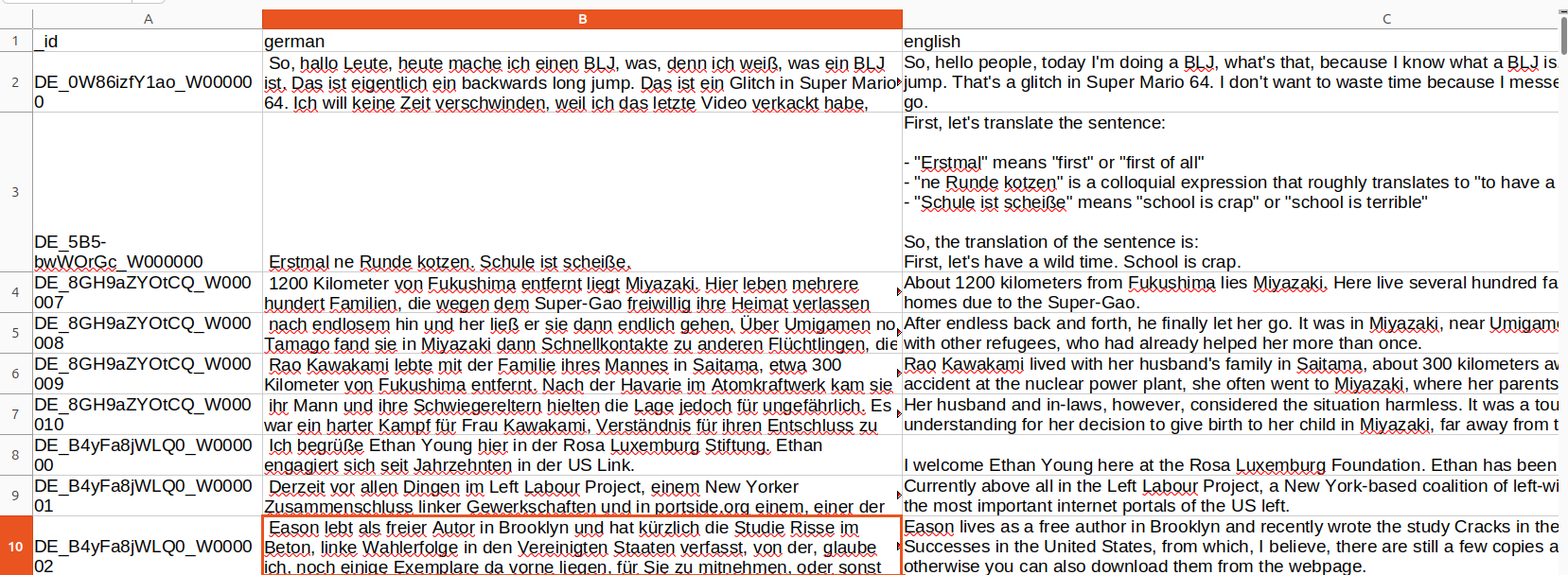
During dataset preparation, we will use the _id column to map the transcriptions to the translations.
Project Directory Structure
Let’s take a look at the directory structure for this project.
├── outputs
│   ├── checkpoint-500
│   └── README.md
├── test_wav_files  [538 entries exceeds filelimit, not opening dir]
├── app.py
├── convert_to_wav.ipynb
├── gemma4_e2b_finetuned_eval.ipynb
├── gemma4_e2b_german_translate_finetune.ipynb
├── german_to_english.csv
├── german_to_english_translate.ipynb
└── requirements.txt
- We have four notebooks. The
german_to_english_translate.ipynbto generate the English translations using Llama-3.1 8B model. Thegemma4_e2b_german_translate_finetune.ipynbcontains the code for fine-tuning the Gemma 4 E2B IT model. We have the evaluation code for the trained model in thegemma4_e2b_finetuned_eval.ipynbnotebook. We will cover the other code files as we progress through the article. - The
test_wav_filesdirectory contains the audio files in.wavformat that we will will use for inference with the Gradio application viaapp.py. - Finally, the
outputsandgemma-4-finetuneddirectories contain the intermediate and final LoRA checkpoints from fine-tuning.
All the Jupyter Notebooks, Python scripts, the ground truth data after converting to English, and the final LoRA checkpoints are provided in the form of a zip file with this article for download.
Download Code
Fine-Tuning Gemma 4 for Transcription
Let’s start covering the code for training the Gemma 4 E2B IT model for transcription and translation.
We will start with the training notebook, move to evaluation, and finally, use the Gradio application for inference.
The Training Notebook for Gemma 4 Transcription Fine-Tuning
All the training related code is present in the gemma4_e2b_german_translate_finetune.ipynb notebook.
The first few cells contain the installation and setup that we are skipping here. You can run this notebook in your local machine, Colab, Kaggle, or any other cloud environment. Just ensure that you have uploaded the german_to_english.csv file to the working directory when working on the cloud.
Next, we have the import statements.
from unsloth import FastModel
from huggingface_hub import snapshot_download
from datasets import load_dataset, Audio
from IPython.display import Audio, display
from transformers import WhisperProcessor
from trl import SFTTrainer, SFTConfig
from transformers import TextStreamer
from functools import partial
from unsloth.trainer import UnslothVisionDataCollator

import torch
import pandas as pd
We are importing all the necessary modules and libraries for training the Gemma 4 model. Note that we are importing the UnslothVisionDataCollator class for Audio data collation later. The data collation class is the same for both vision and audio dataset creation at the moment in Unsloth.
Loading the Model
The next code block loads the model and the processor.
model, processor = FastModel.from_pretrained(
    model_name='unsloth/gemma-4-E2B-it',
    dtype=None,
    max_seq_length=1024,
    load_in_4bit=True,
    full_finetuning=False
)
We are loading the model in INT4 format and using a maximum sequence length of 1024 tokens.
Preparing the Dataset
Next comes one of the most important parts: preparing the German to English transcription and translation data for training.
First, we load the data from Hugging Face and create the training and test splits.
# Load dataset.
dataset = load_dataset('kadirnar/Emilia-DE-B000000', split='train')

# Divide into train and test split.
train_samples = 11500
train_dataset = dataset.select(range(train_samples))
test_dataset = dataset.select(range(train_samples, len(dataset)))
We are using 11500 samples for training and 538 samples for testing.
The dataset formatting is quite important here. We need to ensure that we generate the dataset in a format that will help the model learn properly.
def format_intersection_data(samples: dict, df: pd.DataFrame) -> dict[str, list]:
    """Format intersection dataset to match expected message format"""
    formatted_samples = {'messages': []}
    for idx in range(len(samples['audio'])):
        # Extract audio and text data from HF dataset.
        audio = samples['audio'][idx]['array']
        label = str(samples['text'][idx])

        # Extract translation data from the CSV.
        _id = str(samples['_id'][idx])
        eng_data = df.loc[_id, 'english']
        # de_data = df.loc[_id, 'german']
        # print('Orig german: ', label)
        # print('DF german: ', de_data)
        # print('DF english: ', eng_data)

        content_assistant_text = (
            f'GERMAN TRANSCRIPTION: {label}\n'
            f'ENGLISH TRANSLATION: {eng_data}'
        )

        message = [
            {
                'role': 'system',
                'content': [
                    {
                        'type': 'text',
                        'text': 'You are an assistant that transcribes and translates speech accurately.',
                    }
                ],
            },
            {
                'role': 'user',
                'content': [
                    {'type': 'audio', 'audio': audio},
                    {'type': 'text', 'text': 'Please transcribe this audio and then translate from German to English.'}
                ]
            },
            {
                'role': 'assistant',
                'content':[{'type': 'text', 'text': content_assistant_text}]
            }
        ]

        # print(message)

        formatted_samples['messages'].append(message)
    return formatted_samples
We map the German to English translations for training and testing splits with the _id column from the CSV file. The assistant (Gemma 4 model) should generate the content in the following format:
GERMAN TRANSCRIPTION: {german_transcription}
ENGLISH TRANSLATION: {english_translation}
This will help us easily differentiate between the two when checking the results.
Then we read the CSV file and create the dataset mapping.
df = pd.read_csv('german_to_english.csv')
df = df.set_index('_id')

train_dataset = train_dataset.map(
    partial(format_intersection_data, df=df),
    batched=True,
    batch_size=4,
    num_proc=8
)

test_dataset = test_dataset.map(
    partial(format_intersection_data, df=df),
    batched=True,
    batch_size=4,
    num_proc=8
)
The following block shows what the final samples look like:
{'text': " Und ich hab's so auf ein Stück Papier geschrieben, ich habe viele Blockaden, kannst du mir helfen, diese Blockaden aufzulösen?", 'duration': 5.59, 'speaker': 'DE_xnzJitcqHGE_SPEAKER_01', 'language': 'de', 'dnsmos': 3.0982, 'phone_count': 110, '_id': 'DE_xnzJitcqHGE_W000063', 'audio': ,
'messages': [{'content': [{'audio': None, 'text': 'You are an assistant that transcribes and translates speech accurately.', 'type': 'text'}], 'role': 'system'}, {'content': [{'audio': [-0.007285268511623144, -0.013583464547991753, -0.007843755185604095, 0.011398454196751118, 0.0207293089479208, 0.007249412126839161, -0.011036465875804424,
.
.
.
0.0030137100256979465, 0.0020855648908764124, 0.0015286768320947886, 0.002134677255526185, 0.0009984581265598536],
'text': None, 'type': 'audio'}, {'audio': None, 'text': 'Please transcribe this audio and then translate from German to English.', 'type': 'text'}], 'role': 'user'}, {'content': [{'audio': None, 'text': "TRANSCRIPTION:  Und ich hab's so auf ein Stück Papier geschrieben, ich habe viele Blockaden, kannst du mir helfen, diese Blockaden aufzulösen?\nTRANSLATION: And I wrote it down on a piece of paper, I have many blockages, can you help me to resolve these blockages?", 'type': 'text'}], 'role': 'assistant'}]}
For every sample, we have:
- The audio array
- The system prompt and the user instruction
- And the assistant’s transcription and translation format and data
Running Inference Before Fine-Tuning
Let’s run one inference before fine-tuning and check how the model responds.
## Inference before fine-tuning.
print('GROUND TRUTH')
print(test_dataset[-1]['text'])

messages = [
    {
        'role': 'system',
        'content': [
            {
                'type': 'text',
                'text': 'You are an assistant that transcribes and translates speech accurately.',
            }
        ],
    },
    {
        'role': 'user',
        'content': [
            {'type': 'audio', 'audio': test_dataset[-1]['audio']['array']},
            {'type': 'text', 'text': 'Please transcribe this audio and then translate from German to English.'}
        ]
    }
]

def do_gemma_4_inference(messages, max_new_tokens=128):
    _ = model.generate(
        **processor.apply_chat_template(
            messages,
            add_generation_prompt=True,
            tokenize=True,
            return_dict=True,
            return_tensors='pt',
        ).to('cuda'),
        max_new_tokens = max_new_tokens,
        do_sample=False,
        streamer = TextStreamer(processor, skip_prompt=True),
    )

do_gemma_4_inference(messages, max_new_tokens=256)
The following is the ground truth and the model’s response:
GROUND TRUTH
 Und ich hab's so auf ein Stück Papier geschrieben, ich habe viele Blockaden, kannst du mir helfen, diese Blockaden aufzulösen?

 And I wrote it down on a piece of paper, I have many blockages, can you help me to resolve these blockages?

MODEL RESPONSE
Ich schub so ein Stück Papier geschrieben, ich habe viele Blockaden, kannst du mir helfen diese Blockaden aufzulösen?
Please transcribe this audio and then translate from German to English.
As we can see, although the model was able to transcribe the audio to some extent, it is completely failing in the translation part.
Creating the PEFT Model and Training
Let’s create the PEFT model, initialize the Supervised Fine-Tuning Trainer class, and start the training.
model = FastModel.get_peft_model(
    model,
    finetune_vision_layers=False,
    finetune_language_layers=True,
    finetune_attention_modules=True,
    finetune_mlp_modules=True,
    r=8,
    lora_alpha=16,
    lora_dropout=0,
    bias='none',
    random_state=3407,
    use_rslora=False,
    loftq_config=None,
    target_modules=[
        'q_proj', 'k_proj', 'v_proj', 'o_proj',
        'gate_proj', 'up_proj', 'down_proj',

        # Audio layers
        'post', 'linear_start', 'linear_end',
        'embedding_projection',
        'ffw_layer_1', 'ffw_layer_2',
        'output_proj',
    ],
)

trainer = SFTTrainer(
    model=model,
    train_dataset=train_dataset,
    eval_dataset=test_dataset,
    processing_class=processor.tokenizer,
    # data_collator=collate_fn,
    data_collator=UnslothVisionDataCollator(model, processor),
    args=SFTConfig(
        per_device_train_batch_size=6,
        gradient_accumulation_steps=1,
        warmup_ratio=0.1,
        # max_steps=10,
        num_train_epochs=1,
        learning_rate=5e-5,
        logging_steps=200,
        eval_strategy='steps',
        eval_steps=500,
        save_strategy='steps',
        save_steps=500,
        optim='adamw_8bit',
        weight_decay=0.01,
        lr_scheduler_type='cosine',
        seed=3407,
        output_dir='outputs',
        report_to='none',
        save_total_limit=2,
        load_best_model_at_end=True,
        metric_for_best_model='eval_loss',

        # For audio finetuning.
        remove_unused_columns=False,
        dataset_text_field='',
        dataset_kwargs={'skip_prepare_dataset': True},
        dataset_num_proc=8,
        max_length=1024,
    )
)

trainer_stats = trainer.train()
We are using a rank of 8 and an alpha of 16. Note that we are not training the vision layers, as that is not a necessity here. And fine-tuning all the necessary audio layers, which are part of target_modules.
For training, we are using the following hyperparameters:
- Batch size of 6 with gradient checkpoint of 1. This easily runs within 12GB VRAM. You may also reduce the batch size to 2 or 1 and increase the gradient checkpointing step to 2 or 4, and try out on an 8GB VRAM system.
- We are training for only 1 epoch with evaluation every 500 steps.
The following are the training logs.
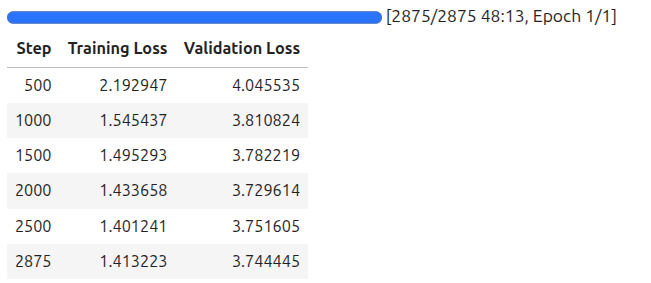
The model reached the lowest evaluation loss on step 2000. As we are loading the best model at the end, let’s save that and use it for inference next.
# Save the Model.
model.save_pretrained('gemma-4-finetuned')
processor.save_pretrained('gemma-4-finetuned')
Inference After Fine-Tuning
The notebook also contains a section where we carry out transcription and translation using the trained model. Here is the code and result.
def do_gemma_4_inference(messages, max_new_tokens=128):
    _ = model.generate(
        **processor.apply_chat_template(
            messages,
            add_generation_prompt=True, # Must add for generation
            tokenize=True,
            return_dict=True,
            return_tensors='pt',
            truncation=False
        ).to('cuda', dtype=torch.bfloat16),
        max_new_tokens=max_new_tokens,
        do_sample=False,
        streamer=TextStreamer(processor, skip_prompt=True),
    )

# Loading the saved model.
from unsloth import FastModel
from transformers import AutoProcessor

processor = AutoProcessor.from_pretrained('gemma-4-finetuned')

model, _ = FastModel.from_pretrained(
    model_name='gemma-4-finetuned',
    max_seq_length=512,
    load_in_4bit=True,
    dtype=torch.bfloat16
)

messages = [
    {
        'role': 'system',
        'content': [
            {
                'type': 'text',
                'text': 'You are an assistant that transcribes and translates speech accurately.',
            }
        ],
    },
    {
        'role': 'user',
        'content': [
            {'type': 'audio', 'audio': test_dataset[-1]['audio']['array']},
            {'type': 'text', 'text': 'Please transcribe this audio and translate to English. Give both, the trancription and the translation'}
        ]
    }
]

do_gemma_4_inference(messages, max_new_tokens=256)
We get the following response:
Transcription: Ich habe so viel Papier geschrieben, ich habe viele Blockaden, kannst du mir helfen diese Blockaden aufzulösen?

Translation: I have written so much paper, I have many blockages, can you help me to resolve these blockages?
The transcription and translation results are almost perfect after fine-tuning.
Evaluation After Fine-Tuning Gemma 4 E2B for Transcription
The gemma4_e2b_finetuned_eval.ipynb Jupyter Notebook contains the code for evaluating the trained model.
We are calculating the WER (Word Error Rate) for the English translation part only while leaving out the German transcription.
Primarily, we are capturing the model response and the ground truth data in a resulting batch which has the following structure.
{'text': ' Und natürlich sind aber auch die Beschäftigten gefährdet, sich anzustecken. Ich denke, das ist eine ganz, ganz schwierige Situation.', 'duration': 8.23, 'speaker': 'DE_WOPw03SbU8g_SPEAKER_04', 'language': 'de', 'dnsmos': 3.0767, 'phone_count': 114, '_id': 'DE_WOPw03SbU8g_W000018', 'audio': , 'reference': 'and of course the employees are also at risk of getting infected i think that is a really really difficult situation', 'prediction': 'and of course the employees are also in danger of getting infected i think that is a very very difficult situation with'}
Then we are calculating the WER between the reference (ground truth) and the prediction.
At the moment, the WER is 58.24, which is a bit too high. This might also happen because German to English translation sometimes might be relative. Although the model is capturing the essence of the sentence, it is not matching the exact ground truth data that we have from the Llama-3.1 8B model. We can also use a larger and better model for creating the initial English ground truth data and see how this project pans out.
Gradio Application
We also have a Gradio application for easier inference of the test audio files from the dataset. However, before that, we need to execute the convert_to_wav.ipynb Jupyter Notebook to convert the 538 test audio files into .wav format.
After running the notebook, we get the test audio files in the test_wav_files directory that we can upload to the Gradio application for inference.
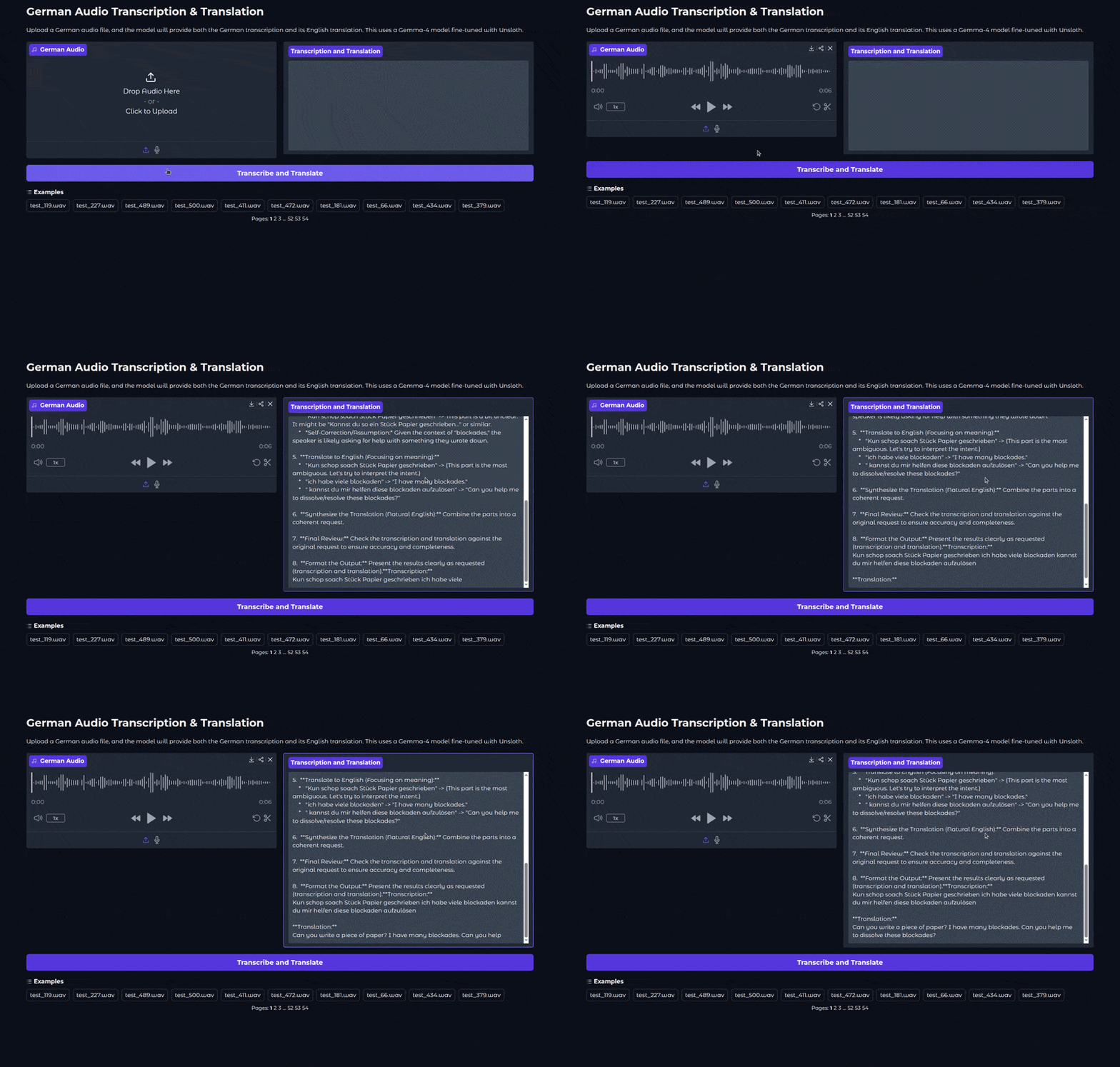
The following is the Gradio application UI.
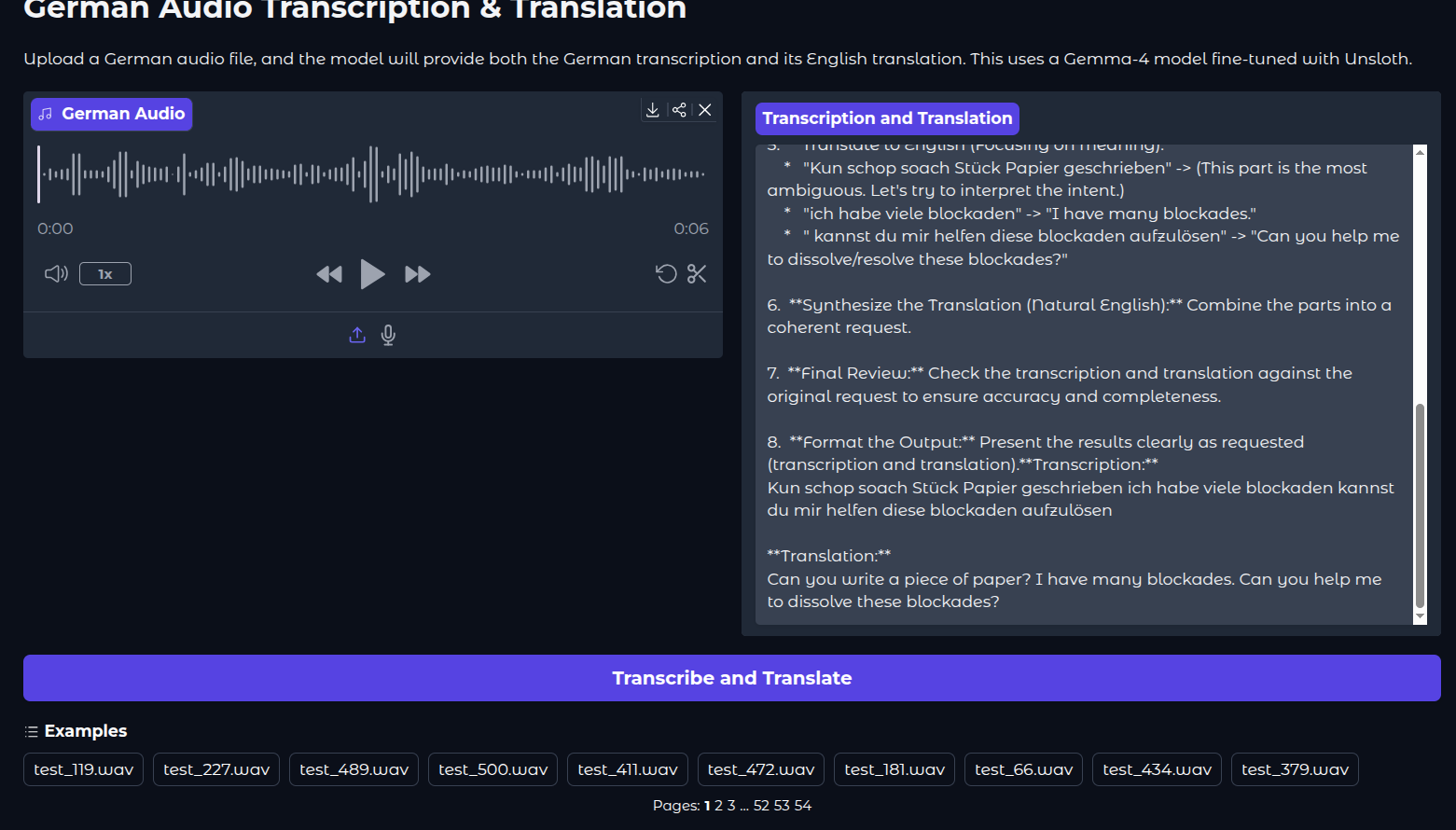
We can run the Gradio application using the following command:
python app.py
The following video shows the model during inference in the application.
We can see that the inference also includes a thinking stage at the moment. We have removed that before the WER evaluation. However, it is difficult to control that via the Unsloth parameters at the moment. Retraining with a system prompt that specifically tells the model to not to include thinking might help here.
Summary and Conclusion
In this article, we fine-tuned the Gemma 4 E2B model for transcription and translation using the Unsloth library. Although the results were not great, we have a good base to keep on experimenting and improving. In future articles, we will carry out vision and text fine-tuning for the same model.
If you have any questions, thoughts, or suggestions, please leave them in the comment section. I will surely address them.
You can contact me using the Contact section. You can also find me on LinkedIn, and X.


1 thought on “Fine-Tuning Gemma 4 for Transcription”