
For the last few years, VLMs (Vision Language Models) have become more powerful at grounding tasks. These include object detection, pointing, and OCR. However, one issue remains. NTP (Next Token Prediction) is suboptimal for predicting the coordinates for a single bounding box or point coordinate. Predicting the numbers for a single object (bounded by a box), which is one atomic unit, token by token, is slow and a practical bottleneck during inference. This is where the latest LocateAnything model by NVIDIA comes in. It introduces a new PBD (Parallel Box Decoding), which decodes a single bounding box in a single step.
In this article, we will cover an introduction to the LocateAnything model. Along with a brief of the important components of the paper, we will also create a simple Gradio application. This application will include the following experiments using the LocateAnything model:
- Object detection
- Text detection and OCR
- Object Pointing
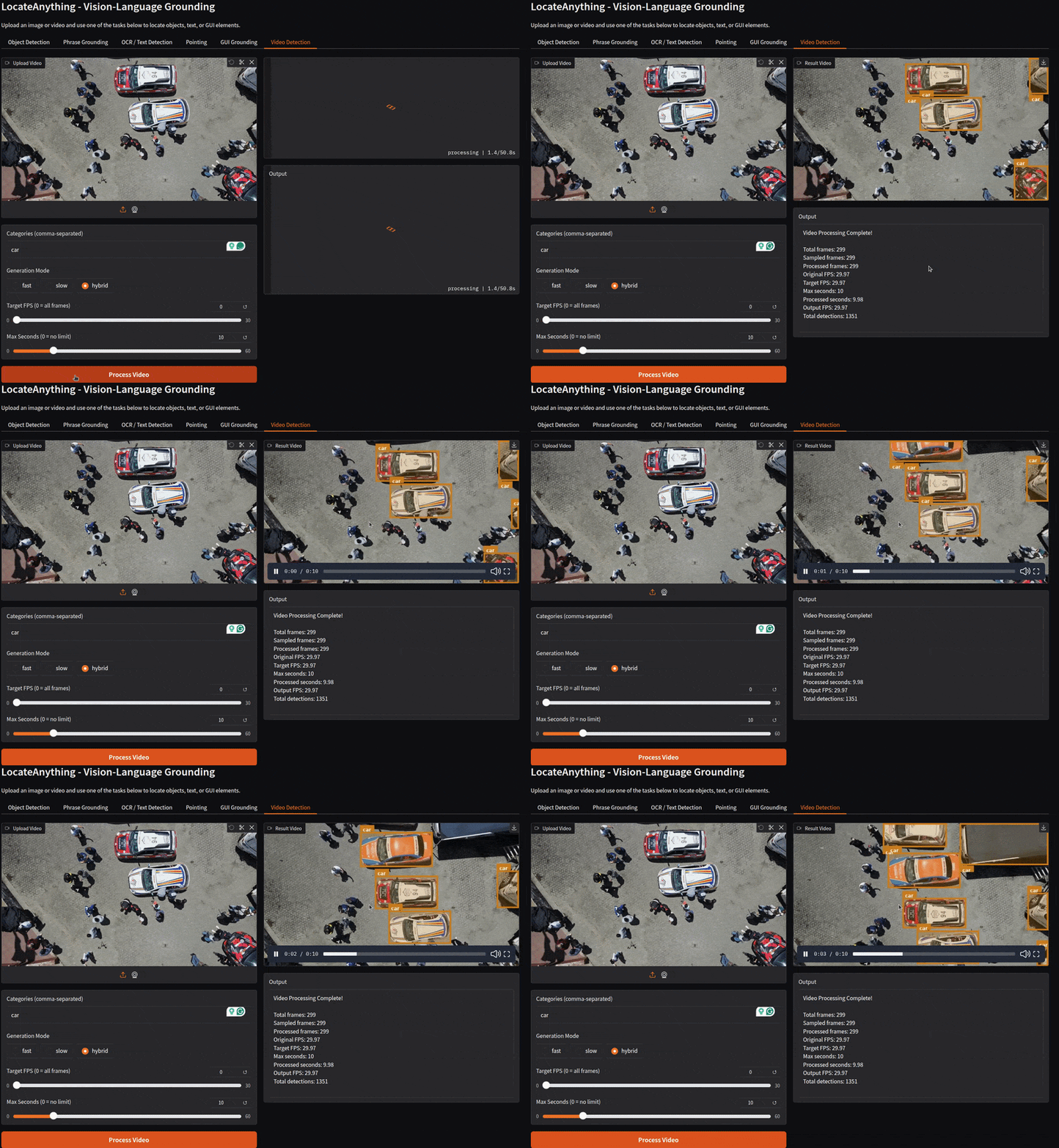
- Object detection in videos
Let’s jump into the article.
NVIDIA LocateAnything – A Single Model for Detection, Pointing, OCR, and GUI Grounding
The LocateAnything model was released by researchers from NVIDIA in the paper – LocateAnything: Fast and High-Quality Vision-Language Grounding with Parallel Box Decoding.
In simple words, it is a vision language model that is capable of object detection, object pointing, OCR, and GUI grounding.
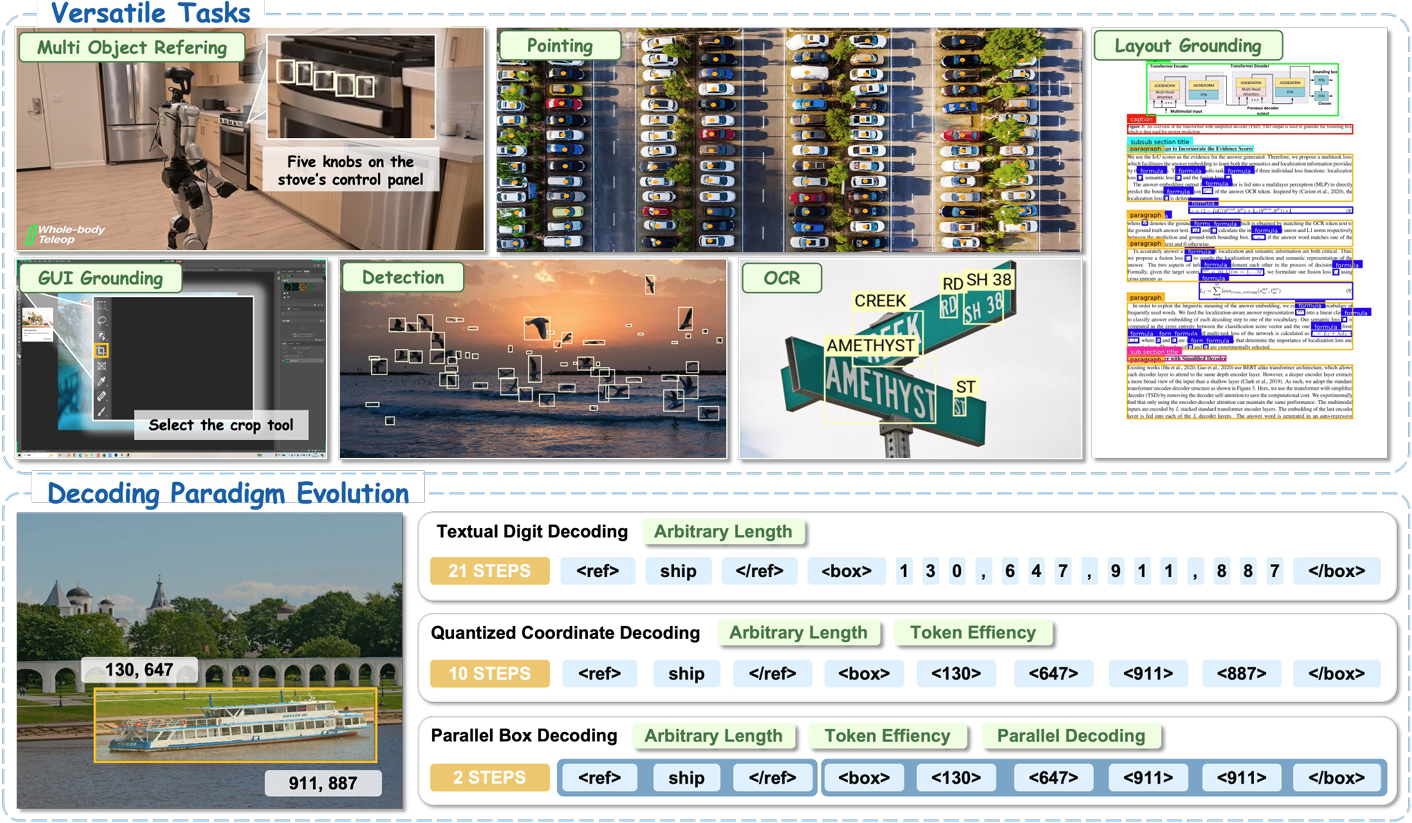
But the story does not end there. There are a lot of practical motivations behind building this mode.
Motivation Behind LocateAnything
The first motivation comes from the modeling side. Traditionally, VLMs break down the object detection task as a coordinate token generation problem. They serialize a 2D coordinate, which is of course a number, into multiple 1D tokens. Instead of regressing numbers as we have in object detection heads, it becomes a token prediction problem. Two issues arise here: first, the mismatch in the coupled structure of the box geometry; second, it is extremely slow.
The second motivation is more practical and caters to the real-world. We are now using VLMs for robotics, understanding navigation, and predicting the next behavior. This asks for a much faster detection and grounding model for real-world scenarios. And token-by-token prediction is a limitation here. That’s where LocateAnything’s PBD (Parallel Box Decoding) comes into the picture.
To address the above issues, the paper proposes two solutions:
- LocateAnything: A unified framework for VLM-based visual detection and grounding.
- Parallel Box Decoding: Treating each bounding box (or point) as one atomic unit, learning to predict the coordinate set (
x1, y1, x2, y2) in one parallel step.
Locate Anything Architecture and Inference Methodology
In this section, we will summarize the primary concepts from Sections 1, 2, and 3 of the paper, which cover:
- The LocateAnything Architecture
- Problem formulation
- Inference methodology
LocateAnything Architecture
LocateAnything is built upon:
- The MoonViT vision encoder
- And the Qwen2.5 language model as decoder
An MLP projector bridges the image encoder and the language decoder.
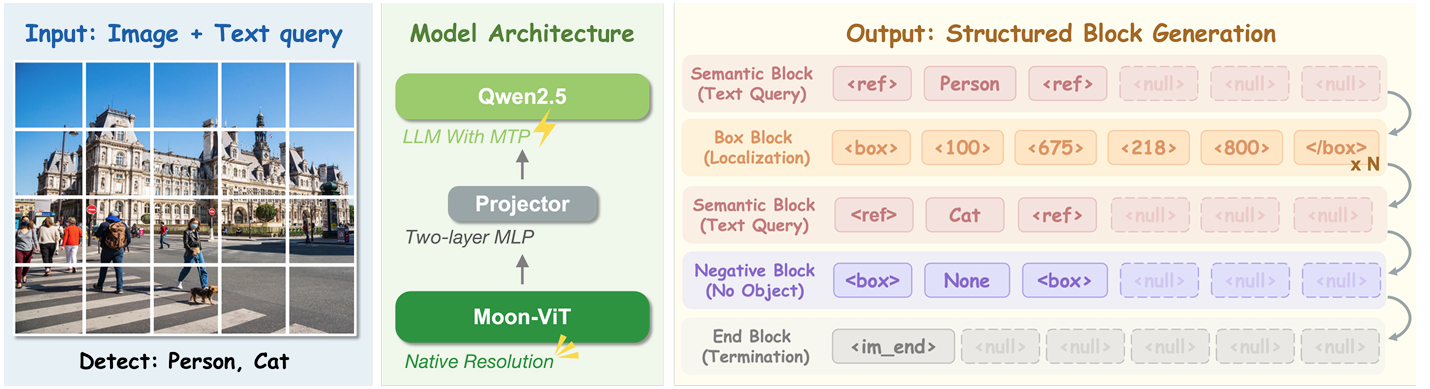
The choice for MoonViT is crucial here, as it maintains the aspect ratio of images during the creation of patch embeddings.
In the above architecture diagram, the output structure is of special interest here. It answers the question of “how does the model generate output boxes?“
The model does not predict the bounding box coordinates token-by-token (which we call NTP or Next Token Prediction). Instead, it outputs the complete box in a single parallel step. This is facilitated by PDB, where the model treats each bounding box coordinate block, normalized between [0, 1000], as a single atomic unit. A single atomic unit (or block as referred in the paper) consists of 6 elements. These include the four coordinates and two structural tokens (
dog<0><639><306><795> <105><456><408><751> <505><488><1000><775> window<0><153><275><382> <552><165><936><381> carNone <|im_end|>
If we observe the above block, the model detects two classes of objects: dog and window. The output block format separates each semantic block (seen in Figure 3) with the tokens. And it separates different objects within the same class with |im_end| token.
Summarizing the above output structure, with PBD, we have four functional blocks as output:
- Semantic block enclosing the class names
- Box block enclosing the coordinates
- Negative block when no objects are present for a given class
- And an End block
LocateAnything Inference Modes
During inference, the NVIDIA LocateAnything model supports three different prediction modes to balance between speed and accuracy.
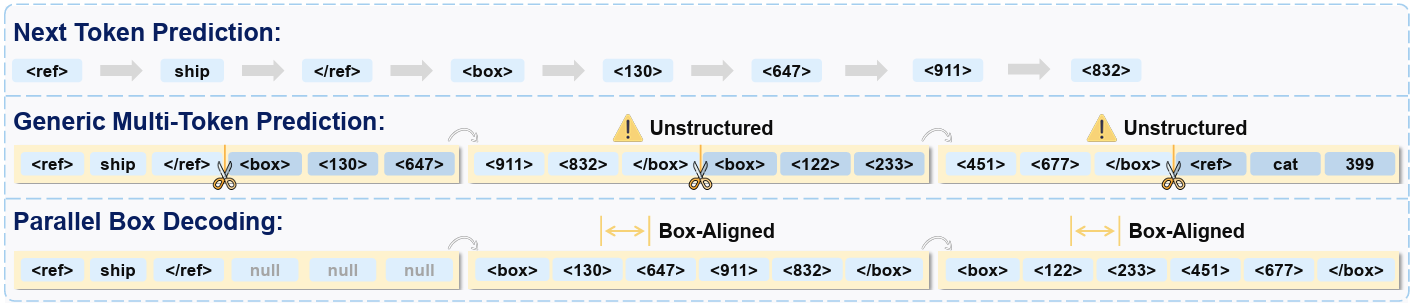
- Fast Mode: This is an MTP (Multi-Token Prediction) mode, which predicts full boxes in parallel. This provides maximum throughput and is best suited for on-device inference, such as robotics and embodied agents.
- Slow Mode: This is the traditional NTP (Next Token Prediction) mode. This is specifically built for predicting tokens autoregressively for maximum stability. It is best suited for high-precision tasks such as data labeling and offline evaluation.
- Hybrid Mode: Hybrid mode is a combination of the above two and uses Fast Mode by default. When the MTP decoding is unreliable or erroneous (which can happen due to malformed box predictions), then it falls back to the Slow Mode. This provides a good balance between speed and accuracy.
We will stop our discussion of the paper here. However, I recommend going through the paper at least once to understand the architecture and evaluations in more detail.
Inference using LocateAnything
In this section, we will cover inference with LocateAnything.
Project Directory Structure
Let’s take a look at the project directory structure.
├── input
│   ├── image_1.jpg
│   ├── image_2 (Copy).jpg
│   ├── image_2.jpg
│   └── video_1.mp4
├── app.py
├── inference.py
└── requirements.txt
- We have two Python scripts,
app.pyandinference.py. The former contains the Gradio frontend code, and the latter contains the LocateAnything model inference logic. - The input directory contains a few images and videos that we will use for experiments.
- We also have a requirements file for streamlined setup.
All the source code and files are available in zip format for download along with this article.
Download Code
Installing Requirements
We can install all the necessary dependencies via the requirements file.
pip install -r requirements.txt
This is all the setup we need.
LocateAnything Inference Logic
We will skip most of the Gradio and object annotation code here. We will take a look at the core inference class, which is part of the inference.py script. In the inference class, we support the following workflows:
- Object detection
- Object pointing
- Text detection and OCR
- GUI grounding
- Object detection in videos
The following code block shows the entirety of LocateAnythingWorker.
class LocateAnythingWorker:
"""Stateful worker that loads the model once and serves perception queries."""
def __init__(self, model_path: str, device: str = "cuda", dtype=torch.bfloat16):
self.device = device
self.dtype = dtype
self.tokenizer = AutoTokenizer.from_pretrained(model_path, trust_remote_code=True)
self.processor = AutoProcessor.from_pretrained(model_path, trust_remote_code=True)
self.model = AutoModel.from_pretrained(
model_path,
torch_dtype=dtype,
trust_remote_code=True,
).to(device).eval()
@torch.no_grad()
def predict(
self,
image: Image.Image,
question: str,
generation_mode: str = "hybrid", # "fast" (MTP) | "slow" (NTP/AR) | "hybrid"
max_new_tokens: int = 2048,
temperature: float = 0.7,
verbose: bool = True,
) -> dict:
messages = [
{"role": "user", "content": [
{"type": "image", "image": image},
{"type": "text", "text": question},
]}
]
text = self.processor.py_apply_chat_template(
messages, tokenize=False, add_generation_prompt=True
)
images, videos = self.processor.process_vision_info(messages)
inputs = self.processor(
text=[text], images=images, videos=videos, return_tensors="pt"
).to(self.device)
pixel_values = inputs["pixel_values"].to(self.dtype)
input_ids = inputs["input_ids"]
image_grid_hws = inputs.get("image_grid_hws", None)
response = self.model.generate(
pixel_values=pixel_values,
input_ids=input_ids,
attention_mask=inputs["attention_mask"],
image_grid_hws=image_grid_hws,
tokenizer=self.tokenizer,
max_new_tokens=max_new_tokens,
use_cache=True,
generation_mode=generation_mode,
temperature=temperature,
do_sample=True,
top_p=0.9,
repetition_penalty=1.1,
verbose=verbose,
)
result = {"answer": response[0] if isinstance(response, tuple) else response}
if isinstance(response, tuple) and len(response) >= 3:
result["history"] = response[1]
result["stats"] = response[2]
return result
# Convenience methods for each task
def detect(self, image: Image.Image, categories: list[str], **kwargs) -> dict:
"""Object detection / document layout analysis."""
cats = "".join(categories)
prompt = f"Locate all the instances that matches the following description: {cats}."
return self.predict(image, prompt, **kwargs)
def ground_single(self, image: Image.Image, phrase: str, **kwargs) -> dict:
"""Phrase grounding — single instance."""
prompt = f"Locate a single instance that matches the following description: {phrase}."
return self.predict(image, prompt, **kwargs)
def ground_multi(self, image: Image.Image, phrase: str, **kwargs) -> dict:
"""Phrase grounding — multiple instances."""
prompt = f"Locate all the instances that match the following description: {phrase}."
return self.predict(image, prompt, **kwargs)
def ground_text(self, image: Image.Image, phrase: str, **kwargs) -> dict:
"""Text grounding."""
prompt = f"Please locate the text referred as {phrase}."
return self.predict(image, prompt, **kwargs)
def detect_text(self, image: Image.Image, **kwargs) -> dict:
"""Scene text detection."""
prompt = "Detect all the text in box format."
return self.predict(image, prompt, **kwargs)
def ground_gui(self, image: Image.Image, phrase: str, output_type: str = "box", **kwargs) -> dict:
"""GUI grounding (box or point)."""
if output_type == "point":
prompt = f"Point to: {phrase}."
else:
prompt = f"Locate the region that matches the following description: {phrase}."
return self.predict(image, prompt, **kwargs)
def point(self, image: Image.Image, phrase: str, **kwargs) -> dict:
"""Pointing."""
prompt = f"Point to: {phrase}."
return self.predict(image, prompt, **kwargs)
# Utility: parse model output
@staticmethod
def parse_boxes(answer: str, image_width: int, image_height: int) -> list[dict]:
"""Parse model output into pixel-coordinate bounding boxes.
Coordinates in model output are normalized integers in [0, 1000].
"""
boxes = []
for m in re.finditer(r"<(\d+)><(\d+)><(\d+)><(\d+)> ", answer):
x1, y1, x2, y2 = [int(g) for g in m.groups()]
boxes.append({
"x1": x1 / 1000 * image_width,
"y1": y1 / 1000 * image_height,
"x2": x2 / 1000 * image_width,
"y2": y2 / 1000 * image_height,
})
return boxes
@staticmethod
def parse_points(answer: str, image_width: int, image_height: int) -> list[dict]:
"""Parse model output into pixel-coordinate points."""
points = []
for m in re.finditer(r"<(\d+)><(\d+)> ", answer):
x, y = int(m.group(1)), int(m.group(2))
points.append({
"x": x / 1000 * image_width,
"y": y / 1000 * image_height,
})
return points
@staticmethod
def parse_text_boxes(answer: str, image_width: int, image_height: int) -> list[dict]:
"""Parse model output into text boxes with associated text.
Handles cases where one label is followed by multiple elements.
Each box is associated with the most recent that came before it.
Format: text content<(\d+)><(\d+)><(\d+)><(\d+)> ", answer)]
for box_coords in boxes:
x1_str, y1_str, x2_str, y2_str, box_pos = box_coords
# Find the most recent ref that came before this box
current_label = ""
for ref_text, ref_end_pos in reversed(refs):
if ref_end_pos <= box_pos:
current_label = ref_text
break
x1, y1, x2, y2 = [int(g) for g in [x1_str, y1_str, x2_str, y2_str]]
text_boxes.append({
"text": current_label,
"x1": x1 / 1000 * image_width,
"y1": y1 / 1000 * image_height,
"x2": x2 / 1000 * image_width,
"y2": y2 / 1000 * image_height,
})
return text_boxes
def detect_video(
self,
video_path: str,
categories: list[str],
output_path: str,
generation_mode: str = "hybrid",
target_fps: int = None,
max_seconds: int = None,
**kwargs
) -> dict:
"""Run detection on a video file.
Args:
video_path: Path to input video file
categories: List of category strings to detect
output_path: Path to save output video
generation_mode: Generation mode for inference
target_fps: Target FPS to sample (None = process all frames)
max_seconds: Maximum seconds of video to process (None = process all)
**kwargs: Additional arguments passed to predict()
Returns:
Dict with stats about the video processing
"""
import gc
# Read video
cap = cv2.VideoCapture(video_path)
if not cap.isOpened():
raise ValueError(f"Failed to open video file: {video_path}")
fps = cap.get(cv2.CAP_PROP_FPS)
vid_w = int(cap.get(cv2.CAP_PROP_FRAME_WIDTH))
vid_h = int(cap.get(cv2.CAP_PROP_FRAME_HEIGHT))
# Read all frames
all_frames = []
while cap.isOpened():
ret, frame = cap.read()
if not ret:
break
all_frames.append(frame)
cap.release()
total_frames = len(all_frames)
if total_frames == 0:
raise ValueError("Failed to read any frames from the video.")
# Calculate max frames based on max_seconds
if max_seconds is not None and max_seconds > 0:
max_frames_limit = int(max_seconds * fps)
all_frames = all_frames[:max_frames_limit]
total_frames = len(all_frames)
# Sample frames based on target_fps
if target_fps is not None and target_fps > 0 and fps > target_fps:
# Calculate sampling interval
sample_interval = int(fps / target_fps)
sampled_indices = list(range(0, total_frames, sample_interval))
frames_to_process = [all_frames[i] for i in sampled_indices]
else:
# Process all frames
sampled_indices = list(range(total_frames))
frames_to_process = all_frames
category_str = "".join(categories)
# Run inference on sampled frames
inference_results = []
processed_count = 0
for i, frame in enumerate(frames_to_process):
# Convert BGR to RGB for PIL
pil_img = Image.fromarray(cv2.cvtColor(frame, cv2.COLOR_BGR2RGB))
# Run inference
result = self.detect(pil_img, categories, generation_mode=generation_mode, verbose=False, **kwargs)
output_text = result["answer"]
inference_results.append(output_text)
processed_count += 1
# Clean up GPU memory
if torch.cuda.is_available():
torch.cuda.empty_cache()
gc.collect()
# Draw detections and create output video
# Calculate output FPS based on sampling
if target_fps is not None and target_fps > 0 and fps > target_fps:
out_fps = target_fps
else:
out_fps = fps
fourcc = cv2.VideoWriter_fourcc(*"mp4v")
out = cv2.VideoWriter(output_path, fourcc, out_fps, (vid_w, vid_h))
detections_summary = []
for i, (frame, output_text) in enumerate(zip(frames_to_process, inference_results)):
# Parse detections
detections = parse_mixed_results(output_text, category_str)
valid_results = postprocess_detections(detections, vid_w, vid_h)
# Draw on frame
frame_to_draw = draw_on_frame(frame, valid_results, draw_label=True)
out.write(frame_to_draw)
# Collect summary
for det in valid_results:
detections_summary.append({
"frame": sampled_indices[i] + 1,
"label": det.get("label", "object"),
"type": det.get("type", "box"),
"coords": det.get("coords", [])
})
out.release()
stats = {
"total_frames": total_frames,
"sampled_frames": len(sampled_indices),
"processed_frames": processed_count,
"original_fps": fps,
"target_fps": target_fps if target_fps else fps,
"max_seconds": max_seconds,
"processed_seconds": total_frames / fps if fps > 0 else 0,
"output_fps": out_fps,
"detections_count": len(detections_summary)
}
return stats
We have a few things going on in the above code block.
- The very first thing we do in the
__init__method is loading the model and the tokenizer. - The
predictmethod works as the global inference function, accepting all types of inference requests, be it detection, pointing, or GUI grounding. - Then we have different convenience methods for different tasks, including object detection, pointing, GUI grounding, text detection, and phrase grounding. In phrase grounding, we detect a single text in a document or image that matches the user input.
- There are utility methods for parsing the bounding boxes, points, and text boxes as well.
- One of the more complex workflows is the video detection method. Here, we extract all the frames from the video and carry out inference frame-by-frame. As video detection can be time-consuming, we have an option to choose the FPS and the number of seconds we want to run the detection.
This is most of the core logic we have. Let’s see some results.
LocateAnything Inference Results
All the inference experiments were carried out on an RTX 3080 10GB GPU.
We can run the application by executing the following command.
python app.py
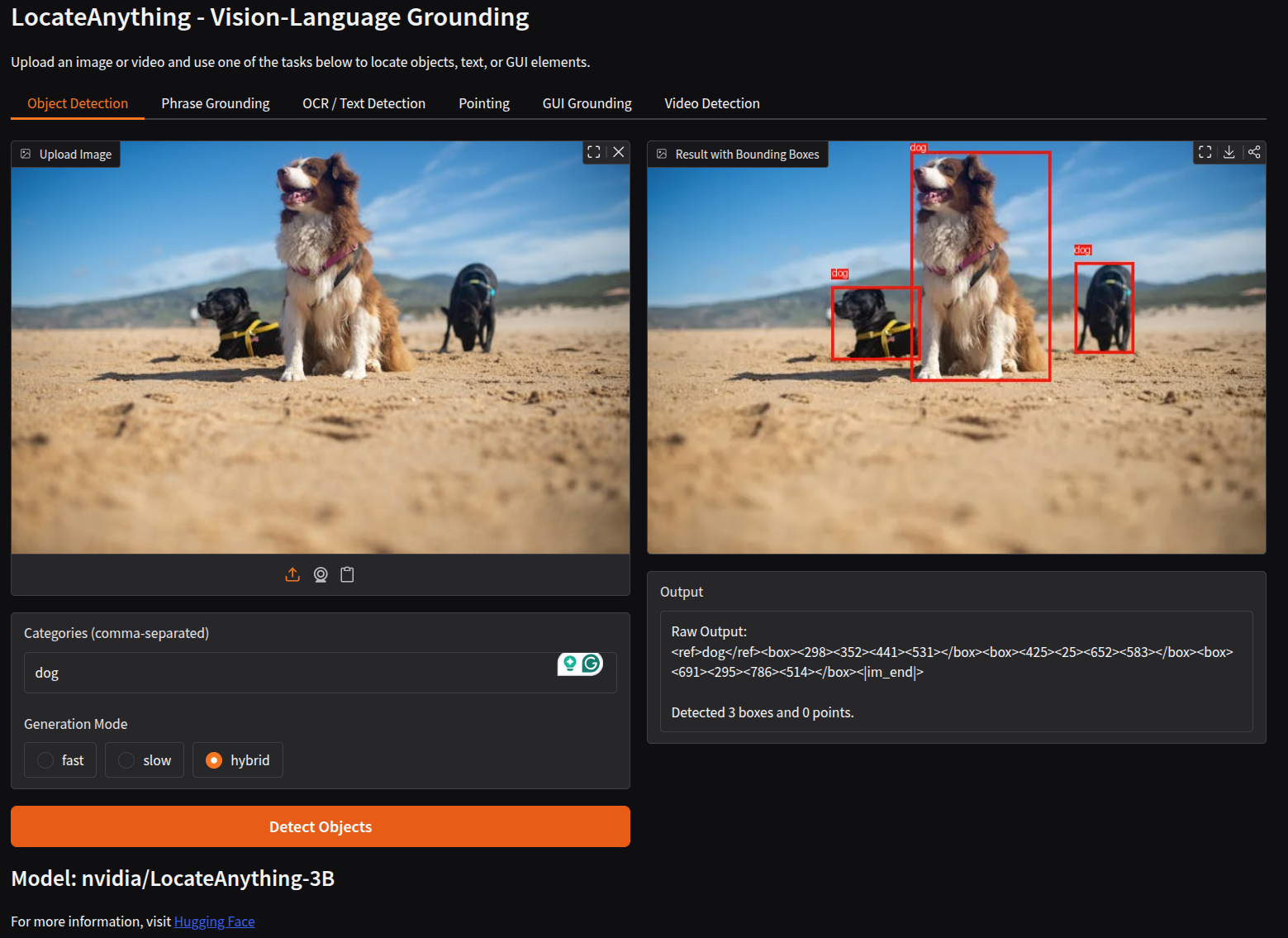
The following figure shows what the Gradio app GUI looks like.
Along with the detection (or any other task) annotation, we also show the raw outputs.
LocateAnything Object Detection
Let’s take a look at multi-object detection results.
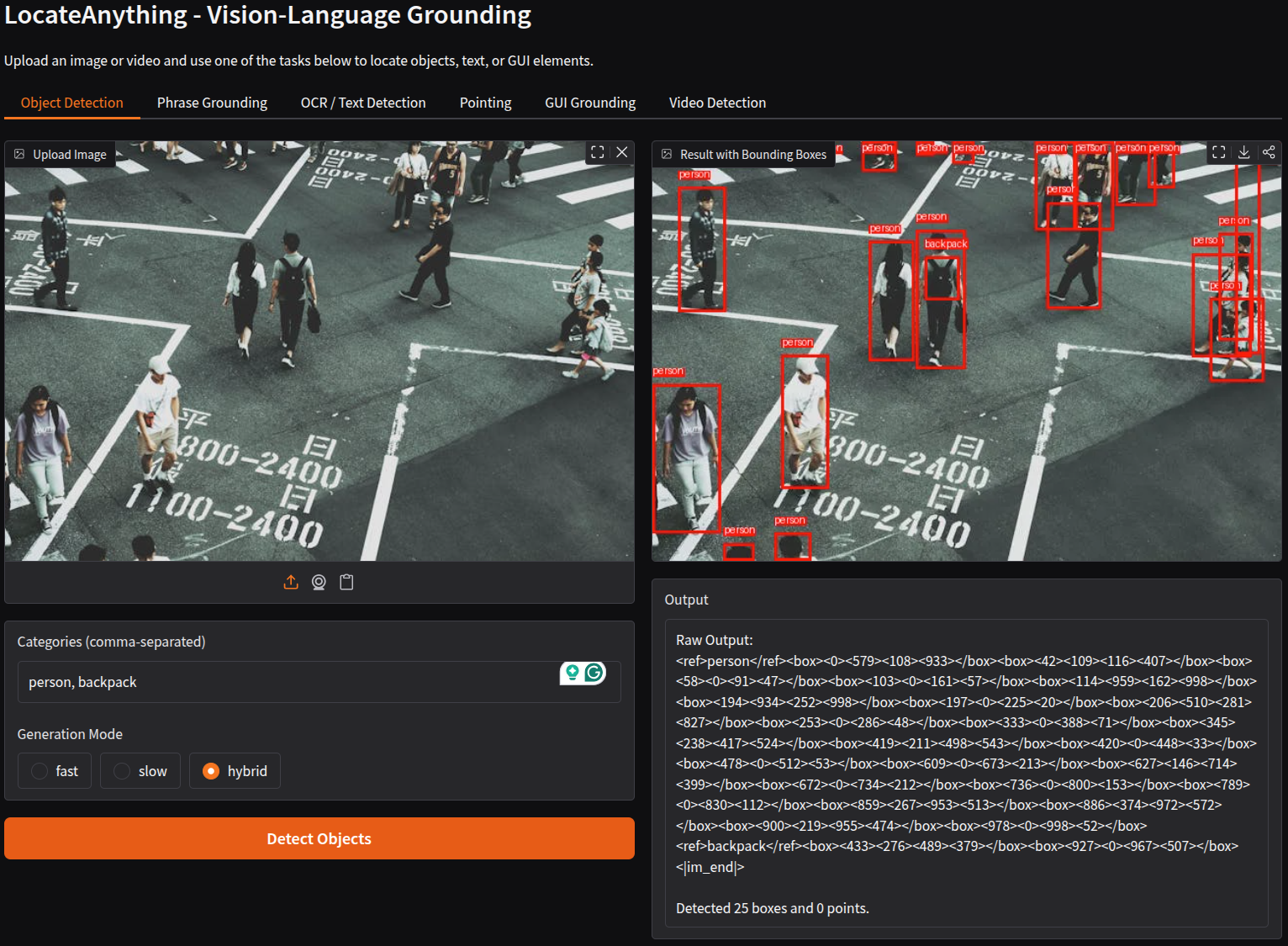
We asked the model to detect persons and backpacks in the above image. What’s impressive is that the model is capable of detecting the person when most of their body is hidden in the frame. It can detect the backpack on one of the people accurately. However, we can also see false positives for backpacks in the top-right corner. It might so happen that using high-resolution images solves the issue.
LocateAnything Pointing
Let’s try out object pointing now.
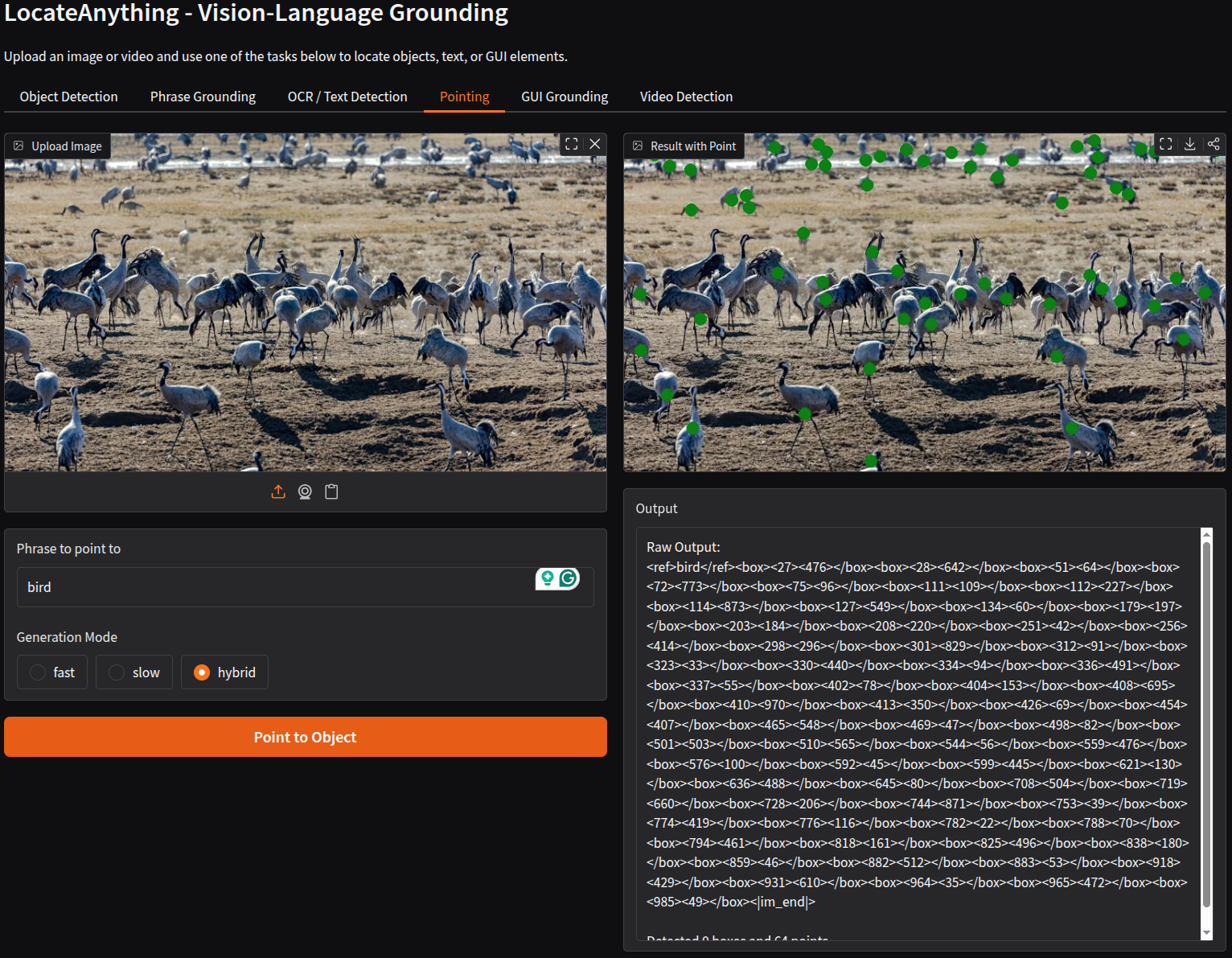
Here we ask the model to point to all the birds. It was able to point to most of them. However, it missed those that are partially occluded and the ones that are out of focus at the back.
LocateAnything Text Detection and OCR
Let’s carry out text detection and OCR now.
We used a receipt from the SROIE v2 data for text detection and OCR here. The following is the result.
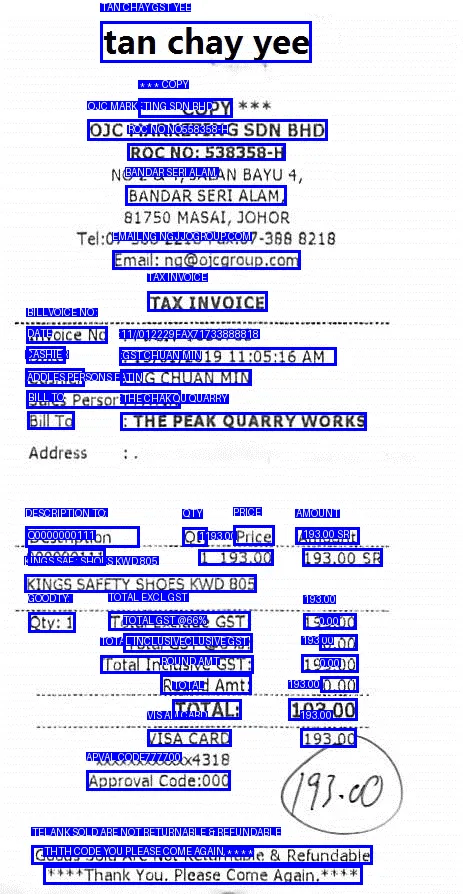
The results good but not great. Although all the text detection happened accurately, the OCR is not very accurate.
LocateAnything Video Object Detection
In the above video, we prompt the model to detect cars. We set the FPS to 0, which accounts for the original FPS of the video, and we carry out detection on 5 seconds of the video. Being a general object detection model, the model performs quite well here. One thing to note here is that we do not get real-time detection on videos with an RTX 3080 GPU. To address that, much more powerful cloud GPUs might be a necessity.
Summary and Conclusion
We covered a brief introduction to the NVIDIA LocateAnything model in this article. We started with a discussion of the important components of the paper and then moved to the inference. The inference results revealed the general strengths and weaknesses of the model. I hope this article was worth your time.
If you have any questions, thoughts, or suggestions, please leave them in the comment section. I will surely address them.
You can contact me using the Contact section. You can also find me on LinkedIn, and X.
References