

Since LLMs and Generative AI dropped, AI inference services are one of the hottest startup spaces. Services like Fal and Together provide hosted models that we can use via APIs and SDKs. While Fal focuses more on the image generation (vision space) [at the moment], Together focuses more on LLMs, VLMs, and a bit of image generation models as well. In this article, we will jump into serverless inference with Together.

Serverless inference primarily refers to hosted models that we can directly use via API calls (think curl command on a terminal) or calls from SDKs as well. We need not host the models ourselves. The load, GPU, latency, and other hardware/software components are managed by the service (Together here). We just need to manage the API calls and think about handling incoming user requests and the output from the model.
What will we cover in serverless inference with Together?
- How to send a command to an LLM via Python SDK?
- How to send an image generation command to the FLUX model?
- What is the process to chat with a VLM using a local image?
- How do we create a Gradio application using the serverless models provided on Together? All the while handling chat history and text streaming.
Project Directory Structure
Let’s take a look at the directory structure.
.
├── app.py
├── chat.py
├── image_gen.py
├── .env
└── vision_chat.py
We have four Python files.
chat.pycontains the code to make an API call to one of the language models using the Python SDK.vision_chat.pycontains the code to make an API call to a vision language model.- Using
image_gen.py, we make an API call to an image generation model. - Finally, the
app.pyfile contains the code for creating a Gradio application where we can chat with any of the serverless language models hosted by Together.
Note that, although we will be using all the free models available via the serverless inference, we still need an API key. Create an account on Together and paste your API key in a .env file in the same folder as shown in the folder structure. Upon creating an account, you will get $25 free credit that you can use to experiment with paid models as well.
TOGETHER_API_KEY=YOUR_API_KEY
All the files are available for download via the download section.
Download Code
Installing Dependencies
There are three major dependencies for moving forward with this post.
- Together AI Python package
pip install together
- Gradio for creating the final application
pip install gradio
- Requests package to download images
pip install requests
Let’s jump right into the code now.
Serveless Language Model Chat Inference with Together
We will start with the language model serverless inference using Together.
The code is present in chat.py.
The following block contains the entire code.
from together import Together
from dotenv import load_dotenv

import os

load_dotenv()

api_key = os.getenv('TOGETHER_API_KEY')

client = Together(api_key=api_key)

model = 'meta-llama/Llama-3.3-70B-Instruct-Turbo-Free'

max_tokens = 8096

prompt = "What is the Transformer neural network architecture?"

stream = client.chat.completions.create(
    model=model,
    messages=[
      {
        'role': 'user',
        'content': prompt
      }
    ],
    max_tokens=max_tokens,
    stream=True
)

for chunk in stream:
    try:
        print(chunk.choices[0].delta.content, end='', flush=True)
    except:
        print('')
Let’s go through the code:
- We import the
Togetherclass from thetogethermodule. We need this to initialize the client. - Next, we load our API key from the
.envfile. - We are using the
meta-llama/Llama-3.3-70B-Instruct-Turbo-Freewhich is one of the free models available on Together. - Then we define maximum number of output tokens that we want and the prompt.
- We are making a streaming API call using
client.chat.completions.createwithstream=True, which returns a generator that yields parts of the response incrementally. This allows the text output to be processed (e.g., printed to stdout) as it’s being generated. - Finally, as the chunks are arriving via the stream, we print them on the terminal.
We can execute the code via the following command.
python chat.py
The following GIF shows what the streaming output looks like.

You can play around with other prompts as well.
Serveless VLM Inference with Together
Next, we will move to an API call using a vision language model. The code for this is present in the vision_chat.py file.
from together import Together
from dotenv import load_dotenv

import os
import base64

load_dotenv()

api_key = os.getenv('TOGETHER_API_KEY')

client = Together(api_key=api_key)

model = 'meta-llama/Llama-Vision-Free'

prompt = 'Describe the image in detail.'

image_url = 'image.png'

def encode_image(image_path):
        with open(image_path, 'rb') as image_file:
            return base64.b64encode(image_file.read()).decode('utf-8')

base64_image = encode_image(image_url)

stream = client.chat.completions.create(
    model=model,
    messages=[
        {
            'role': 'user',
            'content': [
                {'type': 'text', 'text': prompt},
                {
                    'type': 'image_url',
                    'image_url': {
                        'url': f'data:image/jpeg;base64,{base64_image}',
                    },
                },
            ],
        }
    ],
    stream=True,
)

for chunk in stream:
    try:
        print(chunk.choices[0].delta.content, end='', flush=True)
    except:
        print('')
- In this case, we are using the free
meta-llama/Llama-Vision-Freewhich is the Llama 3.2 11B vision language model. - We define a prompt and provide a path to a local image using the
image_urlvariable. You can provide path to the image you have in your local system. - We have a small helper function,
encode_imagethat encodes the image into base64 format to be passed to the API call. - Next, we make the API call. This time, the user content has two dictionaries. One for the text prompt and another for passing the base64 encoded image.
- Finally, we stream the output.
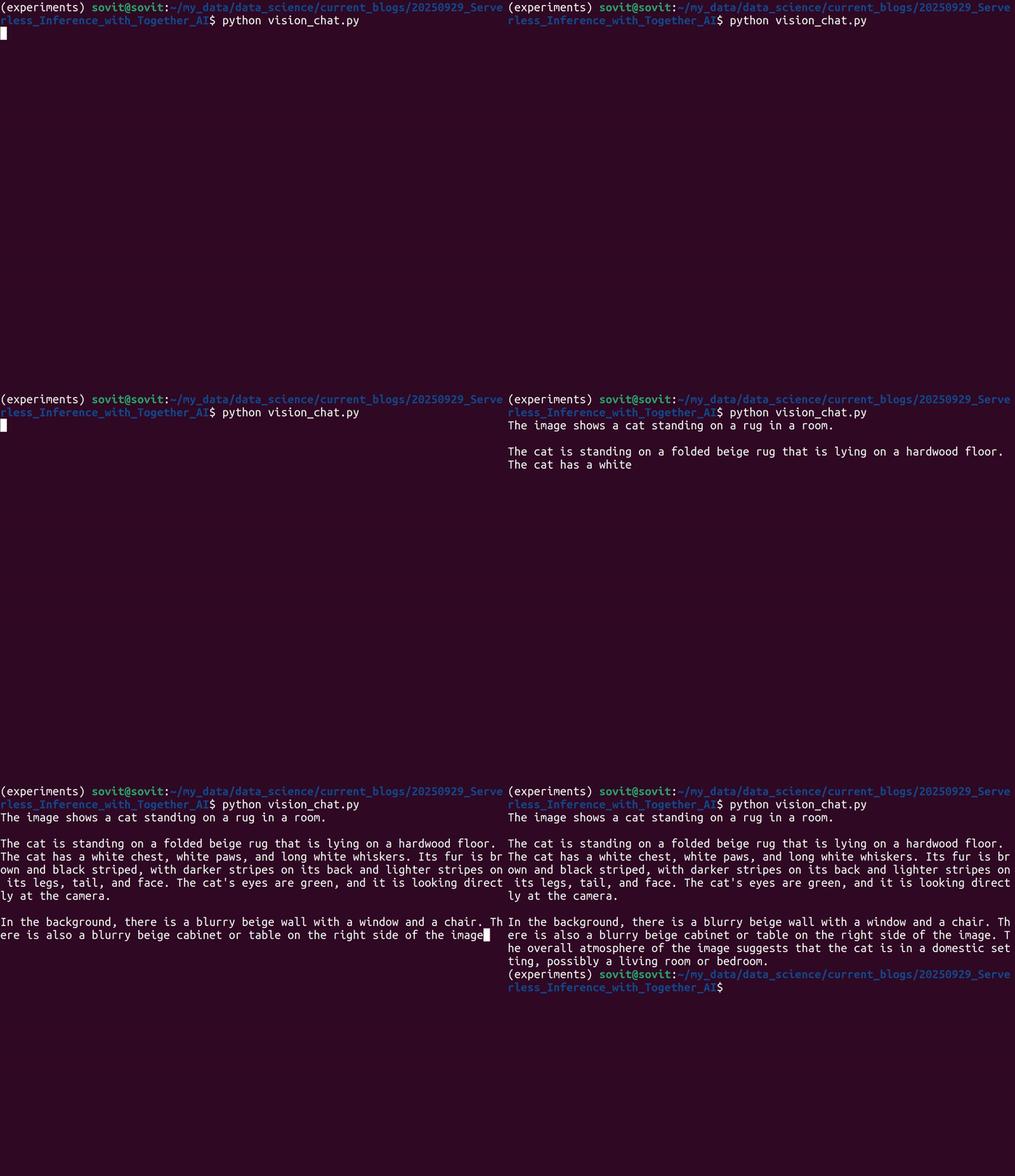
Execute the code via the following command.
python vision_chat.py
As the image was of a cat, this is what the streaming output looks like.
You can visit this article if you want to start with fine-tuning Llama 3.2 vision.
Serverless Image Generation Inference with Together
Now, we will move to an image generation model. We will use the FLUX Schnell model, which is available for free API calls, to generate an image.
The code for this is present in the image_gen.py file.
from together import Together
from dotenv import load_dotenv

import os
import requests

load_dotenv()

api_key = os.getenv('TOGETHER_API_KEY')

client = Together(api_key=api_key)

model = 'black-forest-labs/FLUX.1-schnell-Free'

prompt = 'A cat on a mat.'

response = client.images.generate(
    prompt=prompt,
    model=model,
    steps=2,
    n=1
)

print(response)
image_url = response.data[0].url
print(image_url)

response = requests.get(image_url)
with open('image.png', 'wb') as file:
    file.write(response.content)
- After initializing the modules, we are defining the image generation model, which is
black-forest-labs/FLUX.1-schnell-Free. - Then we define the prompt to generate an image of a cat.
- The image generation endpoint accepts the prompt, the model name, the number of inference steps, and
ndefines the number of images to generate. - We extract the URL from the response and save the image using the
requestslibrary.
We execute the code using the following command.
python image_gen.py
The response looks like the following, where we are interested in the URL.
id='o5jtb6B-2kFHot-969a40b9b8fdcbcd-PDX' model='black-forest-labs/FLUX.1-schnell-Free' object='list' data=[ImageChoicesData(index=0, b64_json=None, url='https://api.together.ai/shrt/sD3DbBE4hoyWWvAI', timings={'inference': 0.7588069010525942})]
Following is the image that was generated.

Creating a Gradio Chat Application with Together Serverless Inference
For the final part of this article, we will create a Gradio application where we can chat with almost all the serverless language models from Together.
The code is present in app.py.
Import Statements
The following are all the imports that we need along the way.
"""
A Gradio streaming UI for the Together.ai Chat API.

This application provides a user-friendly interface to interact with various
language models available through Together.ai, supporting real-time,
streaming responses.
"""

import gradio as gr
import os

from together import Together
from dotenv import load_dotenv

# Load environment variables from a .env file.
# The .env file should contain your TOGETHER_API_KEY.
load_dotenv()
If you have the .env file present in the project directory, then you need not paste the API key again in the Gradio UI.
Creating a Dictionary Mapping for Supported Models
Next, we need to create a dictionary mapping for the models that we want our application to support. We will include free and paid models.
# A dictionary mapping user-friendly model names to their API strings.
# The list is structured to show Free models first, then Paid models, sorted alphabetically.
MODELS = {
    # Free Models
    'Llama 3.3 70B Instruct Turbo (Free)': 'meta-llama/Llama-3.3-70B-Instruct-Turbo-Free',

    # Paid Models
    'DeepSeek R1 Distill Llama 70B': 'deepseek-ai/DeepSeek-R1-Distill-Llama-70B',
    'DeepSeek R1 Distill Qwen 1.5B': 'deepseek-ai/DeepSeek-R1-Distill-Qwen-1.5B',
    'DeepSeek R1 Distill Qwen 14B': 'deepseek-ai/DeepSeek-R1-Distill-Qwen-14B',
    'DeepSeek-R1-0528': 'deepseek-ai/DeepSeek-R1',
    'DeepSeek-R1-0528 Throughput': 'deepseek-ai/DeepSeek-R1-0528-tput',
    'DeepSeek-V3-0324': 'deepseek-ai/DeepSeek-V3',
    'GLM 4.5 Air': 'zai-org/GLM-4.5-Air-FP8',
    'Gemma 2 27B': 'google/gemma-2-27b-it',
    'Gemma 3N E4B Instruct': 'google/gemma-3n-E4B-it',
    'Gemma Instruct (2B)': 'google/gemma-2b-it',
    'Kimi K2 Instruct': 'moonshotai/Kimi-K2-Instruct',
    'Llama 3 8B Instruct Lite': 'meta-llama/Meta-Llama-3-8B-Instruct-Lite',
    'Llama 3 8B Instruct Reference': 'meta-llama/Llama-3-8b-chat-hf',
    'Llama 3 70B Instruct Reference': 'meta-llama/Llama-3-70b-chat-hf',
    'Llama 3.1 8B Instruct Turbo': 'meta-llama/Meta-Llama-3.1-8B-Instruct-Turbo',
    'Llama 3.1 405B Instruct Turbo': 'meta-llama/Meta-Llama-3.1-405B-Instruct-Turbo',
    'Llama 3.1 Nemotron 70B': 'nvidia/Llama-3.1-Nemotron-70B-Instruct-HF',
    'Llama 3.2 3B Instruct Turbo': 'meta-llama/Llama-3.2-3B-Instruct-Turbo',
    'Llama 3.3 70B Instruct Turbo': 'meta-llama/Llama-3.3-70B-Instruct-Turbo',
    'Llama 4 Maverick (17Bx128E)': 'meta-llama/Llama-4-Maverick-17B-128E-Instruct-FP8',
    'Llama 4 Scout (17Bx16E)': 'meta-llama/Llama-4-Scout-17B-16E-Instruct',
    'Magistral Small 2506 API': 'mistralai/Magistral-Small-2506',
    'Marin 8B Instruct': 'marin-community/marin-8b-instruct',
    'Mistral (7B) Instruct': 'mistralai/Mistral-7B-Instruct-v0.1',
    'Mistral (7B) Instruct v0.2': 'mistralai/Mistral-7B-Instruct-v0.2',
    'Mistral (7B) Instruct v0.3': 'mistralai/Mistral-7B-Instruct-v0.3',
    'Mistral Small 3 Instruct (24B)': 'mistralai/Mistral-Small-24B-Instruct-2501',
    'MythoMax-L2 (13B)': 'Gryphe/MythoMax-L2-13b',
    'Nous Hermes 2 - Mixtral 8x7B-DPO': 'NousResearch/Nous-Hermes-2-Mixtral-8x7B-DPO',
    'Perplexity AI R1-1776': 'perplexity-ai/r1-1776',
    'QwQ-32B': 'Qwen/QwQ-32B',
    'Qwen 2 Instruct (72B)': 'Qwen/Qwen2-72B-Instruct',
    'Qwen2 VL 72B Instruct': 'Qwen/Qwen2-VL-72B-Instruct',
    'Qwen 2.5 7B Instruct Turbo': 'Qwen/Qwen2.5-7B-Instruct-Turbo',
    'Qwen 2.5 72B Instruct Turbo': 'Qwen/Qwen2.5-72B-Instruct-Turbo',
    'Qwen 2.5 Coder 32B Instruct': 'Qwen/Qwen2.5-Coder-32B-Instruct',
    'Qwen2.5 Vision Language 72B Instruct': 'Qwen/Qwen2.5-VL-72B-Instruct',
    'Qwen3 235B A22B Throughput': 'Qwen/Qwen3-235B-A22B-fp8-tput',
    'Qwen3 235B-A22B Instruct 2507': 'Qwen/Qwen3-235B-A22B-Instruct-2507-tput',
    'Qwen3 235B-A22B Thinking 2507': 'Qwen/Qwen3-235B-A22B-Thinking-2507',
    'Qwen3-Coder 480B-A35B Instruct': 'Qwen/Qwen3-Coder-480B-A35B-Instruct-FP8',
}


# The recommended default model for getting started.
RECOMMENDED_MODEL_DISPLAY_NAME = 'Llama 3.3 70B Instruct Turbo'
You can find all the Together serverless models here. We can include more models in the future as they get released.
Helper Function to Create Model Lists
The following function creates two lists, one containing free models and another containing paid models. We need this for displaying in the Gradio UI.
def get_model_choices():
    """
    Creates a list of model choices for the Gradio dropdown.

    It separates the models into 'Free' and 'Paid' categories.
    """

    # Find all free models by checking for '(Free)' in the name.
    free_models = sorted([name for name in MODELS if '(Free)' in name])
    paid_models = sorted([name for name in MODELS if '(Free)' not in name])


    # Create tuples for gr.Dropdown with separators.
    choices = []
    if free_models:
        choices.append(('--- Free Models ---', None))
        choices.extend(free_models)

    if paid_models:
        choices.append(('--- Paid Models ---', None))
        choices.extend(paid_models)

    return choices
Helper Function for Chat Streaming
The following helper function handles chat streams, chat history, and makes the API call to the model.
def chat_stream(api_key, model_display_name, user_message, chat_history, temperature, max_tokens, top_p):
"""
Generates a streaming response from the Together.ai API.
This function is a generator that yields the updated chat history
token by token.
"""
# Input validation.
if not api_key:
raise gr.Error('TOGETHER_API_KEY is required. Please enter it on the left.')
if not user_message:
raise gr.Error('Please enter a message.')
if not model_display_name:
raise gr.Error('Please select a model from the dropdown.')
# Get the actual API model string from the display name.
model_api_string = MODELS[model_display_name]
# Initialize the Together client.
try:
client = Together(api_key=api_key)
except Exception as e:
raise gr.Error(f'Failed to initialize Together client: {e}')
# Format the message history for the API.
messages = []
for user_msg, assistant_msg in chat_history:
messages.append({'role': 'user', 'content': user_msg})
if assistant_msg:
messages.append({'role': 'assistant', 'content': assistant_msg})
messages.append({'role': 'user', 'content': user_message})
# Append the user's message to the chat display instantly.
# The bot's response will be populated token by token.
chat_history.append([user_message, ''])
# The core streaming logic.
try:
stream = client.chat.completions.create(
model=model_api_string,
messages=messages,
temperature=temperature,
max_tokens=int(max_tokens),
top_p=top_p,
stream=True
)
for chunk in stream:
# Get the content from the chunk, handling potential None values.
content = chunk.choices[0].delta.content or ''
if content == '': content = r'\'
if content == ' ': content = r'\<\/think\>'
# Append the new token to the last message in the history.
chat_history[-1][1] += content
# Yield the updated history to Gradio to stream the output.
yield chat_history
except Exception as e:
# If an error occurs, update the last message with the error info.
chat_history[-1][1] = f'**An error occurred:** {e}'
yield chat_history
The function is designed in such a way that we can continue with a different model in the same chat session.
Putting Together the Gradio UI
Finally, we put together all the components of the UI.
# Gradio UI
with gr.Blocks(theme=gr.themes.Soft(primary_hue='orange', secondary_hue='orange')) as demo:
    gr.Markdown('# Together.ai Streaming Chat Demo')
    gr.Markdown('🍊 An interface to test and compare streaming chat models from Together.ai.')

    with gr.Row():
        with gr.Column(scale=1):
            gr.Markdown('## Controls')

            api_key_input = gr.Textbox(
                label='Together API Key',
                value=os.getenv('TOGETHER_API_KEY', ''),
                type='password',
                placeholder='Enter your API key here'
            )

            model_dropdown = gr.Dropdown(
                label='Select a Model',
                choices=get_model_choices(),
                value=RECOMMENDED_MODEL_DISPLAY_NAME,
                interactive=True
            )

            with gr.Accordion('Advanced Settings', open=False):
                temperature_slider = gr.Slider(
                    minimum=0.0, maximum=2.0, value=0.7, step=0.1,
                    label='Temperature',
                    info='Controls randomness. Lower is more deterministic.'
                )
                max_tokens_slider = gr.Slider(
                    minimum=128, maximum=131072, value=4096, step=128,
                    label='Max New Tokens',
                    info='The maximum number of tokens to generate.'
                )
                top_p_slider = gr.Slider(
                    minimum=0.0, maximum=1.0, value=0.7, step=0.1,
                    label='Top-P',
                    info='Nucleus sampling. Considers tokens with top p probability mass.'
                )

        with gr.Column(scale=3):
            chatbot = gr.Chatbot(
                label='Chat',
                # height=600
            )

            with gr.Row():
                message_input = gr.Textbox(
                    placeholder='Type your message here...',
                    show_label=False,
                    scale=5
                )
                submit_button = gr.Button(
                    'Send',
                    variant='primary',
                    scale=1
                )

            clear_button = gr.ClearButton(
                [message_input, chatbot],
                value='🗑️ Clear Chat'
            )


    # Event Listeners

    # Define a list of inputs for the chat function.
    inputs = [
        api_key_input,
        model_dropdown,
        message_input,
        chatbot,
        temperature_slider,
        max_tokens_slider,
        top_p_slider
    ]

    # When the user submits a message (by pressing Enter or clicking the button),
    # call the chat_stream function. The output is streamed to the chatbot.
    # After submission, the message input box is cleared.
    submit_event = message_input.submit(
        fn=chat_stream,
        inputs=inputs,
        outputs=chatbot,
    ).then(
        fn=lambda: gr.update(value=''),
        inputs=None,
        outputs=message_input,
        queue=False
    )

    submit_button.click(
        fn=chat_stream,
        inputs=inputs,
        outputs=chatbot,
    ).then(
        fn=lambda: gr.update(value=''),
        inputs=None,
        outputs=message_input,
        queue=False
    )

# Enable the queue for handling multiple users and long-running requests.
# Launch the Gradio app.
if __name__ == '__main__':
    demo.queue().launch()
We have a dropdown to choose the model, a text box to paste the API key, advanced options for models, and a message box to type the user message.
Launching the Gradio UI for Serverless Together Chat
Let’s execute the application and see how it works.
python app.py
The following is a recording showing the application at work.
You can add more functionalities if you wish, maybe change the UI, or even the color theme.
Summary and Conclusion
In this article, we covered serverless inference with Together AI. We started with a simple chat API call, then a VLM API call, and moved to an image generation one. Finally, we created a Gradio application to chat with models using our API key. In the future, we will try to create more advanced applications using Together models.
If you have any questions, thoughts, or suggestions, please leave them in the comment section. I will surely address them.
You can contact me using the Contact section. You can also find me on LinkedIn, and X.


1 thought on “Serverless Inference with Together AI”