
Among open-source LLMs, the Qwen series of models is perhaps one of the best known. Be it their language-only models or the VLMs, they always punch above their weight. Recently, the researchers from Qwen released Qwen3.5, a series of multimodal native language models that can accept text, image, and video input. In this article, we are going to explore the same, with an overview from their official technical article, and running inference using vLLM & llama.cpp.
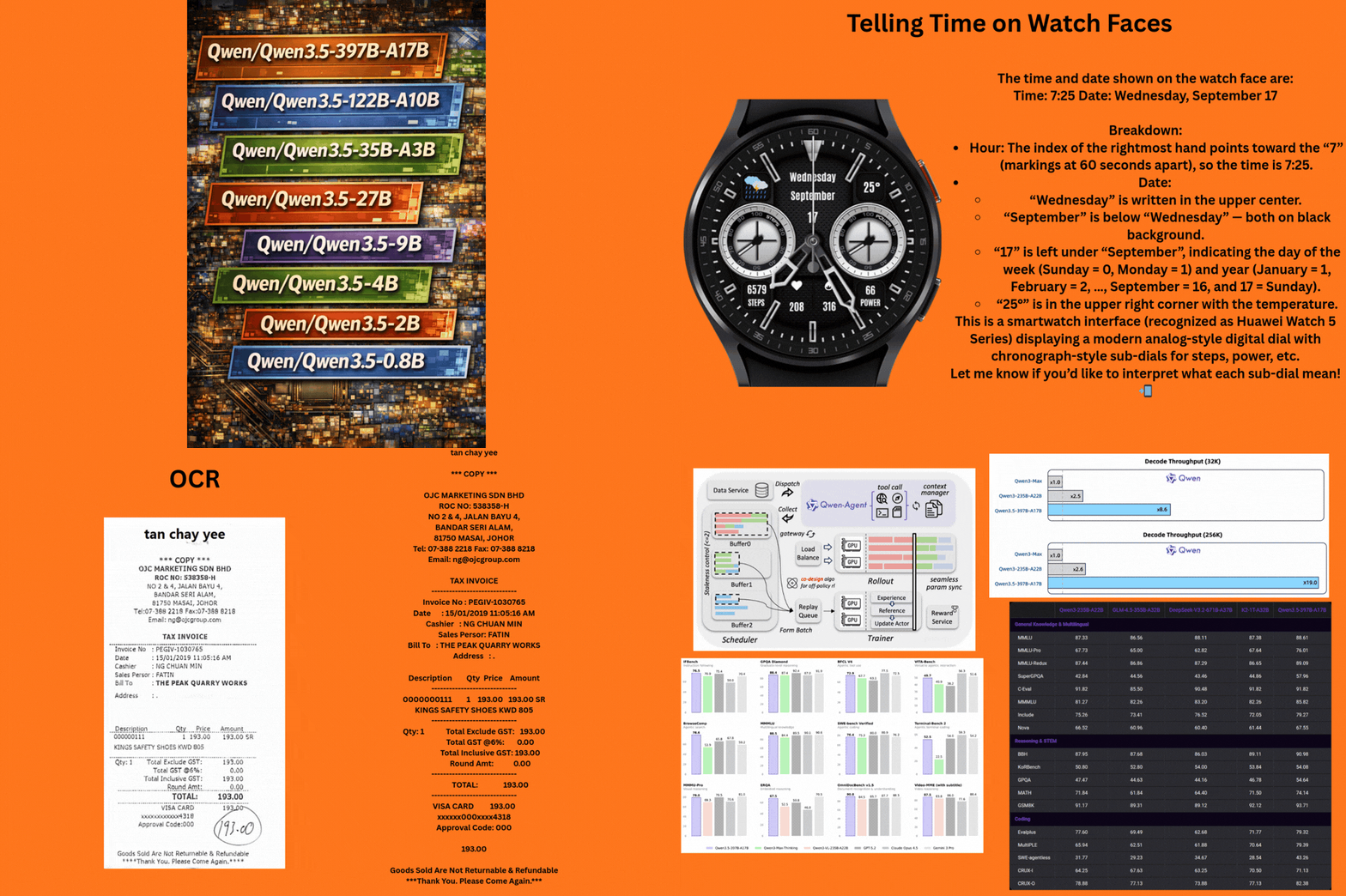
What makes the release of Qwen3.5 more interesting is not just the technical capability. But also the day-1 support with various libraries like Hugging Face Transformers, KTransformers, Unsloth, vLLM, and llama.cpp. This makes the models accessible to a wide range of community contributors to test them out.
What are we going to cover in this article with Qwen3.5?
- An overview of the motive, capability, and benchmark results from the official article.
- Inference using vLLM and llama.cpp using Qwen3.5 for:
- Text-only task
- Image description
- Video description
- Object counting
- OCR
Models in the Qwen3.5 Series
Qwen3.5 comes in 8 model sizes across both base and instruction-tuned models:
- Qwen3.5-397B-A17B
- Qwen3.5-122B-A10B
- Qwen3.5-35B-A3B
- Qwen3.5-27B
- Qwen3.5-9B
- Qwen3.5-4B
- Qwen3.5-2B
- Qwen3.5-0.8B
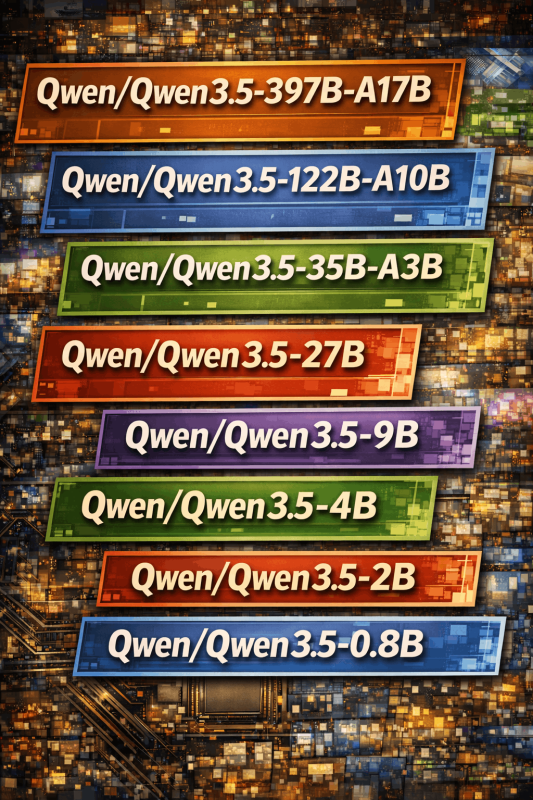
This makes the model series extremely accessible across a range of hardware, from cloud GPUs to local desktop/laptop and mobile environments. The open-source models have a context length of 262,144 tokens. It is quite interesting to see so many open-source models being dropped for a family of LLMs in a short period of time. Not to mention the day one integrations with vLLM, llama.cpp, KTransformers, and Hugging Face Transformers.
Additionally, Qwen3.5 Plus, their flagship closed-source model, is available only via Qwen Chat and API with a context length of 1M tokens.
Furthermore, unlike Qwen3 LLMs, all Qwen3.5 models are natively multimodal with image and video support.
Benchmarks and Performance of Qwen3.5
At the time of writing this, no technical report or paper is out yet. However, according to the official article, Qwen3.5-397B-A17B, which is the flagship open-source model in the series, achieves amazing results in reasoning, coding, agent capabilities, and multimodal understanding. It uses Sparse Mixture-of-Experts. With just 17B active parameters, with the right resources, it will be super-efficient during inference.
The following image shows the performance of the same against other flagship closed-source models.
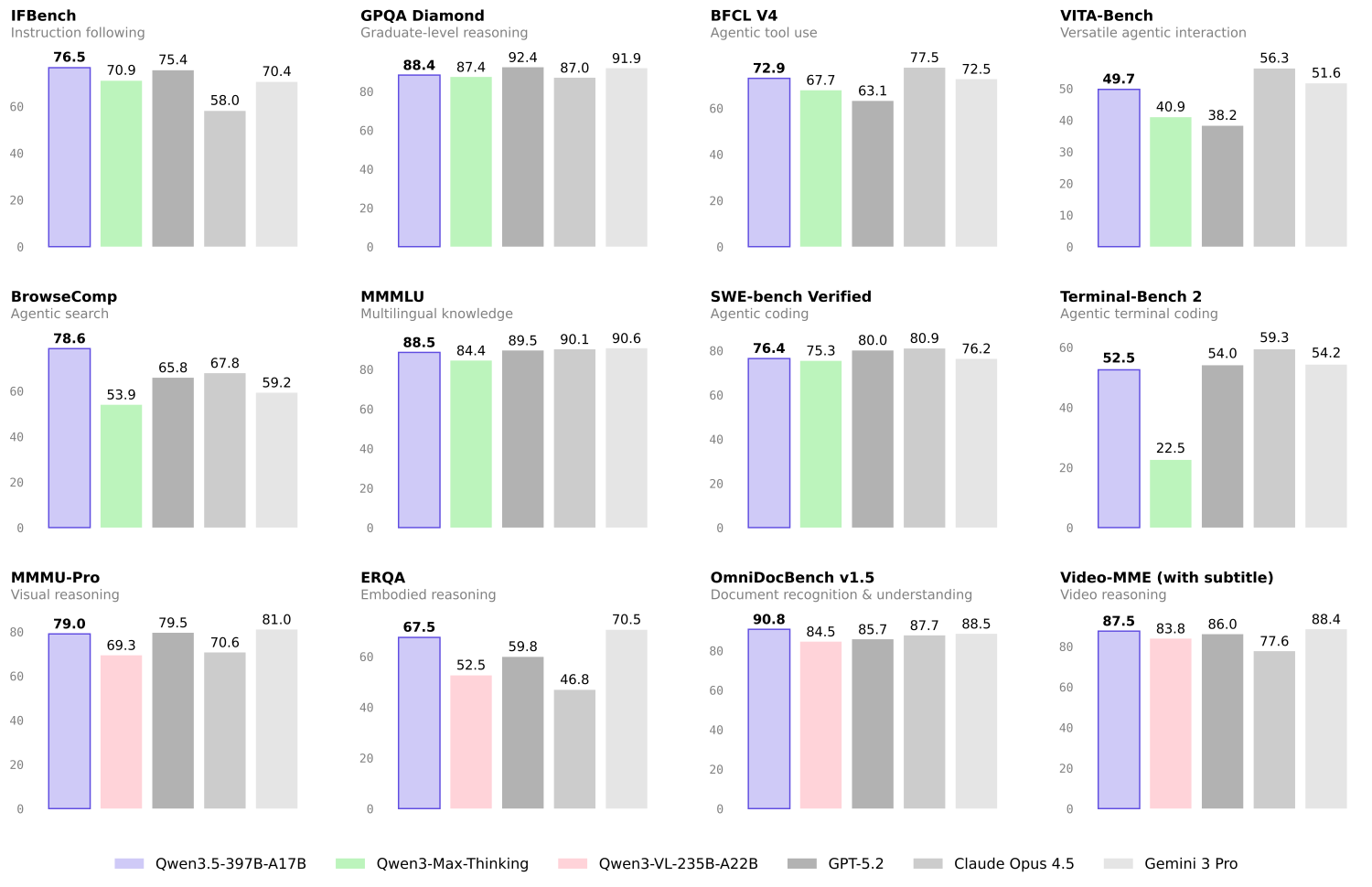
We can see right away that the largest Qwen3.5 model does not always beat the other closed-source models. However, that is not even the point. At the moment, we have an open model that can be deployed on local clusters by companies that have resources and achieve almost the same performance as closed-source ones without sending their data outside of their organization. This gap will close rapidly by the end of 2026.
The following table shows the language capabilities of the Qwen3.5-397B-A17B compared against other models.
| GPT5.2 | Claude 4.5 Opus | Gemini-3 Pro | Qwen3-Max-Thinking | K2.5-1T-A32B | Qwen3.5-397B-A17B | |
|---|---|---|---|---|---|---|
| Knowledge | ||||||
| MMLU-Pro | 87.4 | 89.5 | 89.8 | 85.7 | 87.1 | 87.8 |
| MMLU-Redux | 95.0 | 95.6 | 95.9 | 92.8 | 94.5 | 94.9 |
| SuperGPQA | 67.9 | 70.6 | 74.0 | 67.3 | 69.2 | 70.4 |
| C-Eval | 90.5 | 92.2 | 93.4 | 93.7 | 94.0 | 93.0 |
| Instruction Following | ||||||
| IFEval | 94.8 | 90.9 | 93.5 | 93.4 | 93.9 | 92.6 |
| IFBench | 75.4 | 58.0 | 70.4 | 70.9 | 70.2 | 76.5 |
| MultiChallenge | 57.9 | 54.2 | 64.2 | 63.3 | 62.7 | 67.6 |
| Long Context | ||||||
| AA-LCR | 72.7 | 74.0 | 70.7 | 68.7 | 70.0 | 68.7 |
| LongBench v2 | 54.5 | 64.4 | 68.2 | 60.6 | 61.0 | 63.2 |
| STEM | ||||||
| GPQA | 92.4 | 87.0 | 91.9 | 87.4 | 87.6 | 88.4 |
| HLE | 35.5 | 30.8 | 37.5 | 30.2 | 30.1 | 28.7 |
| HLE-Verified¹ | 43.3 | 38.8 | 48 | 37.6 | — | 37.6 |
| Reasoning | ||||||
| LiveCodeBench v6 | 87.7 | 84.8 | 90.7 | 85.9 | 85.0 | 83.6 |
| HMMT Feb 25 | 99.4 | 92.9 | 97.3 | 98.0 | 95.4 | 94.8 |
| HMMT Nov 25 | 100 | 93.3 | 93.3 | 94.7 | 91.1 | 92.7 |
| IMOAnswerBench | 86.3 | 84.0 | 83.3 | 83.9 | 81.8 | 80.9 |
| AIME26 | 96.7 | 93.3 | 90.6 | 93.3 | 93.3 | 91.3 |
| General Agent | ||||||
| BFCL-V4 | 63.1 | 77.5 | 72.5 | 67.7 | 68.3 | 72.9 |
| TAU2-Bench | 87.1 | 91.6 | 85.4 | 84.6 | 77.0 | 86.7 |
| VITA-Bench | 38.2 | 56.3 | 51.6 | 40.9 | 41.9 | 49.7 |
| DeepPlanning | 44.6 | 33.9 | 23.3 | 28.7 | 14.5 | 34.3 |
| Tool Decathlon | 43.8 | 43.5 | 36.4 | 18.8 | 27.8 | 38.3 |
| MCP-Mark | 57.5 | 42.3 | 53.9 | 33.5 | 29.5 | 46.1 |
| Search Agent | ||||||
| HLE w/ tool | 45.5 | 43.4 | 45.8 | 49.8 | 50.2 | 48.3 |
| BrowseComp | 65.8 | 67.8 | 59.2 | 53.9 | –/74.9 | 69.0/78.6 |
| BrowseComp-zh | 76.1 | 62.4 | 66.8 | 60.9 | — | 70.3 |
| WideSearch | 76.8 | 76.4 | 68.0 | 57.9 | 72.7 | 74.0 |
| Seal-0 | 45.0 | 47.7 | 45.5 | 46.9 | 57.4 | 46.9 |
| Multilingualism | ||||||
| MMMLU | 89.5 | 90.1 | 90.6 | 84.4 | 86.0 | 88.5 |
| MMLU-ProX | 83.7 | 85.7 | 87.7 | 78.5 | 82.3 | 84.7 |
| NOVA-63 | 54.6 | 56.7 | 56.7 | 54.2 | 56.0 | 59.1 |
| INCLUDE | 87.5 | 86.2 | 90.5 | 82.3 | 83.3 | 85.6 |
| Global PIQA | 90.9 | 91.6 | 93.2 | 86.0 | 89.3 | 89.8 |
| PolyMATH | 62.5 | 79.0 | 81.6 | 64.7 | 43.1 | 73.3 |
| WMT24++ | 78.8 | 79.7 | 80.7 | 77.6 | 77.6 | 78.9 |
| MAXIFE | 88.4 | 79.2 | 87.5 | 84.0 | 72.8 | 88.2 |
| Coding Agent | ||||||
| SWE-bench Verified | 80.0 | 80.9 | 76.2 | 75.3 | 76.8 | 76.4 |
| SWE-bench Multilingual | 72.0 | 77.5 | 65.0 | 66.7 | 73.0 | 69.3 |
| SecCodeBench | 68.7 | 68.6 | 62.4 | 57.5 | 61.3 | 68.3 |
| Terminal Bench 2 | 54.0 | 59.3 | 54.2 | 22.5 | 50.8 | 52.5 |
The next table shows the vision-language performance of the same model.
| GPT5.2 | Claude 4.5 Opus | Gemini-3 Pro | Qwen3-VL-235B-A22B | K2.5-1T-A32B | Qwen3.5-397B-A17B | |
|---|---|---|---|---|---|---|
| STEM and Puzzle | ||||||
| MMMU | 86.7 | 80.7 | 87.2 | 80.6 | 84.3 | 85.0 |
| MMMU-Pro | 79.5 | 70.6 | 81.0 | 69.3 | 78.5 | 79.0 |
| MathVision | 83.0 | 74.3 | 86.6 | 74.6 | 84.2 | 88.6 |
| Mathvista(mini) | 83.1 | 80.0 | 87.9 | 85.8 | 90.1 | 90.3 |
| We-Math | 79.0 | 70.0 | 86.9 | 74.8 | 84.7 | 87.9 |
| DynaMath | 86.8 | 79.7 | 85.1 | 82.8 | 84.4 | 86.3 |
| ZEROBench | 9 | 3 | 10 | 4 | 9 | 12 |
| ZEROBench_sub | 33.2 | 28.4 | 39.0 | 28.4 | 33.5 | 41.0 |
| BabyVision | 34.4 | 14.2 | 49.7 | 22.2 | 36.5 | 52.3/43.3 |
| General VQA | ||||||
| RealWorldQA | 83.3 | 77.0 | 83.3 | 81.3 | 81.0 | 83.9 |
| MMStar | 77.1 | 73.2 | 83.1 | 78.7 | 80.5 | 83.8 |
| HallusionBench | 65.2 | 64.1 | 68.6 | 66.7 | 69.8 | 71.4 |
| MMBenchEN-DEV-v1.1 | 88.2 | 89.2 | 93.7 | 89.7 | 94.2 | 93.7 |
| SimpleVQA | 55.8 | 65.7 | 73.2 | 61.3 | 71.2 | 67.1 |
| Text Recognition and Document Understanding | ||||||
| OmniDocBench1.5 | 85.7 | 87.7 | 88.5 | 84.5 | 88.8 | 90.8 |
| CharXiv(RQ) | 82.1 | 68.5 | 81.4 | 66.1 | 77.5 | 80.8 |
| MMLongBench-Doc | — | 61.9 | 60.5 | 56.2 | 58.5 | 61.5 |
| CC-OCR | 70.3 | 76.9 | 79.0 | 81.5 | 79.7 | 82.0 |
| AI2D_TEST | 92.2 | 87.7 | 94.1 | 89.2 | 90.8 | 93.9 |
| OCRBench | 80.7 | 85.8 | 90.4 | 87.5 | 92.3 | 93.1 |
| Spatial Intelligence | ||||||
| ERQA | 59.8 | 46.8 | 70.5 | 52.5 | — | 67.5 |
| CountBench | 91.9 | 90.6 | 97.3 | 93.7 | 94.1 | 97.2 |
| RefCOCO(avg) | — | — | 84.1 | 91.1 | 87.8 | 92.3 |
| ODInW13 | — | — | 46.3 | 43.2 | — | 47.0 |
| EmbSpatialBench | 81.3 | 75.7 | 61.2 | 84.3 | 77.4 | 84.5 |
| RefSpatialBench | — | — | 65.5 | 69.9 | — | 73.6 |
| LingoQA | 68.8 | 78.8 | 72.8 | 66.8 | 68.2 | 81.6 |
| V* | 75.9 | 67.0 | 88.0 | 85.9 | 77.0 | 95.8/91.1 |
| Hypersim | — | — | — | 11.0 | — | 12.5 |
| SUNRGBD | — | — | — | 34.9 | — | 38.3 |
| Nuscene | — | — | — | 13.9 | — | 16.0 |
| Video Understanding | ||||||
| VideoMME(w sub.) | 86 | 77.6 | 88.4 | 83.8 | 87.4 | 87.5 |
| VideoMME(w/o sub.) | 85.8 | 81.4 | 87.7 | 79.0 | 83.2 | 83.7 |
| VideoMMMU | 85.9 | 84.4 | 87.6 | 80.0 | 86.6 | 84.7 |
| MLVU (M-Avg) | 85.6 | 81.7 | 83.0 | 83.8 | 85.0 | 86.7 |
| MVBench | 78.1 | 67.2 | 74.1 | 75.2 | 73.5 | 77.6 |
| LVBench | 73.7 | 57.3 | 76.2 | 63.6 | 75.9 | 75.5 |
| MMVU | 80.8 | 77.3 | 77.5 | 71.1 | 80.4 | 75.4 |
| Visual Agent | ||||||
| ScreenSpot Pro | — | 45.7 | 72.7 | 62.0 | — | 65.6 |
| OSWorld-Verified | 38.2 | 66.3 | — | 38.1 | 63.3 | 62.2 |
| AndroidWorld | — | — | — | 63.7 | — | 66.8 |
| Medical VQA | ||||||
| SLAKE | 76.9 | 76.4 | 81.3 | 54.7 | 81.6 | 79.9 |
| PMC-VQA | 58.9 | 59.9 | 62.3 | 41.2 | 63.3 | 64.2 |
| MedXpertQA-MM | 73.3 | 63.6 | 76.0 | 47.6 | 65.3 | 70.0 |
As we can see, the model is surpassing a lot of the closed-source models in the vision-language performance. Even though it is behind in some of the benchmarks, the gap is not that high anymore. This shows how far we have come with open-source multimodal models that can now compete with proprietary ones.
Pretraining and Performance Against Other Similar Open-Source Models
The authors of Qwen3.5 focus on three components while pretraining: power, efficiency, and versatility.
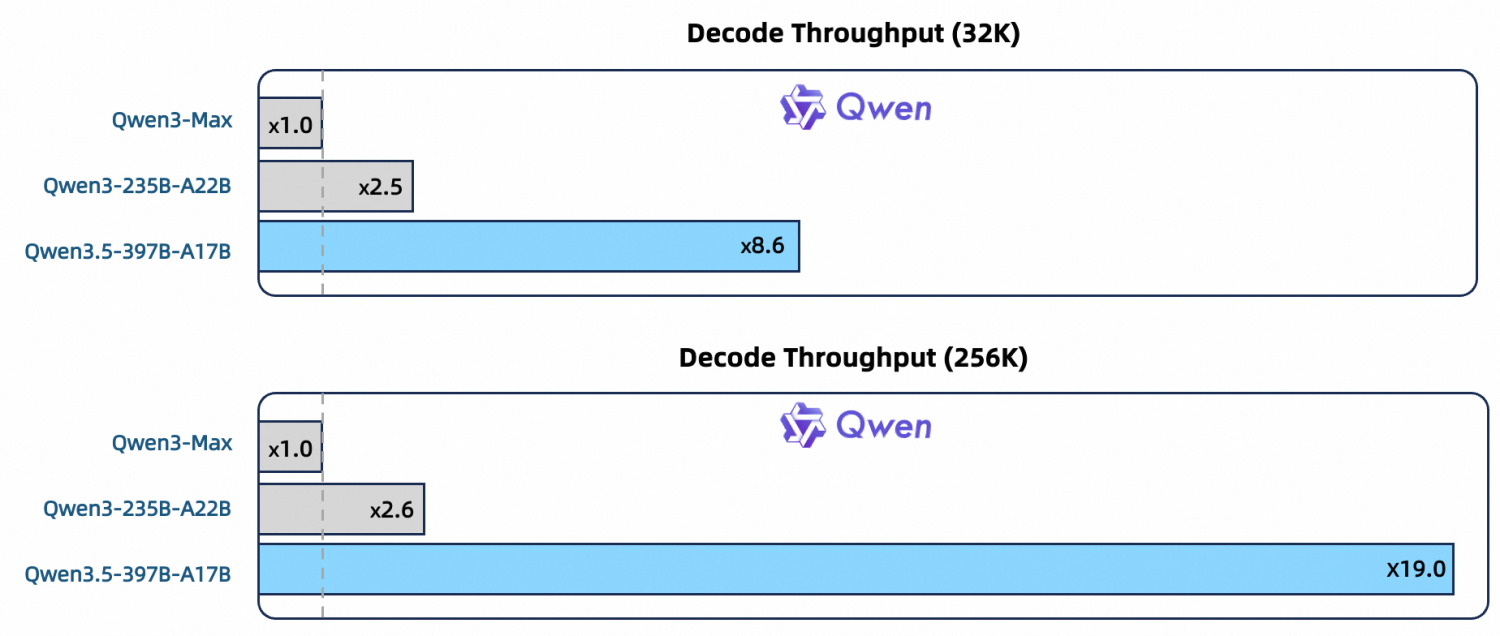
The models have been trained on a significantly larger corpus of data with higher-sparsity MoE, combined with Gated DeltaNet and Gated Attention. We can see from the above figure that it surpasses the previous Qwen models in throughput.
But how does it stack against other similar open-source models?
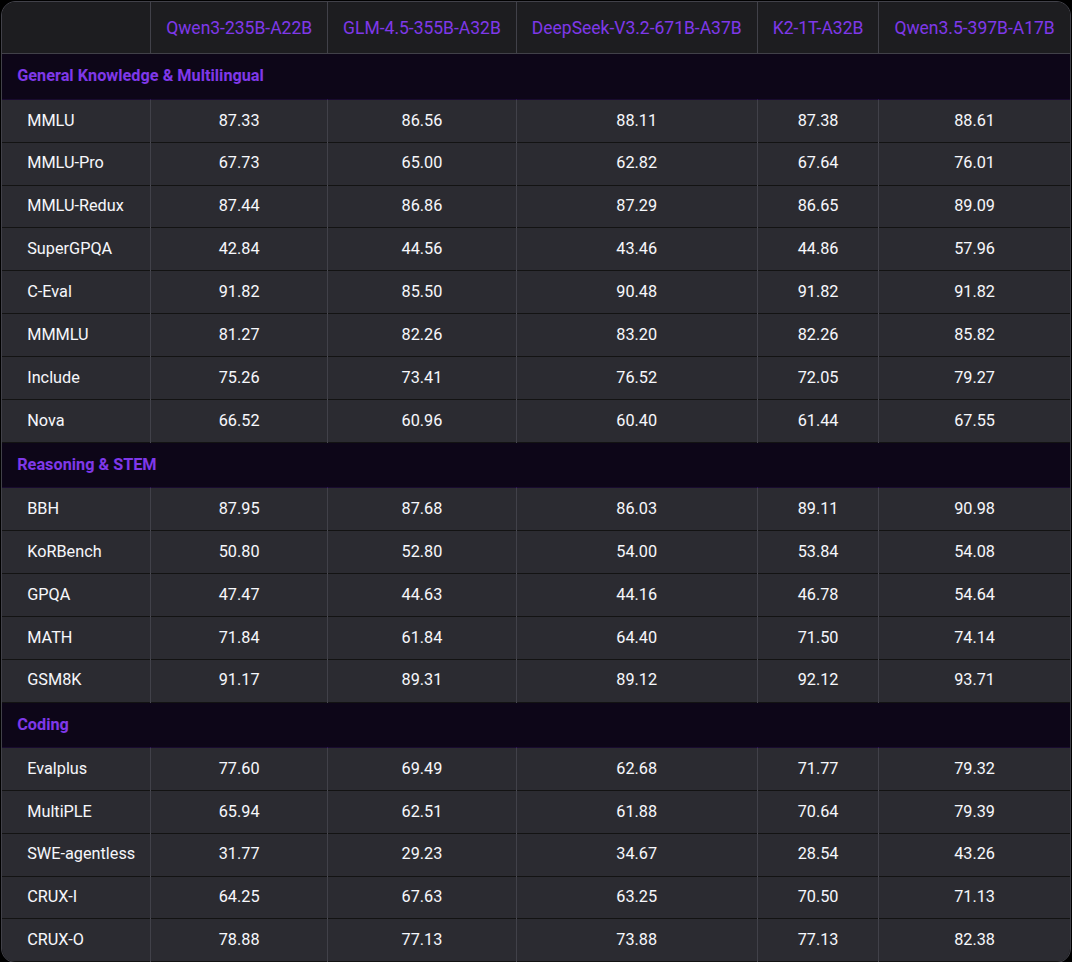
We can see that it either matches or surpasses all the open-source models of similar scale in the above benchmarks.
The technical article also lays out the infrastructure used for efficient training and inference of the latest Qwen3.5 models. This includes their data service, parallelism strategies across vision and language, and a native FP8 training pipeline.
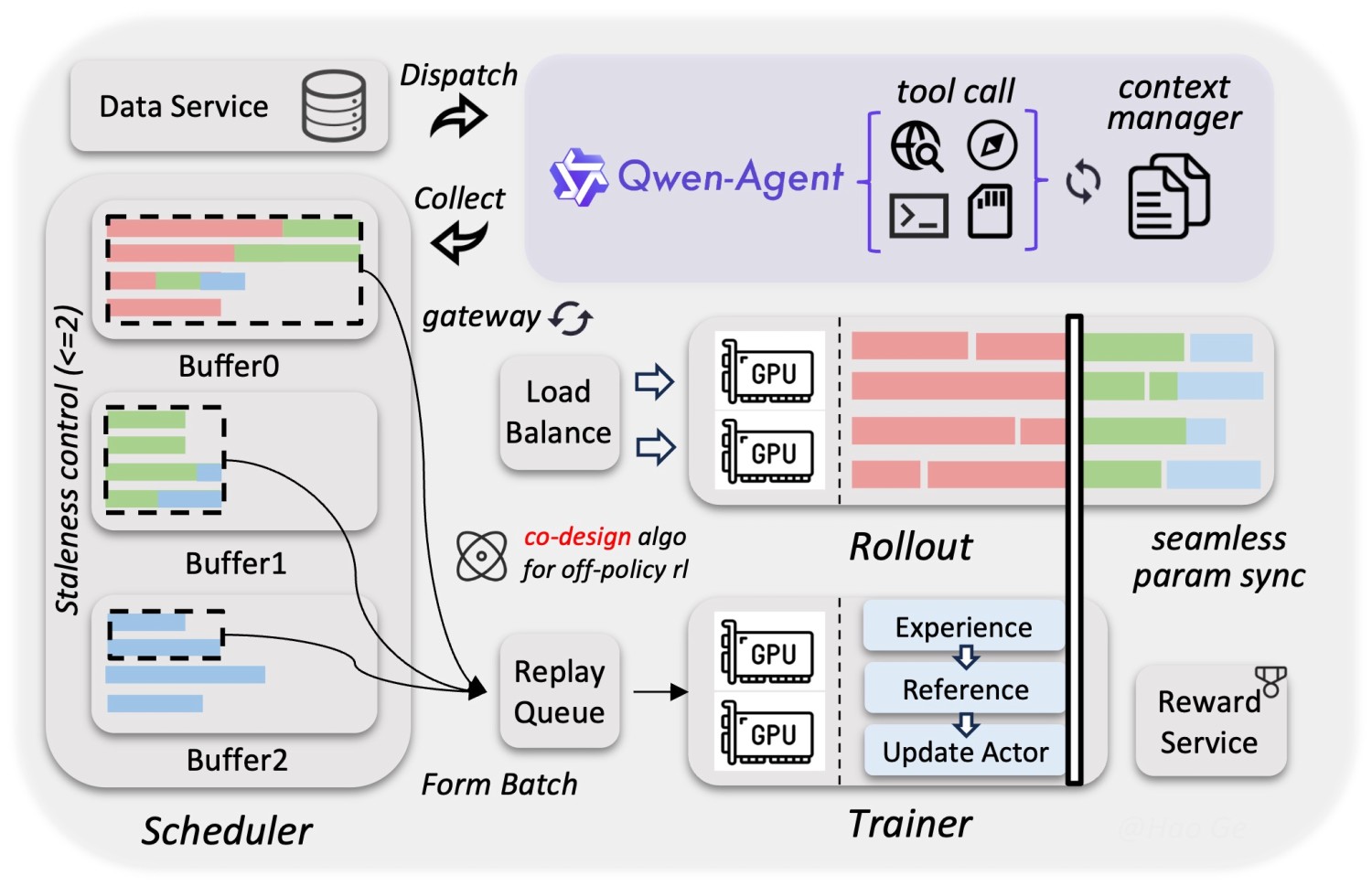
It is best to go through the technical article to understand a few of the components deeply. From the next section onward, we will focus on the inference of Qwen3.5 models.
If You Are Interested, Find More Qwen Articles Below
- Grounding Qwen3-VL Detection with SAM2
- Fine-Tuning Qwen3-VL
- Video Summarizer Using Qwen2.5-Omni
- Qwen2 VL – Inference and Fine-Tuning for Understanding Charts
- Fine Tuning Qwen 1.5 for Coding
Qwen3.5 Inference with vLLM and llama.cpp
For Qwen3.5 inference, we will focus on two libraries, vLLM and llama.cpp. vLLM supports inference with all three modalities: text, image, and video. However, it does not offer CPU RAM offloading like llama.cpp does. Although llama.cpp does not support video inference, we can use it for running larger models.
All the experiments covered here were run on a system with 8GB VRAM and 32 GB system RAM.
Project Directory Structure
The following is the directory that we are following.
├── input
│   ├── image_1.jpg
│   ├── image_2.jpg
│   ├── image_3.jpg
│   ├── image_4.png
│   └── video_1.mp4
└── qwen_3_5_inference_server.ipynb
- The input directory contains the images that we will use for inference.
- We have the
qwen_3_5_inference_server.ipynbthat contains the inference code.
The notebook and the inference data are available as a downloadable zip file along with this article.
Download Code
Installing Dependencies and Setup
It is best to create a new environment for installing all the dependencies.
First, we are going to install vLLM using uv. The following command installs vLLM for NVIDIA CUDA.
uv pip install vllm --torch-backend=auto
Second, to install llama.cpp, you can follow the gpt-oss getting started article.
Third, install the OpenAI Python client.
pip install openai
Finally, create a .env file in the project directory. This contains a dummy OpenAI API key that we need for creating the OpenAI client instance.
OPENAI_API_KEY="EMPTY"
This is all the setup we need for running Qwen3.5 locally.
Qwen3.5 Inference using vLLM
Let’s launch the vLLM first and start covering the Jupyter Notebook.
vllm serve Qwen/Qwen3.5-0.8B \
--port 8000 \
--max-model-len 4000 \
--gpu-memory-utilization 0.8 \
--allowed-local-media-path $PWD
- We are launching the Qwen3.5-0.8B model here on port 8000 with a context length of 4000. You can increase the context length as per your requirement and according to the VRAM at your disposal.
- The
--gpu-memory-utilization 0.8uses around 80% of the VRAM when loading the model and leaves a bit of overhead for dynamic allocation as and when needed during inference. - The
--allowed-local-media-pathtells from which directory we can read the files for multimodal inference. This is important as we can only provide subpaths of this path when passing images or videos for inference. Here we are using the present working directory as the path as all the inference files are present in theinputdirectory.
Jupyter Notebook Code for Qwen3.5 Inference
Let’s cover the Jupyter Notebook now.
All the code is present in qwen_3_5_inference_server.ipynb.
Imports
The following code block contains all the imports that we need.
from openai import OpenAI

import os
import base64
Create the OpenAI Client
We will use the localhost base URL and the dummy API key from .env.
client = OpenAI(
    base_url='http://localhost:8000/v1',
    api_key=str(os.getenv('OPENAI_API_KEY'))
)
Helper Function for Image Conversion
The following function converts all the image paths to base64 encoded format which makes it easier to use them with both vLLM and llama.cpp.
def image_to_data_uri(image_path):
    mime = 'jpeg'
    with open(image_path, 'rb') as f:
        data = base64.b64encode(f.read()).decode()
    return f"data:image/{mime};base64,{data}"
Text-Only Inference
Let’s carry out a text-only inference. The following code block contains a function for text inference using the OpenAI chat completions format.
def text_inference(instruction, max_tokens=1024, model_name='Qwen/Qwen3.5-0.8B'):
    response = client.chat.completions.create(
        model=model_name,
        messages=[{
            'role': 'user',
            'content': [{
                'type': 'text',
                'text': instruction,
            }]
        }],
        max_tokens=max_tokens,
        stream=True
    )

    for chunk in response:
            content = chunk.choices[0].delta.content
            print(content, end='', flush=True)
The next code block just calls the function.
response = text_inference('Tell me a short story about rivers.')
We get a streaming response. Following is the truncated output.
In the year 1842, the Great Salt产量 was no longer the unyielding force of nature, but a slave to the river itself.

The Grand Saltway was a system of canals woven through the Mountain Passes. There was only one river passing through it now: the **River of Ice**, frozen midway between two major cities, the City of Gold and the City of Stone. Today, the water was murky, heavy with tar and brine, drifting lazily like a sleeping moth.
.
.
.
Image Inference
We have a similar function for image inference that accepts a base64 encoded image as input, along with the text instruction.
def image_inference(instruction, image_path, max_tokens=1024, model_name='Qwen/Qwen3.5-0.8B'):
    uri = image_to_data_uri(image_path)

    response = client.chat.completions.create(
        model=model_name,
        messages=[{
            'role': 'user',
            'content': [
                {
                    'type': 'image_url',
                    'image_url': {
                        # 'url': f"file://{image_path}"
                        'url': f"{uri}"
                    },
                },
                {
                    'type': 'text',
                    'text': instruction,
                 }
            ]
        }],
        max_tokens=max_tokens,
        stream=True
    )

    for chunk in response:
            content = chunk.choices[0].delta.content
            print(content, end='', flush=True)

image_inference(
    instruction='What is this image?',
    image_path=os.path.join(os.getcwd(), 'input/image_1.jpg')
)
Following is the image we are using for inference, along with the response below that.
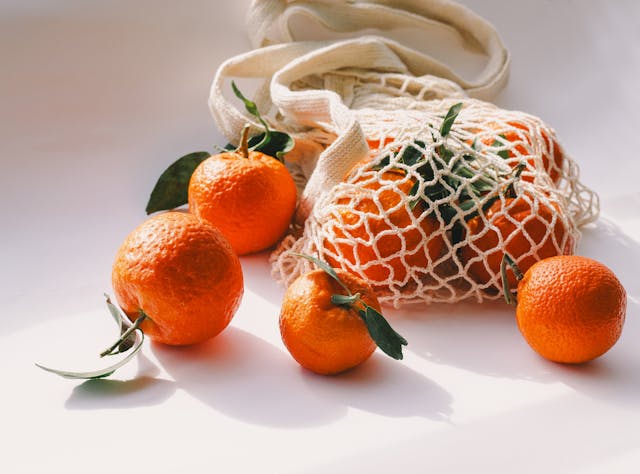
This image is a still life photograph featuring bright orange mandarin oranges (also known as tangerines or sisal oranges) arranged on a clean, white surface. The scene evokes an elegant, minimalist aesthetic, likely intended for stock photography, editorial work, or promotional material.

**Key elements include:**

- **Fruits:** Multiple ripe mandarin oranges, some with green calyxes attached — indicating freshness and natural origin. One fruit bears a single green leaf tucked near its stem.
- **Packaging:** The fruits are loosely arranged around a reusable eco-friendly mesh bag (tpartyer bag), which is crinkled and loosely wound, suggesting it’s filled and ready to be used — a highly sustainable organic choice.
- **Background & Lighting:** The background is明亮的、无纹理的白色素面 (white expanse), with soft shadows beneath the fruits and bag, giving depth and natural lighting. The overall color palette is minimal, dominated by citrus orange and beige tones, including the natural canvas color of the bag.
- **Style & Composition:** The lighting is bright and directional, producing even illumination and subtle highlights on the textured rind of the oranges and the weave of the mesh. The composition is deliberate, placing the most prominent fruit near the top left, while others are scattered for visual interest. There are no distracting elements — the focus remains entirely on the natural beauty of fruit and its sustainable packaging.

**Overall Impression:**
The image captures the harmony between natural complexity (orange skin) and minimalism (white, clean space). It’s both fresh and refined — perfect for aligning sustainability with culinary aesthetics. If it were purchased, it could be used as an invitation photo or visual storytelling piece about “natural, wholesome, ethically sourced food.”
We can see that although the model contains just 0.8B parameters, the description of the image is quite detailed.
Video Inference
For video inference, we need to provide the full file path of the video along with the text instruction.
def video_inference(instruction, video_path, max_tokens=1024, model_name='Qwen/Qwen3.5-0.8B'):
    response = client.chat.completions.create(
        model=model_name,
        messages=[{
            'role': 'user',
            'content': [
                {
                    'type': 'video_url',
                    'video_url': {
                        'url': f"file://{video_path}"
                    },
                },
                {
                    'type': 'text',
                    'text': instruction,
                 }
            ]
        }],
        max_tokens=max_tokens,
        stream=True
    )

    for chunk in response:
            content = chunk.choices[0].delta.content
            print(content, end='', flush=True)

video_inference(
    'How many zebras are in the video?',
    os.path.join(os.getcwd(), 'input/video_1.mp4')
)
We are using the following video for inference.
We get the following output.
There are six zebras in the video.
The model is making a mistake here by counting six zebras in the video, whereas there are only 5. Larger models will surely give a better output in this scenario.
Image Counting Experiments
Let’s use this model for an image counting experiment and ask the model to count the number of oranges in the first image that we used earlier.
image_inference(
    instruction='How many oranges are there outside the bag?',
    image_path=os.path.join(os.getcwd(), 'input/image_1.jpg')
)
The following is the model output.
There are **3** oranges outside the bag:

1. One orange is in the foreground, slightly to the left — fully visible and near the bottom.
2. Another orange is nestled inside the net bag bowl, positioned more toward the center-lower part.
3. A third orange is on the far right edge, partially cut off by the frame.

These are the only standout visible oranges — no orange is inside the net bag itself.

✅ Final Answer: **3**
The model is again making a mistake here by counting 3 oranges outside the bag, whereas there are 4.
Telling Time on Watch Faces
One of the interesting experiments is telling the time of analog watch faces, which a lot of previous models failed.
image_inference(
    instruction='What time and date are shown on the watch face?',
    image_path=os.path.join(os.getcwd(), 'input/image_4.png')
)
We are using the following image for inference here.
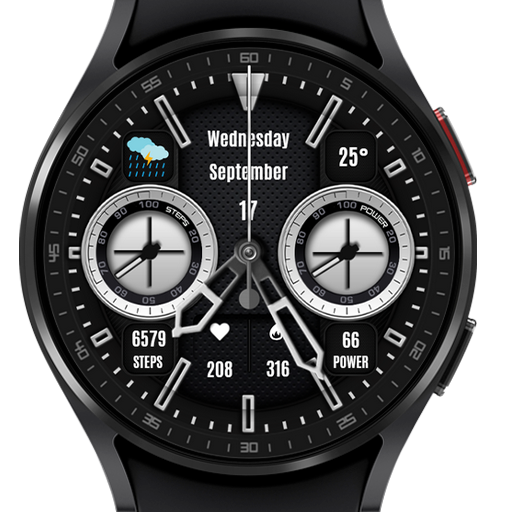
We get the following output from the model.
The time and date shown on the watch face are:

**Time: 7:25**
**Date: Wednesday, September 17**

---

### Breakdown:
- **Hour**: The index of the rightmost hand points toward the “7” (markings at 60 seconds apart), so the time is 7:25.
- **Date**:
  - “Wednesday” is written in the upper center.
  - “September” is below “Wednesday” — both on black background.
  - “17” is left under “September”, indicating the day of the week (Sunday = 0, Monday = 1) and year (January = 1, February = 2, …, September = 16, and 17 = Sunday).
  - “25°” is in the upper right corner with the temperature.

This is a smartwatch interface (recognized as Huawei Watch 5 Series) displaying a modern analog-style digital dial with chronograph-style sub-dials for steps, power, etc.

Let me know if you’d like to interpret what each sub-dial mean! 📲
It is quite amusing to see that a model with 0.8B parameters is telling the correct time with a detailed breakdown of the image. A couple of years ago, even the largest VLMs struggled with telling time on analog watch faces.
OCR Experiment
The final experiment that we will do with vLLM + Qwen3.5-0.8B is for OCR.
image_inference(
    instruction='Carry out OCR in this receipt without additional text.',
    image_path=os.path.join(os.getcwd(), 'input/X00016469670.jpg')
)
We have the following receipt image for OCR.
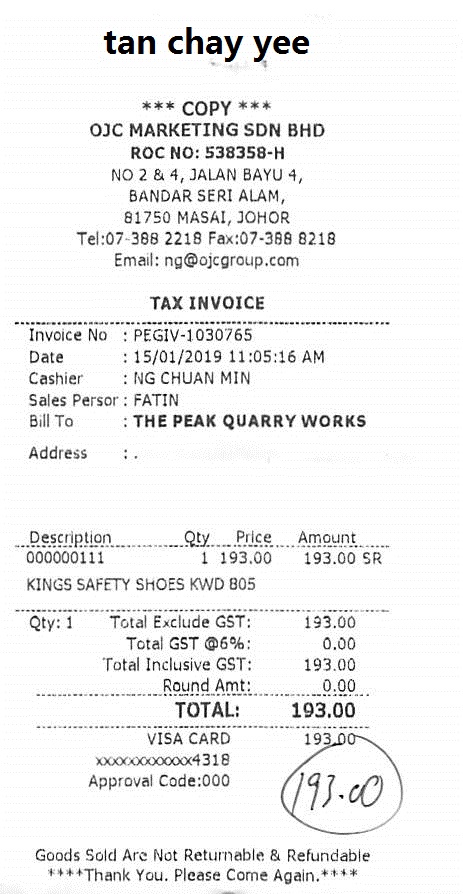
The following block contains the output.
tan chay yee
*** COPY ***
OJC MARKETING SDN BHD
ROC NO: 538358-H
NO 2 & 4, JALAN BAYU 4,
BANDAR SERI ALAM,
81750 MASAL, JOHOR
Tel:07-368 2218 Fax:07-368 8218
Email: ng{ojcgroup.com
TAX INVOICE
Invoice No :PEGIV-1030765
Date :15/01/2019 11:05:16 AM
Cashier : NG CHUAN MIN
Sales Person : FATIN
Bill To : THE PEAK QUARRY WORKS
Address : .
Description Qty Price Amount
000000111 1 193.00 193.00 SR
KINGS SAFETY SHOES KWD 805
Qty:1 Total Exclude GST:
0.10 193.00
03/07/16 35.00 Total GST @6%
03/07/16 193.00
Total Inclusive GST:
0000 000000 0000 0000 00193.00
Round Amt:
00.00
TOTAL: 193.00
VISA CARD ************4318

----
**** Thank You, Please Come Again.****
Goods Sold Are Not Returnable & Refundable
****
We can see that the model has made quite a few mistakes in the bottom section of the image. It is also not maintaining the structure, and sometimes the lines are jumbled up. Perhaps a larger model will work much better here.
llama.cpp Qwen3.5 Inference
Note: We cannot run video inference natively with llama.cpp.
We can run much larger models using llama.cpp because of CPU RAM offloading. Here we are running the Qwen3.5-4B INT4 GGUF model.
./build/bin/llama-server \
-hf unsloth/Qwen3.5-4B-GGUF \
-c 32000 \
--reasoning-budget 0 \
--port 8000 \
--media-path $PWD
Let’s carry out inference on some of the images where the smaller Qwen3.5 model made inference.
The first one is the counting experiment.
image_inference(
    instruction='How many oranges are there outside the bag?',
    image_path=os.path.join(os.getcwd(), 'input/image_1.jpg')
)
We get the following output.
Looking at the image, we can count the oranges that are **outside** the mesh bag:

- One on the far left (with a leaf and stem)
- One behind it (also with a stem and leaf)
- One in the front center (smaller, with a green leaf)
- One on the far right (with a stem and leaf)

That’s **four** oranges clearly outside the bag.

The remaining oranges are inside the mesh bag — you can see several through the netting, but they’re not “outside.”

✅ Final Answer: **4**
The answer is entirely correct this time. The model also shows spatial reasoning by telling which orange is placed where.
Finally, the OCR experiment.
image_inference(
    instruction='Carry out OCR on this receipt without additional text.',
    image_path=os.path.join(os.getcwd(), 'input/X00016469670.jpg')
)
We have the following output from the model.
tan chay yee

*** COPY ***

OJC MARKETING SDN BHD
ROC NO: 538358-H
NO 2 & 4, JALAN BAYU 4,
BANDAR SERI ALAM,
81750 MASAI, JOHOR
Tel: 07-388 2218 Fax: 07-388 8218
Email: [email protected]

TAX INVOICE
-----------------------------
Invoice No : PEGIV-1030765
Date      : 15/01/2019 11:05:16 AM
Cashier   : NG CHUAN MIN
Sales Persor: FATIN
Bill To   : THE PEAK QUARRY WORKS
Address   : .

-----------------------------
Description        Qty  Price    Amount
-----------------------------
0000000111        1    193.00   193.00 SR
KINGS SAFETY SHOES KWD 805
-----------------------------
Qty: 1            Total Exclude GST:   193.00
                  Total GST @6%:       0.00
                  Total Inclusive GST: 193.00
                  Round Amt:           0.00
-----------------------------
                  TOTAL:              193.00
-----------------------------
VISA CARD         193.00
xxxxxx000xxxx4318
Approval Code: 000

193.00

Goods Sold Are Not Returnable & Refundable
***Thank You. Please Come Again.***
The Qwen3.5-4B model outputs correct OCR text this time. Not only that, it also maintained the structure wherever it was necessary.
Summary and Conclusion
In this article, we covered an introduction to the Qwen3.5 models. We started with a brief discussion of the important aspects of the official technical article. Then we moved to inference using vLLM and llama.cpp. We discovered where the smaller Qwen3.5 model was making mistakes and where the larger one was excelling. In future articles, we will focus on fine-tuning Qwen3.5 models for use cases where the pretrained ones are not performing well.
If you have any questions, thoughts, or suggestions, please leave them in the comment section. I will surely address them.
You can contact me using the Contact section. You can also find me on LinkedIn, and X.
References


2 thoughts on “Introduction to Qwen3.5 – Overview, vLLM, and llama.cpp”