
In this article, we will dive into Gemma 4, the latest in the Gemma family by Google DeepMind. Gemma 4 comes with a host of upgrades, not just in terms of AI capability, but also on the open-source front. We will discuss the model’s architecture, the developments, capabilities, and inference code with a simple Gradio application in this article.
Gemma 4 natively supports text, image, audio, and video input. Starting from a 2B parameters effective model, all the way up to a 31B parameter dense model, we have a bunch of options to run on different devices. Let’s discover all of that further in the article.
What will we cover about Gemma 4 in this article?
- What differs in Gemma 4 architecture compared to the previous generation?
- What are the different sizes of the model available?
- Running inference using a Gradio application for: object detection, image captioning, audio understanding & transcription, video understanding, and OCR.
Why Gemma 4?
Gemma 4 is one of those releases where the interesting part is not what’s announced, but what’s missing.

There is no proper paper. No clean architectural diagram that explains everything end-to-end. No detailed breakdown of training. And yet, the model is clearly doing something right, especially in reasoning and multimodal tasks.
So instead of treating it like a well-documented system, it makes more sense to treat Gemma 4 as a black box with strong signals.
And this model can run everywhere and still be competitive.
That constraint shows up everywhere in the design. The model family spans from small variants that run on edge devices to larger ones that compete with much bigger models. It mixes dense and mixture-of-experts architectures in the same lineup.
More importantly, it is clearly not built just for chat. The entire system leans toward agent-style usage-function calling, structured outputs, and multi-step reasoning. The model is expected to operate inside systems, not just respond to prompts.
That shift matters more than any single architectural change.
In the last article, we covered the fine-tuning of Gemma 4 for audio transcription and translation. You can visit the article to understand the complete process of fine-tuning Gemma 4.
How does Gemma 4 Differ From Previous Versions?
The jump to Gemma 4 is not about a single breakthrough. It is about stacking several practical changes that, together, make the model behave very differently.
Improvement in Attention Mechanism
The most visible change is in attention. Instead of using full attention everywhere, Gemma 4 alternates between local sliding-window attention and global full-context attention. Most layers operate on a limited window, which keeps things efficient, while selected layers still see the entire sequence. Crucially, the final layers are global, so the model can still integrate information across the full context. This balance is what allows it to scale to long contexts without collapsing.
That directly connects to the next change: long context is no longer brute-forced. The model supports up to 256K tokens, but it does not achieve this by simply increasing compute. It combines hybrid attention, modified positional encoding, and shared key-value reuse across layers. There is a big difference between a model that technically handles long input and one that can reason over it without degrading immediately.
Per-Layer Embedding
Another subtle but important addition is Per-Layer Embeddings (PLE). In a standard transformer, each token gets a single embedding, and every layer has to work with that same representation. In Gemma 4, each layer receives an additional, lightweight embedding signal specific to that layer. This reduces the burden on early layers to encode everything upfront and allows later layers to specialize more cleanly.
There is also a strong emphasis on inference efficiency. One example is the shared KV cache, where some layers reuse key and value projections instead of recomputing them. This reduces memory usage and speeds up inference, especially at long context lengths, with minimal impact on quality. It is a very practical optimization, and it tells you what the model is really optimized for.
Finally, Gemma 4 does not force a single architectural choice. It supports both dense and mixture-of-experts variants within the same family.
As such, there are 4 model scales:
- Gemma 4 E2B – 5B total and 2B effective parameters
- Gemma 4 E4B – 8B total and 4B effective parameters
- Gemma 4 26B A4B – 26B total and 4B active parameters during inference
- Gemma 4 31B – the largest dense model in the series
The dense models prioritize quality, while the MoE models activate only a subset of parameters during inference, making them significantly faster. This flexibility is essential if the goal is to run across very different hardware environments.
What is the Architecture of Gemma 4?
At a high level, Gemma 4 is still a decoder-only transformer. But that description is almost useless on its own. What matters is how the standard transformer components are modified and arranged.
The core of the model is a stack of transformer layers with alternating attention patterns. Some layers operate locally, attending only to a fixed window of tokens. Others operate globally, attending to the full sequence. This creates a hierarchy where early layers capture local structure, and later layers integrate global context. It is a simple idea, but it is doing most of the heavy lifting in terms of efficiency and long-context behavior.
Positional encoding also plays a bigger role than it might seem. Gemma 4 uses different rotary positional encoding strategies for different types of layers. Local attention layers use standard RoPE, while global layers use a modified version that scales better to long sequences. Without this, extending context length would quickly break down.
The embedding layer is no longer a single static entry point. With Per-Layer Embeddings, each transformer block receives its own additional token-level signal. You can think of this as giving each layer a slightly different view of the input, instead of forcing all layers to interpret the same representation. This reduces information bottlenecks and allows more flexible processing across depth.
Another important piece is how attention states are handled during inference. Instead of computing keys and values independently in every layer, some layers reuse them from earlier ones. This shared KV mechanism reduces both compute and memory usage, which becomes critical when working with large contexts.
Built-In Multimodality
On top of the text backbone, Gemma 4 integrates multimodal encoders. Images, audio, and even video (through frames) are converted into token-like representations and merged into the same sequence as text. There is no separate reasoning pathway later. Everything is processed through the same transformer stack. This unification simplifies the system and avoids the complexity of stitching together multiple models.
Finally, the architecture supports both dense and mixture-of-experts execution. In the dense setup, all parameters are active for every token. In the MoE setup, only a subset of experts is activated dynamically. This allows the model to trade off between quality and efficiency without changing the overall structure.
What Can We Do with Gemma 4?
All of these design choices start to make sense when you look at how the model is used.
The most obvious capability is long-context reasoning. With context windows up to 256K tokens, you can process large documents, codebases, or multi-step workflows in a single pass. More importantly, the model does not degrade as quickly as earlier approaches, which makes this capability actually useful rather than theoretical.
Multimodal support is another major advantage. Since images, audio, and text are all converted into tokens and processed together, you can build systems that combine different types of input without separate pipelines. Tasks like OCR, document understanding, UI parsing, or speech-to-text naturally fit into this setup. However, one thing to note is that the larger two models, 26B A4B and the 31B one, do not have audio processing capability.
The model is also clearly designed for agent-style workflows. Native support for structured outputs, system prompts, and function calling makes it suitable for building systems that interact with tools and APIs. Instead of just generating text, the model can participate in multi-step processes.
At the smaller end, Gemma 4 enables on-device AI. The E2B and E4B models are optimized for low-latency inference on laptops and edge devices. This opens up use cases where privacy, cost, or connectivity constraints make cloud-based models less practical.
At the larger end, the models are strong in coding and reasoning tasks, making them useful as local development assistants or backend reasoning engines.
And because the family includes both dense and MoE variants, you can choose the trade-off that fits your constraints.
All of this sounds reasonable on paper. But the real question is how these architectural decisions show up during inference.
That is where things get interesting, and the inference experiments from the next section will show us Gemma 4’s capability.
Gradio Application and Inference with Gemma 4
The codebase in this article supports the following experiments with Gemma 4 with a Gradio application.
- Object detection
- Image captioning
- OCR (Optical Character Recognition)
- Audio understanding
- Audio transcription
- Video understanding
In the article, we will mostly focus on object detection, image captioning, OCR, and video understanding.
Project Directory Structure
Before diving into the code, let’s check out the directory structure of the project.
├── input
│   ├── image_1.jpg
│   ├── image_2.jpg
│   └── video_1.mp4
├── app.py
├── README.md
└── requirements.txt
- We have only one Python file,
app.pycontaining all the code. - The
requirements.txtcontains all the necessary dependencies.
The code files are available for download in the form of a zip file along with a few image/video inputs. You can install the requirements and start experimenting locally.
Download Code
Installing Dependencies
We can install all the necessary libraries using the requirements file.
pip install -r requirements.txt
This is all the setup we need for running Gemma 4 locally.
The Gemma 4 E2B model can be easily run with less than 8GB VRAM locally, as it supports CPU offloading. This is going to be our primary model for experimentation here.
Gemma 4 Inference Code
For each of the experiments, we will cover the core logic here rather than the entire app.py file here.
Let’s start with object detection:
Object Detection with Gemma 4
The object detection code is wrapped in the object_detection function in the file.
def object_detection(image, model_id, what_object, max_tokens):
    """Detect objects in an image and return annotated image with streaming output"""
    if current_model is None or current_model_id != model_id:
        load_status = load_model(model_id)
        if "Error" in load_status:
            yield image, load_status
            return

    try:
        # Resize image to multiple of 48
        processed_image = resize_to_48_multiple(image)

        # Format prompt
        prompt = f"What's the bounding box for the {what_object} in the image?"

        messages = [
            {
                "role": "user",
                "content": [
                    {"type": "image", "image": processed_image},
                    {"type": "text", "text": prompt}
                ]
            }
        ]

        inputs = current_processor.apply_chat_template(
            messages,
            tokenize=True,
            return_dict=True,
            return_tensors="pt",
            add_generation_prompt=True
        ).to(current_model.device)

        # Setup streaming
        streamer = TextIteratorStreamer(current_processor.tokenizer, skip_special_tokens=True, skip_prompt=True)
        generation_kwargs = dict(inputs, max_new_tokens=max_tokens, do_sample=False, streamer=streamer)

        # Start generation in a separate thread
        thread = Thread(target=current_model.generate, kwargs=generation_kwargs)
        thread.start()

        # Stream the output
        full_response = ""
        for new_text in streamer:
            full_response += new_text
            yield processed_image, f"Generating...\n\nPrompt used: \"{prompt}\"\n\n{full_response}"

        thread.join()

        # Parse the final response
        result = current_processor.parse_response(full_response)
        content = result.get("content", full_response)

        try:
            detections = extract_json(content)

            # Draw bounding boxes
            annotated_image = draw_bounding_boxes(processed_image, detections)

            # Format JSON for display
            json_str = json.dumps(detections, indent=2)

            yield annotated_image, f"✓ Detection successful!\n\nPrompt used: \"{prompt}\"\n\nJSON Output:\n{json_str}"
        except (ValueError, KeyError, json.JSONDecodeError) as e:
            # If JSON parsing fails, return original image and raw response
            yield processed_image, f"⚠ Could not parse detection results.\n\nPrompt used: \"{prompt}\"\n\nRaw response:\n{content}"

    except Exception as e:
        yield image, f"Error: {str(e)}"
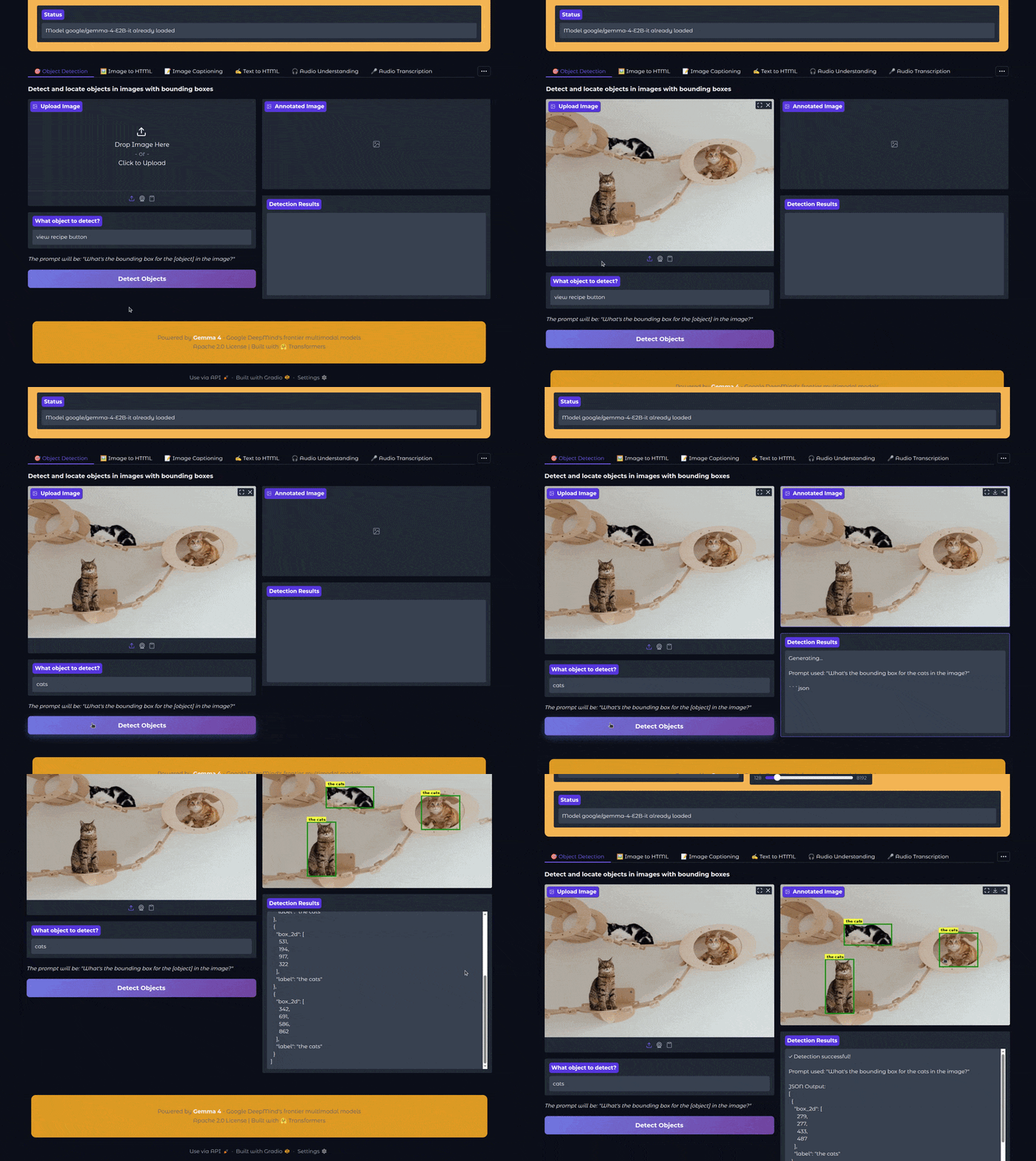
For object detection, we use a prompt in the following format:
What’s the bounding box for the {what_object} in the image?
We can provide the object name in the Gradio UI that will replace {what_object} in the above prompt. Using this prompt, we get a JSON output from the model that we further extract the bounding box coordinates from and annotate the original image.
The following video shows the object detection workflow in action:
In the above video, we ask the model to detect the cats, which it did successfully.
Image Captioning with Gemma 4
The next experiment is image captioning. This is straightforward as we just ask the model to describe an image.
def image_captioning(image, model_id, prompt, max_tokens):
    """Generate detailed caption for an image with custom prompt and streaming output"""
    if current_model is None or current_model_id != model_id:
        load_status = load_model(model_id)
        if "Error" in load_status:
            yield load_status
            return

    try:
        messages = [
            {
                "role": "user",
                "content": [
                    {"type": "image", "image": image},
                    {"type": "text", "text": prompt}
                ]
            }
        ]

        inputs = current_processor.apply_chat_template(
            messages,
            tokenize=True,
            return_dict=True,
            return_tensors="pt",
            add_generation_prompt=True
        ).to(current_model.device)

        # Setup streaming
        streamer = TextIteratorStreamer(current_processor.tokenizer, skip_special_tokens=True, skip_prompt=True)
        generation_kwargs = dict(inputs, max_new_tokens=max_tokens, streamer=streamer)

        # Start generation in a separate thread
        thread = Thread(target=current_model.generate, kwargs=generation_kwargs)
        thread.start()

        # Stream the output
        full_response = ""
        for new_text in streamer:
            full_response += new_text
            yield full_response

        thread.join()

        # Parse the final response
        result = current_processor.parse_response(full_response)
        yield result.get("content", full_response)

    except Exception as e:
        yield f"Error: {str(e)}"
We can provide the prompt directly from the Gradio UI with a default prompt already available. The following video shows an example.
There is not much to analyze here, as overall, image captioning/description has become an easy problem for VLMs nowadays.
Video Understanding with Gemma 4
The next experiment is video understanding.
def video_understanding(video, model_id, prompt, max_tokens):
    """Understand and describe video content with streaming output"""
    if current_model is None or current_model_id != model_id:
        load_status = load_model(model_id)
        if "Error" in load_status:
            yield load_status
            return

    try:
        messages = [
            {
                "role": "user",
                "content": [
                    {"type": "video", "video": video},
                    {"type": "text", "text": prompt}
                ]
            }
        ]

        inputs = current_processor.apply_chat_template(
            messages,
            tokenize=True,
            return_dict=True,
            return_tensors="pt",
            add_generation_prompt=True
        ).to(current_model.device)

        # Setup streaming
        streamer = TextIteratorStreamer(current_processor.tokenizer, skip_special_tokens=True, skip_prompt=True)
        generation_kwargs = dict(inputs, max_new_tokens=max_tokens, streamer=streamer)

        # Start generation in a separate thread
        thread = Thread(target=current_model.generate, kwargs=generation_kwargs)
        thread.start()

        # Stream the output
        full_response = ""
        for new_text in streamer:
            full_response += new_text
            yield full_response

        thread.join()

        # Parse the final response
        result = current_processor.parse_response(full_response)
        yield result.get("content", full_response)

    except Exception as e:
        yield f"Error: {str(e)}"
Gemma 4 processes videos frame-by-frame and can provide an overall understanding of the video.
In this scenario, the model was able to capture the scene, the setting, the attire of the skaters, and the background in the video as well.
OCR with Gemma 4
We can use the image captioning tab for OCR as well. We just need to change the prompt appropriately.
Let’s take a look at a video.
The extracted text is entirely correct. However, there is one limitation. The model is not able to adhere to the structure properly. For example, the small table in the cash calculation section. Perhaps a larger version of the model or a better prompt might solve it.
Further Experiments
You can experiment with Gemma 4 for the other use cases in the Gradio application, such as audio transcription and understanding or image and text to HTML. For generating HTML code, perhaps a larger model like the 26B A4B or the 31B model will work much better.
Summary and Conclusion
In this article, we covered the Gemma 4 model. We started with a brief discussion of the architecture, new components, and capabilities. Then we moved to the inference experiments using a Gradio application. In the next few articles, we will specifically cover the fine-tuning for specific image and text tasks.
If you have any questions, thoughts, or suggestions, please leave them in the comment section. I will surely address them.
You can contact me using the Contact section. You can also find me on LinkedIn, and X.


1 thought on “Gemma 4 – Inference, Architecture, and Practical Insights”