
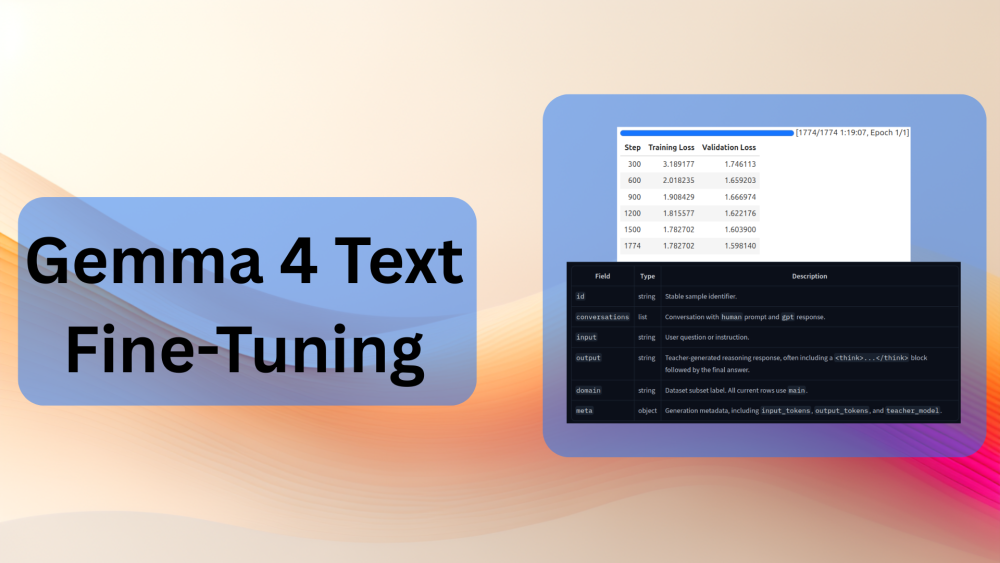
The multimodal capabilities of Gemma 4 across text, image, audio, and video are impressive. This, paired with the smaller versions of the model (E2B and E4B), can power amazing on-device assistants. In the last few articles, we have already seen Gemma 4 in action across various tasks and fine-tuning for image and audio transcription/translation. In this article, we will go back to the most fundamental task, Gemma 4 text fine-tuning.
All the Gemma 4 models have thinking (reasoning capability) out of the box. However, there is always room for improvement. In this article, we will be fine-tuning the Gemma 4 E2B model on a reasoning dataset whose responses are derived from the recently released DeepSeek-V4. We will get into the details of the dataset in its respective section.
What will we cover while fine-tuning Gemma 4 E2B for text?
- Understanding the DeepSeek-V4 distilled reasoning dataset?
- Setting up the training and evaluation code.
- Running inference after fine-tuning the model.
The DeepSeek-V4 Distilled Dataset
DeepSeek-V4 dropped recently, and practitioners have already started gathering useful reasoning datasets from it to fine-tune smaller models.
In this article, we are going to use the DeepSeek-V4-Distill-8000x from Hugging Face.
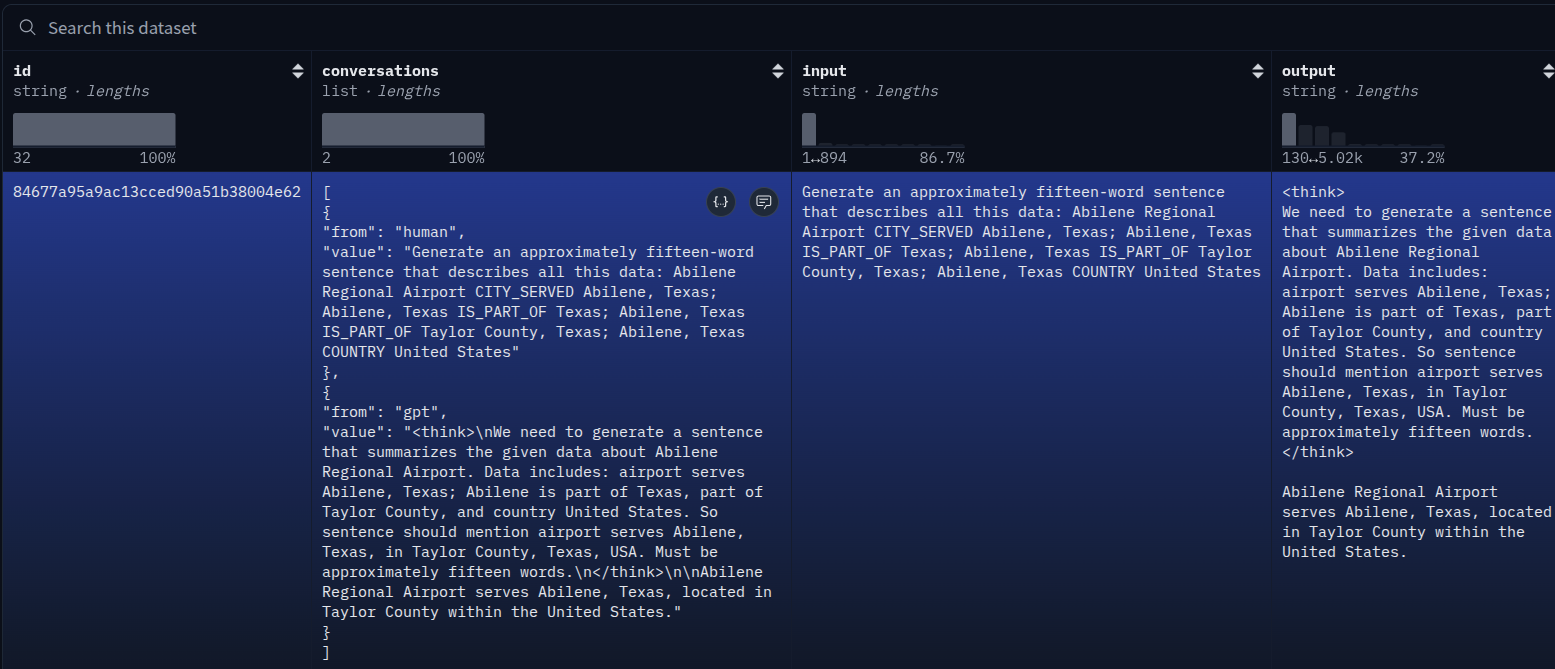
This is a supervised fine-tuning dataset for reasoning. The dataset contains answers from the DeepSeek-V4-Flash model, and the questions were gathered from GLM 5.1. You can visit the dataset link to gather more details. It contains 7716 samples.
Although all the Gemma 4 models are capable of good reasoning out of the box, this is a good dataset to experiment with when trying out the text fine-tuning of Gemma 4.
Each sample contains the following information.
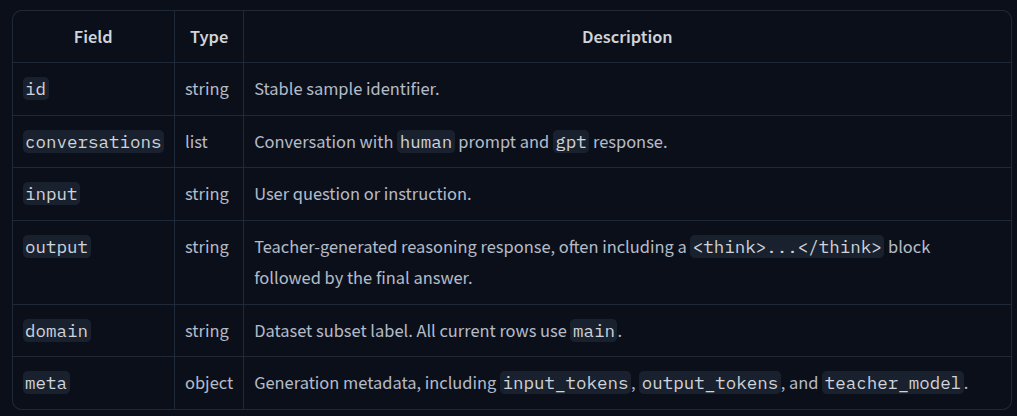
However, we can prepare the entire training dataset by using the id and conversations columns only.
The following is a sample example.
{
"id": "84677a95a9ac13cced90a51b38004e62",
"conversations": [
{"from": "human", "value": "..."},
{"from": "gpt", "value": "... \\n\\n..."}
],
"input": "...",
"output": "... \\n\\n...",
"domain": "main",
"meta": {
"input_tokens": 65,
"output_tokens": 95,
"teacher_model": "DeepSeek-V4-Flash"
}
}
Project Directory Structure
The following is the project directory structure that we are maintaining.
├── gemma-4-text-lora
│   ├── adapter_config.json
│   ├── adapter_model.safetensors
│   ├── chat_template.jinja
│   ├── processor_config.json
│   ├── README.md
│   ├── tokenizer_config.json
│   └── tokenizer.json
├── gemma4_text_ft.ipynb
├── inference.py
└── requirements.txt
- The Jupyter Notebook contains all the training code, and the
inference.pyscript builds a simple Gradio application for inference. - The
gemma-4-text-loracontains the LoRA model weights.
The LoRA fine-tuned weights, training notebook, and requirements file are available as a zip file for download along with this article.
Download Code
Installing Dependencies
All the necessary libraries can be installed via the requirements file.
pip install -r requirements.txt
Find other Gemma 4 articles below:
- Gemma 4 – Inference, Architecture, and Practical Insights
- Fine-Tuning Gemma 4 for Transcription
- Fine-Tuning Gemma 4 for Vision
Fine-Tuning Gemma 4 for Text
Let’s get into the coding part of the article now.
All the training-related code is present in gemma4_text_ft.ipynb Jupyter Notebook. The first few cells also contain the installation steps for the libraries in case you are running on Colab/Kaggle/cloud notebook environments.
Imports
The first code cell imports all the necessary libraries and modules.
from unsloth import FastModel
from transformers import TextStreamer
from datasets import load_dataset
from unsloth.chat_templates import get_chat_template
from unsloth.chat_templates import standardize_data_formats
from trl import SFTTrainer, SFTConfig
from unsloth.chat_templates import train_on_responses_only

import torch
We are importing the standardize_data_formats function so that we can easily convert the conversations into the Gemma 4 supported format.
Load the Gemma-4 Model
Let’s load the model now.
model, tokenizer = FastModel.from_pretrained(
    model_name='unsloth/gemma-4-E2B-it',
    dtype=None,
    max_seq_length=1024,
    load_in_4bit=False,
    full_finetuning=False,
)
We are loading the model in FP16 format here with a context length of 1024. For now, 1024 context length should suffice, as most of the model responses in the dataset are shorter than that.
Load and Prepare the Dataset
The next step is to load the dataset and prepare it in the necessary format.
dataset = load_dataset('Jackrong/DeepSeek-V4-Distill-8000x', split='train[:7700]')

# Divide into train and test split.
train_samples = 7200
train_dataset = dataset.select(range(train_samples))
test_dataset = dataset.select(range(train_samples, len(dataset)))

print(f"Train size: {len(train_dataset)}, Test size: {len(test_dataset)}")

tokenizer = get_chat_template(
    tokenizer,
    chat_template='gemma-4',
)

train_dataset = standardize_data_formats(train_dataset, num_proc=0)
test_dataset = standardize_data_formats(test_dataset, num_proc=0)

def formatting_prompts_func(examples):
    # print(examples['conversations'])
    convos = examples['conversations']
    texts = [tokenizer.apply_chat_template(
        convo, tokenize=False, add_generation_prompt=False).removeprefix(''
     ) for convo in convos]
    return { 'text' : texts, }

train_dataset = train_dataset.map(formatting_prompts_func, batched=True)
test_dataset = test_dataset.map(formatting_prompts_func, batched=True)
We are loading 7700 samples while using 7200 samples for training and 500 samples for testing.
We override the Gemma 4-specific tokenizer and then standardize the dataset. In the original dataset, we had the dataset roles defined as human and gpt.
{'id': '84677a95a9ac13cced90a51b38004e62', 'conversations': [{'from': 'human', 'value': 'Generate an approximately fifteen-word sentence that describes all this data: Abilene Regional Airport CITY_SERVED Abilene, Texas; Abilene, Texas IS_PART_OF Texas; Abilene, Texas IS_PART_OF Taylor County, Texas; Abilene, Texas COUNTRY United States'}, {'from': 'gpt', 'value': '\nWe need to generate a sentence that summarizes the given data about Abilene Regional Airport. Data includes: airport serves Abilene, Texas; Abilene is part of Texas, part of Taylor County, and country United States. So sentence should mention airport serves Abilene, Texas, in Taylor County, Texas, USA. Must be approximately fifteen words.\n \n\nAbilene Regional Airport serves Abilene, Texas, located in Taylor County within the United States.'}], 'input': 'Generate an approximately fifteen-word sentence that describes all this data: Abilene Regional Airport CITY_SERVED Abilene, Texas; Abilene, Texas IS_PART_OF Texas; Abilene, Texas IS_PART_OF Taylor County, Texas; Abilene, Texas COUNTRY United States', 'output': '\nWe need to generate a sentence that summarizes the given data about Abilene Regional Airport. Data includes: airport serves Abilene, Texas; Abilene is part of Texas, part of Taylor County, and country United States. So sentence should mention airport serves Abilene, Texas, in Taylor County, Texas, USA. Must be approximately fifteen words.\n \n\nAbilene Regional Airport serves Abilene, Texas, located in Taylor County within the United States.', 'domain': 'main', 'meta': {'input_tokens': 65, 'output_tokens': 95, 'teacher_model': 'DeepSeek-V4-Flash'}}
After standardization, the roles become user and assistant.
{'id': '84677a95a9ac13cced90a51b38004e62', 'conversations': [{'role': 'user', 'content': 'Generate an approximately fifteen-word sentence that describes all this data: Abilene Regional Airport CITY_SERVED Abilene, Texas; Abilene, Texas IS_PART_OF Texas; Abilene, Texas IS_PART_OF Taylor County, Texas; Abilene, Texas COUNTRY United States'}, {'role': 'assistant', 'content': '\nWe need to generate a sentence that summarizes the given data about Abilene Regional Airport. Data includes: airport serves Abilene, Texas; Abilene is part of Texas, part of Taylor County, and country United States. So sentence should mention airport serves Abilene, Texas, in Taylor County, Texas, USA. Must be approximately fifteen words.\n \n\nAbilene Regional Airport serves Abilene, Texas, located in Taylor County within the United States.'}], 'input': 'Generate an approximately fifteen-word sentence that describes all this data: Abilene Regional Airport CITY_SERVED Abilene, Texas; Abilene, Texas IS_PART_OF Texas; Abilene, Texas IS_PART_OF Taylor County, Texas; Abilene, Texas COUNTRY United States', 'output': '\nWe need to generate a sentence that summarizes the given data about Abilene Regional Airport. Data includes: airport serves Abilene, Texas; Abilene is part of Texas, part of Taylor County, and country United States. So sentence should mention airport serves Abilene, Texas, in Taylor County, Texas, USA. Must be approximately fifteen words.\n \n\nAbilene Regional Airport serves Abilene, Texas, located in Taylor County within the United States.', 'domain': 'main', 'meta': {'input_tokens': 65, 'output_tokens': 95, 'teacher_model': 'DeepSeek-V4-Flash'}}
Initializing LoRA and Training Gemma 4 for Text
The next code block initializes the LoRA.
model = FastModel.get_peft_model(
    model,
    finetune_vision_layers=False,
    finetune_language_layers=True,
    finetune_attention_modules=True,
    finetune_mlp_modules=True,

    r=8,
    lora_alpha=8,
    lora_dropout=0,
    bias='none',
    random_state=3407,
)
We are applying both rank and alpha of 8. As there is no vision component involved here, we are not fine-tuning the vision layers.
Next, let’s define the supervised fine-tuning trainer, make the changes to train the model on the assistant’s responses only, and start the training process.
trainer = SFTTrainer(
    model=model,
    tokenizer=tokenizer,
    train_dataset=train_dataset,
    eval_dataset=test_dataset,
    args=SFTConfig(
        dataset_text_field='text',
        per_device_train_batch_size=4,
        gradient_accumulation_steps=1,
        warmup_steps=5,
        num_train_epochs=1,
        learning_rate=2e-4, # Reduce to 2e-5 for long training runs
        logging_steps=300,
        eval_steps=300,
        eval_strategy='steps',
        optim='adamw_8bit',
        weight_decay=0.001,
        lr_scheduler_type='linear',
        seed=3407,
        report_to='none',
        max_length=1024,
    ),
)

trainer = train_on_responses_only(
    trainer,
    instruction_part='<|turn>user\n',
    response_part='<|turn>model\n',
    num_proc=0
)

trainer_stats = trainer.train()
We are using a batch size of 4, which requires around 16GB VRAM for fine-tuning. You can reduce the batch size and increase the gradient accumulation steps if you are using a 10GB or 12GB VRAM system. We are training for a single epoch here.
The following are the training logs.
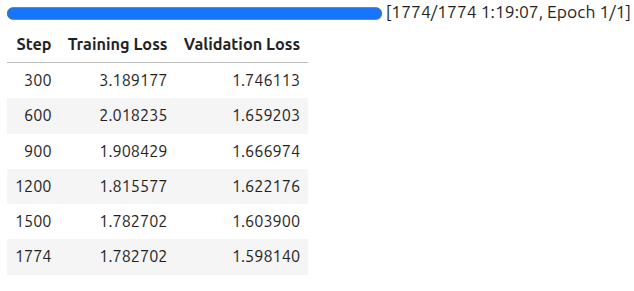
We will use the last saved model for inference in the next section.
Inference using the Trained Gemma 4 Text Reasoning Model
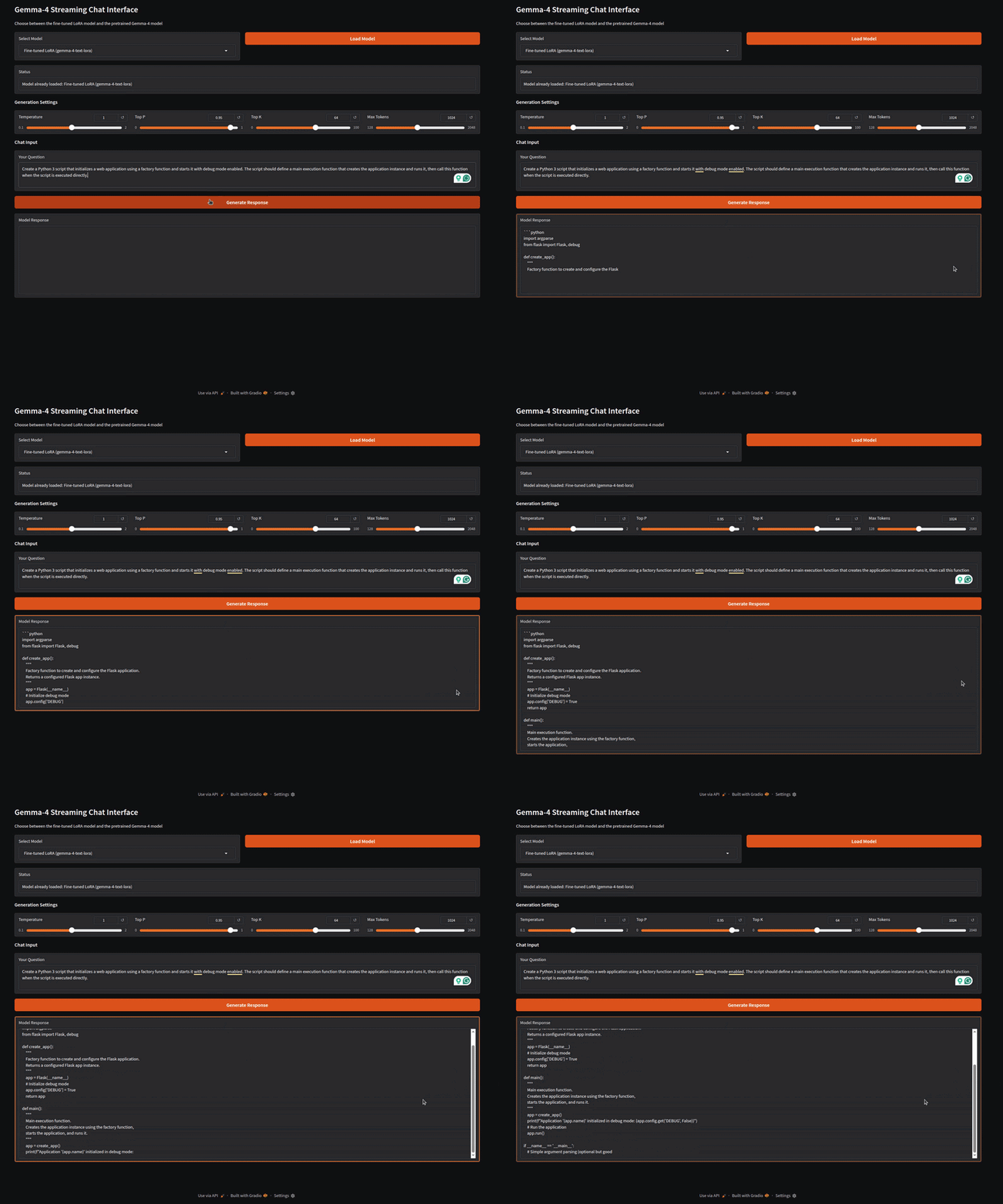
The inference.py script contains the code for a Gradio application that can load both the LoRA weights and the pretrained Gemma 4 E2B model. Let’s start the application and try some samples from the dataset.
python inference.py
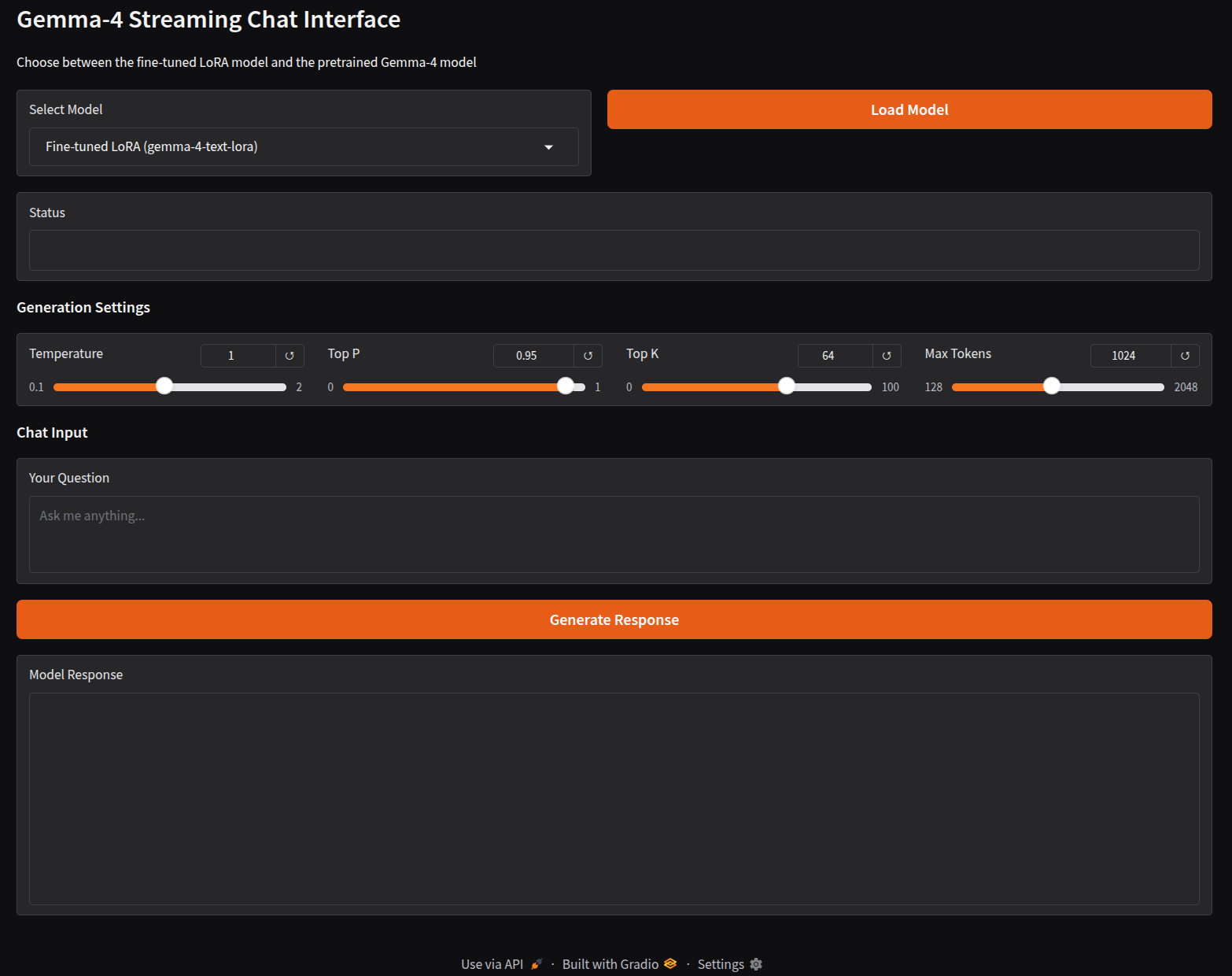
The following video shows loading the fine-tuned Gemma 4 LoRA and running it on a prompt from the dataset.
The above video shows the response to one of the prompts from the dataset. We can verify the answer manually for now. Feel free to try out different prompts from the dataset, and also compare it against the pretrained model that we can choose from the Gradio Select Model dropdown.
We can further improve the entire process by having a proper evaluation pipeline along with a comparison workflow that compares the pretrained and fine-tuned model responses.
Summary and Conclusion
In this article, we finetuned the Gemma 4 model on a text task. We trained it on reasoning samples collected from the DeepSeek-V4 model. We also built a simple Gradio application for running the trained model easily.
If you have any questions, thoughts, or suggestions, please leave them in the comment section. I will surely address them.
You can contact me using the Contact section. You can also find me on LinkedIn, and X.


Nice writeup on the Gemma 4 text fine-tuning pipeline. That DeepSeek-V4 distilled reasoning dataset seems like a solid practical choice for experiments—especially with the Unsloth integration keeping the LoRA training fast.
We’ve been evaluating Gemma 4 E2B for some internal reasoning tasks, and the pretrained chain-of-thought capability is already quite strong. That said, I’m curious: did you run into any issues with the model retaining its reasoning structure after fine-tuning, or did the DeepSeek-V4 data actually improve the thinking format in your tests?
Thanks Jason. I have not done a thorough evaluation of the fine-tuned model yet. But plan to do it soon.