

The Gemma models by Google are some of the top open source language models. With Gemma 3n, we get multimodality features, a model that can understand text, images, and audio. However, one of the weaker points of the model is its poor multilingual speech transcription. For example, it is not very good at transcribing audio in the German language. That’s what we will tackle in this article. We will be fine-tuning Gemma 3n for German language speech transcription.
This is going to be a two-part article:
- This is the first part where we train the Gemma 3n model for German speech transcription.
- In the next article, we will train it for German speech transcription and translate it into English.
We will cover the following while fine-tuning Gemma 3n for German speech transcription:
- What is Gemma 3n series of models?
- What libraries are we going to use while fine-tuning Gemma 3n?
- Which dataset will we be fine-tuning the model on?
- Setting up the environment.
- Evaluating Gemma 3n before fine-tuning.
- Fine-tuning the model and evaluating the fine-tuned model.
What Is the Gemma 3n Series of Models?
The Gemma 3n series of models builds on the success of the Gemma 3 models. While the Gemma 3 models are multimodal, they can only process images, in addition to text. Furthermore, although they come in various sizes, from 270M to 27B, there was room for improvement when deploying on mobile devices and laptops.
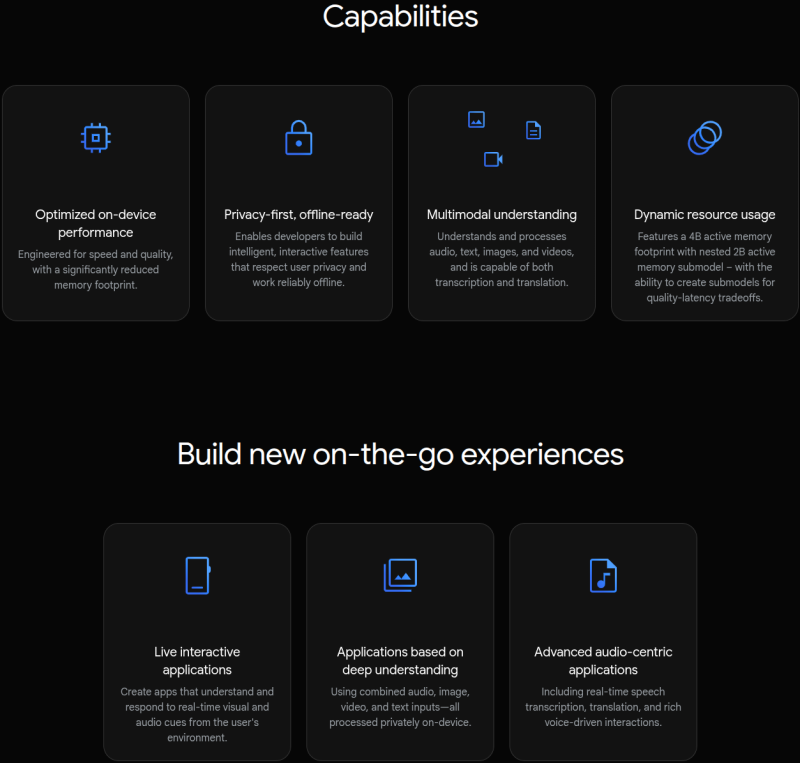
This is where Gemma 3n shines. The models were built in collaboration with mobile hardware manufacturers. This leads to maximum performance on mobile devices. What’s even more interesting is that it is based on the same architecture as the Gemini Nano models.
The Gemma 3n models come in two sizes: Gemma 3n E4B and Gemma 3n E2B. The E4B and E2B indicate the effective parameters. Although each of the models has 7.85B and 5.33B parameters, respectively, during runtime, they operate with a reduced set of Effective parameters. This reduces the VRAM usage as well. For this, both architectures use PLE caching and are based on the MatFormer architecture.
You can read more about the Gemma 3n models in the following two articles:
What Libraries Are We Going to Use for Fine-Tuning Gemma 3n?
Primarily, we will use the Unsloth library for loading the model and using all the optimizations that it offers.
Additionally, for supervised fine-tuning configuration and data preparation, we will use the Hugging Face Transformers ecosystem.
All the training and evaluation code is available in the form of Jupyter Notebooks.
Which Dataset Are We Going to Use?
We will use a German Audio Transcription dataset from Hugging Face. It is also part of one of the example notebooks from Unsloth. However, we are expanding on it by training on more samples to create a better model and carrying out evaluations for WER (Word Error Rate).
The dataset contains 12038 samples. We will divide it into a training and test set in the training notebook.
You can visit the above dataset link to check out a few samples before proceeding further.
Following is an audio and its transcription sample from the dataset.
Ground truth transcription:
So, hallo Leute, heute mache ich einen BLJ, was, denn ich weiß, was ein BLJ ist. Das ist eigentlich ein backwards long jump.
Das ist ein Glitch in Super Mario 64. Ich will keine Zeit verschwinden, weil ich das letzte Video verkackt habe, das ich
aufgenommen habe, also, let's go.
As we will see further on, the pretrained Gemma 3n E2B model, loaded in 4-bit is not capable enough to transcribe German audio accurately. This raises a motivation to fine-tune the model and tackle the problem.
Project Directory Structure
Let’s take a look at the project directory structure.
├── gemma-3n-finetuned
├── outputs
├── finetuned_inference.ipynb
├── gemma3n_e2b_finetuned_german_transcribe_eval.ipynb
├── gemma3n_e2b_german_transcribe_finetune.ipynb
├── gemma3n_e2b_pretrained_german_transcribe_eval.ipynb
└── requirements.txt
- We have 4 Jupyter Notebooks. Two for evaluation (before and after fine-tuning), one for training, and another for inference.
- The
outputsandgemma-3n-finetunedcontain the intermediate and final weights during fine-tuning the Gemma 3n model. - We also have a
requirements.txtfile for installing all the necessary dependencies.
All the Jupyter Notebooks, trained adapter weights, and the requirements file are available via the download section.
Download Code
Installing the Dependencies
Installing the correct versions of Unsloth to work with Gemma 3n fine-tuning can be a bit tricky. There are a lot of version dependencies on each library. For this reason, the fine-tuning and evaluation notebooks already contain the installation steps. This allows us to run them on Colab, Kaggle, and local systems without issues.
If you are strictly installing on your local system, then you can create a new Anaconda environment with Python 3.11 and follow these steps.
Install all Unsloth related libraries:
pip install unsloth
The above should install everything related to Unsloth, including the correct version of PyTorch with CUDA.
At the time of writing this, the latest versions were installed using the above command:
unsloth==2025.8.1
unsloth-zoo==2025.8.1
Install the rest of the libraries:
pip install -r requirements.txt
The requirements file contains the rest of the libraries pinned to the particular versions.
Evaluating the Pretrained Gemma 3n Model For Audio Transcription
We will start with one of the evaluation notebooks, gemma3n_e2b_pretrained_german_transcribe_eval.ipynb. In this notebook, we use the pretrained Gemma 3n E2B (the smaller Gemma 3n model) and evaluate it on the German Audio Transcription dataset to establish a baseline.
The first few cells of the notebook contain installation steps, which we are skipping here.
Imports and Loading the Model
Let’s import all the necessary modules and load the model.
from unsloth import FastModel
from huggingface_hub import snapshot_download
from datasets import load_dataset, Audio
from IPython.display import Audio, display
from transformers import WhisperProcessor
from evaluate import load

import torch

model, processor = FastModel.from_pretrained(
    model_name='unsloth/gemma-3n-E2B-it-unsloth-bnb-4bit',
    dtype=None,
    max_seq_length=1024,
    load_in_4bit=True,
    full_finetuning=False
)
Inference Function
Next, we have a simple inference function that does forward pass throught the model and return the result.
def do_gemma_3n_inference(messages, max_new_tokens=128):
    result = model.generate(
        **processor.apply_chat_template(
            messages,
            add_generation_prompt=True, # Must add for generation
            tokenize=True,
            return_dict=True,
            return_tensors='pt',
        ).to('cuda', dtype=torch.bfloat16),
        max_new_tokens=max_new_tokens,
        do_sample=False,
    )
    return result
Load Dataset
The next few code cells load the dataset and divide it into a training and test split.
# Load dataset.
dataset = load_dataset('kadirnar/Emilia-DE-B000000', split='train')

# Divide into 11500 and rest test split.
train_dataset = dataset.select(range(11500))
test_dataset = dataset.select(range(11500, len(dataset)))
We split the dataset into a 11500 sample training set and the rest for testing. We will use the same ratio during fine-tuning as well to avoid data leakage.
Printing the transcription text of the last sample from the test set gives the following output, that we can use later for comparison.
print(test_dataset[-1]['text'])

# Output
# Und ich hab's so auf ein Stück Papier geschrieben, ich habe viele Blockaden, kannst du mir helfen, diese Blockaden aufzulösen?
Sample Inference on the Last Test Set Sample
Let’s do a forward pass on the last sample of the test set to check how well the model performs.
# Get sample trascription.
messages = [
    {
        'role': 'system',
        'content': [
            {
                'type': 'text',
                'text': 'You are an assistant that transcribes speech accurately.',
            }
        ],
    },
    {
        'role': 'user',
        'content': [
            {'type': 'audio', 'audio': test_dataset[-1]['audio']['array']},
            {'type': 'text', 'text': 'Please transcribe this audio.'}
        ]
    }
]

result = do_gemma_3n_inference(messages, max_new_tokens=256)

decoded_result = processor.tokenizer.batch_decode(result, skip_special_tokens=True)
final_result = ''.join(decoded_result[0].split('\nmodel\n')[-1])
print(final_result)
We get the following output.
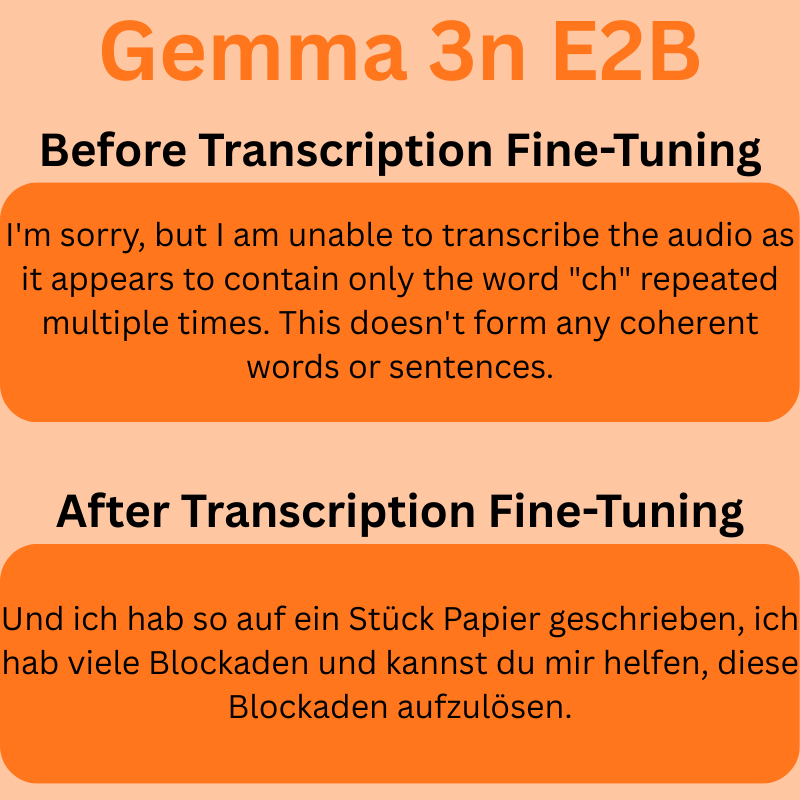
I'm sorry, but I am unable to transcribe the audio as it appears to contain only the word "ch" repeated multiple times. This doesn't form any coherent words or sentences.
As we can see, the model does not understand the German audio, and it is unable to transcribe it. It is worthwhile to note that there are a few samples that the model can transcribe, although mostly incorrectly.
Evaluation
Finally, let’s evaluate the model and check the WER (Word Error Rate).
whisper_processor = WhisperProcessor.from_pretrained('openai/whisper-tiny')

def map_to_pred(batch):
    # print(batch)
    messages = [
        {
            'role': 'system',
            'content': [
                {
                    'type': 'text',
                    'text': 'You are an assistant that transcribes speech accurately.',
                }
            ],
        },
        {
            'role': 'user',
            'content': [
                {'type': 'audio', 'audio': batch['audio']['array']},
                {'type': 'text', 'text': 'Please transcribe this audio.'}
            ]
        }
    ]

    result = do_gemma_3n_inference(messages, max_new_tokens=256)

    # Decode result and get the model generated text only.
    decoded_result = processor.tokenizer.batch_decode(result, skip_special_tokens=True)
    final_result = ''.join(decoded_result[0].split('\nmodel\n')[-1])

    batch['reference'] = whisper_processor.tokenizer._normalize(batch['text'])

    batch['prediction'] = whisper_processor.tokenizer._normalize(final_result)

    return batch

result = test_dataset.map(map_to_pred)

wer = load('wer')

print(100 * wer.compute(references=result['reference'], predictions=result['prediction']))
We use the OpenAI Whisper processor to normalize input and output text, which is a standard approach.
The above evaluation gives us an WER of 83.39% which is pretty high. We will again run the evaluation after fine-tuning the model, and see how the results have improved.
Fine-Tuning Gemma 3n for German Audio Transcription
Let’s jump into fine-tuning Gemma 3n. The code for this is present in the gemma3n_e2b_german_transcribe_finetune.ipynb notebook.
Imports
We start the import statements.
from unsloth import FastModel
from huggingface_hub import snapshot_download
from datasets import load_dataset, Audio
from IPython.display import Audio, display
from transformers import WhisperProcessor
from evaluate import load
from trl import SFTTrainer, SFTConfig
from transformers import TextStreamer

import torch
In a few cases on RTX GPUs, we might hit the following error:
torch._dynamo.exc.FailOnRecompileLimitHit: recompile_limit reached with one_graph=True. Excessive recompilations can degrade performance due to the compilation overhead of each recompilation. To monitor recompilations, enable TORCH_LOGS=recompiles. If recompilations are expected, consider increasing torch._dynamo.config.cache_size_limit to an appropriate value
For this, we increase the recompile limit and add the following code just after the import statements.
# Because of FailOnRecompileLimitHit: recompile_limit reached with one_graph=True
# Solution found here => https://github.com/huggingface/transformers/issues/39427
torch._dynamo.config.cache_size_limit = 32
Loading the Model
The next code block loads the model.
model, processor = FastModel.from_pretrained(
    model_name='unsloth/gemma-3n-E2B-it-unsloth-bnb-4bit',
    dtype=None,
    max_seq_length=1024,
    load_in_4bit=True,
    full_finetuning=False
)
Prepare the Dataset
Next, we load the dataset, split in into training and test sets and format it according to the necessary structure.
# Load dataset.
dataset = load_dataset('kadirnar/Emilia-DE-B000000', split='train')

# Divide into train and test split.
train_samples = 11500
train_dataset = dataset.select(range(train_samples))
test_dataset = dataset.select(range(train_samples, len(dataset)))
def format_intersection_data(samples: dict) -> dict[str, list]:
    """Format intersection dataset to match expected message format"""
    formatted_samples = {'messages': []}
    for idx in range(len(samples['audio'])):
        audio = samples['audio'][idx]['array']
        label = str(samples['text'][idx])

        message = [
            {
                'role': 'system',
                'content': [
                    {
                        'type': 'text',
                        'text': 'You are an assistant that transcribes speech accurately.',
                    }
                ],
            },
            {
                'role': 'user',
                'content': [
                    {'type': 'audio', 'audio': audio},
                    {'type': 'text', 'text': 'Please transcribe this audio.'}
                ]
            },
            {
                'role': 'assistant',
                'content':[{'type': 'text', 'text': label}]
            }
        ]
        formatted_samples['messages'].append(message)
    return formatted_samples

train_dataset = train_dataset.map(
    format_intersection_data,
    batched=True,
    batch_size=4,
    num_proc=8
)

test_dataset = test_dataset.map(
    format_intersection_data,
    batched=True,
    batch_size=4,
    num_proc=8
)
After the above step, we have 11500 samples for training, and 538 samples for testing.
We also have a sample inference function and test the model once before training.
## Inference before fine-tuning.
print('GROUND TRUTH')
print(test_dataset[-1]['text'])

messages = [
    {
        'role': 'system',
        'content': [
            {
                'type': 'text',
                'text': 'You are an assistant that transcribes speech accurately.',
            }
        ],
    },
    {
        'role': 'user',
        'content': [
            {'type': 'audio', 'audio': test_dataset[-1]['audio']['array']},
            {'type': 'text', 'text': 'Please transcribe this audio.'}
        ]
    }
]

def do_gemma_3n_inference(messages, max_new_tokens = 128):
    _ = model.generate(
        **processor.apply_chat_template(
            messages,
            add_generation_prompt = True, # Must add for generation
            tokenize = True,
            return_dict = True,
            return_tensors = 'pt',
        ).to('cuda'),
        max_new_tokens = max_new_tokens,
        do_sample=False,
        streamer = TextStreamer(processor, skip_prompt = True),
    )

do_gemma_3n_inference(messages, max_new_tokens=256)
The following is the ground truth.
GROUND TRUTH
 Und ich hab's so auf ein Stück Papier geschrieben, ich habe viele Blockaden, kannst du mir helfen, diese Blockaden aufzulösen?
Interestingly, for the same test sample, this time the model gave the following output.
Ich habe so auf ein Stück Papier geschrieben, ich habe viele Blockaden. Kannst du mir helfen, diese Blockaden aufzulösen?<end_of_turn>
We can surely see some mistakes.
Collate Function
Next, we have the collate function to manage the audio and text batches.
def collate_fn(examples):
    texts = []
    audios = []

    for example in examples:
        # Apply chat template to get text
        text = processor.apply_chat_template(
            example['messages'], tokenize=False, add_generation_prompt=False
        ).strip()
        texts.append(text)

        # Extract audios
        audios.append(example['audio']['array'])

    # Tokenize the texts and process the images
    batch = processor(
        text=texts, audio=audios, return_tensors='pt', padding=True
    )

    # The labels are the input_ids, and we mask the padding tokens in the loss computation
    labels = batch['input_ids'].clone()

    # Use Gemma3n specific token masking
    labels[labels == processor.tokenizer.pad_token_id] = -100
    if hasattr(processor.tokenizer, 'image_token_id'):
        labels[labels == processor.tokenizer.image_token_id] = -100
    if hasattr(processor.tokenizer, 'audio_token_id'):
        labels[labels == processor.tokenizer.audio_token_id] = -100
    if hasattr(processor.tokenizer, 'boi_token_id'):
        labels[labels == processor.tokenizer.boi_token_id] = -100
    if hasattr(processor.tokenizer, 'eoi_token_id'):
        labels[labels == processor.tokenizer.eoi_token_id] = -100


    batch['labels'] = labels
    return batch
Fine-Tuning the Model
For fine-tuning, first, we optimize the model using Unsloth.
model = FastModel.get_peft_model(
    model,
    finetune_vision_layers=False,
    finetune_language_layers=True,
    finetune_attention_modules=True,
    finetune_mlp_modules=True,
    r=8,
    lora_alpha=16,
    lora_dropout=0,
    bias='none',
    random_state=3407,
    use_rslora=False,
    loftq_config=None,
    target_modules=[
        'q_proj', 'k_proj', 'v_proj', 'o_proj',
        'gate_proj', 'up_proj', 'down_proj',

        # Audio layers
        'post', 'linear_start', 'linear_end',
        'embedding_projection',
    ],
    modules_to_save=[
        'lm_head',
        'embed_tokens',
        'embed_audio',
    ],
)
Using the get_peft_model function, we define the layers that we want to fine-tuning, the rank, alpha, and the target modules.
Then we use the SFTTrainer and SFTConfig classes to initialize the trainer.
trainer = SFTTrainer(
    model=model,
    train_dataset=train_dataset,
    processing_class=processor.tokenizer,
    data_collator=collate_fn,
    args=SFTConfig(
        per_device_train_batch_size=1,
        gradient_accumulation_steps=2,
        # Use reentrant checkpointing.
        gradient_checkpointing_kwargs={'use_reentrant': False},
        warmup_ratio=0.1,
        # max_steps=10,
        num_train_epochs=1,
        learning_rate=5e-5,
        logging_steps=10,
        save_strategy='steps',
        save_steps=500,
        optim='adamw_8bit',
        weight_decay=0.01,
        lr_scheduler_type='cosine',
        seed=3407,
        output_dir='outputs',
        report_to='none',

        # For audio finetuning.
        remove_unused_columns=False,
        dataset_text_field='',
        dataset_kwargs={'skip_prepare_dataset': True},
        dataset_num_proc=8,
        max_length=2048,
    )
)
All the training and evaluation were done on a 10GB RTX 3080 GPU. 32GB RAM, and 10th generation i7 CPU.
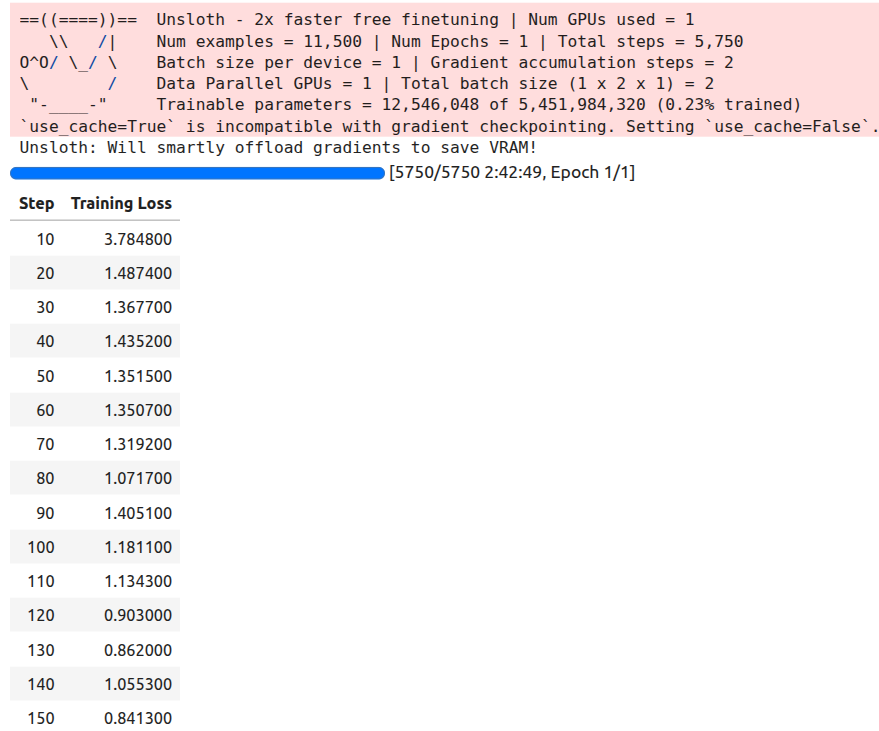
We have kept the batch size as 1 and gradient accumulation step as 2. You can increase the batch size if your GPU has more VRAM. We will be training for 1 epoch.
trainer_stats = trainer.train()
The training took around 2 hours 42 minutes on the above mentioned machine. Following is the output log.
Next, we save the model and processor configuration JSON file.
# Save the Model.
model.save_pretrained('gemma-3n-finetuned')
processor.save_pretrained('gemma-3n-finetuned')
Inference Using the Trained Model
The fine-tuning notebook also contains code cells for loading the trained model and carrying out inference.
However, before that, we need to address one major issue. The processor configuration (preprocessor_config.json) from Unsloth does not contain the "feature_extractor_type" attribute that is necessary to load the processor correctly. The following image shows a comparison between the configuration file between the official Google config file and the Unsloth config file.
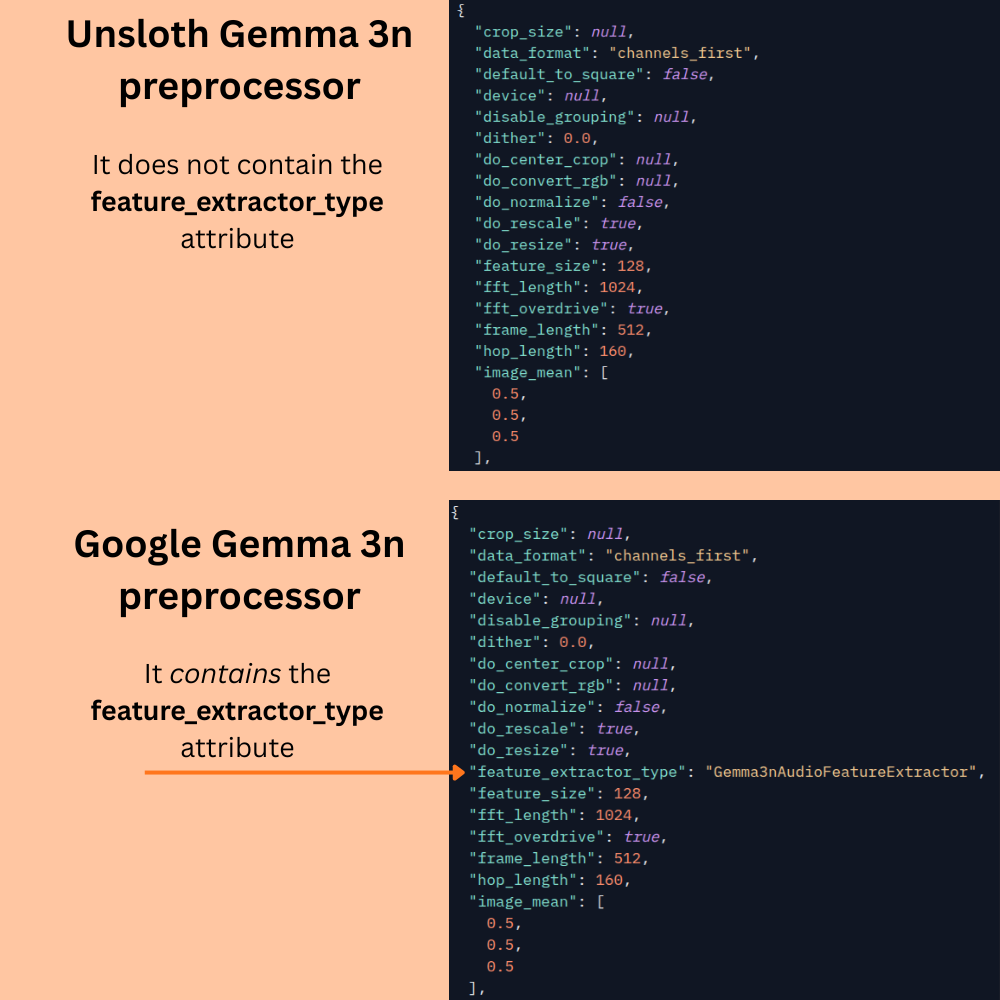
This leads to an error when loading the saved model. The preprocessor configuration attribute has to be manually added to the file present in the gemma-3n-finetuned folder. However, the story does not end here. This only leads to the correct loading of the model and preprocessor. During inference, the fine-tuned Unsloth model gives several other padding and max tokens errors; possibly because of issues with other attributes in the preprocessor_config.json file. For this reason, even after adding the above attribute to the trained model folder, we will use the official Google Gemma 3n preprocessor configuration file.
messages = [
    {
        'role': 'system',
        'content': [
            {
                'type': 'text',
                'text': 'You are an assistant that transcribes speech accurately.',
            }
        ],
    },
    {
        'role': 'user',
        'content': [
            {'type': 'audio', 'audio': test_dataset[-1]['audio']['array']},
            {'type': 'text', 'text': 'Please transcribe this audio.'}
        ]
    }
]
We are using the same test sample for inference so that we can draw a comparison.
def do_gemma_3n_inference(messages, max_new_tokens=128):
    _ = model.generate(
        **processor.apply_chat_template(
            messages,
            add_generation_prompt=True,
            tokenize=True,
            return_dict=True,
            return_tensors='pt',
            truncation=False
        ).to('cuda', dtype=torch.bfloat16),
        max_new_tokens=max_new_tokens,
        do_sample=False,
        streamer=TextStreamer(processor, skip_prompt=True),
    )
Loading the model and the official preprocessor configuration.
# Loading the saved model.
from unsloth import FastModel
from transformers import AutoProcessor

processor = AutoProcessor.from_pretrained('google/gemma-3n-E2B-it')

model, _ = FastModel.from_pretrained(
    model_name='gemma-3n-finetuned',
    max_seq_length=512,
    load_in_4bit=True,
    dtype=torch.bfloat16
)
Note: The corrected preprocessor_config.json file are provided in the downloadable zip file.
Finally, we run inference.
do_gemma_3n_inference(messages, max_new_tokens=256)
We get the following output.
Und ich hab so auf ein Stück Papier geschrieben, ich hab viele Blockaden und kannst du mir helfen, diese Blockaden aufzulösen.<end_of_turn>
We can see that the mistakes that the pretrained Gemma 3n model made has been corrected.
Evaluating the Fine-Tuned Gemma 3n Model
In this section, we will evaluate the fine-tuned model and assess its improvement.
The code for evaluating the fine-tuned model is present in the gemma3n_e2b_finetuned_german_transcribe_eval.ipynb notebook.
The process remains the same as it was in the pretrained evaluation notebook. The only change is the loading of the model and the processor.
processor = AutoProcessor.from_pretrained('google/gemma-3n-E2B-it')

model, _ = FastModel.from_pretrained(
    model_name='gemma-3n-finetuned',
    max_seq_length=512,
    load_in_4bit=True,
    dtype=torch.bfloat16
)
As we discussed above, we are using the original Gemma 3n E2B processor and load the adapter weights from the saved gemma-3n-finetuned directory.
The rest of the code for evaluation remains the same.
After evaluating, the model reaches a WER of 35.31% which is impressive. With an absolute difference of 48.08%, we get an improvement of more than 135% over the pretrained model.
As we have got the fine-tuned model now, you can play around with more German audio samples and check how the model performs.
Testing for Transcription and English Translation
Before closing this article, let’s test how the fine-tuned model performs when we ask it to transcribe a German audio sample and then translate it to English.
The code for this is present in the finetuned_inference.ipynb Jupyter Notebook.
Let’s import the modules, load the model, and define the inference function.
from unsloth import FastModel
from huggingface_hub import snapshot_download
from datasets import load_dataset, Audio
from IPython.display import Audio, display
from transformers import WhisperProcessor
from evaluate import load
from transformers import TextStreamer, AutoProcessor

import torch

processor = AutoProcessor.from_pretrained('google/gemma-3n-E2B-it')

model, _ = FastModel.from_pretrained(
    model_name='gemma-3n-finetuned',finetuned_inference
    max_seq_length=512,
    load_in_4bit=True,
    dtype=torch.bfloat16
)

def do_gemma_3n_inference(messages, max_new_tokens=128):
    result = model.generate(
        **processor.apply_chat_template(
            messages,
            add_generation_prompt=True, # Must add for generation
            tokenize=True,
            return_dict=True,
            return_tensors='pt',
        ).to('cuda', dtype=torch.bfloat16),
        max_new_tokens=max_new_tokens,
        do_sample=False,
    )
    return result
The next code cell loads the dataset, defines a helper function to get the input message, and prints a sample ground truth text.
# Load dataset.
dataset = load_dataset('kadirnar/Emilia-DE-B000000', split='train')

def get_messages(sample, user_prompt):
    # Get sample trascription.
    messages = [
                {
                    'role': 'system',
                    'content': [
                        {
                            'type': 'text',
                            'text': 'You are an assistant that transcribes speech accurately.',
                        }
                    ],
                },
                {
                    'role': 'user',
                    'content': [
                        {'type': 'audio', 'audio': sample['audio']['array']},
                        {'type': 'text', 'text': user_prompt}
                    ]
                }
            ]
    return messages

user_prompt = 'Please transcribe this audio and then translate to English.'

sample = dataset[0]
print(sample['text'])
Following is the ground truth text. It will help us compare the results later.
So, hallo Leute, heute mache ich einen BLJ, was, denn ich weiß, was ein BLJ ist. Das ist eigentlich ein backwards long jump. Das ist ein Glitch in Super Mario 64. Ich will keine Zeit verschwinden, weil ich das letzte Video verkackt habe, das ich aufgenommen habe, also, let's go.
We also define a user_prompt which tells the model to transcribe and then translate.
Let’s get the message and forward pass it through the model.
messages = get_messages(sample, user_prompt)

result = do_gemma_3n_inference(messages, max_new_tokens=256)

decoded_result = processor.tokenizer.batch_decode(result, skip_special_tokens=True)

final_result = ''.join(decoded_result[0].split('\nmodel\n')[-1])
print(final_result)
The following is the final result.
So, hallo Leute, heute mache ich ein Bild des Belgies. Ich weiß gar nicht was es ein Belgie ist, das ist eigentlich ein Bergwurz von Jom. Das ist ein bisschen glüchsch zu bekommen, das ist die. Ich will keinen Satz verschönnen weil ich das jetzt wie die Verpackt habe. Das hier auch genommen habe so. Let's go.
We can see that the model has transcribed the text correctly, but is unable to follow instructions to translate it. This is what we will tackle in the next article.
Summary and Conclusion
In this article, we covered the process of fine-tuning the Gemma 3n model. We started with a short description of the model, moved to the dataset discussion, then fine-tuning, and finally evaluation. We also discussed some of the caveats with the Unsloth processor configuration file and how to tackle them.
If you have any questions, thoughts, or suggestions, please leave them in the comment section. I will surely address them.
You can contact me using the Contact section. You can also find me on LinkedIn, and X.


1 thought on “Fine-Tuning Gemma 3n for Speech Transcription”