
In this article, we will cover an incremental improvement to the gpt-oss-chat project. We will add web search as a tool call capability. Instead of the user specifying to use web search, the model will decide based on the prompt and chat history whether to use web search or not. This includes additional benefits that we will cover further in the article. Although small, this article will show how to handle web search tool with streaming capability.
This is the second article in the gpt-oss-chat series. Here is a list of all the articles published so far.
The above article provides an introduction to the project and the motivation behind it.
This article, along with covering the details of the tool call, also showcases how far we have come with small language models like gpt-oss-20b. When grounded with knowledge base, they give excellent answers and have become adept at tool calls.
We will cover the following topics in this article:
- What changes do we need to make to transition from a hard-coded web search to a tool call web search?
- How do we handle web search tool call along with streaming tokens?
- What are the caveats and edge cases that we need to take care of?
Disclaimer: This is a work in progress, and the code that we will discuss here might not be 100% error-free. However, it is an incremental improvement and might help others in the community to find solutions to similar problems. The project is open source, and contributions are welcome.
Why Do We Need Web Search Tool Call with Streaming in gpt-oss-chat
In the previous article, we covered:
- Using in-memory QDrant vector DB for local RAG, and
- Web search toggle to search the internet using Tavily and Perplexity API
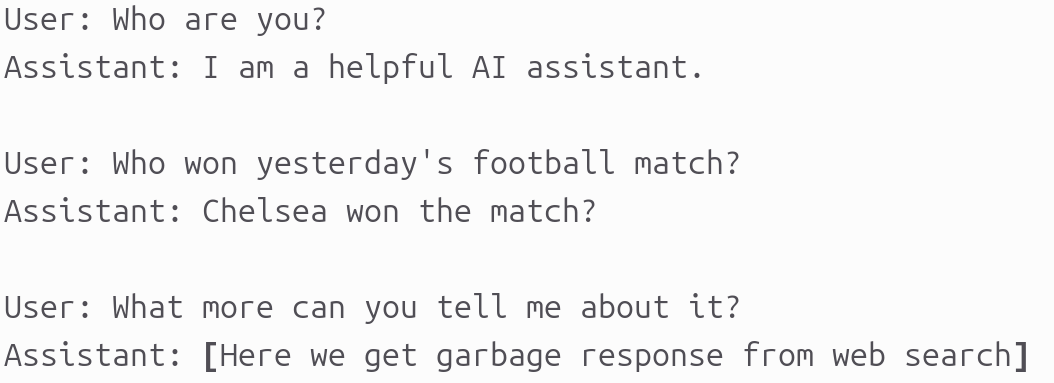
Right now, we enable web search manually and begin chatting with the model. For example, a series of chat turns could be like the following.
There are a few issues that stem here:
- The very first issue that every user query will be a call to web search. Even the first one where we ask the assistant about itself.
- The second issue is that the search query for web is exactly what the user inputs. No history is taken into account. This means that in the third turn, although the user is expecting a refined web search answer, the search query actually becomes “What more can you tell me about it?”. This will return a garbage answer.
Web search tool call eliminates both of the above issues. The LLM will decide when to make a web search call. Furthermore, it generates the search query based on the user’s input and history.
We will take a look at both of these in action further in the article.
This web search tool call with streaming is now officially a part of the gpt-oss-chat main branch.
Project Directory Structure
The following is the project directory structure.
.
├── api_call.py
├── app.py
├── assets
│   ├── gpt-oss-chat-terminal.png
│   └── gpt-oss-chat-ui.png
├── LICENSE
├── README.md
├── requirements.txt
├── semantic_engine.py
├── tool_simulation.py
├── tools.py
└── web_search.py
Compared to the previous article, we have two more files in this update:
- First,
tools.pycontains the tool definitions that we will be using. Second,tool_simulation.pyis a simple script for experimenting and debugging. We can ignore the latter for now. - However, we will mostly focus on one script here, that is
api_call.py, which has major changes.
This article comes with a zip file of the stable codebase of gpt-oss-chat that you can download, extract, set up, and get started with running the application.
Download Code
Setting Up Dependencies
I highly recommend going through the first article in the gpt-oss-chat series to get a better overview of the other files. It also contains a detailed section for setting up the following:
- llama.cpp
- Pypi requirements
- Web search API keys
From the next section onward, we will jump into the code.
Adding Web Search Tool Call with Streaming to gpt-oss-chat
There are two files that we will cover here:
tools.pyapi_call.py
Defining the Web Search Tool
We need to define the tool function definition and JSON schema definition for every tool call that we want to have in the pipeline. At the time of writing this, we only have the web search tool call in tools.py.
from web_search import do_web_search

def search_web(topic: str, search_engine: str) -> str:
    result =  do_web_search(
        topic,
        search_engine=search_engine
    )
    return '\n'.join(result)

tools = [
    {
        "type": "function",
        "function": {
            "name": "search_web",
            "description": "Search the web for information on a given topic.",
            "parameters": {
                "type": "object",
                "properties": {
                    "topic": {"type": "string"},
                    "search_engine": {"type": "string", "default": "tavily"}
                },
                "required": ["topic", "search_engine"]
            },
        },
    }
]
The Python function controls how the tool call is executed in the codebase, while the JSON schema describes the tool’s interface and helps the agent decide which parameters to supply or modify during a call. At runtime, the agent never sees the Python implementation – it only has access to the JSON schema.
The search_web Python function accepts a search query string and the search engine as parameters. The search engine can either be “tavily” or “perplexity”. It defaults to Tavily, and we can ask the agent in the prompt to use the Perplexity API instead. Internally, this function delegates the web result retrieval task to the do_web_search function from the web_search module.
Updating the Executable Script with Tool Call and Streaming
The updates to the api_call.py script are more significant. Handling tool call with real-time streaming of tokens can be a pain point in many cases.
In particular, we need to carefully handle:
- Detecting the exact point in the token stream where a tool call is initiated
- Incrementally capturing and reconstructing tool arguments as they arrive token by token
- Preserving any dangling content emitted by the model so that the first token of the final assistant response is not lost after the tool executes
Imports and Other Boilerplate Code
The following code block covers the import statements, argument parsers, the system prompt, and initializing the OpenAI client.
from openai import OpenAI, APIError
from web_search import do_web_search
from semantic_engine import (
    read_pdf,
    chunk_text,
    create_and_upload_in_mem_collection,
    search_query
)
from rich.console import Console
from rich.markdown import Markdown
from rich.live import Live
from pathlib import Path
from tools import tools, search_web

import argparse
import sys
import json

parser = argparse.ArgumentParser(
    description='RAG-powered chatbot with optional web search and local PDF support'
)
parser.add_argument(
    '--web-search',
    dest='web_search',
    action='store_true',
    help='Enable web search for answering queries'
)
parser.add_argument(
    '--search-engine',
    type=str,
    default='tavily',
    choices=['tavily', 'perplexity'],
    help='web search engine to use (default: tavily)'
)
parser.add_argument(
    '--local-rag',
    dest='local_rag',
    help='provide path of a local PDF file for RAG',
    default=None
)
parser.add_argument(
    '--model',
    type=str,
    default='model.gguf',
    help='model name to use (default: model.gguf)'
)
parser.add_argument(
    '--api-url',
    type=str,
    default='http://localhost:8080/v1',
    help='OpenAI API base URL (default: http://localhost:8080/v1)'
)
args = parser.parse_args()

system_message = """
You are a helpful assistant. You never say you are an OpenAI model or chatGPT.
You are here to help the user with their requests.
When the user asks who are you, you say that you are a helpful AI assistant.
You have access to the following tools:
1. search_web: Use this tool to search the web for up-to-date information.
Always use the tools when necessary to get accurate information.
"""

# Initialize Rich console
console = Console()

# Initialize OpenAI client
try:
    client = OpenAI(base_url=args.api_url, api_key='')
except Exception as e:
    console.print(f"[red]Error: Failed to initialize OpenAI client: {e}[/red]")
    sys.exit(1)
Here, we have updated the system prompt so that the assistant recognizes that it has access to certain tool calls.
Handling Chat History Along with Tool Call Argument
When we introduce any tool call to the chat history, the chat template expands from three roles to four:
systemuserassistanttool
This fundamentally changes how chat history must be constructed and maintained. In particular, messages with the tool role are not free-form; they must be explicitly tied to a preceding tool call made by the assistant.
The following helper function plays a central role in managing this state.
chat_history = []
def append_to_chat_history(
    role=None,
    content=None,
    chat_history=None,
    tool_call_id=None,
    tool_identifier=False,
    tool_name=None,
    tool_args=None
):
    if tool_identifier:
        chat_history.append({
            "role": role,
            "content": content,
            "tool_calls": [{
                "id": tool_call_id,
                "type": "function",
                "function": {
                    "name": tool_name,
                    "arguments": tool_args
                }
            }]
        })
        return chat_history
    if tool_call_id is not None:
        chat_history.append({'role': role, 'content': content, 'tool_call_id': tool_call_id})
    else:
        chat_history.append({'role': role, 'content': content})

    return chat_history

chat_history = append_to_chat_history('system', system_message, chat_history)

messages = chat_history
The key question to understand here is: what happens when the role is tool?
The critical detail is not the presence of tool_call_id on the tool message itself. Instead, tool call recognition is driven by the assistant message containing a properly formatted tool_calls field that exactly matches the jinja tool-calling template.
If the assistant message does not include the tool_calls key, subsequent messages with role="tool" will fail validation, even if a tool_call_id is provided. From the model’s perspective, no tool call was ever initiated.
In other words, the tool_calls field is what establishes intent and structure, while the tool_call_id merely links the tool response back to that declared call.
Only after this assistant message is correctly appended can we add a tool role message containing the tool’s output. At that point, the conversation can safely continue by prompting the model to answer the original question using the tool result.
Here are two visual examples, one wrong template and one correct template.
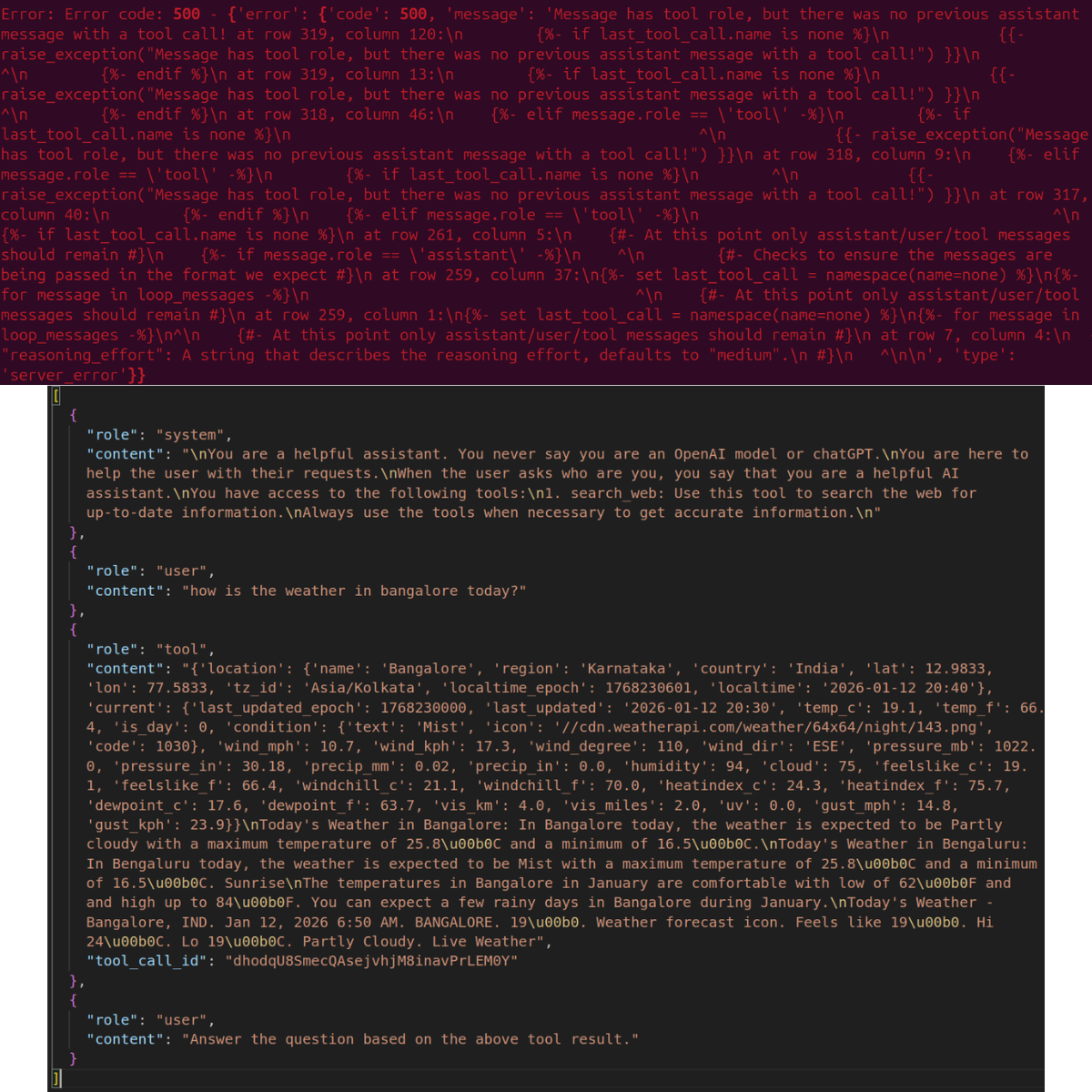
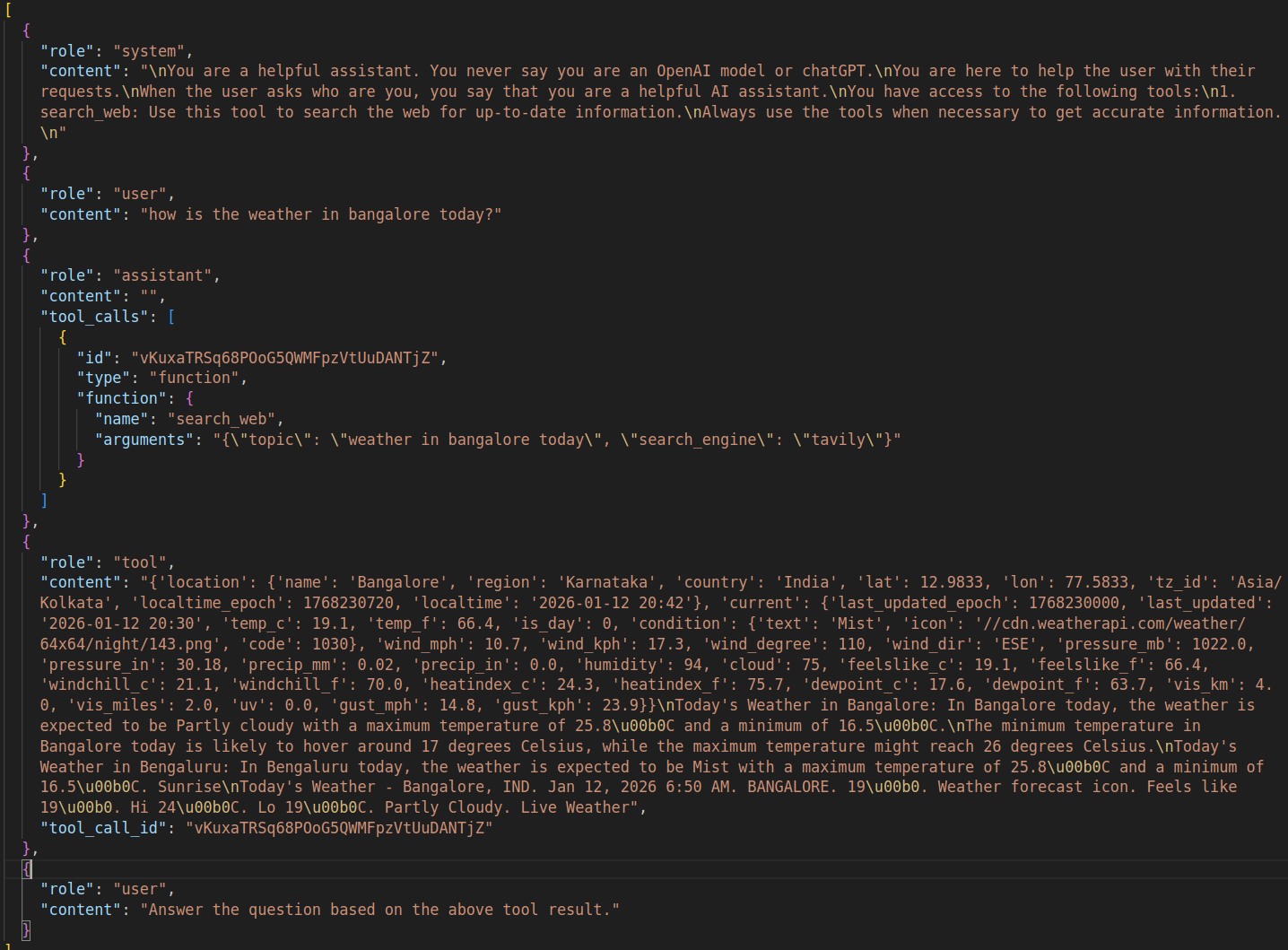
Figure 3 shows the error we get with the wrong template. Upon closer inspection of the chat history, we can see that the tool result is present with the tool ID and content. However, there is no assistant call showing that a tool call was made.
Figure 4 then shows the correct chat history format. Here, we have an assistant role with a tool_calls key indicating which tool was called and what the arguments were. The next role is tool which contains the results. Finally, we append another user role and ask the assistant to answer the previous question based on the tool call result.
This is one of the critical parts we need to take care of while handling tool calls.
Vector Search Document Embedding Section
The vector search using in-memory Qdrant DB that we devised in the last article remains intact.
### Embed document for vector search ###
if args.local_rag is not None:
    if not Path(args.local_rag).exists():
        console.print(f"[red]Error: PDF file not found: {args.local_rag}[/red]")
        sys.exit(1)

    try:
        console.print("[cyan]Ingesting local document for RAG...[/cyan]")
        console.print("[cyan]Reading and creating chunks...[/cyan]")
        full_text = read_pdf(args.local_rag)
        documents = chunk_text(full_text, chunk_size=512, overlap=50)
        console.print(f"[green]✓ Total chunks created: {len(documents)}[/green]")

        console.print("[cyan]Creating Qdrant collection...[/cyan]")
        create_and_upload_in_mem_collection(documents=documents)
        console.print("[green]✓ RAG collection ready[/green]")
    except Exception as e:
        console.print(f"[red]Error processing PDF: {e}[/red]")
        sys.exit(1)
###########################################

# Display available features
console.print("[bold cyan]RAG-Powered Chatbot Started[/bold cyan]")
if args.web_search:
    console.print(f"[cyan]  • Web search enabled ({args.search_engine})[/cyan]")
if args.local_rag:
    console.print(f"[cyan]  • Local RAG enabled[/cyan]")
console.print("[cyan]Type 'exit' or 'quit' to end the conversation[/cyan]\n")
We also print the features available, in case the users pass the command line arguments for web search and local RAG.
Handling Tool Call with Streaming in the Chat Loop
In the chat loop, we need to handle the following:
- Appending the chat history in the right order
- Local retrieval and web search if the user has passed the respective command line arguments
- Discovering tool calls (for now, web search only) when the streaming content is incoming from the assistant
In this article’s use case, we won’t be enabling the web search command line argument that switches it on permanently. As we are testing the web search tool call, we will solely prepare the code such that the assistant can make the decision when to make the tool call.
The following code block shows the entire function.
def run_chat_loop(client, args, messages, console):
    """
    Reusable chat loop function that can be imported by other modules.

    Args:
        client: OpenAI client instance
        args: Parsed arguments containing web_search, search_engine, local_rag, and model
        messages: Chat history list
        console: Rich console instance for output

    Returns:
        messages: Updated chat history
    """
    while True:
        try:
            user_input = console.input("[bold blue]You: [/bold blue]").strip()
            print()
            if not user_input:
                continue
            if user_input.lower() in ['exit', 'quit']:
                console.print("[yellow]Goodbye![/yellow]")
                break

            context_sources = []
            search_results = []
            ### Web search and context addition starts here ###
            if args.web_search:
                try:
                    console.print(f"[dim]Searching with {args.search_engine}...[/dim]")
                    web_search_results = do_web_search(
                        query=user_input, search_engine=args.search_engine
                    )
                    # context = "\n".join(web_search_results)
                    # user_input = f"Use the following web search results as context to answer the question.\n\nContext:\n{context}\n\nQuestion: {user_input}"
                    search_results.extend(web_search_results)
                    context_sources.append("web search")
                except Exception as e:
                    console.print(f"[yellow]Warning: Web search failed: {e}[/yellow]")
            ### Web search and context addition ends here ###

            ### Document retrieval begins here ###
            if args.local_rag is not None:
                try:
                    console.print("[dim]Searching local documents...[/dim]")
                    hits, local_search_results = search_query(user_input, top_k=3)
                    # context = "\n".join(local_search_results)
                    # user_input = f"Use the following document search results as context to answer the question.\n\nContext:\n{context}\n\nQuestion: {user_input}"
                    search_results.extend(local_search_results)
                    context_sources.append("local RAG")
                except Exception as e:
                    console.print(f"[yellow]Warning: Document search failed: {e}[/yellow]")
            ### Document retrieval ends here ###

            # Update user input if search results are found.
            if len(search_results) > 0:
                context = "\n".join(search_results)
                user_input = f"Use the following search results as context to answer the question.\n\nContext:\n{context}\n\nQuestion: {user_input}"

            # messages = append_to_chat_history({'role': 'user', 'content': user_input})
            messages = append_to_chat_history('user', user_input, messages)

            try:
                stream = client.chat.completions.create(
                    model=args.model,
                    messages=messages,
                    stream=True,
                    tools=tools,
                    tool_choice='auto',
                )

                # print(event.choices[0].delta.content for event in stream)  # Debug: Print each event received from the stream
                # print(stream)

            except APIError as e:
                console.print(f"[red]Error: API request failed: {e}[/red]")
                messages.pop()  # Remove the user message that failed
                continue

            # Process tool calls.
            tool_args = ''
            assistant_message_with_tool_call = ''
            tool_name = None
            tool_id = None
            dangling_stream_content = ''
            for event in stream:
                if event.choices[0].delta.tool_calls is not None:
                    if event.choices[0].delta.tool_calls[0].function.name is not None:
                        tool_name = event.choices[0].delta.tool_calls[0].function.name
                        tool_id = event.choices[0].delta.tool_calls[0].id
                        assistant_message_with_tool_call = event
                    tool_args += event.choices[0].delta.tool_calls[0].function.arguments
                if event.choices[0].delta.content is not None:
                    dangling_stream_content = event.choices[0].delta.content
                    break

            if tool_name is not None:
                console.print(f"[bold cyan]Using tool: {tool_name} ::: Args: {tool_args} [/bold cyan]")
                tool_args = json.loads(tool_args)

                # Execute tool call.
                if tool_name == 'search_web':
                    result = search_web(**tool_args)
                    # console.print(f"[dim]Tool result: {result}[/dim]")

                # Append assistant message with tool call to chat history.
                # messages = append_to_chat_history(
                #     'assistant',
                #     assistant_message_with_tool_call,
                #     chat_history=messages,
                #     tool_call_id=tool_id
                # )
                messages = append_to_chat_history(
                    role='assistant',
                    content='',
                    chat_history=messages,
                    tool_call_id=tool_id,
                    tool_identifier=True,
                    tool_name=tool_name,
                    tool_args=json.dumps(tool_args)
                )

                # Append tool result.
                messages = append_to_chat_history(
                    'tool',
                    str(result),
                    chat_history=messages,
                    tool_call_id=tool_id
                )

                # Append user query according to tool result.
                messages = append_to_chat_history(
                    'user',
                    "Answer the question based on the above tool result.",
                    chat_history=messages
                )


                # For debugging.
                # print(messages)

                # Make API call again with tool results added to the messages.
                console.print(f"[dim]Fetching final response from assistant...[/dim]")
                console.print()
                stream = client.chat.completions.create(
                    model=args.model,
                    messages=messages,
                    stream=True,
                    tools=tools,
                    tool_choice='auto',
                )

            # No tool call, just collect assistant response.
            # The logical flow also comes here when tool call is done and we
            # are streaming final response.
            current_response = ''
            buffer = ''
            # print(f"Dangling stream content: '{dangling_stream_content}'")
            if len(dangling_stream_content) > 0:
                # console.print(f"[dim] Dangling string: '{dangling_stream_content}'[/dim]")
                buffer += dangling_stream_content
            console.print("[bold green]Assistant:[/bold green] ")
            with Live(
                Markdown(''),
                console=console,
                refresh_per_second=10,
                # vertical_overflow='visible'
                vertical_overflow='ellipsis'
            ) as live:
                for event in stream:
                    stream_content = event.choices[0].delta.content
                    if stream_content is not None:
                        buffer += stream_content
                        live.update(Markdown(buffer))
                        current_response += stream_content

                messages = append_to_chat_history('assistant', current_response, messages)
                console.print()
                if context_sources:
                    console.print(f"[dim](Sources: {', '.join(context_sources)})[/dim]")

            console.print()

        except KeyboardInterrupt:
            console.print("\n[yellow]Interrupted. Goodbye![/yellow]")
            break
        except Exception as e:
            console.print(f"[red]Error: {e}[/red]")
            continue

    return messages

def main():
    """Main entry point when running api_call.py directly."""
    run_chat_loop(client, args, messages, console)


if __name__ == '__main__':
    main()
This chat loop runs indefinitely until the user passes either exit or quit as the prompt. Let’s skip everything till line 186 in the above code block.
Starting from line 189:
- We check if any local retrieval was performed. If so, we add it as context to the user query.
- On line 197, we perform the first assistant call. We pass the
toolslist andtool_choiceas'auto'so that the assistant decides which tool to call and when. - The critical part starts from line 214. We initialize variables to capture the tool arguments, tool name, tool ID, and any streaming content that might not be part of the tool call that we need to append to the final content (
dangling_stream_content). The following block shows the streaming content when the assistant decides to make a tool call based on the user query.
You: How is the weather today in Bangalore?

ChatCompletionChunk(id='chatcmpl-pz3DLNccmZDcTFgqY9rMW12hxzsH1ceW', choices=[Choice(delta=ChoiceDelta(content=None, function_call=None, refusal=None, role=None, tool_calls=[ChoiceDeltaToolCall(index=0, id='HXf5Jvzp3E8UPzihHkw1WLlMeGlZldI7', function=ChoiceDeltaToolCallFunction(arguments='{"', name='search_web'), type='function')]), finish_reason=None, index=0, logprobs=None)], created=1768265971, model='ggml-org/gpt-oss-20b-GGUF', object='chat.completion.chunk', service_tier=None, system_fingerprint='b7502-e1f15b454', usage=None)
ChatCompletionChunk(id='chatcmpl-pz3DLNccmZDcTFgqY9rMW12hxzsH1ceW', choices=[Choice(delta=ChoiceDelta(content=None, function_call=None, refusal=None, role=None, tool_calls=[ChoiceDeltaToolCall(index=0, id=None, function=ChoiceDeltaToolCallFunction(arguments='topic', name=None), type=None)]), finish_reason=None, index=0, logprobs=None)], created=1768265971, model='ggml-org/gpt-oss-20b-GGUF', object='chat.completion.chunk', service_tier=None, system_fingerprint='b7502-e1f15b454', usage=None)
ChatCompletionChunk(id='chatcmpl-pz3DLNccmZDcTFgqY9rMW12hxzsH1ceW', choices=[Choice(delta=ChoiceDelta(content=None, function_call=None, refusal=None, role=None, tool_calls=[ChoiceDeltaToolCall(index=0, id=None, function=ChoiceDeltaToolCallFunction(arguments='":"', name=None), type=None)]), finish_reason=None, index=0, logprobs=None)], created=1768265971, model='ggml-org/gpt-oss-20b-GGUF', object='chat.completion.chunk', service_tier=None, system_fingerprint='b7502-e1f15b454', usage=None)
ChatCompletionChunk(id='chatcmpl-pz3DLNccmZDcTFgqY9rMW12hxzsH1ceW', choices=[Choice(delta=ChoiceDelta(content=None, function_call=None, refusal=None, role=None, tool_calls=[ChoiceDeltaToolCall(index=0, id=None, function=ChoiceDeltaToolCallFunction(arguments='weather', name=None), type=None)]), finish_reason=None, index=0, logprobs=None)], created=1768265971, model='ggml-org/gpt-oss-20b-GGUF', object='chat.completion.chunk', service_tier=None, system_fingerprint='b7502-e1f15b454', usage=None)
ChatCompletionChunk(id='chatcmpl-pz3DLNccmZDcTFgqY9rMW12hxzsH1ceW', choices=[Choice(delta=ChoiceDelta(content=None, function_call=None, refusal=None, role=None, tool_calls=[ChoiceDeltaToolCall(index=0, id=None, function=ChoiceDeltaToolCallFunction(arguments=' Bangalore', name=None), type=None)]), finish_reason=None, index=0, logprobs=None)], created=1768265971, model='ggml-org/gpt-oss-20b-GGUF', object='chat.completion.chunk', service_tier=None, system_fingerprint='b7502-e1f15b454', usage=None)
ChatCompletionChunk(id='chatcmpl-pz3DLNccmZDcTFgqY9rMW12hxzsH1ceW', choices=[Choice(delta=ChoiceDelta(content=None, function_call=None, refusal=None, role=None, tool_calls=[ChoiceDeltaToolCall(index=0, id=None, function=ChoiceDeltaToolCallFunction(arguments=' today', name=None), type=None)]), finish_reason=None, index=0, logprobs=None)], created=1768265971, model='ggml-org/gpt-oss-20b-GGUF', object='chat.completion.chunk', service_tier=None, system_fingerprint='b7502-e1f15b454', usage=None)
ChatCompletionChunk(id='chatcmpl-pz3DLNccmZDcTFgqY9rMW12hxzsH1ceW', choices=[Choice(delta=ChoiceDelta(content=None, function_call=None, refusal=None, role=None, tool_calls=[ChoiceDeltaToolCall(index=0, id=None, function=ChoiceDeltaToolCallFunction(arguments='","', name=None), type=None)]), finish_reason=None, index=0, logprobs=None)], created=1768265971, model='ggml-org/gpt-oss-20b-GGUF', object='chat.completion.chunk', service_tier=None, system_fingerprint='b7502-e1f15b454', usage=None)
ChatCompletionChunk(id='chatcmpl-pz3DLNccmZDcTFgqY9rMW12hxzsH1ceW', choices=[Choice(delta=ChoiceDelta(content=None, function_call=None, refusal=None, role=None, tool_calls=[ChoiceDeltaToolCall(index=0, id=None, function=ChoiceDeltaToolCallFunction(arguments='search', name=None), type=None)]), finish_reason=None, index=0, logprobs=None)], created=1768265971, model='ggml-org/gpt-oss-20b-GGUF', object='chat.completion.chunk', service_tier=None, system_fingerprint='b7502-e1f15b454', usage=None)
ChatCompletionChunk(id='chatcmpl-pz3DLNccmZDcTFgqY9rMW12hxzsH1ceW', choices=[Choice(delta=ChoiceDelta(content=None, function_call=None, refusal=None, role=None, tool_calls=[ChoiceDeltaToolCall(index=0, id=None, function=ChoiceDeltaToolCallFunction(arguments='_engine', name=None), type=None)]), finish_reason=None, index=0, logprobs=None)], created=1768265971, model='ggml-org/gpt-oss-20b-GGUF', object='chat.completion.chunk', service_tier=None, system_fingerprint='b7502-e1f15b454', usage=None)
ChatCompletionChunk(id='chatcmpl-pz3DLNccmZDcTFgqY9rMW12hxzsH1ceW', choices=[Choice(delta=ChoiceDelta(content=None, function_call=None, refusal=None, role=None, tool_calls=[ChoiceDeltaToolCall(index=0, id=None, function=ChoiceDeltaToolCallFunction(arguments='":"', name=None), type=None)]), finish_reason=None, index=0, logprobs=None)], created=1768265971, model='ggml-org/gpt-oss-20b-GGUF', object='chat.completion.chunk', service_tier=None, system_fingerprint='b7502-e1f15b454', usage=None)
ChatCompletionChunk(id='chatcmpl-pz3DLNccmZDcTFgqY9rMW12hxzsH1ceW', choices=[Choice(delta=ChoiceDelta(content=None, function_call=None, refusal=None, role=None, tool_calls=[ChoiceDeltaToolCall(index=0, id=None, function=ChoiceDeltaToolCallFunction(arguments='t', name=None), type=None)]), finish_reason=None, index=0, logprobs=None)], created=1768265971, model='ggml-org/gpt-oss-20b-GGUF', object='chat.completion.chunk', service_tier=None, system_fingerprint='b7502-e1f15b454', usage=None)
ChatCompletionChunk(id='chatcmpl-pz3DLNccmZDcTFgqY9rMW12hxzsH1ceW', choices=[Choice(delta=ChoiceDelta(content=None, function_call=None, refusal=None, role=None, tool_calls=[ChoiceDeltaToolCall(index=0, id=None, function=ChoiceDeltaToolCallFunction(arguments='av', name=None), type=None)]), finish_reason=None, index=0, logprobs=None)], created=1768265972, model='ggml-org/gpt-oss-20b-GGUF', object='chat.completion.chunk', service_tier=None, system_fingerprint='b7502-e1f15b454', usage=None)
ChatCompletionChunk(id='chatcmpl-pz3DLNccmZDcTFgqY9rMW12hxzsH1ceW', choices=[Choice(delta=ChoiceDelta(content=None, function_call=None, refusal=None, role=None, tool_calls=[ChoiceDeltaToolCall(index=0, id=None, function=ChoiceDeltaToolCallFunction(arguments='ily', name=None), type=None)]), finish_reason=None, index=0, logprobs=None)], created=1768265972, model='ggml-org/gpt-oss-20b-GGUF', object='chat.completion.chunk', service_tier=None, system_fingerprint='b7502-e1f15b454', usage=None)
ChatCompletionChunk(id='chatcmpl-pz3DLNccmZDcTFgqY9rMW12hxzsH1ceW', choices=[Choice(delta=ChoiceDelta(content=None, function_call=None, refusal=None, role=None, tool_calls=[ChoiceDeltaToolCall(index=0, id=None, function=ChoiceDeltaToolCallFunction(arguments='"}', name=None), type=None)]), finish_reason=None, index=0, logprobs=None)], created=1768265972, model='ggml-org/gpt-oss-20b-GGUF', object='chat.completion.chunk', service_tier=None, system_fingerprint='b7502-e1f15b454', usage=None)
Using tool: search_web ::: Args: {"topic":"weather Bangalore today","search_engine":"tavily"}
Fetching final response from assistant...

Assistant:

Bangalore – 13 Jan 2026 (current)

 • Time: 06:28 AM IST (local)
 • Condition: Partly cloudy
 • Temperature: 17.2 °C (62.9 °F) – feels like 17.2 °C
 • Wind: 13.3 kph (8.3 mph) from the east
 • Humidity: 90 %
 • Pressure: 1018 mb (30.07 in)
 • Visibility: 10 km (6 mi)
 • Precipitation: none recorded so far

So it’s a cool, partly‑cloudy morning with a gentle breeze and high humidity. No rain is expected at the moment.
- This part makes the tool call and argument retrieval tricky. As we can see, the assistant decides that it will make a tool call in the first stream content indicated by
function=ChoiceDeltaToolCallFunction. And it chooses the tool name as'web_search'. - We use this part to recognize that a tool call will be made and what tool to use. The following stream contents contain the argument to pass to the tool call. However, as we can see, that also reaches us in streams, each stream event containing one token of the argument. We accumulate the entire argument, capture the final remaining token from the stream in the form of
dangling_stream_contentand break out of the loop. All of this happens in lines 219-228. - After that, we check if the tool name is not
None, then we make the call to theweb_searchtool. We get the result, append the assistant result withtool_callskey and the tool result with the tool ID. Finally, we append another user query to answer the previous question and make a subsequent call to the assistant.
And all of this for handling one tool call. We have to repeat this process in a loop when we have multiple tool calls. Finally, after the tool call is made, we break to line 289 and start streaming the final content onto the terminal.
This is the entirety of the code that we have for handling tool call with streaming in gpt-oss-chat.
Experiment with Tool Call in gpt-oss-chat
To run the application, we first need to start the llama.cpp server.
./llama-server -hf ggml-org/gpt-oss-20b-GGUF -c 16000
Next, run the script.
python api_call.py
Let’s take a look at some experiments.
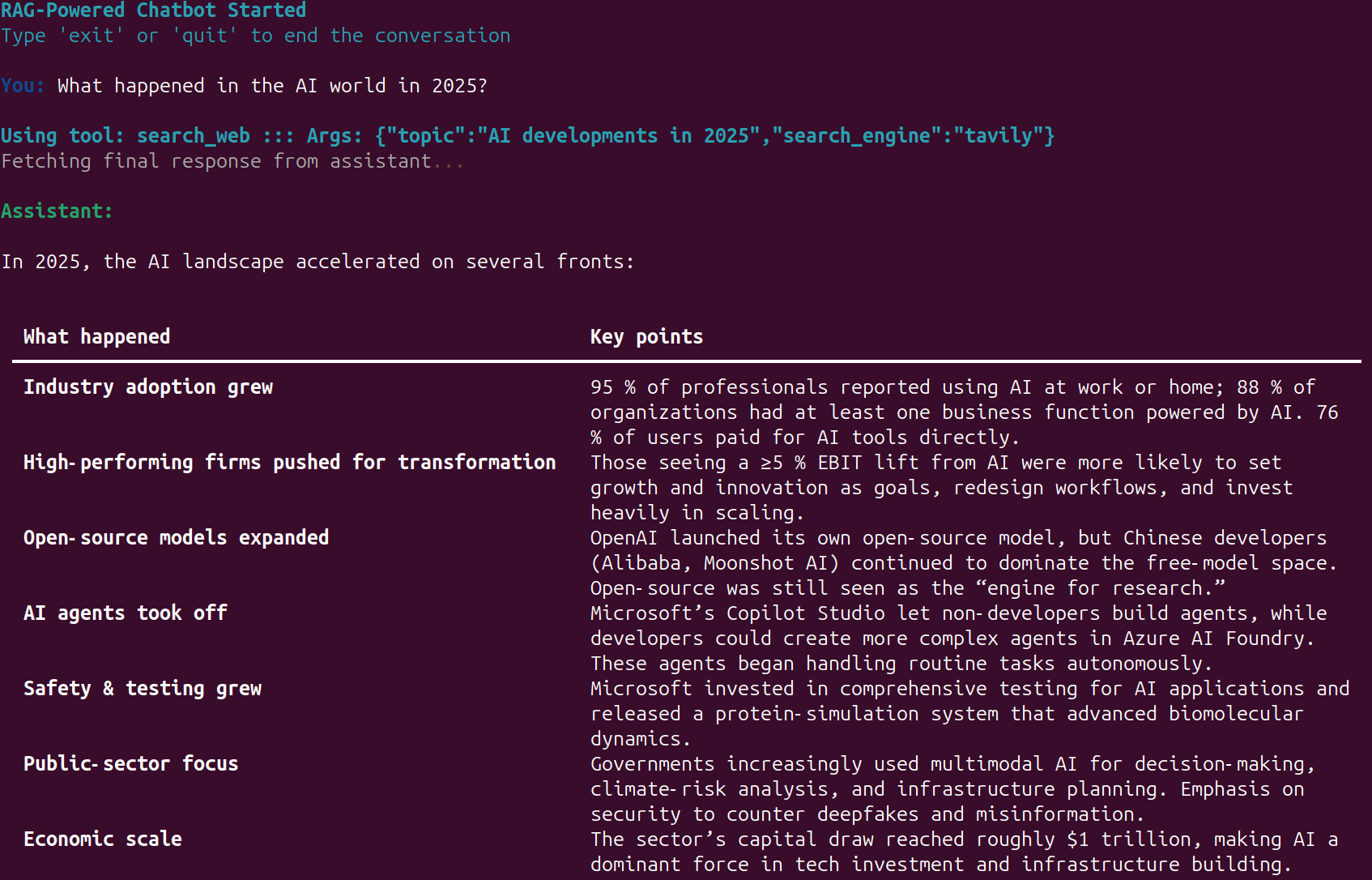
Whenever the web search tool call happens, we show the information along with the exact search query that goes to the API.
The following video shows the web search tool call in action.
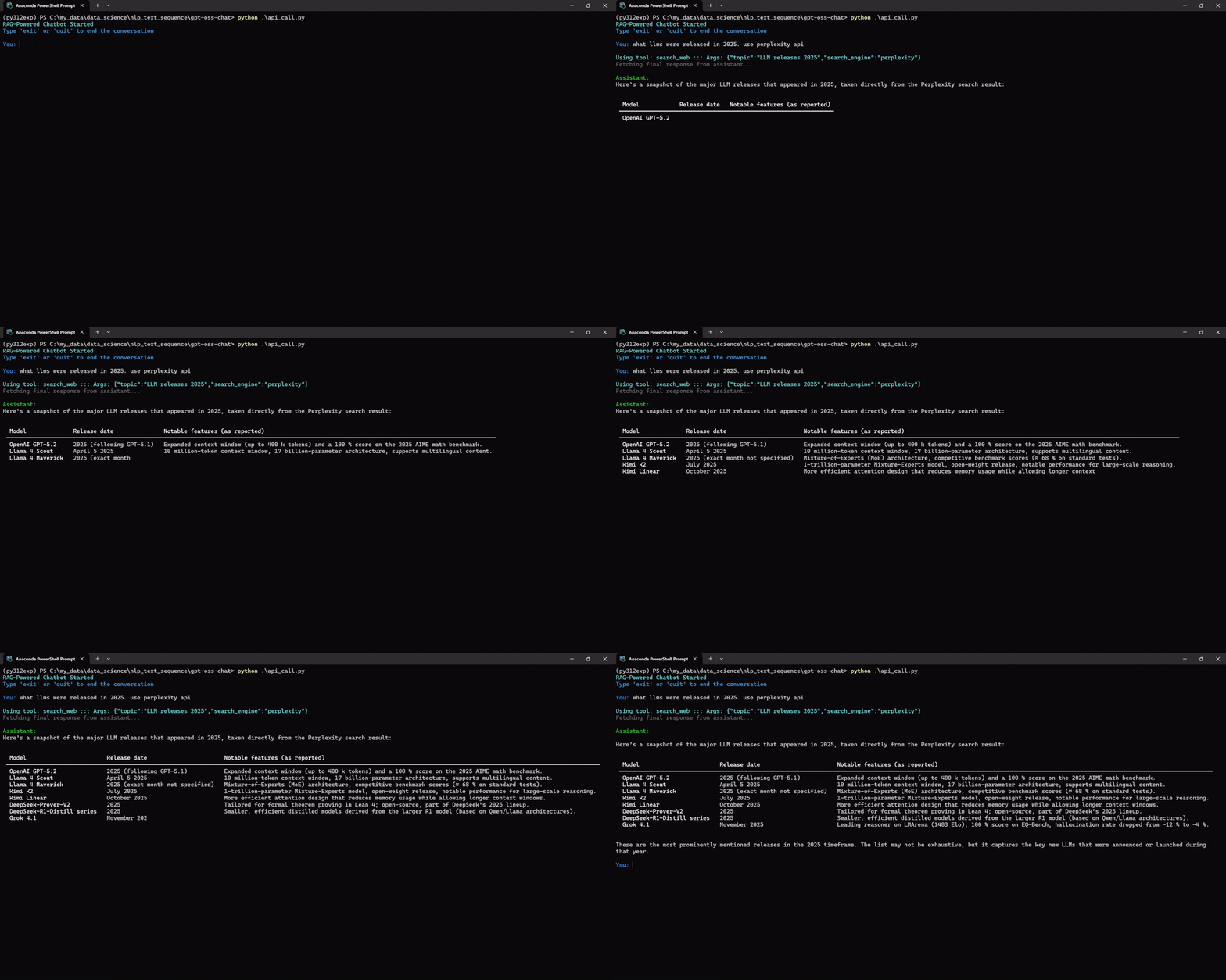
We can also specify the prompt for which web search API we want to use. For example, in the following, we ask the assistant to use the perplexity API.
Try to play around with different prompts and check when the assistant calls the web search tool.
Summary and Conclusion
In this article, we explored how to add the web search tool call along with streaming to gpt-oss-chat. While doing so, we identified multiple caveats that we need to take care of. In future articles, we will work on adding multiple tools and handling them.
If you have any questions, thoughts, or additions, please leave them in the comment section. I will surely address them.
You can contact me using the Contact section. You can also find me on LinkedIn, and X.

