
Following up on previous articles, this week, we will extend gpt-oss-chat with RAG tool call. In the last few articles, we focused on setting the base for gpt-oss-chat and adding RAG & web search capabilities. In fact, we even added web search as a tool call where the assistant decides when to search the web. This article will be an extension in a similar direction, where we add local RAG (Retrieval Augmented Generation) as a tool call.
This is the third article in the gpt-oss-chat series:
This is a minor incremental improvement, where much of the code remains the same with essential changes only. Our aim is to learn how to add multiple tool choices for an assistant and let it choose the best one in each chat turn based on user interaction. All the while maintaining real-time streaming of tokens.
What are we going to cover while adding RAG tool call for gpt-oss-chat?
- What is the motivation behind this, and what is the benefit?
- What parts of the codebase have changed and need to be updated?
- How does our assistant perform during real-time interaction and choose between multiple tools?
Why Do We Need RAG as a Tool Call?
Real-world chatbots seldom have only one tool at their disposal. By default, they always have the web search as a tool call. Furthermore, to enhance the spectrum of user experience, they have several “application connectors” options, which inherently work as tool call.
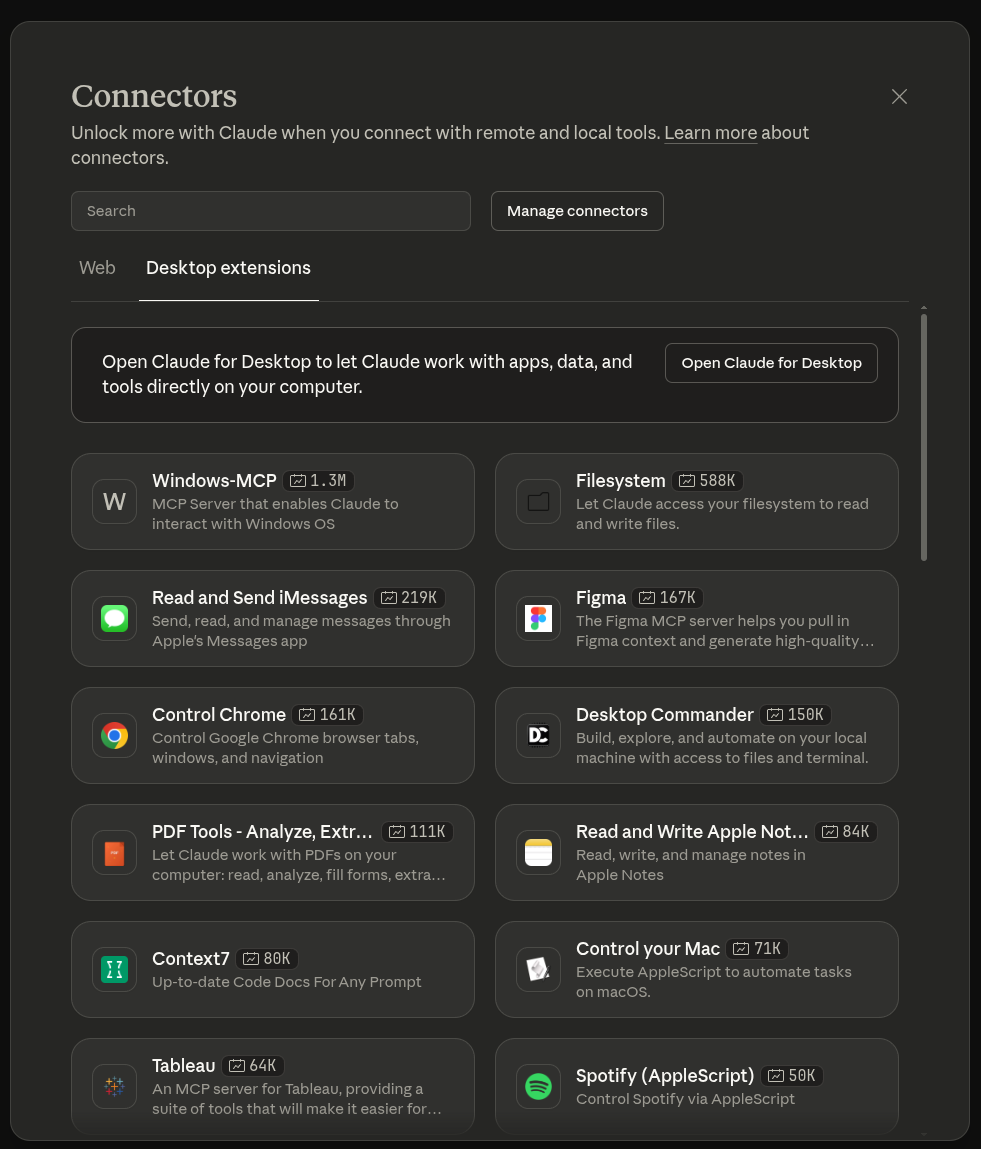
Claude chat is a classic example of this. It provides web search tool call option, and several connector options. These connectors can be tool calls or MCPs (Model Context Protocols).
For this particular reason, enabling our gpt-oss-chat with RAG as a tool call leads to a natural learning path for how we can achieve the same locally.
This has the added benefit that the local document search is not carried out forcefully by default. Rather, the model decides based on the user query and chat history whether to call the RAG tool and search the document. This saves context and time to respond when RAG is not needed.
So, the assistant acts as a router to different tools at its disposal as and when needed.
Project Directory Structure
The following is the project directory structure.
├── assets
│   ├── gpt-oss-chat-terminal.png
│   └── gpt-oss-chat-ui.png
├── tools
│   ├── tool_simulation.py
│   └── tools.py
├── utils
│   └── prompt.py
├── api_call.py
├── app.py
├── LICENSE
├── README.md
├── requirements.txt
├── semantic_engine.py
└── web_search.py
Compared to the previous two articles, the structure has changed a bit.
- We now have the code for different tools inside the
toolsmodule. - The prompt and history management has moved to the
utilsmodule. - The
api_call.pyandapp.pyremains the main executable script for CLI-based chat and Gradio-based chat, respectively. Although in this article, we will entirely focus onapi_call.py. - There are no logical changes in
semantic_engine.pyandweb_search.pycompared to the previous article.
A stable version of the codebase is available for download with this article. You can also visit the gpt-oss-chat GitHub repository to check the latest code.
Download Code
Installing Dependencies
Please visit the first article in the series, gpt-oss-chat Local RAG and Web Search (Installing Dependencies section), which describes all the installation steps, including:
- llama.cpp
- Local library installation via
requirements.txt - And setting up web search API keys for Tavily and Perplexity
This is all the setup we need for now. From the next section onwards, we will jump into the code.
Adding RAG as a Tool Call to gpt-oss-chat
From here on, we will cover the important sections of the codebase. As there are not many changes to the primary logic, this discussion will be short. However, we will focus more on the inference and the assistant’s capability to choose between the two tools.
Prompt Management
The entire prompt management code has now moved to utils/prompt.py.
SYSTEM_MESSAGE = """
You are a helpful assistant. You never say you are an OpenAI model or chatGPT.
You are here to help the user with their requests.
When the user asks who are you, you say that you are a helpful AI assistant.
You have access to the following tools:
1. search_web: Use this tool to search the web for up-to-date information.
2. local_rag: When the user uploads a document, you can use this tool to retrieve information.

You can combine results of tools as and when necessary.
Always use the tools when necessary to get accurate information.
"""

def append_to_chat_history(
    role=None,
    content=None,
    chat_history=None,
    tool_call_id=None,
    tool_identifier=False,
    tool_name=None,
    tool_args=None
):
    if tool_identifier:
        chat_history.append({
            "role": role,
            "content": content,
            "tool_calls": [{
                "id": tool_call_id,
                "type": "function",
                "function": {
                    "name": tool_name,
                    "arguments": tool_args
                }
            }]
        })
        return chat_history
    if tool_call_id is not None:
        chat_history.append({'role': role, 'content': content, 'tool_call_id': tool_call_id})
    else:
        chat_history.append({'role': role, 'content': content})

    return chat_history
We are now using an updated system prompt with additional information about the local_rag tool. We will get to know more about it in the next subsection.
The append_to_chat_history function for chat history management remains the same as in the last article.
Adding the Local RAG Tool
Let’s add the RAG tool to our codebase. The code for this resides in the tools/tools.py.
Following is the entire code from the file.
from web_search import do_web_search
from semantic_engine import search_query

tools = [
    {
        "type": "function",
        "function": {
            "name": "search_web",
            "description": "Search the web for information on a given topic.",
            "parameters": {
                "type": "object",
                "properties": {
                    "topic": {"type": "string"},
                    "search_engine": {"type": "string", "default": "tavily"}
                },
                "required": ["topic", "search_engine"]
            },
        },
    },
    {
        "type": "function",
        "function": {
            "name": "local_rag",
            "description": "Search the document for local RAG information on a given topic when a document is passed by the user.",
            "parameters": {
                "type": "object",
                "properties": {
                    "top_k": {"type": "integer"},
                    "topic": {"type": "string"}
                },
                "required": ["top_k", "topic"]
            },
        },
    }
]

def search_web(topic: str, search_engine: str) -> str:
    result =  do_web_search(
        topic,
        search_engine=search_engine
    )
    return '\n'.join(result)

def local_rag(topic: str, top_k: int) -> str:
    hits, result = search_query(topic, top_k=top_k)

    return '\n'.join(result)
We first import the search_query function from semantic_engine module that holds the core logic for local RAG using Qdrant in-memory vector DB. You may visit the first article in the series to know more about it.
Next, we update the tools list with an additional dictionary containing the local_rag function data. The assistant can pass two parameters to the tool: the first is top_k, which decides the number of chunks to retrieve, and the second is the topic for search.
Finally, the local_rag function handles the call to search_query function and returns the result as a string.
Handling Core Logic for Multiple Tool Calls
The core logic of deciding and calling the tools resides in api_call.py. This is also the executable script that we run via terminal. As there are not many changes in the code, we will discuss the essential ones only. You can find a detailed discussion of the entire script in the previous article.
Import Statements
We now import the tool and prompt logic from the respective modules.
from openai import OpenAI, APIError
from web_search import do_web_search
from semantic_engine import (
    read_pdf,
    chunk_text,
    create_and_upload_in_mem_collection,
    search_query
)
from rich.console import Console
from rich.markdown import Markdown
from rich.live import Live
from pathlib import Path
from tools.tools import tools, search_web, local_rag
from utils.prompt import SYSTEM_MESSAGE, append_to_chat_history

import argparse
import sys
import json

parser = argparse.ArgumentParser(
    description='RAG-powered chatbot with optional web search and local PDF support'
)
parser.add_argument(
    '--web-search',
    dest='web_search',
    action='store_true',
    help='Enable web search for answering queries'
)
parser.add_argument(
    '--search-engine',
    type=str,
    default='tavily',
    choices=['tavily', 'perplexity'],
    help='web search engine to use (default: tavily)'
)
parser.add_argument(
    '--local-rag',
    dest='local_rag',
    help='provide path of a local PDF file for RAG',
    default=None
)
parser.add_argument(
    '--rag-tool',
    dest='rag_tool',
    help='provide a pdf path to enable local RAG tool, \
          the model decides when to call the RAG tool instead of each call'
)
parser.add_argument(
    '--model',
    type=str,
    default='model.gguf',
    help='model name to use (default: model.gguf)'
)
parser.add_argument(
    '--api-url',
    type=str,
    default='http://localhost:8080/v1',
    help='OpenAI API base URL (default: http://localhost:8080/v1)'
)
args = parser.parse_args()
Furthermore, we have an additional command line argument for using the RAG as a tool call, --rag-tool. We still need to pass a document for RAG. However, we do not want the search and retrieval to happen on every chat turn, which is the case when we pass the document with --local-rag command line argument. So, the new argument tells the assistant to carry out search and retrieval only when necessary.
Embedding the Document
We embed the document when the user passes one along with the --rag-tool argument.
### Embed document for vector search ###
if args.local_rag is not None or args.rag_tool is not None:
    if not Path(args.local_rag or args.rag_tool).exists():
        console.print(f"[red]Error: PDF file not found: {args.local_rag}[/red]")
        sys.exit(1)

    try:
        console.print("[cyan]Ingesting local document for RAG...[/cyan]")
        console.print("[cyan]Reading and creating chunks...[/cyan]")
        full_text = read_pdf(args.local_rag or args.rag_tool)
        documents = chunk_text(full_text, chunk_size=512, overlap=50)
        console.print(f"[green]✓ Total chunks created: {len(documents)}[/green]")

        console.print("[cyan]Creating Qdrant collection...[/cyan]")
        create_and_upload_in_mem_collection(documents=documents)
        console.print("[green]✓ RAG collection ready[/green]")
    except Exception as e:
        console.print(f"[red]Error processing PDF: {e}[/red]")
        sys.exit(1)
###########################################
We manage this in conjunction with the general RAG embedding logic.
The Chat Loop
The following code block contains the entire run_chat_loop function.
def run_chat_loop(client, args, messages, console):
    """
    Reusable chat loop function that can be imported by other modules.

    Args:
        client: OpenAI client instance
        args: Parsed arguments containing web_search, search_engine, local_rag, and model
        messages: Chat history list
        console: Rich console instance for output

    Returns:
        messages: Updated chat history
    """
    while True:
        try:
            user_input = console.input("[bold blue]You: [/bold blue]").strip()
            print()
            if not user_input:
                continue
            if user_input.lower() in ['exit', 'quit']:
                console.print("[yellow]Goodbye![/yellow]")
                break

            context_sources = []
            search_results = []
            ### Web search and context addition starts here ###
            if args.web_search:
                try:
                    console.print(f"[dim]Searching with {args.search_engine}...[/dim]")
                    web_search_results = do_web_search(
                        query=user_input, search_engine=args.search_engine
                    )
                    # context = "\n".join(web_search_results)
                    # user_input = f"Use the following web search results as context to answer the question.\n\nContext:\n{context}\n\nQuestion: {user_input}"
                    search_results.extend(web_search_results)
                    context_sources.append("web search")
                except Exception as e:
                    console.print(f"[yellow]Warning: Web search failed: {e}[/yellow]")
            ### Web search and context addition ends here ###

            ### Document retrieval begins here ###
            if args.local_rag is not None:
                try:
                    console.print("[dim]Searching local documents...[/dim]")
                    hits, local_search_results = search_query(user_input, top_k=3)
                    # context = "\n".join(local_search_results)
                    # user_input = f"Use the following document search results as context to answer the question.\n\nContext:\n{context}\n\nQuestion: {user_input}"
                    search_results.extend(local_search_results)
                    context_sources.append("local RAG")
                except Exception as e:
                    console.print(f"[yellow]Warning: Document search failed: {e}[/yellow]")
            ### Document retrieval ends here ###

            # Update user input if search results are found.
            if len(search_results) > 0:
                context = "\n".join(search_results)
                user_input = f"Use the following search results as context to answer the question.\n\nContext:\n{context}\n\nQuestion: {user_input}"

            if args.rag_tool is not None:
                user_input += ' User has passed a document that can be used for local_rag tool'

            # messages = append_to_chat_history({'role': 'user', 'content': user_input})
            messages = append_to_chat_history('user', user_input, messages)

            try:
                stream = client.chat.completions.create(
                    model=args.model,
                    messages=messages,
                    stream=True,
                    tools=tools,
                    tool_choice='auto',
                )

                # print(event.choices[0].delta.content for event in stream)  # Debug: Print each event received from the stream
                # print(stream)

            except APIError as e:
                console.print(f"[red]Error: API request failed: {e}[/red]")
                messages.pop()  # Remove the user message that failed
                continue

            # Process tool calls.
            tool_args = ''
            assistant_message_with_tool_call = ''
            tool_name = None
            tool_id = None
            dangling_stream_content = ''
            for event in stream:
                if event.choices[0].delta.tool_calls is not None:
                    if event.choices[0].delta.tool_calls[0].function.name is not None:
                        tool_name = event.choices[0].delta.tool_calls[0].function.name
                        tool_id = event.choices[0].delta.tool_calls[0].id
                        assistant_message_with_tool_call = event
                    tool_args += event.choices[0].delta.tool_calls[0].function.arguments
                if event.choices[0].delta.content is not None:
                    dangling_stream_content = event.choices[0].delta.content
                    break

            if tool_name is not None:
                console.print(f"[bold cyan]Using tool: {tool_name} ::: Args: {tool_args} [/bold cyan]")
                tool_args = json.loads(tool_args)

                # Execute tool call.
                if tool_name == 'search_web':
                    result = search_web(**tool_args)
                elif tool_name == 'local_rag':
                    result = local_rag(**tool_args)
                    # console.print(f"[dim]Tool result: {result}[/dim]")

                # Append assistant message with tool call to chat history.
                # messages = append_to_chat_history(
                #     'assistant',
                #     assistant_message_with_tool_call,
                #     chat_history=messages,
                #     tool_call_id=tool_id
                # )
                messages = append_to_chat_history(
                    role='assistant',
                    content='',
                    chat_history=messages,
                    tool_call_id=tool_id,
                    tool_identifier=True,
                    tool_name=tool_name,
                    tool_args=json.dumps(tool_args)
                )

                # Append tool result.
                messages = append_to_chat_history(
                    'tool',
                    str(result),
                    chat_history=messages,
                    tool_call_id=tool_id
                )

                # Append user query according to tool result.
                messages = append_to_chat_history(
                    'user',
                    "Answer the question based on the above tool result.",
                    chat_history=messages
                )


                # For debugging.
                # print(messages)

                # Make API call again with tool results added to the messages.
                console.print(f"[dim]Fetching final response from assistant...[/dim]")
                console.print()
                stream = client.chat.completions.create(
                    model=args.model,
                    messages=messages,
                    stream=True,
                    tools=tools,
                    tool_choice='auto',
                )

            # No tool call, just collect assistant response.
            # The logical flow also comes here when tool call is done and we
            # are streaming final response.
            current_response = ''
            buffer = ''
            # print(f"Dangling stream content: '{dangling_stream_content}'")
            if len(dangling_stream_content) > 0:
                # console.print(f"[dim] Dangling string: '{dangling_stream_content}'[/dim]")
                buffer += dangling_stream_content
            console.print("[bold green]Assistant:[/bold green] ")
            with Live(
                Markdown(''),
                console=console,
                refresh_per_second=10,
                # vertical_overflow='visible'
                vertical_overflow='ellipsis'
            ) as live:
                for event in stream:
                    stream_content = event.choices[0].delta.content
                    if stream_content is not None:
                        buffer += stream_content
                        live.update(Markdown(buffer))
                        current_response += stream_content

                messages = append_to_chat_history('assistant', current_response, messages)
                console.print()
                if context_sources:
                    console.print(f"[dim](Sources: {', '.join(context_sources)})[/dim]")

            console.print()

        except KeyboardInterrupt:
            console.print("\n[yellow]Interrupted. Goodbye![/yellow]")
            break
        except Exception as e:
            console.print(f"[red]Error: {e}[/red]")
            continue

    return messages
On line 59, we check whether the user has asked for using RAG as a tool call or not. If so, we append an extra user message initially, which nudges the assistant to use the local_rag tool when needed.
The logic for checking a tool call in the event stream happens on line 88. The only change here is between lines 103-108. If we discover the local_rag tool call in the event streams, then we make the respective call. A simple if-else is working well now as we have only two tools. As we add more, this will have to be more modular and scalable. However, this will do for now.
The rest of the code remains unchanged.
Experimenting with RAG Tool Call
Let’s run the script and check how well our new tool call is working.
To run the entire pipeline, first, we need to launch the llama.cpp server.
llama-server -hf ggml-org/gpt-oss-20b-GGUF -c 32000
OR if llama-server is not added to the path, run this from the cloned llama.cpp repository.
./build/bin/llama-server -hf ggml-org/gpt-oss-20b-GGUF -c 32000
Here we are using a context length of 32000 for handling larger retrievals.
Second, run the api_call.py script.
python api_call.py --rag-tool <path-to-your-pdf>
In the above command, replace <path-to-your-pdf> with a PDF file path. We are enabling RAG as a tool call with this.
You should see the following screen after the in-memory vector DB is created.
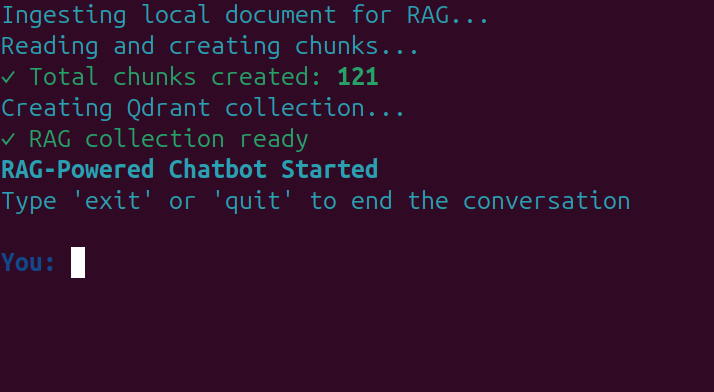
Now, we can start chatting with the assistant.
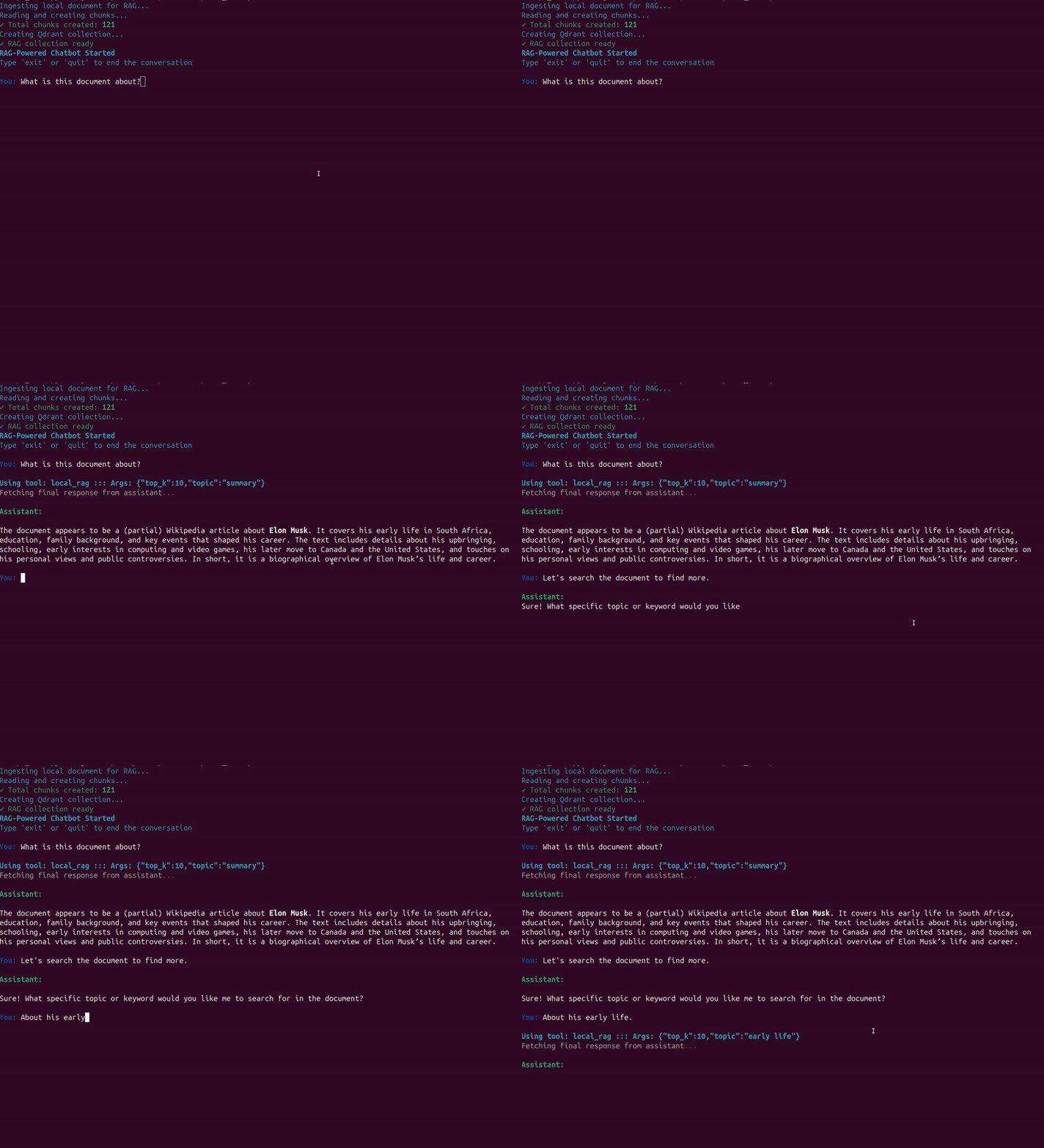
The following video shows an example where we provide data about Elon Musk from Wikipedia in a PDF.
As we can see, the assistant calls the RAG tool when needed.
In the second example, we combine RAG and web search tool calls in different turns.
The model decides which tool to call when based on history and user response.
This saves unncessary tools calls, and in-turn saves in-context memory.
Of course, the above are very simple use cases. As the project progresses, we will make the entire process more streamlined and add more tools.
Summary and Conclusion
In this article, we extended gpt-oss-chat with RAG tool call. We discussed changes in the codebase, the addition of multiple tools, and saw it in action. We will have more such articles in the future with a focus on Agentic LLMs/VLMs and tool calls.
If you have any questions, thoughts, or suggestions, please leave them in the comment section. I will surely address them.
You can contact me using the Contact section. You can also find me on LinkedIn, and X.

