gpt-oss 20B and 120B are the first open-weight models from OpenAI after GPT2. Community demand for an open ChatGPT-like architecture led to this model being Apache 2.0 license. Though smaller than the proprietary models, the gpt-oss series excels in tool calling and local inference. This article explores gpt-oss architecture with llama.cpp inference. Along with that, we will also cover their MXFP4 quantization and the Harmony chat format.
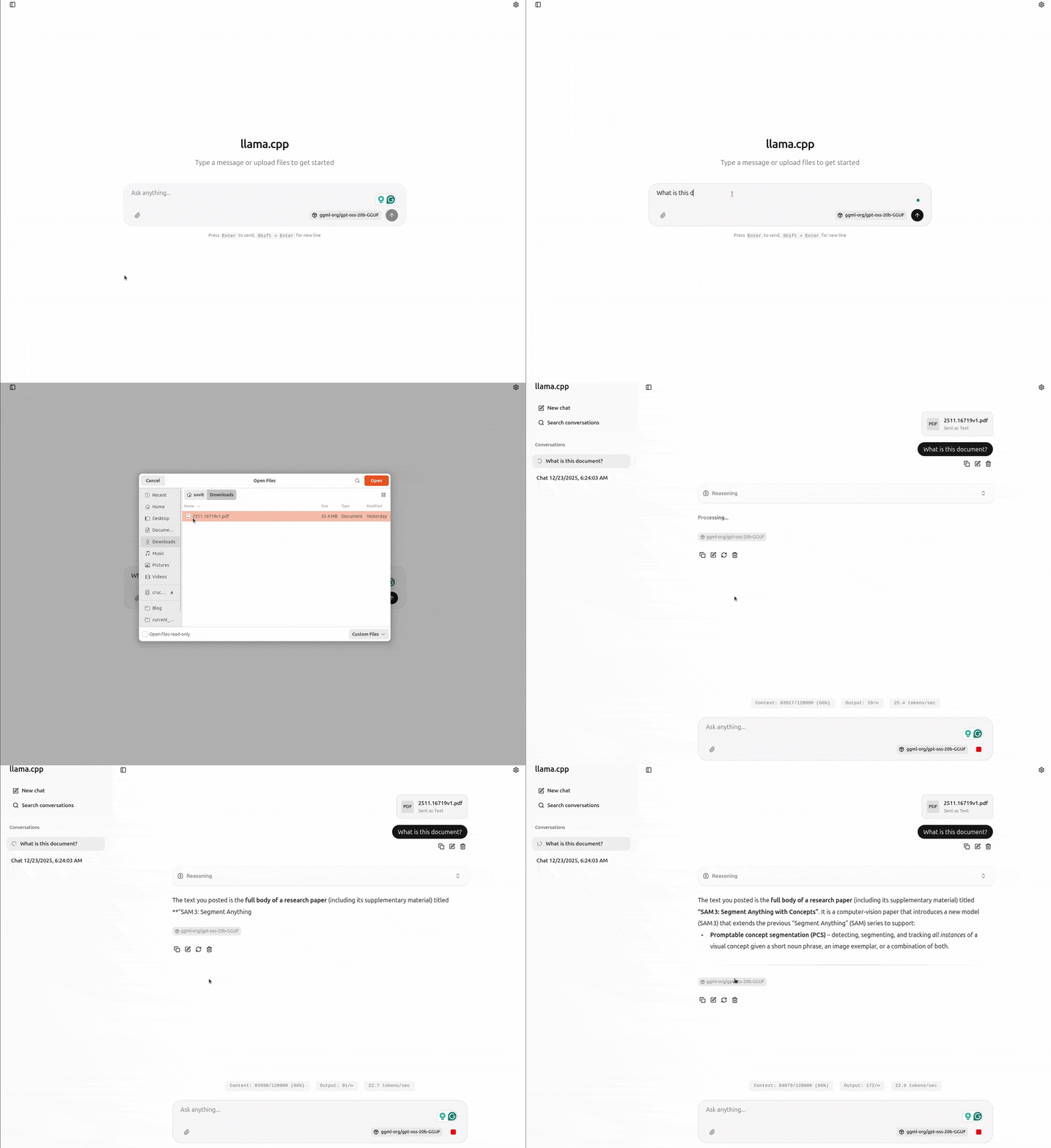
Figure 1. gpt-oss-20b demo with llama.cpp UI server.
This article is the first in the series of gpt-oss.
The model card released by OpenAI for gpt-oss contains a lot of information. However, we will cover the essentialones and move on to the practical stuff as soon as possible.
We will cover the following in this article:
gpt-oss MoE (Mixture-of-Experts) architecture.
MXFP4 quantization benefits.
Harmony chat format.
gpt-oss benchmark and performance.
gpt-oss llama.cpp inference.
gpt-oss MoE Architecture
OpenAI published two open-weight MoE models in the category, gpt-oss-120b, and gpt-oss-20b. Both models are released under the Apache 2.0 license, making them completely open for any downstream task.
These models are meant for strong instruction following, tool use, code execution, and reasoning.
Both models are autoregressive Mixture-of-Experts (MoE) transformer models, building upon the GPT-2 and GPT-3 architectures.
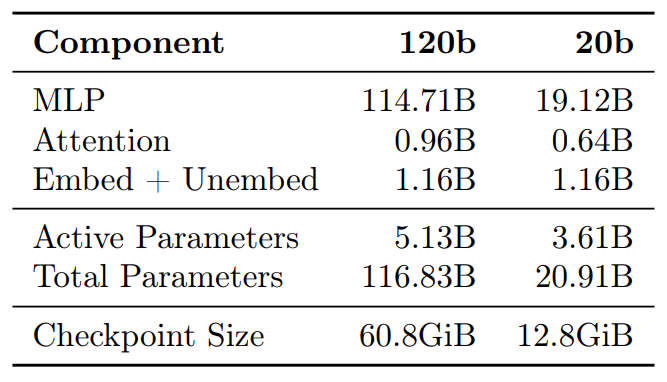
Figure 2. gpt-oss parameter counts for different layers.
gpt-oss-120b
The gpt-oss-120b model contains 36 layers. It has a total of 116.8B parameters with 5.1B active parameters for the forward pass.
gpt-oss-20b
The 20B model contains 24 layers, with 20.9B total and 3.6B active parameters.
The MoE Core
The gpt-oss models keep the core architecture of GPT-3 but replace the forward pass MLP layers with Mixture-of-Experts blocks.
Experts – 128 experts for the 120B model, 32 for the 20B model.
Router – a lightweight linear projection that scores each expert; top‑4 experts are activated per token.
Gated SwiGLU – each expert’s output is gated and fused via SwiGLU.
Model Features and Architectural Knobs
Feature
GPT‑OSS 120B
GPT‑OSS 20B
Total parameters
116.8B (≈5.1B active per token)
20.9B (≈3.6B active)
Quantisation
MXFP4 (4.25 bits/param)
MXFP4
License
Apache‑2.0 + usage policy
Apache‑2.0 + usage policy
Target use‑case
Local inference, tool‑calling, agentic workflows
Same, but lower‑memory footprint
Availability
Hugging‑Face Hub, OpenAI model card
Same
Parameter
120B
20B
Layers
36
24
Residual dim
2880
2880
Query heads
64 (64×64)
64
Attention pattern
Alternating banded‑window / dense (bandwidth 128)
Same
Rotary embeddings
Yes
Yes
Context length
131 072 tokens (via YaRN)
Same
MXFP4 Quantization
OpenAI post-trained the gpt-oss models with MXFP4 quantization of the MoE weights. This results in weights being quantized to 4.25 bits per parameter. As the MoE weights account for 90% of the total parameters, quantization helps these models to fit on single GPUs.
Model
Size
Notes
gpt-oss-120b
60.8 GiB
80 GB GPU + 8 GB system RAM needed
gpt-oss-20b
12.8 GiB
16 GB GPU enough
However, as we will see later with llama.cpp inference, we can run the model inference with far less VRAM with more than 100K context length.
Harmony Chat Format
The gpt-oss models use the o200k_harmony tokenizer and the Harmony chat format.
The Harmony chat is a custom format used specifically for these models. It helps in adhering to the instruction hierarchy and also using channels during CoT and tool calls.
Feature
What it does
Roles
system > developer > user > assistant > tool (instruction hierarchy).
Channels
analysis, commentary, final. The model can interleave tool calls inside a CoT.
Tokenization
The o200k_harmony tokenizer adds special tokens for roles and channels.
gpt-oss Benchmark and Performance
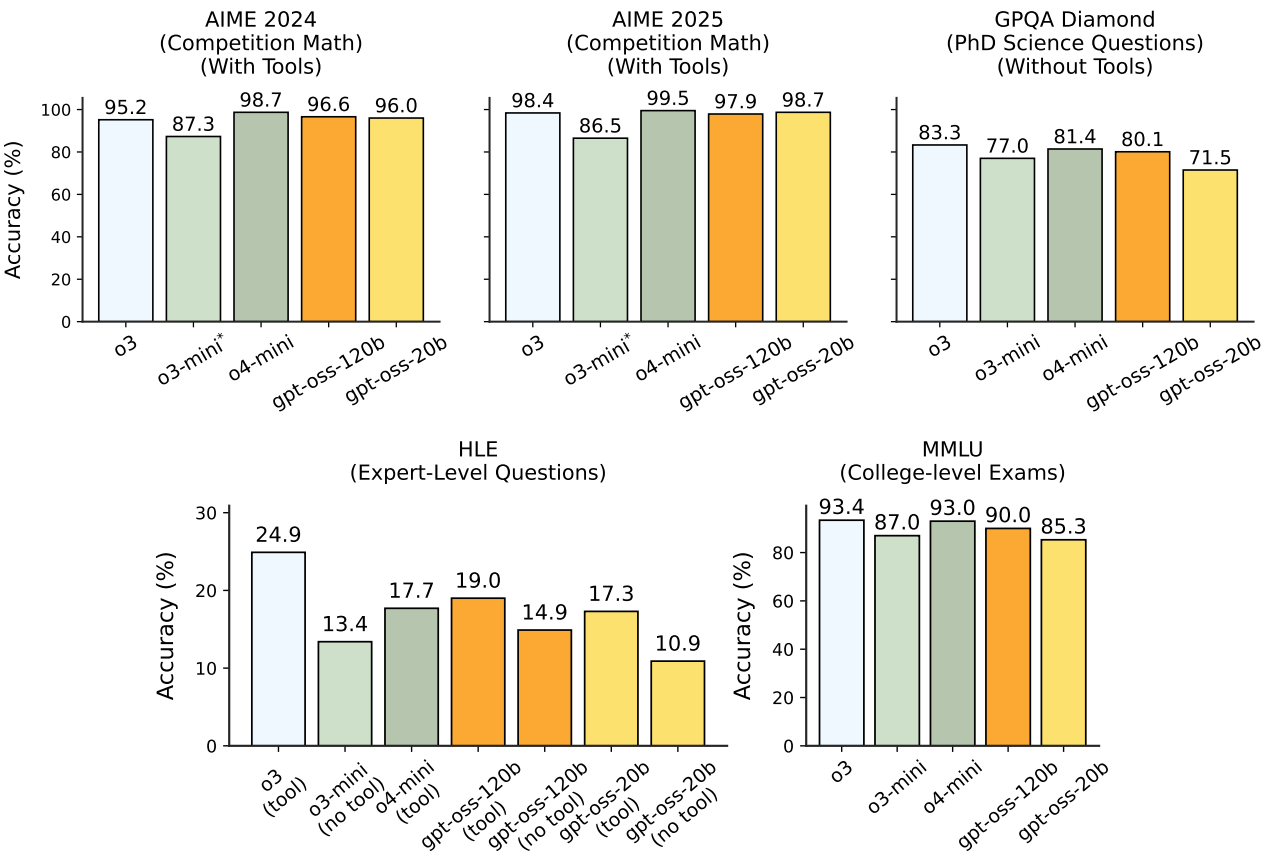
The authors perform benchmarks on reasoning, coding, and tool use. The results were compared to OpenAI o3, o3-mini, and o4-mini.
The following figure shows the full evaluation results.
Figure 3. Evaluations and comparison of gpt-oss with OpenAI o3, o3-mini, and o4-mini.
Takeaway – GPT‑OSS 120B approaches GPT‑4o‑mini on coding while the 20B model is surprisingly close to o3‑mini. The MoE architecture gives it an edge on long‑form reasoning where a fixed‑size transformer would struggle.
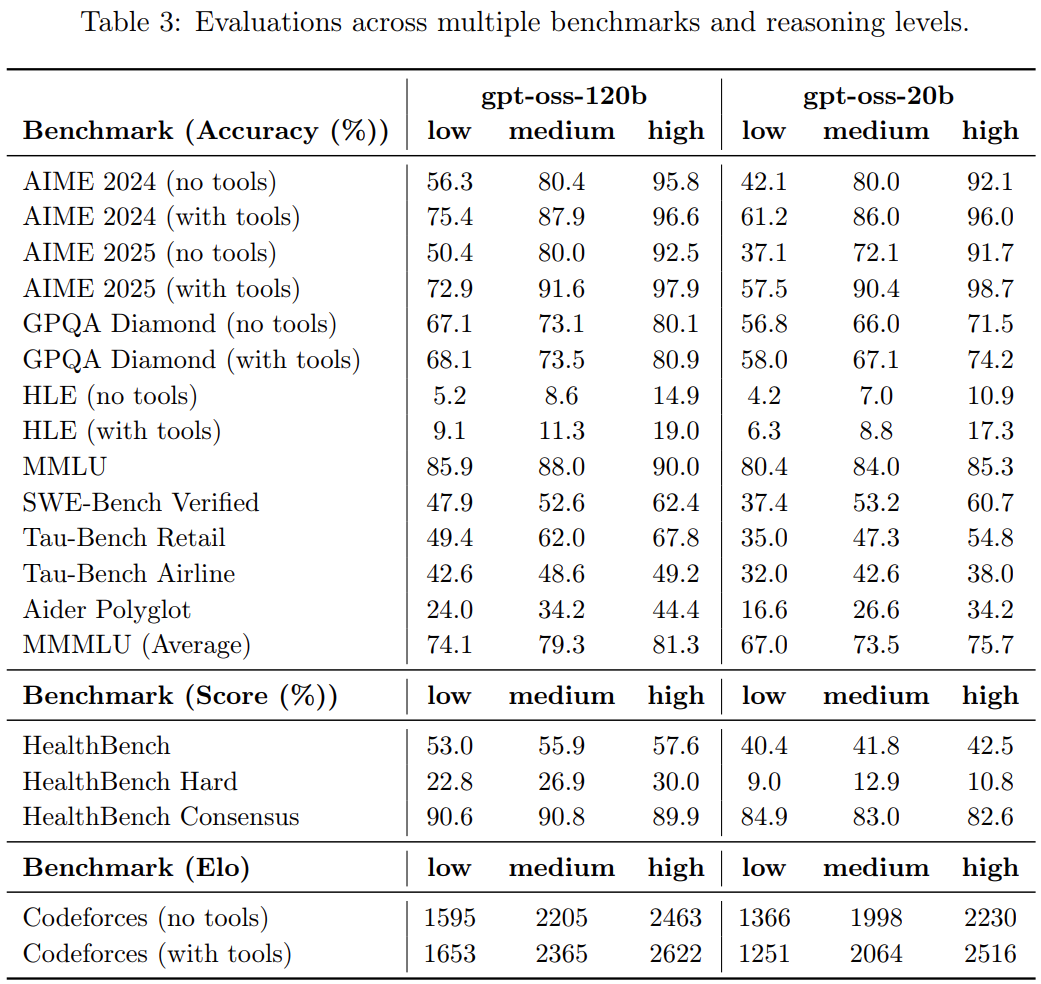
Here are the full results across multiple benchmarks and reasoning levels.
Figure 4. gpt-oss benchmarks across low, medium, and high reasoning.
We will stop the discussion of the model card here and move on to inference with llama.cpp next. It is highly recommended to go through the model card to gain even deeper insights regarding the benchmarks, performance, and safety tests.
The -hf argument tells it to download the model from Hugging Face if not available locally.
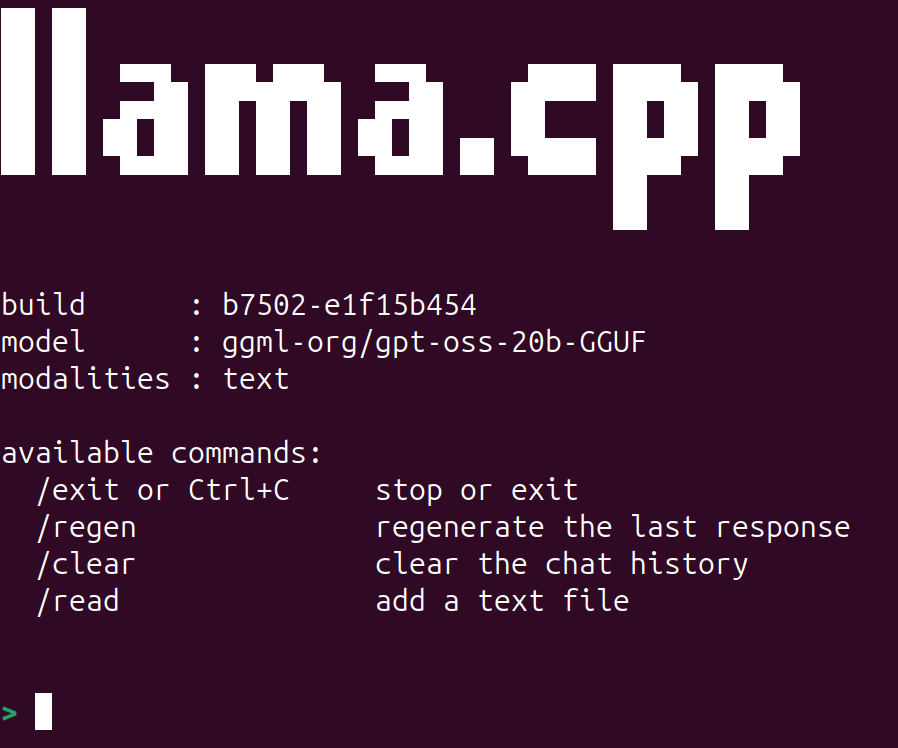
After the model downloads and starts, you should see the following.
Figure 5. llama.cpp CLI.
You can start chatting with the model. llama.cpp already handles chat history, so we can just start talking as if in any other chat UI we use online. By default, the model uses a context length of 4096 tokens. However, we can increase it to almost 130K context length using the -c command line argument.
Again, it should load without any issues if you have around 6GB VRAM and 16GB system RAM. The only hit you might see is slightly slower tokens per second.
Video 1. Chatting with gpt-oss-20b in llama.cpp CLI mode.
You can see all the command line arguments that llama-cli supports with the following command:
./build/bin/llama-cli --help
llama.cpp UI Server
The latest llama.cpp build also supports a new UI server that launches a simple chat UI, similar to what we get with ChatGPT. We can launch the server with the following command.
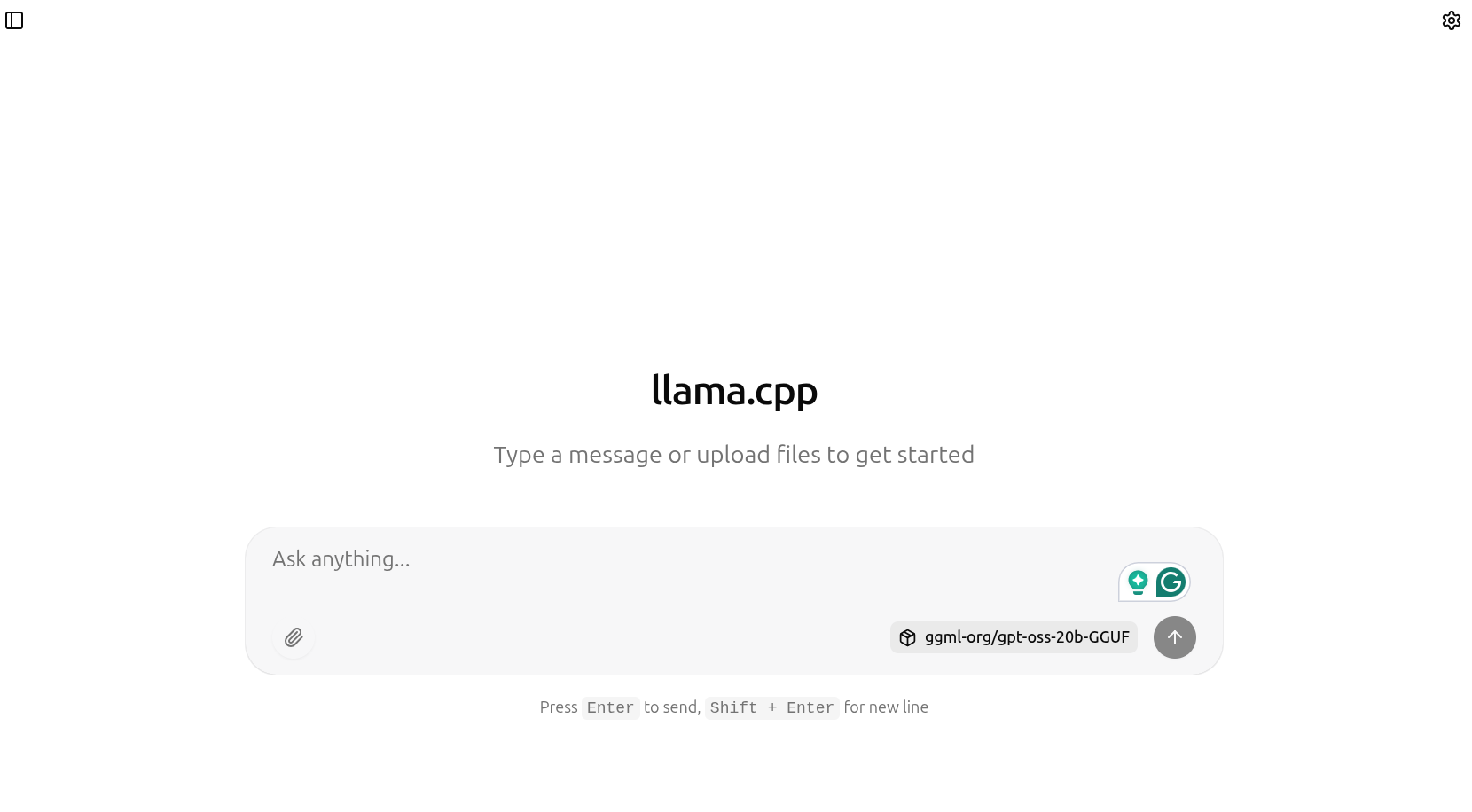
After the model has been loaded, we can go to http://127.0.0.1:8080 to chat with the gpt-oss model.
Figure 6. llama.cpp UI.
The llama.cpp UI server makes it easy to upload documents for RAG as well. We can upload PDF and text files, which the gpt-oss model can use as context to answer the questions. The following video shows uploading the SAM3 model paper and asking questions about it.
Video 2. Chatting with gpt-oss-20b using llama.cpp UI server.
If you are running on a low VRAM machine (e.g., 10GB or less) and upload a large file, say more tokens than the GPU can handle as the context length increases, then llama.cpp processes these tokens in batches. The downside is that it takes time, but the upside is that even with an 8GB or 10GB VRAM machine, we can have a full 130K context length chat with the model. The following figure shows the batch processing of tokens when I uploaded the SAM3 PDF, which contained more than 80000 tokens.
Figure 7. Batch processing of tokens in llama.cpp with higher user token context.
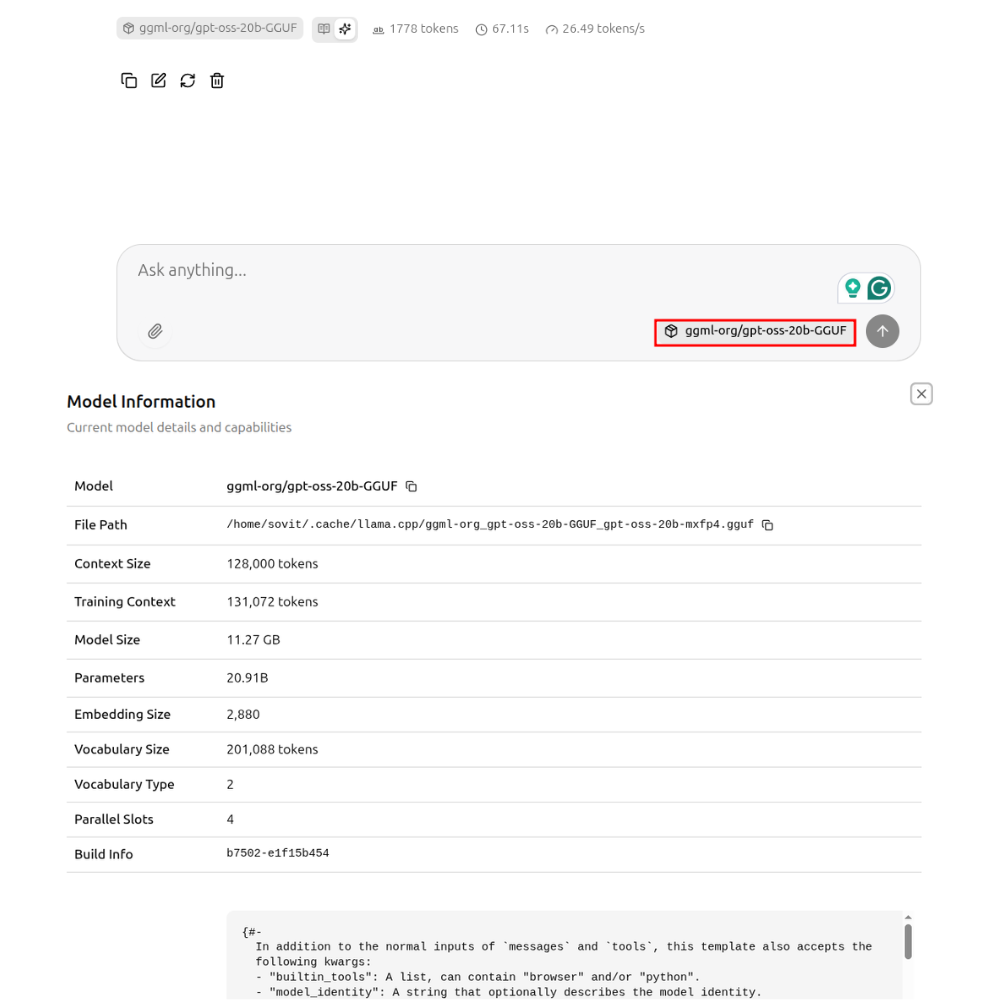
Clicking on the model name on the chat tab will open the model information along with the system prompt.
Figure 8. Visualizing model information on llama.cpp UI server.
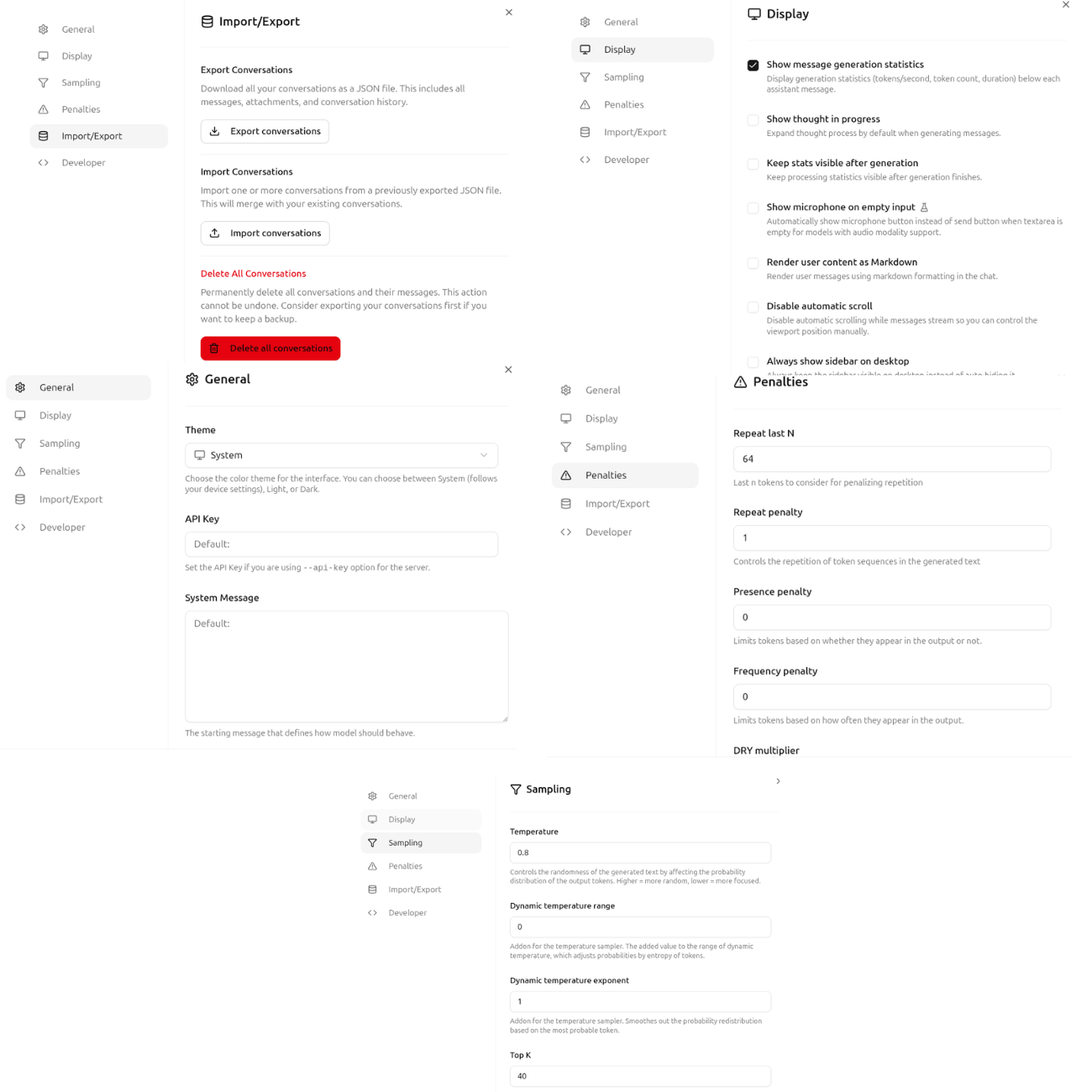
Furthermore, clicking on the settings icon at the top exposes several model and UI settings, such as general, display, sampling, and penalty.
Figure 9. llama.cpp UI server model settings.
These cover some of the basics of llama.cpp and running the UI server with gpt-oss-20b chat. You can play around and see how the model performs in various scenarios.
In future articles, we will cover more advanced topics such as fine-tuning gpt-oss for specific domains, exporting to GGUF, and running them with llama.cpp.
Summary and Conclusion
In this article, we covered the gpt-oss model with llama.cpp inference. We discussed the model architecture, the Harmony chat template, the MXFP4 quantization, and ran inference using llama.cpp. We will explore more advanced use cases with gpt-oss in the near future.
If you have any questions, thoughts, or suggestions, please leave them in the comment section. I will surely address them.
You can contact me using the Contact section. You can also find me on LinkedIn, and X.
Liked it? Take a second to support Sovit Ranjan Rath on Patreon!
This website uses cookies so that we can provide you with the best user experience possible. Cookie information is stored in your browser and performs functions such as recognising you when you return to our website and helping our team to understand which sections of the website you find most interesting and useful.
Strictly Necessary Cookies
Strictly Necessary Cookie should be enabled at all times so that we can save your preferences for cookie settings.
If you disable this cookie, we will not be able to save your preferences. This means that every time you visit this website you will need to enable or disable cookies again.




1 thought on “gpt-oss Inference with llama.cpp”